
9.5 KiB
从CLI工具风格看Agent工具渐进式披露
距离Anthropic发布Skills也过去将近两个月的时间了,其中Anthropic提到了一个术语渐进式披露(Progressive Disclosure),这到底是什么东西?解决了什么问题?
其实在我的Vibe Coding流程中,我很少使用MCP。因为我觉得MCP实现质量层次不齐,本质是上下文注入(工具的本质也是上下文注入),我不确定别人写的提示词会不会影响到我的工作流,干脆直接不用。现在的MCP实现基本上就是把所有的功能全都包装成工具暴露给Agent(一个功能包装成一个工具,给定详细的描述,告诉agent在什么时候进行调用,参数格式是什么),这就导致了现在的提示词爆炸。
直到Anthropic发布了Skills,研究了一下发现本质仍然是提示词注入。如果说MCP是提供了一套注入工具的规范,那么Skills所提倡的则是“离经叛道”。Skills给了一个Markdown文档用于描述该skill的用途和最佳用法,附带提供了一些脚本(与MCP不同)。
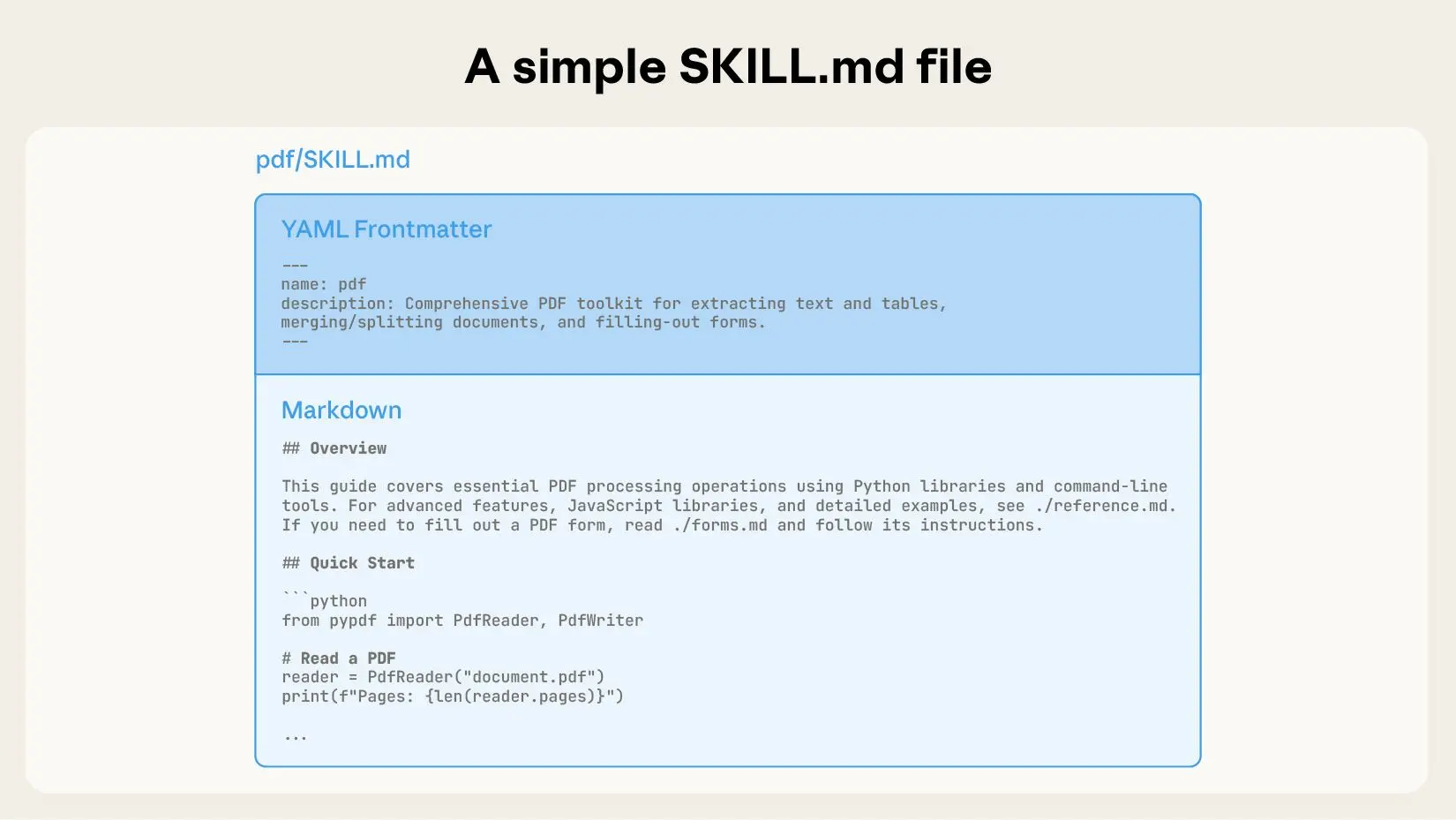 由于这些脚本直接在用户本地运行,存在极大的安全风险。如果用户不能对脚本代码进行review,很容易造成数据泄露、感染病毒等严重安全性问题。相比于MCP提供一个标准化的接口,Skill提供一系列的脚本文件,不同的skill可能拥有不同类型的脚本文件,比如有些脚本使用node.js实现,有些脚本使用Python实现,要使用这些脚本还需要用户安装对应的运行时和脚本所需要的依赖。这也是我说“离经叛道”的原因所在。
这真的是最佳实践吗?
关于渐进式披露,Anthropic是这样描述的:
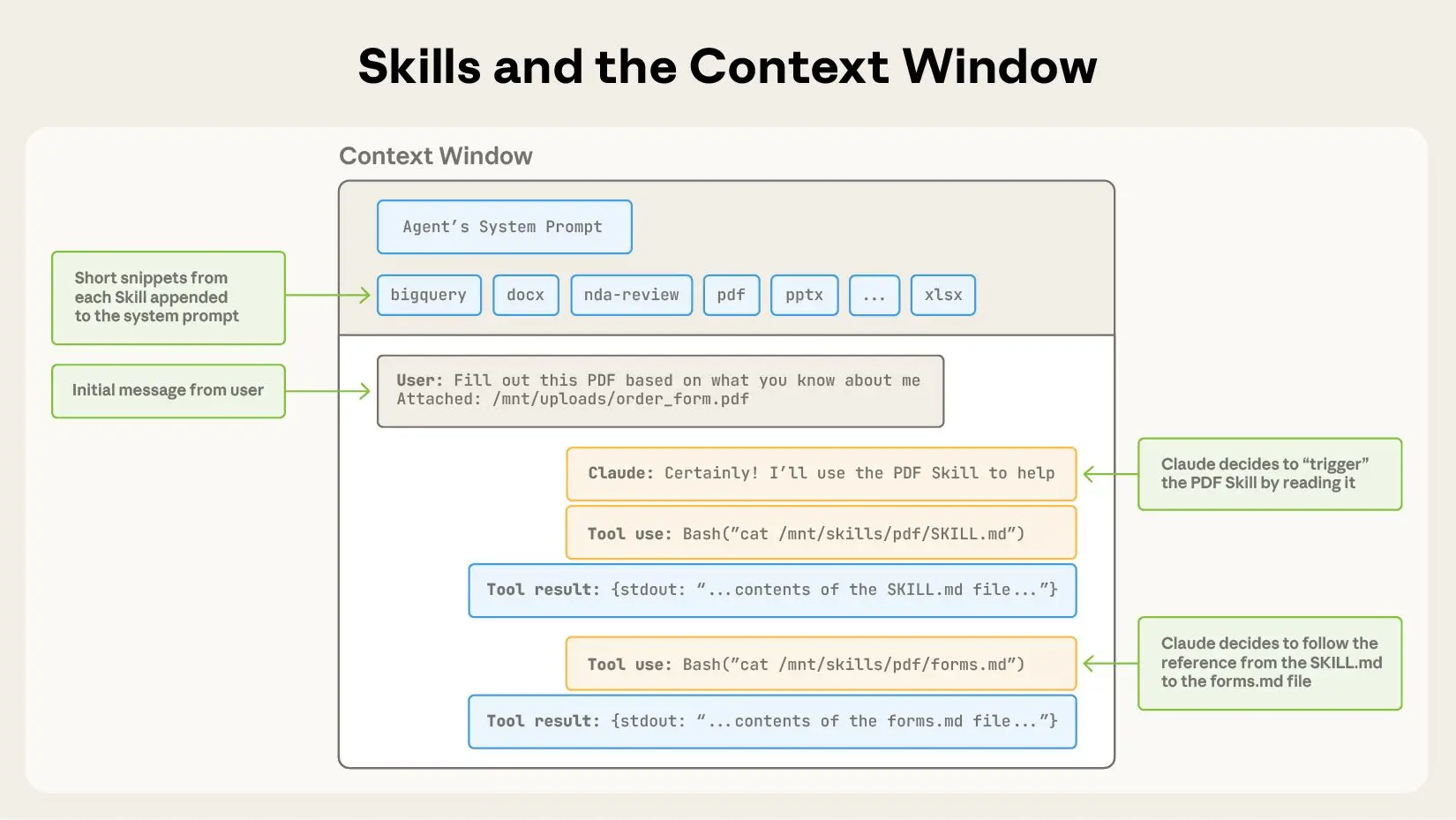
渐进式披露是使代理技能灵活且可扩展的核心设计原则。就像一本组织良好的手册,从目录开始,然后是具体章节,最后是详细的附录一样,技能允许 Claude 仅在需要时加载信息:
拥有文件系统和代码执行工具的智能体在执行特定任务时,无需将技能的全部内容读取到上下文窗口中。这意味着技能中可以包含的上下文信息量实际上是无限的。
下图是使用Skill的上下文窗口变化
我们真的需要这样去实现吗?
在我们平时使用CLI工具时,一般的CLI工具都会带有一个--help参数,用于查看该工具的用法和说明,这不就是该工具的使用手册吗?比如:
> npm --help
npm <command>

Usage:

npm install        install all the dependencies in your project
npm install <foo>  add the <foo> dependency to your project
npm test           run this project's tests
npm run <foo>      run the script named <foo>
npm <command> -h   quick help on <command>
npm -l             display usage info for all commands
npm help <term>    search for help on <term>
npm help npm       more involved overview

All commands:

    access, adduser, audit, bugs, cache, ci, completion,
    config, dedupe, deprecate, diff, dist-tag, docs, doctor,
    edit, exec, explain, explore, find-dupes, fund, get, help,
    help-search, hook, init, install, install-ci-test,
    install-test, link, ll, login, logout, ls, org, outdated,
    owner, pack, ping, pkg, prefix, profile, prune, publish,
    query, rebuild, repo, restart, root, run-script, sbom,
    search, set, shrinkwrap, star, stars, start, stop, team,
    test, token, uninstall, unpublish, unstar, update, version,
    view, whoami

Specify configs in the ini-formatted file:
    /Users/xxx/.npmrc
or on the command line via: npm <command> --key=value

More configuration info: npm help config
Configuration fields: npm help 7 config
这份手册也不会返回所有的命令所有的用法,它只会返回它有哪些命令可以实现什么功能,对于命令的具体用法你仍然可以通过--help参数获得:
> npm install --help
Install a package

Usage:
npm install [<package-spec> ...]

Options:
[-S|--save|--no-save|--save-prod|--save-dev|--save-optional|--save-peer|--save-bundle]
[-E|--save-exact] [-g|--global]
[--install-strategy <hoisted|nested|shallow|linked>] [--legacy-bundling]
[--global-style] [--omit <dev|optional|peer> [--omit <dev|optional|peer> ...]]
[--include <prod|dev|optional|peer> [--include <prod|dev|optional|peer> ...]]
[--strict-peer-deps] [--prefer-dedupe] [--no-package-lock] [--package-lock-only]
[--foreground-scripts] [--ignore-scripts] [--no-audit] [--no-bin-links]
[--no-fund] [--dry-run] [--cpu <cpu>] [--os <os>] [--libc <libc>]
[-w|--workspace <workspace-name> [-w|--workspace <workspace-name> ...]]
[-ws|--workspaces] [--include-workspace-root] [--install-links]

aliases: add, i, in, ins, inst, insta, instal, isnt, isnta, isntal, isntall

Run "npm help install" for more info
这是不是很像上面的渐进式披露的定义?
我们是不是可以按照这种风格去实现一个MCP来实现无需skill的工具渐进式披露?我使用Codex将官方的PDF Skill转换成了一个MCP,只暴露一个工具:
{
    "name": "mcp__pdf__pdf",
    "description": "Comprehensive PDF manipulation toolkit for extracting text and tables, creating new PDFs, merging/splitting documents, and handling forms. When Claude needs to fill in a PDF form or programmatically process, generate, or analyze PDF documents at scale.You need to pass in the --help parameter to obtain the usage of this tool first.",
    "input_schema": {
        "type": "object",
        "properties": {
            "params": {
                "$ref": "#/$defs/PdfCommandInput"
            }
        },
        "required": [
            "params"
        ],
        "$defs": {
            "PdfCommandInput": {
                "additionalProperties": false,
                "properties": {
                    "argv": {
                        "description": "Command tokens excluding the leading 'pdf' executable name",
                        "items": {
                            "type": "string"
                        },
                        "title": "Argv",
                        "type": "array"
                    },
                    "command": {
                        "anyOf": [
                            {
                                "type": "string"
                            },
                            {
                                "type": "null"
                            }
                        ],
                        "default": null,
                        "description": "Optional command string; if set, it will be split like a shell",
                        "title": "Command"
                    }
                },
                "title": "PdfCommandInput",
                "type": "object"
            }
        },
        "title": "pdfArguments"
    }
}
下面是使用该MCP的上下文窗口变化
User: Extract all the text from test.pdf and write it into result.txt
Agent: Tool(name="pdf", args=["--help"])
Tool: pdf - Comprehensive PDF manipulation toolkit for extracting text and tables, creating new PDFs, merging/splitting documents, and handling forms. When Claude needs to fill in a PDF form or programmatically process, generate, or analyze PDF documents at scale在使用之前你需要先传入--help参数以获取该工具的用法\n\nUsage:\n  pdf [--help] <domain> <command> [options]\n\nDomains:\n  forms      Fill, extract, and validate PDF form fields.\n  documents  Create, merge, and split PDFs.\n  text       Extract text content from PDFs.\n  tables     Extract tables (heuristic, whitespace-based).\n  images     Render PDF pages to PNG images.\n\nRun `pdf <domain> --help` for domain help.\nRun `pdf <domain> <command> --help` for command help.
Agent: Tool(name="pdf", args=["text", "--help"])
Tool: text - Extract text content from PDFs.\n\nUsage:\n  pdf text <command> [options]\n\nCommands:\n  extract  Extract text content from a PDF.\n\nRun `pdf text <command> --help` for details.
Agent: Tool(name="pdf", args=["text", "extract", "--help"])
Tool: usage: pdf text extract --pdf PDF_PATH [--pages PAGES] [--out OUTPUT_PATH]\n                        [--format {text,json}] [--overwrite]\n\nExtract text content from a PDF.\n\noptions:\n  --pdf PDF_PATH        Input PDF\n  --pages PAGES         Page selection like 1,3-5 or 'all' (default: all)\n  --out OUTPUT_PATH     Write extracted text to a file\n  --format {text,json}  Output format (default: text)\n  --overwrite           Overwrite output file if it exists\n
Agent: Tool(name="pdf", args=["text", "extract", "--pdf", "test.pdf", "--out", "result.txt", "--overwrite"])
Tool: {"result": {"stdout": "xx","data": {"pdf_path": "test.pdf","page_count": 6,"pages": [xxx],"format": "text","output_path": "result.txt"}}}
Agent: xxx
从上下文变化情况来看,完全实现了渐进式披露,该MCP代码开源(代码完全由codex编写,只验证想法,未做任何审查): https://github.com/musistudio/pdf-skill-mcp
如果你有什么想法也欢迎与我进行交流 email: m@musiiot.top