 d380d68555
- Add Firecrawl SDK dependency for web scraping functionality
- Create /api/scrape endpoint to handle website content extraction
- Replace mock data with real Firecrawl API integration
- Add recent sources section showing scraped content excerpts
- Update UI to display scraping success/error messages
- Fix API response structure handling for Firecrawl integration

🤖 Generated with [Claude Code](https://claude.ai/code)

Co-Authored-By: Claude <noreply@anthropic.com>
24 KiB
Quickstart
Firecrawl allows you to turn entire websites into LLM-ready markdown
Welcome to Firecrawl
Firecrawl is an API service that takes a URL, crawls it, and converts it into clean markdown. We crawl all accessible subpages and give you clean markdown for each. No sitemap required.
How to use it?
We provide an easy to use API with our hosted version. You can find the playground and documentation here. You can also self host the backend if you'd like.
Check out the following resources to get started:
- API: Documentation
- SDKs: Python, Node
- LLM Frameworks: Langchain (python), Langchain (js), Llama Index, Crew.ai, Composio, PraisonAI, Superinterface, Vectorize
- Low-code Frameworks: Dify, Langflow, Flowise AI, Cargo, Pipedream
- Community SDKs: Go, Rust (v1)
- Others: Zapier, Pabbly Connect
- Want an SDK or Integration? Let us know by opening an issue.
Self-host: To self-host refer to guide here.
API Key
To use the API, you need to sign up on Firecrawl and get an API key.
Features
- Scrape: scrapes a URL and get its content in LLM-ready format (markdown, summary, structured data via json mode, screenshot, html)
- Crawl: scrapes all the URLs of a web page and return content in LLM-ready format
- Map: input a website and get all the website urls - extremely fast
- Search: search the web and get full content from results
- Extract: get structured data from single page, multiple pages or entire websites with AI.
Powerful Capabilities
- LLM-ready formats: markdown, summary, structured data, screenshot, HTML, links, metadata
- The hard stuff: proxies, anti-bot mechanisms, dynamic content (js-rendered), output parsing, orchestration
- Lightning fast: Get results in seconds—built for speed and high-throughput use cases.
- Customizability: exclude tags, crawl behind auth walls with custom headers, max crawl depth, etc...
- Media parsing: pdfs, docx, images.
- Reliability first: designed to get the data you need - no matter how hard it is.
- Actions: click, scroll, input, wait and more before extracting data
You can find all of Firecrawl's capabilities and how to use them in our documentation
Installing Firecrawl
```python Python # pip install firecrawl-pyfrom firecrawl import Firecrawl
firecrawl = Firecrawl(api_key="fc-YOUR-API-KEY")
```js Node
# npm install @mendable/firecrawl-js

import Firecrawl from '@mendable/firecrawl-js';

const firecrawl = new Firecrawl({ apiKey: "fc-YOUR-API-KEY" });
Scraping
To scrape a single URL, use the scrape method. It takes the URL as a parameter and returns the scraped data as a dictionary.
firecrawl = Firecrawl(api_key="fc-YOUR-API-KEY")
Scrape a website:
doc = firecrawl.scrape("https://firecrawl.dev", formats=["markdown", "html"]) print(doc)
```js Node
import Firecrawl from '@mendable/firecrawl-js';

const firecrawl = new Firecrawl({ apiKey: "fc-YOUR-API-KEY" });

// Scrape a website:
const doc = await firecrawl.scrape('https://firecrawl.dev', { formats: ['markdown', 'html'] });
console.log(doc);
curl -s -X POST "https://api.firecrawl.dev/v2/scrape" \
  -H "Authorization: Bearer $FIRECRAWL_API_KEY" \
  -H "Content-Type: application/json" \
  -d '{
    "url": "https://firecrawl.dev",
    "formats": ["markdown", "html"]
  }'
Response
SDKs will return the data object directly. cURL will return the payload exactly as shown below.
{
  "success": true,
  "data" : {
    "markdown": "Launch Week I is here! [See our Day 2 Release 🚀](https://www.firecrawl.dev/blog/launch-week-i-day-2-doubled-rate-limits)[💥 Get 2 months free...",
    "html": "<!DOCTYPE html><html lang=\"en\" class=\"light\" style=\"color-scheme: light;\"><body class=\"__variable_36bd41 __variable_d7dc5d font-inter ...",
    "metadata": {
      "title": "Home - Firecrawl",
      "description": "Firecrawl crawls and converts any website into clean markdown.",
      "language": "en",
      "keywords": "Firecrawl,Markdown,Data,Mendable,Langchain",
      "robots": "follow, index",
      "ogTitle": "Firecrawl",
      "ogDescription": "Turn any website into LLM-ready data.",
      "ogUrl": "https://www.firecrawl.dev/",
      "ogImage": "https://www.firecrawl.dev/og.png?123",
      "ogLocaleAlternate": [],
      "ogSiteName": "Firecrawl",
      "sourceURL": "https://firecrawl.dev",
      "statusCode": 200
    }
  }
}
Crawling
The crawl feature allows you to automatically discover and extract content from a URL and all of its accessible subpages. With our SDKs, simply call the crawl method—this will submit a crawl job, wait for it to finish, and return the complete results for the entire site.
Usage
```python Python from firecrawl import Firecrawlfirecrawl = Firecrawl(api_key="fc-YOUR-API-KEY")
docs = firecrawl.crawl(url="https://docs.firecrawl.dev", limit=10) print(docs)
```js Node
import Firecrawl from '@mendable/firecrawl-js';

const firecrawl = new Firecrawl({ apiKey: "fc-YOUR-API-KEY" });

const docs = await firecrawl.crawl('https://docs.firecrawl.dev', { limit: 10 });
console.log(docs);
curl -s -X POST "https://api.firecrawl.dev/v2/crawl" \
  -H "Authorization: Bearer $FIRECRAWL_API_KEY" \
  -H "Content-Type: application/json" \
  -d '{
    "url": "https://docs.firecrawl.dev",
    "limit": 10
  }'
If you're using our API directly, cURL or start crawl functions on SDKs, this will return an ID where you can use to check the status of the crawl.
{
  "success": true,
  "id": "123-456-789",
  "url": "https://api.firecrawl.dev/v2/crawl/123-456-789"
}
Get Crawl Status
Used to check the status of a crawl job and get its result.
```python Python status = firecrawl.get_crawl_status("") print(status) ```const status = await firecrawl.getCrawlStatus("<crawl-id>");
console.log(status);
# After starting a crawl, poll status by jobId
curl -s -X GET "https://api.firecrawl.dev/v2/crawl/<jobId>" \
  -H "Authorization: Bearer $FIRECRAWL_API_KEY"
Response
The response will be different depending on the status of the crawl. For not completed or large responses exceeding 10MB, a next URL parameter is provided. You must request this URL to retrieve the next 10MB of data. If the next parameter is absent, it indicates the end of the crawl data.
{
"status": "completed",
"total": 36,
"completed": 36,
"creditsUsed": 36,
"expiresAt": "2024-00-00T00:00:00.000Z",
"next": "https://api.firecrawl.dev/v2/crawl/123-456-789?skip=26",
"data": [
{
"markdown": "[Firecrawl Docs home page!...",
"html": "<!DOCTYPE html><html lang=\"en\" class=\"js-focus-visible lg:[--scroll-mt:9.5rem]\" data-js-focus-visible=\"\">...",
"metadata": {
"title": "Build a 'Chat with website' using Groq Llama 3 | Firecrawl",
"language": "en",
"sourceURL": "https://docs.firecrawl.dev/learn/rag-llama3",
"description": "Learn how to use Firecrawl, Groq Llama 3, and Langchain to build a 'Chat with your website' bot.",
"ogLocaleAlternate": [],
"statusCode": 200
}
},
...
]
}
JSON mode
With JSON mode, you can easily extract structured data from any URL. We support pydantic schemas to make it easier for you too. Here is how you to use it:
```python Python from firecrawl import Firecrawl from pydantic import BaseModel app = Firecrawl(api_key="fc-YOUR-API-KEY")class JsonSchema(BaseModel): company_mission: str supports_sso: bool is_open_source: bool is_in_yc: bool
result = app.scrape( 'https://firecrawl.dev', formats=[{ "type": "json", "schema": JsonSchema }], only_main_content=False, timeout=120000 )
print(result)
```js Node
import FirecrawlApp from "@mendable/firecrawl-js";
import { z } from "zod";

const app = new FirecrawlApp({
  apiKey: "fc-YOUR_API_KEY"
});

// Define schema to extract contents into
const schema = z.object({
  company_mission: z.string(),
  supports_sso: z.boolean(),
  is_open_source: z.boolean(),
  is_in_yc: z.boolean()
});

const result = await app.scrape("https://docs.firecrawl.dev/", {
  formats: [{
    type: "json",
    schema: schema
  }],
});

console.log(result);
curl -X POST https://api.firecrawl.dev/v2/scrape \
    -H 'Content-Type: application/json' \
    -H 'Authorization: Bearer YOUR_API_KEY' \
    -d '{
      "url": "https://docs.firecrawl.dev/",
      "formats": [ {
        "type": "json",
        "schema": {
          "type": "object",
          "properties": {
            "company_mission": {
                      "type": "string"
            },
            "supports_sso": {
                      "type": "boolean"
            },
            "is_open_source": {
                      "type": "boolean"
            },
            "is_in_yc": {
                      "type": "boolean"
            }
          },
          "required": [
            "company_mission",
            "supports_sso",
            "is_open_source",
            "is_in_yc"
          ]
        }
      } ]
    }'
Output:
{
    "success": true,
    "data": {
      "json": {
        "company_mission": "AI-powered web scraping and data extraction",
        "supports_sso": true,
        "is_open_source": true,
        "is_in_yc": true
      },
      "metadata": {
        "title": "Firecrawl",
        "description": "AI-powered web scraping and data extraction",
        "robots": "follow, index",
        "ogTitle": "Firecrawl",
        "ogDescription": "AI-powered web scraping and data extraction",
        "ogUrl": "https://firecrawl.dev/",
        "ogImage": "https://firecrawl.dev/og.png",
        "ogLocaleAlternate": [],
        "ogSiteName": "Firecrawl",
        "sourceURL": "https://firecrawl.dev/"
      },
    }
}
Search
Firecrawl's search API allows you to perform web searches and optionally scrape the search results in one operation.
- Choose specific output formats (markdown, HTML, links, screenshots)
- Choose specific sources (web, news, images)
- Search the web with customizable parameters (location, etc.)
For details, see the Search Endpoint API Reference.
```python Python from firecrawl import Firecrawlfirecrawl = Firecrawl(api_key="fc-YOUR-API-KEY")
results = firecrawl.search( query="firecrawl", limit=3, ) print(results)
```js Node
import Firecrawl from '@mendable/firecrawl-js';

const firecrawl = new Firecrawl({ apiKey: "fc-YOUR-API-KEY" });

const results = await firecrawl.search('firecrawl', {
  limit: 3,
  scrapeOptions: { formats: ['markdown'] }
});
console.log(results);
curl -s -X POST "https://api.firecrawl.dev/v2/search" \
  -H "Authorization: Bearer $FIRECRAWL_API_KEY" \
  -H "Content-Type: application/json" \
  -d '{
    "query": "firecrawl",
    "limit": 3
  }'
Response
SDKs will return the data object directly. cURL will return the complete payload.
{
  "success": true,
  "data": {
    "web": [
      {
        "url": "https://www.firecrawl.dev/",
        "title": "Firecrawl - The Web Data API for AI",
        "description": "The web crawling, scraping, and search API for AI. Built for scale. Firecrawl delivers the entire internet to AI agents and builders.",
        "position": 1
      },
      {
        "url": "https://github.com/mendableai/firecrawl",
        "title": "mendableai/firecrawl: Turn entire websites into LLM-ready ... - GitHub",
        "description": "Firecrawl is an API service that takes a URL, crawls it, and converts it into clean markdown or structured data.",
        "position": 2
      },
      ...
    ],
    "images": [
      {
        "title": "Quickstart | Firecrawl",
        "imageUrl": "https://mintlify.s3.us-west-1.amazonaws.com/firecrawl/logo/logo.png",
        "imageWidth": 5814,
        "imageHeight": 1200,
        "url": "https://docs.firecrawl.dev/",
        "position": 1
      },
      ...
    ],
    "news": [
      {
        "title": "Y Combinator startup Firecrawl is ready to pay $1M to hire three AI agents as employees",
        "url": "https://techcrunch.com/2025/05/17/y-combinator-startup-firecrawl-is-ready-to-pay-1m-to-hire-three-ai-agents-as-employees/",
        "snippet": "It's now placed three new ads on YC's job board for “AI agents only” and has set aside a $1 million budget total to make it happen.",
        "date": "3 months ago",
        "position": 1
      },
      ...
    ]
  }
}
Extracting without schema
You can now extract without a schema by just passing a prompt to the endpoint. The llm chooses the structure of the data.
app = Firecrawl(api_key="fc-YOUR-API-KEY")
result = app.scrape( 'https://firecrawl.dev', formats=[{ "type": "json", "prompt": "Extract the company mission from the page." }], only_main_content=False, timeout=120000 )
print(result)
```js Node
import FirecrawlApp from "@mendable/firecrawl-js";

const app = new FirecrawlApp({
  apiKey: "fc-YOUR_API_KEY"
});

const result = await app.scrape("https://docs.firecrawl.dev/", {
  formats: [{
    type: "json",
    prompt: "Extract the company mission from the page."
  }]
});

console.log(result);
curl -X POST https://api.firecrawl.dev/v2/scrape \
    -H 'Content-Type: application/json' \
    -H 'Authorization: Bearer YOUR_API_KEY' \
    -d '{
      "url": "https://docs.firecrawl.dev/",
      "formats": [{
        "type": "json",
        "prompt": "Extract the company mission from the page."
      }]
    }'
Output:
{
    "success": true,
    "data": {
      "json": {
        "company_mission": "AI-powered web scraping and data extraction",
      },
      "metadata": {
        "title": "Firecrawl",
        "description": "AI-powered web scraping and data extraction",
        "robots": "follow, index",
        "ogTitle": "Firecrawl",
        "ogDescription": "AI-powered web scraping and data extraction",
        "ogUrl": "https://firecrawl.dev/",
        "ogImage": "https://firecrawl.dev/og.png",
        "ogLocaleAlternate": [],
        "ogSiteName": "Firecrawl",
        "sourceURL": "https://firecrawl.dev/"
      },
    }
}
Interacting with the page with Actions
Firecrawl allows you to perform various actions on a web page before scraping its content. This is particularly useful for interacting with dynamic content, navigating through pages, or accessing content that requires user interaction.
Here is an example of how to use actions to navigate to google.com, search for Firecrawl, click on the first result, and take a screenshot.
It is important to almost always use the wait action before/after executing other actions to give enough time for the page to load.
Example
```python Python from firecrawl import Firecrawlfirecrawl = Firecrawl(api_key="fc-YOUR-API-KEY")
doc = firecrawl.scrape('https://example.com/login', { formats=['markdown'], actions=[ { type: 'write', text: 'john@example.com' }, { type: 'press', key: 'Tab' }, { type: 'write', text: 'secret' }, { type: 'click', selector: 'button[type="submit"]' }, { type: 'wait', milliseconds: 1500 }, { type: 'screenshot', fullPage: true }, ], });
print(doc.markdown, doc.screenshot);
```js Node
import Firecrawl from '@mendable/firecrawl-js';

const firecrawl = new Firecrawl({ apiKey: "fc-YOUR-API-KEY" });

const doc = await firecrawl.scrape('https://example.com/login', {
  formats: ['markdown'],
  actions: [
    { type: 'write', text: 'john@example.com' },
    { type: 'press', key: 'Tab' },
    { type: 'write', text: 'secret' },
    { type: 'click', selector: 'button[type="submit"]' },
    { type: 'wait', milliseconds: 1500 },
    { type: 'screenshot', fullPage: true },
  ],
});

console.log(doc.markdown, doc.screenshot);
curl -X POST https://api.firecrawl.dev/v2/scrape \
    -H 'Content-Type: application/json' \
    -H 'Authorization: Bearer YOUR_API_KEY' \
    -d '{
      "url": "https://example.com/login",
      "formats": ["markdown"],
      "actions": [
        { "type": "write", "text": "john@example.com" },
        { "type": "press", "key": "Tab" },
        { "type": "write", "text": "secret" },
        { "type": "click", "selector": "button[type=\"submit\"]" },
        { "type": "wait", "milliseconds": 1500 },
        { "type": "screenshot", "fullPage": true },
      ],
  }'
Output
```json JSON { "success": true, "data": { "markdown": "Our first Launch Week is over! [See the recap 🚀](blog/firecrawl-launch-week-1-recap)...", "actions": { "screenshots": [ "https://alttmdsdujxrfnakrkyi.supabase.co/storage/v1/object/public/media/screenshot-75ef2d87-31e0-4349-a478-fb432a29e241.png" ], "scrapes": [ { "url": "https://www.firecrawl.dev/", "html": "<html>
Firecrawl
</html>" } ] }, "metadata": { "title": "Home - Firecrawl", "description": "Firecrawl crawls and converts any website into clean markdown.", "language": "en", "keywords": "Firecrawl,Markdown,Data,Mendable,Langchain", "robots": "follow, index", "ogTitle": "Firecrawl", "ogDescription": "Turn any website into LLM-ready data.", "ogUrl": "https://www.firecrawl.dev/", "ogImage": "https://www.firecrawl.dev/og.png?123", "ogLocaleAlternate": [], "ogSiteName": "Firecrawl", "sourceURL": "http://google.com", "statusCode": 200 } } } ```
Open Source vs Cloud
Firecrawl is open source available under the AGPL-3.0 license.
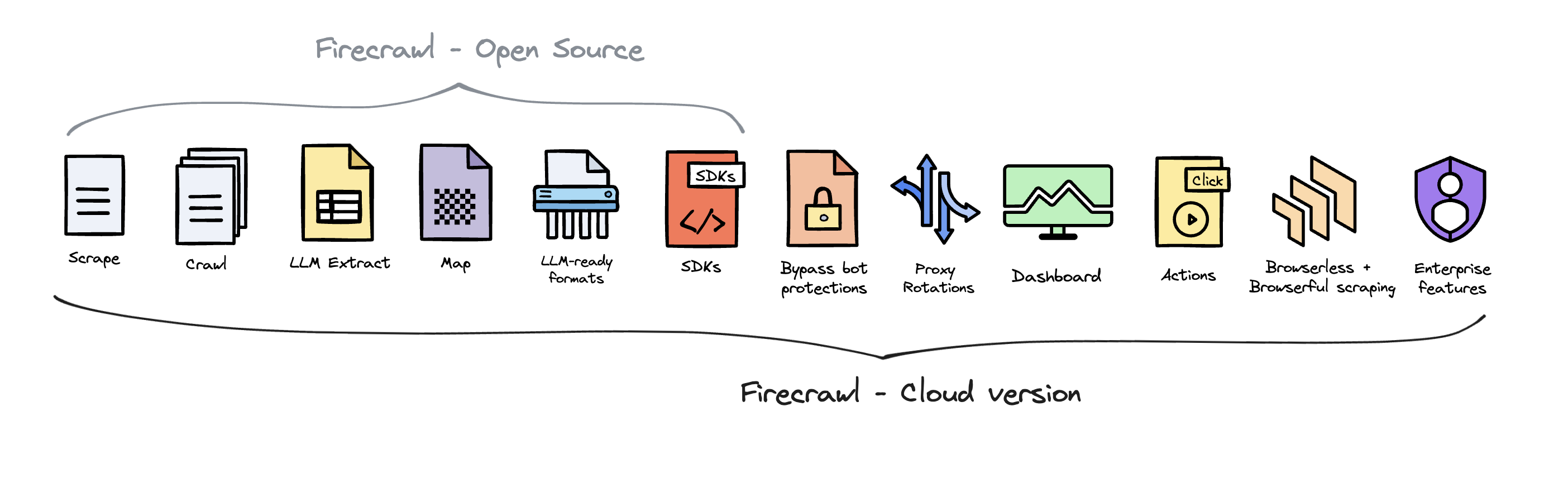
To deliver the best possible product, we offer a hosted version of Firecrawl alongside our open-source offering. The cloud solution allows us to continuously innovate and maintain a high-quality, sustainable service for all users.
Firecrawl Cloud is available at firecrawl.dev and offers a range of features that are not available in the open source version:
Contributing
We love contributions! Please read our contributing guide before submitting a pull request.