Compare commits
90 Commits
crunchyman
...
remove-pac
| Author | SHA1 | Date | |
|---|---|---|---|

|
f4641cff82 | ||
|
|
4386e74ed2 | ||
|
|
5d3d66ee64 | ||
|
|
bf38baf858 | ||
|
|
ab6746a0c0 | ||
|
|
c02483bc41 | ||
|
|
3148b57f1b | ||
|
|
47b79c0e29 | ||
|
|
0dfecec1b3 | ||
|
|
4386d01bf1 | ||
|
|
9a66db0309 | ||
|
|
b7580e038d | ||
|
|
b3e7ebefd9 | ||
|
|
189d9288c1 | ||
|
|
1a547fac91 | ||
|
|
3f1f96076c | ||
|
|
0f9bc3378d | ||
|
|
bdd582b9cb | ||
|
|
693369128d | ||
|
|
2b5fab5cb5 | ||
|
|
e6c062d061 | ||
|
|
689e2de94e | ||
|
|
ab5025e204 | ||
|
|
268577fd20 | ||
|
|
141e8a8585 | ||
|
|
76ecfc086a | ||
|
|
33bb596c01 | ||
|
|
8e478f9e5e | ||
|
|
bad16b200f | ||
|
|
1582fe32c1 | ||
|
|
87b1eb61ee | ||
|
|
f11e00a026 | ||
|
|
feddeafd6e | ||
|
|
d71e7872ea | ||
|
|
01bd121de2 | ||
|
|
cdd87ccc5e | ||
|
|
6442bf5ee1 | ||
|
|
f16a574ad8 | ||
|
|
6393f9f7fb | ||
|
|
74b67830ac | ||
|
|
a49a77d19f | ||
|
|
1a74b50658 | ||
|
|
e04c16cec6 | ||
|
|
3af469b35f | ||
|
|
d5ecca25db | ||
|
|
65f56978b2 | ||
|
|
5e22c8b4ba | ||
|
|
bdd0035fc0 | ||
|
|
c98b0cea11 | ||
|
|
f9ef0c1887 | ||
|
|
0e16d27294 | ||
|
|
3bfbe19fe3 | ||
|
|
087de784fa | ||
|
|
f76b69c935 | ||
|
|
6a6d06766b | ||
|
|
9f430ca48b | ||
|
|
ca87476919 | ||
|
|
fec9e12f49 | ||
|
|
d06e45bf12 | ||
|
|
535fb5be71 | ||
|
|
fba6131db7 | ||
|
|
7f0cdf9046 | ||
|
|
eecad5bfe0 | ||
|
|
fb4a8b6cb7 | ||
|
|
00e01d1d93 | ||
|
|
995e95263c | ||
|
|
0b7b395aa4 | ||
|
|
1679075b6b | ||
|
|
1908c4a337 | ||
|
|
43022d7010 | ||
|
|
04c2dee593 | ||
|
|
d0092a6e6f | ||
|
|
729ae4d2d5 | ||
|
|
219b40b516 | ||
|
|
05950ef318 | ||
|
|
9582c0a91f | ||
|
|
6d01ae3d47 | ||
|
|
d4f92858c2 | ||
|
|
e02ee96aff | ||
|
|
38f9e4deaa | ||
|
|
71410629ba | ||
|
|
450549d875 | ||
|
|
a49f5a117b | ||
|
|
bc9707f813 | ||
|
|
a56a3628b3 | ||
|
|
9dc5e75760 | ||
|
|
16f4d4b932 | ||
|
|
7fef5ab488 | ||
|
|
38e416ef33 | ||
|
|
aa185b28b2 |
@@ -2,4 +2,4 @@
|
|||||||
"task-master-ai": patch
|
"task-master-ai": patch
|
||||||
---
|
---
|
||||||
|
|
||||||
Add license to repo
|
Add CI for testing
|
||||||
5
.changeset/red-lights-mix.md
Normal file
5
.changeset/red-lights-mix.md
Normal file
@@ -0,0 +1,5 @@
|
|||||||
|
---
|
||||||
|
"task-master-ai": patch
|
||||||
|
---
|
||||||
|
|
||||||
|
Fix github actions creating npm releases on next branch push
|
||||||
302
.changeset/two-bats-smoke.md
Normal file
302
.changeset/two-bats-smoke.md
Normal file
@@ -0,0 +1,302 @@
|
|||||||
|
---
|
||||||
|
"task-master-ai": patch
|
||||||
|
---
|
||||||
|
|
||||||
|
- Adjusts the MCP server invokation in the mcp.json we ship with `task-master init`. Fully functional now.
|
||||||
|
- Rename the npx -y command. It's now `npx -y task-master-ai task-master-mcp`
|
||||||
|
- Add additional binary alias: `task-master-mcp-server` pointing to the same MCP server script
|
||||||
|
|
||||||
|
- **Significant improvements to model configuration:**
|
||||||
|
- Increase context window from 64k to 128k tokens (MAX_TOKENS=128000) for handling larger codebases
|
||||||
|
- Reduce temperature from 0.4 to 0.2 for more consistent, deterministic outputs
|
||||||
|
- Set default model to "claude-3-7-sonnet-20250219" in configuration
|
||||||
|
- Update Perplexity model to "sonar-pro" for research operations
|
||||||
|
- Increase default subtasks generation from 4 to 5 for more granular task breakdown
|
||||||
|
- Set consistent default priority to "medium" for all new tasks
|
||||||
|
|
||||||
|
- **Clarify environment configuration approaches:**
|
||||||
|
- For direct MCP usage: Configure API keys directly in `.cursor/mcp.json`
|
||||||
|
- For npm package usage: Configure API keys in `.env` file
|
||||||
|
- Update templates with clearer placeholder values and formatting
|
||||||
|
- Provide explicit documentation about configuration methods in both environments
|
||||||
|
- Use consistent placeholder format "YOUR_ANTHROPIC_API_KEY_HERE" in mcp.json
|
||||||
|
|
||||||
|
- Rename MCP tools to better align with API conventions and natural language in client chat:
|
||||||
|
- Rename `list-tasks` to `get-tasks` for more intuitive client requests like "get my tasks"
|
||||||
|
- Rename `show-task` to `get-task` for consistency with GET-based API naming conventions
|
||||||
|
|
||||||
|
- **Refine AI-based MCP tool implementation patterns:**
|
||||||
|
- Establish clear responsibilities for direct functions vs MCP tools when handling AI operations
|
||||||
|
- Update MCP direct function signatures to expect `context = { session }` for AI-based tools, without `reportProgress`
|
||||||
|
- Clarify that AI client initialization, API calls, and response parsing should be handled within the direct function
|
||||||
|
- Define standard error codes for AI operations (`AI_CLIENT_ERROR`, `RESPONSE_PARSING_ERROR`, etc.)
|
||||||
|
- Document that `reportProgress` should not be used within direct functions due to client validation issues
|
||||||
|
- Establish that progress indication within direct functions should use standard logging (`log.info()`)
|
||||||
|
- Clarify that `AsyncOperationManager` should manage progress reporting at the MCP tool layer, not in direct functions
|
||||||
|
- Update `mcp.mdc` rule to reflect the refined patterns for AI-based MCP tools
|
||||||
|
- **Document and implement the Logger Wrapper Pattern:**
|
||||||
|
- Add comprehensive documentation in `mcp.mdc` and `utilities.mdc` on the Logger Wrapper Pattern
|
||||||
|
- Explain the dual purpose of the wrapper: preventing runtime errors and controlling output format
|
||||||
|
- Include implementation examples with detailed explanations of why and when to use this pattern
|
||||||
|
- Clearly document that this pattern has proven successful in resolving issues in multiple MCP tools
|
||||||
|
- Cross-reference between rule files to ensure consistent guidance
|
||||||
|
- **Fix critical issue in `analyze-project-complexity` MCP tool:**
|
||||||
|
- Implement proper logger wrapper in `analyzeTaskComplexityDirect` to fix `mcpLog[level] is not a function` errors
|
||||||
|
- Update direct function to handle both Perplexity and Claude AI properly for research-backed analysis
|
||||||
|
- Improve silent mode handling with proper wasSilent state tracking
|
||||||
|
- Add comprehensive error handling for AI client errors and report file parsing
|
||||||
|
- Ensure proper report format detection and analysis with fallbacks
|
||||||
|
- Fix variable name conflicts between the `report` logging function and data structures in `analyzeTaskComplexity`
|
||||||
|
- **Fix critical issue in `update-task` MCP tool:**
|
||||||
|
- Implement proper logger wrapper in `updateTaskByIdDirect` to ensure mcpLog[level] calls work correctly
|
||||||
|
- Update Zod schema in `update-task.js` to accept both string and number type IDs
|
||||||
|
- Fix silent mode implementation with proper try/finally blocks
|
||||||
|
- Add comprehensive error handling for missing parameters, invalid task IDs, and failed updates
|
||||||
|
- **Refactor `update-subtask` MCP tool to follow established patterns:**
|
||||||
|
- Update `updateSubtaskByIdDirect` function to accept `context = { session }` parameter
|
||||||
|
- Add proper AI client initialization with error handling for both Anthropic and Perplexity
|
||||||
|
- Implement the Logger Wrapper Pattern to prevent mcpLog[level] errors
|
||||||
|
- Support both string and number subtask IDs with appropriate validation
|
||||||
|
- Update MCP tool to pass session to direct function but not reportProgress
|
||||||
|
- Remove commented-out calls to reportProgress for cleaner code
|
||||||
|
- Add comprehensive error handling for various failure scenarios
|
||||||
|
- Implement proper silent mode with try/finally blocks
|
||||||
|
- Ensure detailed successful update response information
|
||||||
|
- **Fix issues in `set-task-status` MCP tool:**
|
||||||
|
- Remove reportProgress parameter as it's not needed
|
||||||
|
- Improve project root handling for better session awareness
|
||||||
|
- Reorganize function call arguments for setTaskStatusDirect
|
||||||
|
- Add proper silent mode handling with try/catch/finally blocks
|
||||||
|
- Enhance logging for both success and error cases
|
||||||
|
- **Refactor `update` MCP tool to follow established patterns:**
|
||||||
|
- Update `updateTasksDirect` function to accept `context = { session }` parameter
|
||||||
|
- Add proper AI client initialization with error handling
|
||||||
|
- Update MCP tool to pass session to direct function but not reportProgress
|
||||||
|
- Simplify parameter validation using string type for 'from' parameter
|
||||||
|
- Improve error handling for AI client errors
|
||||||
|
- Implement proper silent mode handling with try/finally blocks
|
||||||
|
- Use `isSilentMode()` function instead of accessing global variables directly
|
||||||
|
- **Refactor `expand-task` MCP tool to follow established patterns:**
|
||||||
|
- Update `expandTaskDirect` function to accept `context = { session }` parameter
|
||||||
|
- Add proper AI client initialization with error handling
|
||||||
|
- Update MCP tool to pass session to direct function but not reportProgress
|
||||||
|
- Add comprehensive tests for the refactored implementation
|
||||||
|
- Improve error handling for AI client errors
|
||||||
|
- Remove non-existent 'force' parameter from direct function implementation
|
||||||
|
- Ensure direct function parameters match core function parameters
|
||||||
|
- Implement proper silent mode handling with try/finally blocks
|
||||||
|
- Use `isSilentMode()` function instead of accessing global variables directly
|
||||||
|
- **Refactor `parse-prd` MCP tool to follow established patterns:**
|
||||||
|
- Update `parsePRDDirect` function to accept `context = { session }` parameter for proper AI initialization
|
||||||
|
- Implement AI client initialization with proper error handling using `getAnthropicClientForMCP`
|
||||||
|
- Add the Logger Wrapper Pattern to ensure proper logging via `mcpLog`
|
||||||
|
- Update the core `parsePRD` function to accept an AI client parameter
|
||||||
|
- Implement proper silent mode handling with try/finally blocks
|
||||||
|
- Remove `reportProgress` usage from MCP tool for better client compatibility
|
||||||
|
- Fix console output that was breaking the JSON response format
|
||||||
|
- Improve error handling with specific error codes
|
||||||
|
- Pass session object to the direct function correctly
|
||||||
|
- Update task-manager-core.js to export AI client utilities for better organization
|
||||||
|
- Ensure proper option passing between functions to maintain logging context
|
||||||
|
|
||||||
|
- **Update MCP Logger to respect silent mode:**
|
||||||
|
- Import and check `isSilentMode()` function in logger implementation
|
||||||
|
- Skip all logging when silent mode is enabled
|
||||||
|
- Prevent console output from interfering with JSON responses
|
||||||
|
- Fix "Unexpected token 'I', "[INFO] Gene"... is not valid JSON" errors by suppressing log output during silent mode
|
||||||
|
|
||||||
|
- **Refactor `expand-all` MCP tool to follow established patterns:**
|
||||||
|
- Update `expandAllTasksDirect` function to accept `context = { session }` parameter
|
||||||
|
- Add proper AI client initialization with error handling for research-backed expansion
|
||||||
|
- Pass session to direct function but not reportProgress in the MCP tool
|
||||||
|
- Implement directory switching to work around core function limitations
|
||||||
|
- Add comprehensive error handling with specific error codes
|
||||||
|
- Ensure proper restoration of working directory after execution
|
||||||
|
- Use try/finally pattern for both silent mode and directory management
|
||||||
|
- Add comprehensive tests for the refactored implementation
|
||||||
|
|
||||||
|
- **Standardize and improve silent mode implementation across MCP direct functions:**
|
||||||
|
- Add proper import of all silent mode utilities: `import { enableSilentMode, disableSilentMode, isSilentMode } from 'utils.js'`
|
||||||
|
- Replace direct access to global silentMode variable with `isSilentMode()` function calls
|
||||||
|
- Implement consistent try/finally pattern to ensure silent mode is always properly disabled
|
||||||
|
- Add error handling with finally blocks to prevent silent mode from remaining enabled after errors
|
||||||
|
- Create proper mixed parameter/global silent mode check pattern: `const isSilent = options.silentMode || (typeof options.silentMode === 'undefined' && isSilentMode())`
|
||||||
|
- Update all direct functions to follow the new implementation pattern
|
||||||
|
- Fix issues with silent mode not being properly disabled when errors occur
|
||||||
|
|
||||||
|
- **Improve parameter handling between direct functions and core functions:**
|
||||||
|
- Verify direct function parameters match core function signatures
|
||||||
|
- Remove extraction and use of parameters that don't exist in core functions (e.g., 'force')
|
||||||
|
- Implement appropriate type conversion for parameters (e.g., `parseInt(args.id, 10)`)
|
||||||
|
- Set defaults that match core function expectations
|
||||||
|
- Add detailed documentation on parameter matching in guidelines
|
||||||
|
- Add explicit examples of correct parameter handling patterns
|
||||||
|
|
||||||
|
- **Create standardized MCP direct function implementation checklist:**
|
||||||
|
- Comprehensive imports and dependencies section
|
||||||
|
- Parameter validation and matching guidelines
|
||||||
|
- Silent mode implementation best practices
|
||||||
|
- Error handling and response format patterns
|
||||||
|
- Path resolution and core function call guidelines
|
||||||
|
- Function export and testing verification steps
|
||||||
|
- Specific issues to watch for related to silent mode, parameters, and error cases
|
||||||
|
- Add checklist to subtasks for uniform implementation across all direct functions
|
||||||
|
|
||||||
|
- **Implement centralized AI client utilities for MCP tools:**
|
||||||
|
- Create new `ai-client-utils.js` module with standardized client initialization functions
|
||||||
|
- Implement session-aware AI client initialization for both Anthropic and Perplexity
|
||||||
|
- Add comprehensive error handling with user-friendly error messages
|
||||||
|
- Create intelligent AI model selection based on task requirements
|
||||||
|
- Implement model configuration utilities that respect session environment variables
|
||||||
|
- Add extensive unit tests for all utility functions
|
||||||
|
- Significantly improve MCP tool reliability for AI operations
|
||||||
|
- **Specific implementations include:**
|
||||||
|
- `getAnthropicClientForMCP`: Initializes Anthropic client with session environment variables
|
||||||
|
- `getPerplexityClientForMCP`: Initializes Perplexity client with session environment variables
|
||||||
|
- `getModelConfig`: Retrieves model parameters from session or fallbacks to defaults
|
||||||
|
- `getBestAvailableAIModel`: Selects the best available model based on requirements
|
||||||
|
- `handleClaudeError`: Processes Claude API errors into user-friendly messages
|
||||||
|
- **Updated direct functions to use centralized AI utilities:**
|
||||||
|
- Refactored `addTaskDirect` to use the new AI client utilities with proper AsyncOperationManager integration
|
||||||
|
- Implemented comprehensive error handling for API key validation, AI processing, and response parsing
|
||||||
|
- Added session-aware parameter handling with proper propagation of context to AI streaming functions
|
||||||
|
- Ensured proper fallback to process.env when session variables aren't available
|
||||||
|
|
||||||
|
- **Refine AI services for reusable operations:**
|
||||||
|
- Refactor `ai-services.js` to support consistent AI operations across CLI and MCP
|
||||||
|
- Implement shared helpers for streaming responses, prompt building, and response parsing
|
||||||
|
- Standardize client initialization patterns with proper session parameter handling
|
||||||
|
- Enhance error handling and loading indicator management
|
||||||
|
- Fix process exit issues to prevent MCP server termination on API errors
|
||||||
|
- Ensure proper resource cleanup in all execution paths
|
||||||
|
- Add comprehensive test coverage for AI service functions
|
||||||
|
- **Key improvements include:**
|
||||||
|
- Stream processing safety with explicit completion detection
|
||||||
|
- Standardized function parameter patterns
|
||||||
|
- Session-aware parameter extraction with sensible defaults
|
||||||
|
- Proper cleanup using try/catch/finally patterns
|
||||||
|
|
||||||
|
- **Optimize MCP response payloads:**
|
||||||
|
- Add custom `processTaskResponse` function to `get-task` MCP tool to filter out unnecessary `allTasks` array data
|
||||||
|
- Significantly reduce response size by returning only the specific requested task instead of all tasks
|
||||||
|
- Preserve dependency status relationships for the UI/CLI while keeping MCP responses lean and efficient
|
||||||
|
|
||||||
|
- **Implement complete remove-task functionality:**
|
||||||
|
- Add `removeTask` core function to permanently delete tasks or subtasks from tasks.json
|
||||||
|
- Implement CLI command `remove-task` with confirmation prompt and force flag support
|
||||||
|
- Create MCP `remove_task` tool for AI-assisted task removal
|
||||||
|
- Automatically handle dependency cleanup by removing references to deleted tasks
|
||||||
|
- Update task files after removal to maintain consistency
|
||||||
|
- Provide robust error handling and detailed feedback messages
|
||||||
|
|
||||||
|
- **Update Cursor rules and documentation:**
|
||||||
|
- Enhance `new_features.mdc` with comprehensive guidelines for implementing removal commands
|
||||||
|
- Update `commands.mdc` with best practices for confirmation flows and cleanup procedures
|
||||||
|
- Expand `mcp.mdc` with detailed instructions for MCP tool implementation patterns
|
||||||
|
- Add examples of proper error handling and parameter validation to all relevant rules
|
||||||
|
- Include new sections about handling dependencies during task removal operations
|
||||||
|
- Document naming conventions and implementation patterns for destructive operations
|
||||||
|
- Update silent mode implementation documentation with proper examples
|
||||||
|
- Add parameter handling guidelines emphasizing matching with core functions
|
||||||
|
- Update architecture documentation with dedicated section on silent mode implementation
|
||||||
|
|
||||||
|
- **Implement silent mode across all direct functions:**
|
||||||
|
- Add `enableSilentMode` and `disableSilentMode` utility imports to all direct function files
|
||||||
|
- Wrap all core function calls with silent mode to prevent console logs from interfering with JSON responses
|
||||||
|
- Add comprehensive error handling to ensure silent mode is disabled even when errors occur
|
||||||
|
- Fix "Unexpected token 'I', "[INFO] Gene"... is not valid JSON" errors by suppressing log output
|
||||||
|
- Apply consistent silent mode pattern across all MCP direct functions
|
||||||
|
- Maintain clean JSON responses for better integration with client tools
|
||||||
|
|
||||||
|
- **Implement AsyncOperationManager for background task processing:**
|
||||||
|
- Add new `async-manager.js` module to handle long-running operations asynchronously
|
||||||
|
- Support background execution of computationally intensive tasks like expansion and analysis
|
||||||
|
- Implement unique operation IDs with UUID generation for reliable tracking
|
||||||
|
- Add operation status tracking (pending, running, completed, failed)
|
||||||
|
- Create `get_operation_status` MCP tool to check on background task progress
|
||||||
|
- Forward progress reporting from background tasks to the client
|
||||||
|
- Implement operation history with automatic cleanup of completed operations
|
||||||
|
- Support proper error handling in background tasks with detailed status reporting
|
||||||
|
- Maintain context (log, session) for background operations ensuring consistent behavior
|
||||||
|
|
||||||
|
- **Implement initialize_project command:**
|
||||||
|
- Add new MCP tool to allow project setup via integrated MCP clients
|
||||||
|
- Create `initialize_project` direct function with proper parameter handling
|
||||||
|
- Improve onboarding experience by adding to mcp.json configuration
|
||||||
|
- Support project-specific metadata like name, description, and version
|
||||||
|
- Handle shell alias creation with proper confirmation
|
||||||
|
- Improve first-time user experience in AI environments
|
||||||
|
|
||||||
|
- **Refactor project root handling for MCP Server:**
|
||||||
|
- **Prioritize Session Roots**: MCP tools now extract the project root path directly from `session.roots[0].uri` provided by the client (e.g., Cursor).
|
||||||
|
- **New Utility `getProjectRootFromSession`**: Added to `mcp-server/src/tools/utils.js` to encapsulate session root extraction and decoding. **Further refined for more reliable detection, especially in integrated environments, including deriving root from script path and avoiding fallback to '/'.**
|
||||||
|
- **Simplify `findTasksJsonPath`**: The core path finding utility in `mcp-server/src/core/utils/path-utils.js` now prioritizes the `projectRoot` passed in `args` (originating from the session). Removed checks for `TASK_MASTER_PROJECT_ROOT` env var (we do not use this anymore) and package directory fallback. **Enhanced error handling to include detailed debug information (paths searched, CWD, server dir, etc.) and clearer potential solutions when `tasks.json` is not found.**
|
||||||
|
- **Retain CLI Fallbacks**: Kept `lastFoundProjectRoot` cache check and CWD search in `findTasksJsonPath` for compatibility with direct CLI usage.
|
||||||
|
|
||||||
|
- Updated all MCP tools to use the new project root handling:
|
||||||
|
- Tools now call `getProjectRootFromSession` to determine the root.
|
||||||
|
- This root is passed explicitly as `projectRoot` in the `args` object to the corresponding `*Direct` function.
|
||||||
|
- Direct functions continue to use the (now simplified) `findTasksJsonPath` to locate `tasks.json` within the provided root.
|
||||||
|
- This ensures tools work reliably in integrated environments without requiring the user to specify `--project-root`.
|
||||||
|
|
||||||
|
- Add comprehensive PROJECT_MARKERS array for detecting common project files (used in CLI fallback logic).
|
||||||
|
- Improved error messages with specific troubleshooting guidance.
|
||||||
|
- **Enhanced logging:**
|
||||||
|
- Indicate the source of project root selection more clearly.
|
||||||
|
- **Add verbose logging in `get-task.js` to trace session object content and resolved project root path, aiding debugging.**
|
||||||
|
|
||||||
|
- DRY refactoring by centralizing path utilities in `core/utils/path-utils.js` and session handling in `tools/utils.js`.
|
||||||
|
- Keep caching of `lastFoundProjectRoot` for CLI performance.
|
||||||
|
|
||||||
|
- Split monolithic task-master-core.js into separate function files within direct-functions directory.
|
||||||
|
- Implement update-task MCP command for updating a single task by ID.
|
||||||
|
- Implement update-subtask MCP command for appending information to specific subtasks.
|
||||||
|
- Implement generate MCP command for creating individual task files from tasks.json.
|
||||||
|
- Implement set-status MCP command for updating task status.
|
||||||
|
- Implement get-task MCP command for displaying detailed task information (renamed from show-task).
|
||||||
|
- Implement next-task MCP command for finding the next task to work on.
|
||||||
|
- Implement expand-task MCP command for breaking down tasks into subtasks.
|
||||||
|
- Implement add-task MCP command for creating new tasks using AI assistance.
|
||||||
|
- Implement add-subtask MCP command for adding subtasks to existing tasks.
|
||||||
|
- Implement remove-subtask MCP command for removing subtasks from parent tasks.
|
||||||
|
- Implement expand-all MCP command for expanding all tasks into subtasks.
|
||||||
|
- Implement analyze-complexity MCP command for analyzing task complexity.
|
||||||
|
- Implement clear-subtasks MCP command for clearing subtasks from parent tasks.
|
||||||
|
- Implement remove-dependency MCP command for removing dependencies from tasks.
|
||||||
|
- Implement validate-dependencies MCP command for checking validity of task dependencies.
|
||||||
|
- Implement fix-dependencies MCP command for automatically fixing invalid dependencies.
|
||||||
|
- Implement complexity-report MCP command for displaying task complexity analysis reports.
|
||||||
|
- Implement add-dependency MCP command for creating dependency relationships between tasks.
|
||||||
|
- Implement get-tasks MCP command for listing all tasks (renamed from list-tasks).
|
||||||
|
- Implement `initialize_project` MCP tool to allow project setup via MCP client and radically improve and simplify onboarding by adding to mcp.json (e.g., Cursor).
|
||||||
|
|
||||||
|
- Enhance documentation and tool descriptions:
|
||||||
|
- Create new `taskmaster.mdc` Cursor rule for comprehensive MCP tool and CLI command reference.
|
||||||
|
- Bundle taskmaster.mdc with npm package and include in project initialization.
|
||||||
|
- Add detailed descriptions for each tool's purpose, parameters, and common use cases.
|
||||||
|
- Include natural language patterns and keywords for better intent recognition.
|
||||||
|
- Document parameter descriptions with clear examples and default values.
|
||||||
|
- Add usage examples and context for each command/tool.
|
||||||
|
- **Update documentation (`mcp.mdc`, `utilities.mdc`, `architecture.mdc`, `new_features.mdc`, `commands.mdc`) to reflect the new session-based project root handling and the preferred MCP vs. CLI interaction model.**
|
||||||
|
- Improve clarity around project root auto-detection in tool documentation.
|
||||||
|
- Update tool descriptions to better reflect their actual behavior and capabilities.
|
||||||
|
- Add cross-references between related tools and commands.
|
||||||
|
- Include troubleshooting guidance in tool descriptions.
|
||||||
|
- **Add default values for `DEFAULT_SUBTASKS` and `DEFAULT_PRIORITY` to the example `.cursor/mcp.json` configuration.**
|
||||||
|
|
||||||
|
- Document MCP server naming conventions in architecture.mdc and mcp.mdc files (file names use kebab-case, direct functions use camelCase with Direct suffix, tool registration functions use camelCase with Tool suffix, and MCP tool names use snake_case).
|
||||||
|
- Update MCP tool naming to follow more intuitive conventions that better align with natural language requests in client chat applications.
|
||||||
|
- Enhance task show view with a color-coded progress bar for visualizing subtask completion percentage.
|
||||||
|
- Add "cancelled" status to UI module status configurations for marking tasks as cancelled without deletion.
|
||||||
|
- Improve MCP server resource documentation with comprehensive implementation examples and best practices.
|
||||||
|
- Enhance progress bars with status breakdown visualization showing proportional sections for different task statuses.
|
||||||
|
- Add improved status tracking for both tasks and subtasks with detailed counts by status.
|
||||||
|
- Optimize progress bar display with width constraints to prevent UI overflow on smaller terminals.
|
||||||
|
- Improve status counts display with clear text labels beside status icons for better readability.
|
||||||
|
- Treat deferred and cancelled tasks as effectively complete for progress calculation while maintaining visual distinction.
|
||||||
|
- **Fix `reportProgress` calls** to use the correct `{ progress, total? }` format.
|
||||||
|
- **Standardize logging in core task-manager functions (`expandTask`, `expandAllTasks`, `updateTasks`, `updateTaskById`, `updateSubtaskById`, `parsePRD`, `analyzeTaskComplexity`):**
|
||||||
|
- Implement a local `report` function in each to handle context-aware logging.
|
||||||
|
- Use `report` to choose between `mcpLog` (if available) and global `log` (from `utils.js`).
|
||||||
|
- Only call global `log` when `outputFormat` is 'text' and silent mode is off.
|
||||||
|
- Wrap CLI UI elements (tables, boxes, spinners) in `outputFormat === 'text'` checks.
|
||||||
@@ -1,10 +1,18 @@
|
|||||||
{
|
{
|
||||||
"mcpServers": {
|
"mcpServers": {
|
||||||
"taskmaster-ai": {
|
"taskmaster-ai": {
|
||||||
"command": "node",
|
"command": "node",
|
||||||
"args": [
|
"args": ["./mcp-server/server.js"],
|
||||||
"./mcp-server/server.js"
|
"env": {
|
||||||
]
|
"ANTHROPIC_API_KEY": "YOUR_ANTHROPIC_API_KEY_HERE",
|
||||||
}
|
"PERPLEXITY_API_KEY": "YOUR_PERPLEXITY_API_KEY_HERE",
|
||||||
}
|
"MODEL": "claude-3-7-sonnet-20250219",
|
||||||
}
|
"PERPLEXITY_MODEL": "sonar-pro",
|
||||||
|
"MAX_TOKENS": 128000,
|
||||||
|
"TEMPERATURE": 0.2,
|
||||||
|
"DEFAULT_SUBTASKS": 5,
|
||||||
|
"DEFAULT_PRIORITY": "medium"
|
||||||
|
}
|
||||||
|
}
|
||||||
|
}
|
||||||
|
}
|
||||||
|
|||||||
@@ -85,7 +85,7 @@ alwaysApply: false
|
|||||||
- `parsePRDWithAI(prdContent)`: Extracts tasks from PRD content using AI.
|
- `parsePRDWithAI(prdContent)`: Extracts tasks from PRD content using AI.
|
||||||
|
|
||||||
- **[`utils.js`](mdc:scripts/modules/utils.js): Utility Functions and Configuration**
|
- **[`utils.js`](mdc:scripts/modules/utils.js): Utility Functions and Configuration**
|
||||||
- **Purpose**: Provides reusable utility functions and global configuration settings used across the application.
|
- **Purpose**: Provides reusable utility functions and global configuration settings used across the **CLI application**.
|
||||||
- **Responsibilities** (See also: [`utilities.mdc`](mdc:.cursor/rules/utilities.mdc)):
|
- **Responsibilities** (See also: [`utilities.mdc`](mdc:.cursor/rules/utilities.mdc)):
|
||||||
- Manages global configuration settings loaded from environment variables and defaults.
|
- Manages global configuration settings loaded from environment variables and defaults.
|
||||||
- Implements logging utility with different log levels and output formatting.
|
- Implements logging utility with different log levels and output formatting.
|
||||||
@@ -93,6 +93,7 @@ alwaysApply: false
|
|||||||
- Includes string manipulation utilities (e.g., `truncate`, `sanitizePrompt`).
|
- Includes string manipulation utilities (e.g., `truncate`, `sanitizePrompt`).
|
||||||
- Offers task-specific utility functions (e.g., `formatTaskId`, `findTaskById`, `taskExists`).
|
- Offers task-specific utility functions (e.g., `formatTaskId`, `findTaskById`, `taskExists`).
|
||||||
- Implements graph algorithms like cycle detection for dependency management.
|
- Implements graph algorithms like cycle detection for dependency management.
|
||||||
|
- **Silent Mode Control**: Provides `enableSilentMode` and `disableSilentMode` functions to control log output.
|
||||||
- **Key Components**:
|
- **Key Components**:
|
||||||
- `CONFIG`: Global configuration object.
|
- `CONFIG`: Global configuration object.
|
||||||
- `log(level, ...args)`: Logging function.
|
- `log(level, ...args)`: Logging function.
|
||||||
@@ -100,19 +101,52 @@ alwaysApply: false
|
|||||||
- `truncate(text, maxLength)`: String truncation utility.
|
- `truncate(text, maxLength)`: String truncation utility.
|
||||||
- `formatTaskId(id)` / `findTaskById(tasks, taskId)`: Task ID and search utilities.
|
- `formatTaskId(id)` / `findTaskById(tasks, taskId)`: Task ID and search utilities.
|
||||||
- `findCycles(subtaskId, dependencyMap)`: Cycle detection algorithm.
|
- `findCycles(subtaskId, dependencyMap)`: Cycle detection algorithm.
|
||||||
|
- `enableSilentMode()` / `disableSilentMode()`: Control console logging output.
|
||||||
|
|
||||||
- **[`mcp-server/`](mdc:mcp-server/): MCP Server Integration**
|
- **[`mcp-server/`](mdc:mcp-server/): MCP Server Integration**
|
||||||
- **Purpose**: Provides an MCP (Model Context Protocol) interface for Task Master, allowing integration with external tools like Cursor. Uses FastMCP framework.
|
- **Purpose**: Provides an MCP (Model Context Protocol) interface for Task Master, allowing integration with external tools like Cursor. Uses FastMCP framework.
|
||||||
- **Responsibilities** (See also: [`mcp.mdc`](mdc:.cursor/rules/mcp.mdc)):
|
- **Responsibilities** (See also: [`mcp.mdc`](mdc:.cursor/rules/mcp.mdc)):
|
||||||
- Registers Task Master functionalities as tools consumable via MCP.
|
- Registers Task Master functionalities as tools consumable via MCP.
|
||||||
- Handles MCP requests and translates them into calls to the Task Master core logic.
|
- Handles MCP requests via tool `execute` methods defined in `mcp-server/src/tools/*.js`.
|
||||||
- Prefers direct function calls to core modules via [`task-master-core.js`](mdc:mcp-server/src/core/task-master-core.js) for performance.
|
- Tool `execute` methods call corresponding **direct function wrappers**.
|
||||||
- Uses CLI execution via `executeTaskMasterCommand` as a fallback.
|
- Tool `execute` methods use `getProjectRootFromSession` (from [`tools/utils.js`](mdc:mcp-server/src/tools/utils.js)) to determine the project root from the client session and pass it to the direct function.
|
||||||
- **Implements Caching**: Utilizes a caching layer (`ContextManager` with `lru-cache`) invoked via `getCachedOrExecute` within direct function wrappers ([`task-master-core.js`](mdc:mcp-server/src/core/task-master-core.js)) to optimize performance for specific read operations (e.g., listing tasks).
|
- **Direct function wrappers (`*Direct` functions in `mcp-server/src/core/direct-functions/*.js`) contain the main logic for handling MCP requests**, including path resolution, argument validation, caching, and calling core Task Master functions.
|
||||||
- Standardizes response formatting for MCP clients using utilities in [`tools/utils.js`](mdc:mcp-server/src/tools/utils.js).
|
- Direct functions use `findTasksJsonPath` (from [`core/utils/path-utils.js`](mdc:mcp-server/src/core/utils/path-utils.js)) to locate `tasks.json` based on the provided `projectRoot`.
|
||||||
|
- **Silent Mode Implementation**: Direct functions use `enableSilentMode` and `disableSilentMode` to prevent logs from interfering with JSON responses.
|
||||||
|
- **Async Operations**: Uses `AsyncOperationManager` to handle long-running operations in the background.
|
||||||
|
- **Project Initialization**: Provides `initialize_project` command for setting up new projects from within integrated clients.
|
||||||
|
- Tool `execute` methods use `handleApiResult` from [`tools/utils.js`](mdc:mcp-server/src/tools/utils.js) to process the result from the direct function and format the final MCP response.
|
||||||
|
- Uses CLI execution via `executeTaskMasterCommand` as a fallback only when necessary.
|
||||||
|
- **Implements Robust Path Finding**: The utility [`tools/utils.js`](mdc:mcp-server/src/tools/utils.js) (specifically `getProjectRootFromSession`) and [`core/utils/path-utils.js`](mdc:mcp-server/src/core/utils/path-utils.js) (specifically `findTasksJsonPath`) work together. The tool gets the root via session, passes it to the direct function, which uses `findTasksJsonPath` to locate the specific `tasks.json` file within that root.
|
||||||
|
- **Implements Caching**: Utilizes a caching layer (`ContextManager` with `lru-cache`). Caching logic is invoked *within* the direct function wrappers using the `getCachedOrExecute` utility for performance-sensitive read operations.
|
||||||
|
- Standardizes response formatting and data filtering using utilities in [`tools/utils.js`](mdc:mcp-server/src/tools/utils.js).
|
||||||
|
- **Resource Management**: Provides access to static and dynamic resources.
|
||||||
- **Key Components**:
|
- **Key Components**:
|
||||||
|
- `mcp-server/src/index.js`: Main server class definition with FastMCP initialization, resource registration, and server lifecycle management.
|
||||||
- `mcp-server/src/server.js`: Main server setup and initialization.
|
- `mcp-server/src/server.js`: Main server setup and initialization.
|
||||||
- `mcp-server/src/tools/`: Directory containing individual tool definitions, each registering a specific Task Master command for MCP.
|
- `mcp-server/src/tools/`: Directory containing individual tool definitions. Each tool's `execute` method orchestrates the call to core logic and handles the response.
|
||||||
|
- `mcp-server/src/tools/utils.js`: Provides MCP-specific utilities like `handleApiResult`, `processMCPResponseData`, `getCachedOrExecute`, and **`getProjectRootFromSession`**.
|
||||||
|
- `mcp-server/src/core/utils/`: Directory containing utility functions specific to the MCP server, like **`path-utils.js` for resolving `tasks.json` within a given root** and **`async-manager.js` for handling background operations**.
|
||||||
|
- `mcp-server/src/core/direct-functions/`: Directory containing individual files for each **direct function wrapper (`*Direct`)**. These files contain the primary logic for MCP tool execution.
|
||||||
|
- `mcp-server/src/core/resources/`: Directory containing resource handlers for task templates, workflow definitions, and other static/dynamic data exposed to LLM clients.
|
||||||
|
- [`task-master-core.js`](mdc:mcp-server/src/core/task-master-core.js): Acts as an import/export hub, collecting and exporting direct functions from the `direct-functions` directory and MCP utility functions.
|
||||||
|
- **Naming Conventions**:
|
||||||
|
- **Files** use **kebab-case**: `list-tasks.js`, `set-task-status.js`, `parse-prd.js`
|
||||||
|
- **Direct Functions** use **camelCase** with `Direct` suffix: `listTasksDirect`, `setTaskStatusDirect`, `parsePRDDirect`
|
||||||
|
- **Tool Registration Functions** use **camelCase** with `Tool` suffix: `registerListTasksTool`, `registerSetTaskStatusTool`
|
||||||
|
- **MCP Tool Names** use **snake_case**: `list_tasks`, `set_task_status`, `parse_prd_document`
|
||||||
|
- **Resource Handlers** use **camelCase** with pattern URI: `@mcp.resource("tasks://templates/{template_id}")`
|
||||||
|
- **AsyncOperationManager**:
|
||||||
|
- **Purpose**: Manages background execution of long-running operations.
|
||||||
|
- **Location**: `mcp-server/src/core/utils/async-manager.js`
|
||||||
|
- **Key Features**:
|
||||||
|
- Operation tracking with unique IDs using UUID
|
||||||
|
- Status management (pending, running, completed, failed)
|
||||||
|
- Progress reporting forwarded from background tasks
|
||||||
|
- Operation history with automatic cleanup of completed operations
|
||||||
|
- Context preservation (log, session, reportProgress)
|
||||||
|
- Robust error handling for background tasks
|
||||||
|
- **Usage**: Used for CPU-intensive operations like task expansion and PRD parsing
|
||||||
|
|
||||||
- **Data Flow and Module Dependencies**:
|
- **Data Flow and Module Dependencies**:
|
||||||
|
|
||||||
@@ -121,7 +155,114 @@ alwaysApply: false
|
|||||||
- **UI for Presentation**: [`ui.js`](mdc:scripts/modules/ui.js) is used by command handlers and task/dependency managers to display information to the user. UI functions primarily consume data and format it for output, without modifying core application state.
|
- **UI for Presentation**: [`ui.js`](mdc:scripts/modules/ui.js) is used by command handlers and task/dependency managers to display information to the user. UI functions primarily consume data and format it for output, without modifying core application state.
|
||||||
- **Utilities for Common Tasks**: [`utils.js`](mdc:scripts/modules/utils.js) provides helper functions used by all other modules for configuration, logging, file operations, and common data manipulations.
|
- **Utilities for Common Tasks**: [`utils.js`](mdc:scripts/modules/utils.js) provides helper functions used by all other modules for configuration, logging, file operations, and common data manipulations.
|
||||||
- **AI Services Integration**: AI functionalities (complexity analysis, task expansion, PRD parsing) are invoked from [`task-manager.js`](mdc:scripts/modules/task-manager.js) and potentially [`commands.js`](mdc:scripts/modules/commands.js), likely using functions that would reside in a dedicated `ai-services.js` module or be integrated within `utils.js` or `task-manager.js`.
|
- **AI Services Integration**: AI functionalities (complexity analysis, task expansion, PRD parsing) are invoked from [`task-manager.js`](mdc:scripts/modules/task-manager.js) and potentially [`commands.js`](mdc:scripts/modules/commands.js), likely using functions that would reside in a dedicated `ai-services.js` module or be integrated within `utils.js` or `task-manager.js`.
|
||||||
- **MCP Server Interaction**: External tools interact with the `mcp-server`, which then calls direct function wrappers in `task-master-core.js` or falls back to `executeTaskMasterCommand`. Responses are formatted by `mcp-server/src/tools/utils.js`. See [`mcp.mdc`](mdc:.cursor/rules/mcp.mdc) for details.
|
- **MCP Server Interaction**: External tools interact with the `mcp-server`. MCP Tool `execute` methods use `getProjectRootFromSession` to find the project root, then call direct function wrappers (in `mcp-server/src/core/direct-functions/`) passing the root in `args`. These wrappers handle path finding for `tasks.json` (using `path-utils.js`), validation, caching, call the core logic from `scripts/modules/` (passing logging context via the standard wrapper pattern detailed in mcp.mdc), and return a standardized result. The final MCP response is formatted by `mcp-server/src/tools/utils.js`. See [`mcp.mdc`](mdc:.cursor/rules/mcp.mdc) for details.
|
||||||
|
|
||||||
|
## Silent Mode Implementation Pattern in MCP Direct Functions
|
||||||
|
|
||||||
|
Direct functions (the `*Direct` functions in `mcp-server/src/core/direct-functions/`) need to carefully implement silent mode to prevent console logs from interfering with the structured JSON responses required by MCP. This involves both using `enableSilentMode`/`disableSilentMode` around core function calls AND passing the MCP logger via the standard wrapper pattern (see mcp.mdc). Here's the standard pattern for correct implementation:
|
||||||
|
|
||||||
|
1. **Import Silent Mode Utilities**:
|
||||||
|
```javascript
|
||||||
|
import { enableSilentMode, disableSilentMode, isSilentMode } from '../../../../scripts/modules/utils.js';
|
||||||
|
```
|
||||||
|
|
||||||
|
2. **Parameter Matching with Core Functions**:
|
||||||
|
- ✅ **DO**: Ensure direct function parameters match the core function parameters
|
||||||
|
- ✅ **DO**: Check the original core function signature before implementing
|
||||||
|
- ❌ **DON'T**: Add parameters to direct functions that don't exist in core functions
|
||||||
|
```javascript
|
||||||
|
// Example: Core function signature
|
||||||
|
// async function expandTask(tasksPath, taskId, numSubtasks, useResearch, additionalContext, options)
|
||||||
|
|
||||||
|
// Direct function implementation - extract only parameters that exist in core
|
||||||
|
export async function expandTaskDirect(args, log, context = {}) {
|
||||||
|
// Extract parameters that match the core function
|
||||||
|
const taskId = parseInt(args.id, 10);
|
||||||
|
const numSubtasks = args.num ? parseInt(args.num, 10) : undefined;
|
||||||
|
const useResearch = args.research === true;
|
||||||
|
const additionalContext = args.prompt || '';
|
||||||
|
|
||||||
|
// Later pass these parameters in the correct order to the core function
|
||||||
|
const result = await expandTask(
|
||||||
|
tasksPath,
|
||||||
|
taskId,
|
||||||
|
numSubtasks,
|
||||||
|
useResearch,
|
||||||
|
additionalContext,
|
||||||
|
{ mcpLog: log, session: context.session }
|
||||||
|
);
|
||||||
|
}
|
||||||
|
```
|
||||||
|
|
||||||
|
3. **Checking Silent Mode State**:
|
||||||
|
- ✅ **DO**: Always use `isSilentMode()` function to check current status
|
||||||
|
- ❌ **DON'T**: Directly access the global `silentMode` variable or `global.silentMode`
|
||||||
|
```javascript
|
||||||
|
// CORRECT: Use the function to check current state
|
||||||
|
if (!isSilentMode()) {
|
||||||
|
// Only create a loading indicator if not in silent mode
|
||||||
|
loadingIndicator = startLoadingIndicator('Processing...');
|
||||||
|
}
|
||||||
|
|
||||||
|
// INCORRECT: Don't access global variables directly
|
||||||
|
if (!silentMode) { // ❌ WRONG
|
||||||
|
loadingIndicator = startLoadingIndicator('Processing...');
|
||||||
|
}
|
||||||
|
```
|
||||||
|
|
||||||
|
4. **Wrapping Core Function Calls**:
|
||||||
|
- ✅ **DO**: Use a try/finally block pattern to ensure silent mode is always restored
|
||||||
|
- ✅ **DO**: Enable silent mode before calling core functions that produce console output
|
||||||
|
- ✅ **DO**: Disable silent mode in a finally block to ensure it runs even if errors occur
|
||||||
|
- ❌ **DON'T**: Enable silent mode without ensuring it gets disabled
|
||||||
|
```javascript
|
||||||
|
export async function someDirectFunction(args, log) {
|
||||||
|
try {
|
||||||
|
// Argument preparation
|
||||||
|
const tasksPath = findTasksJsonPath(args, log);
|
||||||
|
const someArg = args.someArg;
|
||||||
|
|
||||||
|
// Enable silent mode to prevent console logs
|
||||||
|
enableSilentMode();
|
||||||
|
|
||||||
|
try {
|
||||||
|
// Call core function which might produce console output
|
||||||
|
const result = await someCoreFunction(tasksPath, someArg);
|
||||||
|
|
||||||
|
// Return standardized result object
|
||||||
|
return {
|
||||||
|
success: true,
|
||||||
|
data: result,
|
||||||
|
fromCache: false
|
||||||
|
};
|
||||||
|
} finally {
|
||||||
|
// ALWAYS disable silent mode in finally block
|
||||||
|
disableSilentMode();
|
||||||
|
}
|
||||||
|
} catch (error) {
|
||||||
|
// Standard error handling
|
||||||
|
log.error(`Error in direct function: ${error.message}`);
|
||||||
|
return {
|
||||||
|
success: false,
|
||||||
|
error: { code: 'OPERATION_ERROR', message: error.message },
|
||||||
|
fromCache: false
|
||||||
|
};
|
||||||
|
}
|
||||||
|
}
|
||||||
|
```
|
||||||
|
|
||||||
|
5. **Mixed Parameter and Global Silent Mode Handling**:
|
||||||
|
- For functions that need to handle both a passed `silentMode` parameter and check global state:
|
||||||
|
```javascript
|
||||||
|
// Check both the function parameter and global state
|
||||||
|
const isSilent = options.silentMode || (typeof options.silentMode === 'undefined' && isSilentMode());
|
||||||
|
|
||||||
|
if (!isSilent) {
|
||||||
|
console.log('Operation starting...');
|
||||||
|
}
|
||||||
|
```
|
||||||
|
|
||||||
|
By following these patterns consistently, direct functions will properly manage console output suppression while ensuring that silent mode is always properly reset, even when errors occur. This creates a more robust system that helps prevent unexpected silent mode states that could cause logging problems in subsequent operations.
|
||||||
|
|
||||||
- **Testing Architecture**:
|
- **Testing Architecture**:
|
||||||
|
|
||||||
@@ -163,4 +304,68 @@ alwaysApply: false
|
|||||||
- **Scalability**: New features can be added as new modules or by extending existing ones without significantly impacting other parts of the application.
|
- **Scalability**: New features can be added as new modules or by extending existing ones without significantly impacting other parts of the application.
|
||||||
- **Clarity**: The modular structure provides a clear separation of concerns, making the codebase easier to navigate and understand for developers.
|
- **Clarity**: The modular structure provides a clear separation of concerns, making the codebase easier to navigate and understand for developers.
|
||||||
|
|
||||||
This architectural overview should help AI models understand the structure and organization of the Task Master CLI codebase, enabling them to more effectively assist with code generation, modification, and understanding.
|
This architectural overview should help AI models understand the structure and organization of the Task Master CLI codebase, enabling them to more effectively assist with code generation, modification, and understanding.
|
||||||
|
|
||||||
|
## Implementing MCP Support for a Command
|
||||||
|
|
||||||
|
Follow these steps to add MCP support for an existing Task Master command (see [`new_features.mdc`](mdc:.cursor/rules/new_features.mdc) for more detail):
|
||||||
|
|
||||||
|
1. **Ensure Core Logic Exists**: Verify the core functionality is implemented and exported from the relevant module in `scripts/modules/`.
|
||||||
|
|
||||||
|
2. **Create Direct Function File in `mcp-server/src/core/direct-functions/`:**
|
||||||
|
- Create a new file (e.g., `your-command.js`) using **kebab-case** naming.
|
||||||
|
- Import necessary core functions, **`findTasksJsonPath` from `../utils/path-utils.js`**, and **silent mode utilities**.
|
||||||
|
- Implement `async function yourCommandDirect(args, log)` using **camelCase** with `Direct` suffix:
|
||||||
|
- **Path Resolution**: Obtain the tasks file path using `const tasksPath = findTasksJsonPath(args, log);`. This relies on `args.projectRoot` being provided.
|
||||||
|
- Parse other `args` and perform necessary validation.
|
||||||
|
- **Implement Silent Mode**: Wrap core function calls with `enableSilentMode()` and `disableSilentMode()`.
|
||||||
|
- Implement caching with `getCachedOrExecute` if applicable.
|
||||||
|
- Call core logic.
|
||||||
|
- Return `{ success: true/false, data/error, fromCache: boolean }`.
|
||||||
|
- Export the wrapper function.
|
||||||
|
|
||||||
|
3. **Update `task-master-core.js` with Import/Export**: Add imports/exports for the new `*Direct` function.
|
||||||
|
|
||||||
|
4. **Create MCP Tool (`mcp-server/src/tools/`)**:
|
||||||
|
- Create a new file (e.g., `your-command.js`) using **kebab-case**.
|
||||||
|
- Import `zod`, `handleApiResult`, **`getProjectRootFromSession`**, and your `yourCommandDirect` function.
|
||||||
|
- Implement `registerYourCommandTool(server)`.
|
||||||
|
- **Define parameters, making `projectRoot` optional**: `projectRoot: z.string().optional().describe(...)`.
|
||||||
|
- Consider if this operation should run in the background using `AsyncOperationManager`.
|
||||||
|
- Implement the standard `execute` method:
|
||||||
|
- Get `rootFolder` using `getProjectRootFromSession` (with fallback to `args.projectRoot`).
|
||||||
|
- Call `yourCommandDirect({ ...args, projectRoot: rootFolder }, log)` or use `asyncOperationManager.addOperation`.
|
||||||
|
- Pass the result to `handleApiResult`.
|
||||||
|
|
||||||
|
5. **Register Tool**: Import and call `registerYourCommandTool` in `mcp-server/src/tools/index.js`.
|
||||||
|
|
||||||
|
6. **Update `mcp.json`**: Add the new tool definition.
|
||||||
|
|
||||||
|
## Project Initialization
|
||||||
|
|
||||||
|
The `initialize_project` command provides a way to set up a new Task Master project:
|
||||||
|
|
||||||
|
- **CLI Command**: `task-master init`
|
||||||
|
- **MCP Tool**: `initialize_project`
|
||||||
|
- **Functionality**:
|
||||||
|
- Creates necessary directories and files for a new project
|
||||||
|
- Sets up `tasks.json` and initial task files
|
||||||
|
- Configures project metadata (name, description, version)
|
||||||
|
- Handles shell alias creation if requested
|
||||||
|
- Works in both interactive and non-interactive modes
|
||||||
|
|
||||||
|
## Async Operation Management
|
||||||
|
|
||||||
|
The AsyncOperationManager provides background task execution capabilities:
|
||||||
|
|
||||||
|
- **Location**: `mcp-server/src/core/utils/async-manager.js`
|
||||||
|
- **Key Components**:
|
||||||
|
- `asyncOperationManager` singleton instance
|
||||||
|
- `addOperation(operationFn, args, context)` method
|
||||||
|
- `getStatus(operationId)` method
|
||||||
|
- **Usage Flow**:
|
||||||
|
1. Client calls an MCP tool that may take time to complete
|
||||||
|
2. Tool uses AsyncOperationManager to run the operation in background
|
||||||
|
3. Tool returns immediate response with operation ID
|
||||||
|
4. Client polls `get_operation_status` tool with the ID
|
||||||
|
5. Once completed, client can access operation results
|
||||||
105
.cursor/rules/changeset.mdc
Normal file
105
.cursor/rules/changeset.mdc
Normal file
@@ -0,0 +1,105 @@
|
|||||||
|
---
|
||||||
|
description: Guidelines for using Changesets (npm run changeset) to manage versioning and changelogs.
|
||||||
|
alwaysApply: true
|
||||||
|
---
|
||||||
|
|
||||||
|
# Changesets Workflow Guidelines
|
||||||
|
|
||||||
|
Changesets is used to manage package versioning and generate accurate `CHANGELOG.md` files automatically. It's crucial to use it correctly after making meaningful changes that affect the package from an external perspective or significantly impact internal development workflow documented elsewhere.
|
||||||
|
|
||||||
|
## When to Run Changeset
|
||||||
|
|
||||||
|
- Run `npm run changeset` (or `npx changeset add`) **after** you have staged (`git add .`) a logical set of changes that should be communicated in the next release's `CHANGELOG.md`.
|
||||||
|
- This typically includes:
|
||||||
|
- **New Features** (Backward-compatible additions)
|
||||||
|
- **Bug Fixes** (Fixes to existing functionality)
|
||||||
|
- **Breaking Changes** (Changes that are not backward-compatible)
|
||||||
|
- **Performance Improvements** (Enhancements to speed or resource usage)
|
||||||
|
- **Significant Refactoring** (Major code restructuring, even if external behavior is unchanged, as it might affect stability or maintainability) - *Such as reorganizing the MCP server's direct function implementations into separate files*
|
||||||
|
- **User-Facing Documentation Updates** (Changes to README, usage guides, public API docs)
|
||||||
|
- **Dependency Updates** (Especially if they fix known issues or introduce significant changes)
|
||||||
|
- **Build/Tooling Changes** (If they affect how consumers might build or interact with the package)
|
||||||
|
- **Every Pull Request** containing one or more of the above change types **should include a changeset file**.
|
||||||
|
|
||||||
|
## What NOT to Add a Changeset For
|
||||||
|
|
||||||
|
Avoid creating changesets for changes that have **no impact or relevance to external consumers** of the `task-master` package or contributors following **public-facing documentation**. Examples include:
|
||||||
|
|
||||||
|
- **Internal Documentation Updates:** Changes *only* to files within `.cursor/rules/` that solely guide internal development practices for this specific repository.
|
||||||
|
- **Trivial Chores:** Very minor code cleanup, adding comments that don't clarify behavior, typo fixes in non-user-facing code or internal docs.
|
||||||
|
- **Non-Impactful Test Updates:** Minor refactoring of tests, adding tests for existing functionality without fixing bugs.
|
||||||
|
- **Local Configuration Changes:** Updates to personal editor settings, local `.env` files, etc.
|
||||||
|
|
||||||
|
**Rule of Thumb:** If a user installing or using the `task-master` package wouldn't care about the change, or if a contributor following the main README wouldn't need to know about it for their workflow, you likely don't need a changeset.
|
||||||
|
|
||||||
|
## How to Run and What It Asks
|
||||||
|
|
||||||
|
1. **Run the command**:
|
||||||
|
```bash
|
||||||
|
npm run changeset
|
||||||
|
# or
|
||||||
|
npx changeset add
|
||||||
|
```
|
||||||
|
2. **Select Packages**: It will prompt you to select the package(s) affected by your changes using arrow keys and spacebar. If this is not a monorepo, select the main package.
|
||||||
|
3. **Select Bump Type**: Choose the appropriate semantic version bump for **each** selected package:
|
||||||
|
* **`Major`**: For **breaking changes**. Use sparingly.
|
||||||
|
* **`Minor`**: For **new features**.
|
||||||
|
* **`Patch`**: For **bug fixes**, performance improvements, **user-facing documentation changes**, significant refactoring, relevant dependency updates, or impactful build/tooling changes.
|
||||||
|
4. **Enter Summary**: Provide a concise summary of the changes **for the `CHANGELOG.md`**.
|
||||||
|
* **Purpose**: This message is user-facing and explains *what* changed in the release.
|
||||||
|
* **Format**: Use the imperative mood (e.g., "Add feature X", "Fix bug Y", "Update README setup instructions"). Keep it brief, typically a single line.
|
||||||
|
* **Audience**: Think about users installing/updating the package or developers consuming its public API/CLI.
|
||||||
|
* **Not a Git Commit Message**: This summary is *different* from your detailed Git commit message.
|
||||||
|
|
||||||
|
## Changeset Summary vs. Git Commit Message
|
||||||
|
|
||||||
|
- **Changeset Summary**:
|
||||||
|
- **Audience**: Users/Consumers of the package (reads `CHANGELOG.md`).
|
||||||
|
- **Purpose**: Briefly describe *what* changed in the released version that is relevant to them.
|
||||||
|
- **Format**: Concise, imperative mood, single line usually sufficient.
|
||||||
|
- **Example**: `Fix dependency resolution bug in 'next' command.`
|
||||||
|
- **Git Commit Message**:
|
||||||
|
- **Audience**: Developers browsing the Git history of *this* repository.
|
||||||
|
- **Purpose**: Explain *why* the change was made, the context, and the implementation details (can include internal context).
|
||||||
|
- **Format**: Follows commit conventions (e.g., Conventional Commits), can be multi-line with a subject and body.
|
||||||
|
- **Example**:
|
||||||
|
```
|
||||||
|
fix(deps): Correct dependency lookup in 'next' command
|
||||||
|
|
||||||
|
The logic previously failed to account for subtask dependencies when
|
||||||
|
determining the next available task. This commit refactors the
|
||||||
|
dependency check in `findNextTask` within `task-manager.js` to
|
||||||
|
correctly traverse both direct and subtask dependencies. Added
|
||||||
|
unit tests to cover this specific scenario.
|
||||||
|
```
|
||||||
|
- ✅ **DO**: Provide *both* a concise changeset summary (when appropriate) *and* a detailed Git commit message.
|
||||||
|
- ❌ **DON'T**: Use your detailed Git commit message body as the changeset summary.
|
||||||
|
- ❌ **DON'T**: Skip running `changeset` for user-relevant changes just because you wrote a good commit message.
|
||||||
|
|
||||||
|
## The `.changeset` File
|
||||||
|
|
||||||
|
- Running the command creates a unique markdown file in the `.changeset/` directory (e.g., `.changeset/random-name.md`).
|
||||||
|
- This file contains the bump type information and the summary you provided.
|
||||||
|
- **This file MUST be staged and committed** along with your relevant code changes.
|
||||||
|
|
||||||
|
## Standard Workflow Sequence (When a Changeset is Needed)
|
||||||
|
|
||||||
|
1. Make your code or relevant documentation changes.
|
||||||
|
2. Stage your changes: `git add .`
|
||||||
|
3. Run changeset: `npm run changeset`
|
||||||
|
* Select package(s).
|
||||||
|
* Select bump type (`Patch`, `Minor`, `Major`).
|
||||||
|
* Enter the **concise summary** for the changelog.
|
||||||
|
4. Stage the generated changeset file: `git add .changeset/*.md`
|
||||||
|
5. Commit all staged changes (code + changeset file) using your **detailed Git commit message**:
|
||||||
|
```bash
|
||||||
|
git commit -m "feat(module): Add new feature X..."
|
||||||
|
```
|
||||||
|
|
||||||
|
## Release Process (Context)
|
||||||
|
|
||||||
|
- The generated `.changeset/*.md` files are consumed later during the release process.
|
||||||
|
- Commands like `changeset version` read these files, update `package.json` versions, update the `CHANGELOG.md`, and delete the individual changeset files.
|
||||||
|
- Commands like `changeset publish` then publish the new versions to npm.
|
||||||
|
|
||||||
|
Following this workflow ensures that versioning is consistent and changelogs are automatically and accurately generated based on the contributions made.
|
||||||
@@ -6,6 +6,16 @@ alwaysApply: false
|
|||||||
|
|
||||||
# Command-Line Interface Implementation Guidelines
|
# Command-Line Interface Implementation Guidelines
|
||||||
|
|
||||||
|
**Note on Interaction Method:**
|
||||||
|
|
||||||
|
While this document details the implementation of Task Master's **CLI commands**, the **preferred method for interacting with Task Master in integrated environments (like Cursor) is through the MCP server tools**.
|
||||||
|
|
||||||
|
- **Use MCP Tools First**: Always prefer using the MCP tools (e.g., `get_tasks`, `add_task`) when interacting programmatically or via an integrated tool. They offer better performance, structured data, and richer error handling. See [`taskmaster.mdc`](mdc:.cursor/rules/taskmaster.mdc) for a comprehensive list of MCP tools and their corresponding CLI commands.
|
||||||
|
- **CLI as Fallback/User Interface**: The `task-master` CLI commands described here are primarily intended for:
|
||||||
|
- Direct user interaction in the terminal.
|
||||||
|
- A fallback mechanism if the MCP server is unavailable or a specific functionality is not exposed via an MCP tool.
|
||||||
|
- **Implementation Context**: This document (`commands.mdc`) focuses on the standards for *implementing* the CLI commands using Commander.js within the [`commands.js`](mdc:scripts/modules/commands.js) module.
|
||||||
|
|
||||||
## Command Structure Standards
|
## Command Structure Standards
|
||||||
|
|
||||||
- **Basic Command Template**:
|
- **Basic Command Template**:
|
||||||
@@ -27,6 +37,126 @@ alwaysApply: false
|
|||||||
- ✅ DO: Include validation for required parameters
|
- ✅ DO: Include validation for required parameters
|
||||||
- ❌ DON'T: Implement business logic in command handlers
|
- ❌ DON'T: Implement business logic in command handlers
|
||||||
|
|
||||||
|
## Best Practices for Removal/Delete Commands
|
||||||
|
|
||||||
|
When implementing commands that delete or remove data (like `remove-task` or `remove-subtask`), follow these specific guidelines:
|
||||||
|
|
||||||
|
- **Confirmation Prompts**:
|
||||||
|
- ✅ **DO**: Include a confirmation prompt by default for destructive operations
|
||||||
|
- ✅ **DO**: Provide a `--yes` or `-y` flag to skip confirmation for scripting/automation
|
||||||
|
- ✅ **DO**: Show what will be deleted in the confirmation message
|
||||||
|
- ❌ **DON'T**: Perform destructive operations without user confirmation unless explicitly overridden
|
||||||
|
|
||||||
|
```javascript
|
||||||
|
// ✅ DO: Include confirmation for destructive operations
|
||||||
|
programInstance
|
||||||
|
.command('remove-task')
|
||||||
|
.description('Remove a task or subtask permanently')
|
||||||
|
.option('-i, --id <id>', 'ID of the task to remove')
|
||||||
|
.option('-y, --yes', 'Skip confirmation prompt', false)
|
||||||
|
.action(async (options) => {
|
||||||
|
// Validation code...
|
||||||
|
|
||||||
|
if (!options.yes) {
|
||||||
|
const confirm = await inquirer.prompt([{
|
||||||
|
type: 'confirm',
|
||||||
|
name: 'proceed',
|
||||||
|
message: `Are you sure you want to permanently delete task ${taskId}? This cannot be undone.`,
|
||||||
|
default: false
|
||||||
|
}]);
|
||||||
|
|
||||||
|
if (!confirm.proceed) {
|
||||||
|
console.log(chalk.yellow('Operation cancelled.'));
|
||||||
|
return;
|
||||||
|
}
|
||||||
|
}
|
||||||
|
|
||||||
|
// Proceed with removal...
|
||||||
|
});
|
||||||
|
```
|
||||||
|
|
||||||
|
- **File Path Handling**:
|
||||||
|
- ✅ **DO**: Use `path.join()` to construct file paths
|
||||||
|
- ✅ **DO**: Follow established naming conventions for tasks (e.g., `task_001.txt`)
|
||||||
|
- ✅ **DO**: Check if files exist before attempting to delete them
|
||||||
|
- ✅ **DO**: Handle file deletion errors gracefully
|
||||||
|
- ❌ **DON'T**: Construct paths with string concatenation
|
||||||
|
|
||||||
|
```javascript
|
||||||
|
// ✅ DO: Properly construct file paths
|
||||||
|
const taskFilePath = path.join(
|
||||||
|
path.dirname(tasksPath),
|
||||||
|
`task_${taskId.toString().padStart(3, '0')}.txt`
|
||||||
|
);
|
||||||
|
|
||||||
|
// ✅ DO: Check existence before deletion
|
||||||
|
if (fs.existsSync(taskFilePath)) {
|
||||||
|
try {
|
||||||
|
fs.unlinkSync(taskFilePath);
|
||||||
|
console.log(chalk.green(`Task file deleted: ${taskFilePath}`));
|
||||||
|
} catch (error) {
|
||||||
|
console.warn(chalk.yellow(`Could not delete task file: ${error.message}`));
|
||||||
|
}
|
||||||
|
}
|
||||||
|
```
|
||||||
|
|
||||||
|
- **Clean Up References**:
|
||||||
|
- ✅ **DO**: Clean up references to the deleted item in other parts of the data
|
||||||
|
- ✅ **DO**: Handle both direct and indirect references
|
||||||
|
- ✅ **DO**: Explain what related data is being updated
|
||||||
|
- ❌ **DON'T**: Leave dangling references
|
||||||
|
|
||||||
|
```javascript
|
||||||
|
// ✅ DO: Clean up references when deleting items
|
||||||
|
console.log(chalk.blue('Cleaning up task dependencies...'));
|
||||||
|
let referencesRemoved = 0;
|
||||||
|
|
||||||
|
// Update dependencies in other tasks
|
||||||
|
data.tasks.forEach(task => {
|
||||||
|
if (task.dependencies && task.dependencies.includes(taskId)) {
|
||||||
|
task.dependencies = task.dependencies.filter(depId => depId !== taskId);
|
||||||
|
referencesRemoved++;
|
||||||
|
}
|
||||||
|
});
|
||||||
|
|
||||||
|
if (referencesRemoved > 0) {
|
||||||
|
console.log(chalk.green(`Removed ${referencesRemoved} references to task ${taskId} from other tasks`));
|
||||||
|
}
|
||||||
|
```
|
||||||
|
|
||||||
|
- **Task File Regeneration**:
|
||||||
|
- ✅ **DO**: Regenerate task files after destructive operations
|
||||||
|
- ✅ **DO**: Pass all required parameters to generation functions
|
||||||
|
- ✅ **DO**: Provide an option to skip regeneration if needed
|
||||||
|
- ❌ **DON'T**: Assume default parameters will work
|
||||||
|
|
||||||
|
```javascript
|
||||||
|
// ✅ DO: Properly regenerate files after deletion
|
||||||
|
if (!options.skipGenerate) {
|
||||||
|
console.log(chalk.blue('Regenerating task files...'));
|
||||||
|
try {
|
||||||
|
// Note both parameters are explicitly provided
|
||||||
|
await generateTaskFiles(tasksPath, path.dirname(tasksPath));
|
||||||
|
console.log(chalk.green('Task files regenerated successfully'));
|
||||||
|
} catch (error) {
|
||||||
|
console.warn(chalk.yellow(`Warning: Could not regenerate task files: ${error.message}`));
|
||||||
|
}
|
||||||
|
}
|
||||||
|
```
|
||||||
|
|
||||||
|
- **Alternative Suggestions**:
|
||||||
|
- ✅ **DO**: Suggest non-destructive alternatives when appropriate
|
||||||
|
- ✅ **DO**: Explain the difference between deletion and status changes
|
||||||
|
- ✅ **DO**: Include examples of alternative commands
|
||||||
|
|
||||||
|
```javascript
|
||||||
|
// ✅ DO: Suggest alternatives for destructive operations
|
||||||
|
console.log(chalk.yellow('Note: If you just want to exclude this task from active work, consider:'));
|
||||||
|
console.log(chalk.cyan(` task-master set-status --id='${taskId}' --status='cancelled'`));
|
||||||
|
console.log(chalk.cyan(` task-master set-status --id='${taskId}' --status='deferred'`));
|
||||||
|
console.log('This preserves the task and its history for reference.');
|
||||||
|
```
|
||||||
|
|
||||||
## Option Naming Conventions
|
## Option Naming Conventions
|
||||||
|
|
||||||
- **Command Names**:
|
- **Command Names**:
|
||||||
@@ -123,7 +253,7 @@ alwaysApply: false
|
|||||||
const taskId = parseInt(options.id, 10);
|
const taskId = parseInt(options.id, 10);
|
||||||
if (isNaN(taskId) || taskId <= 0) {
|
if (isNaN(taskId) || taskId <= 0) {
|
||||||
console.error(chalk.red(`Error: Invalid task ID: ${options.id}. Task ID must be a positive integer.`));
|
console.error(chalk.red(`Error: Invalid task ID: ${options.id}. Task ID must be a positive integer.`));
|
||||||
console.log(chalk.yellow('Usage example: task-master update-task --id=23 --prompt="Update with new information"'));
|
console.log(chalk.yellow('Usage example: task-master update-task --id=\'23\' --prompt=\'Update with new information.\nEnsure proper error handling.\''));
|
||||||
process.exit(1);
|
process.exit(1);
|
||||||
}
|
}
|
||||||
|
|
||||||
@@ -169,8 +299,8 @@ alwaysApply: false
|
|||||||
(dependencies.length > 0 ? chalk.white(`Dependencies: ${dependencies.join(', ')}`) + '\n' : '') +
|
(dependencies.length > 0 ? chalk.white(`Dependencies: ${dependencies.join(', ')}`) + '\n' : '') +
|
||||||
'\n' +
|
'\n' +
|
||||||
chalk.white.bold('Next Steps:') + '\n' +
|
chalk.white.bold('Next Steps:') + '\n' +
|
||||||
chalk.cyan(`1. Run ${chalk.yellow(`task-master show ${parentId}`)} to see the parent task with all subtasks`) + '\n' +
|
chalk.cyan(`1. Run ${chalk.yellow(`task-master show '${parentId}'`)} to see the parent task with all subtasks`) + '\n' +
|
||||||
chalk.cyan(`2. Run ${chalk.yellow(`task-master set-status --id=${parentId}.${subtask.id} --status=in-progress`)} to start working on it`),
|
chalk.cyan(`2. Run ${chalk.yellow(`task-master set-status --id='${parentId}.${subtask.id}' --status='in-progress'`)} to start working on it`),
|
||||||
{ padding: 1, borderColor: 'green', borderStyle: 'round', margin: { top: 1 } }
|
{ padding: 1, borderColor: 'green', borderStyle: 'round', margin: { top: 1 } }
|
||||||
));
|
));
|
||||||
```
|
```
|
||||||
@@ -245,7 +375,7 @@ alwaysApply: false
|
|||||||
' --option1 <value> Description of option1 (required)\n' +
|
' --option1 <value> Description of option1 (required)\n' +
|
||||||
' --option2 <value> Description of option2\n\n' +
|
' --option2 <value> Description of option2\n\n' +
|
||||||
chalk.cyan('Examples:') + '\n' +
|
chalk.cyan('Examples:') + '\n' +
|
||||||
' task-master command --option1=value --option2=value',
|
' task-master command --option1=\'value1\' --option2=\'value2\'',
|
||||||
{ padding: 1, borderColor: 'blue', borderStyle: 'round' }
|
{ padding: 1, borderColor: 'blue', borderStyle: 'round' }
|
||||||
));
|
));
|
||||||
}
|
}
|
||||||
@@ -288,7 +418,7 @@ alwaysApply: false
|
|||||||
// Provide more helpful error messages for common issues
|
// Provide more helpful error messages for common issues
|
||||||
if (error.message.includes('task') && error.message.includes('not found')) {
|
if (error.message.includes('task') && error.message.includes('not found')) {
|
||||||
console.log(chalk.yellow('\nTo fix this issue:'));
|
console.log(chalk.yellow('\nTo fix this issue:'));
|
||||||
console.log(' 1. Run task-master list to see all available task IDs');
|
console.log(' 1. Run \'task-master list\' to see all available task IDs');
|
||||||
console.log(' 2. Use a valid task ID with the --id parameter');
|
console.log(' 2. Use a valid task ID with the --id parameter');
|
||||||
} else if (error.message.includes('API key')) {
|
} else if (error.message.includes('API key')) {
|
||||||
console.log(chalk.yellow('\nThis error is related to API keys. Check your environment variables.'));
|
console.log(chalk.yellow('\nThis error is related to API keys. Check your environment variables.'));
|
||||||
@@ -431,4 +561,46 @@ alwaysApply: false
|
|||||||
}
|
}
|
||||||
```
|
```
|
||||||
|
|
||||||
Refer to [`commands.js`](mdc:scripts/modules/commands.js) for implementation examples and [`new_features.mdc`](mdc:.cursor/rules/new_features.mdc) for integration guidelines.
|
Refer to [`commands.js`](mdc:scripts/modules/commands.js) for implementation examples and [`new_features.mdc`](mdc:.cursor/rules/new_features.mdc) for integration guidelines.
|
||||||
|
// Helper function to show add-subtask command help
|
||||||
|
function showAddSubtaskHelp() {
|
||||||
|
console.log(boxen(
|
||||||
|
chalk.white.bold('Add Subtask Command Help') + '\n\n' +
|
||||||
|
chalk.cyan('Usage:') + '\n' +
|
||||||
|
` task-master add-subtask --parent=<id> [options]\n\n` +
|
||||||
|
chalk.cyan('Options:') + '\n' +
|
||||||
|
' -p, --parent <id> Parent task ID (required)\n' +
|
||||||
|
' -i, --task-id <id> Existing task ID to convert to subtask\n' +
|
||||||
|
' -t, --title <title> Title for the new subtask\n' +
|
||||||
|
' -d, --description <text> Description for the new subtask\n' +
|
||||||
|
' --details <text> Implementation details for the new subtask\n' +
|
||||||
|
' --dependencies <ids> Comma-separated list of dependency IDs\n' +
|
||||||
|
' -s, --status <status> Status for the new subtask (default: "pending")\n' +
|
||||||
|
' -f, --file <file> Path to the tasks file (default: "tasks/tasks.json")\n' +
|
||||||
|
' --skip-generate Skip regenerating task files\n\n' +
|
||||||
|
chalk.cyan('Examples:') + '\n' +
|
||||||
|
' task-master add-subtask --parent=\'5\' --task-id=\'8\'\n' +
|
||||||
|
' task-master add-subtask -p \'5\' -t \'Implement login UI\' -d \'Create the login form\'\n' +
|
||||||
|
' task-master add-subtask -p \'5\' -t \'Handle API Errors\' --details $\'Handle 401 Unauthorized.\nHandle 500 Server Error.\'',
|
||||||
|
{ padding: 1, borderColor: 'blue', borderStyle: 'round' }
|
||||||
|
));
|
||||||
|
}
|
||||||
|
|
||||||
|
// Helper function to show remove-subtask command help
|
||||||
|
function showRemoveSubtaskHelp() {
|
||||||
|
console.log(boxen(
|
||||||
|
chalk.white.bold('Remove Subtask Command Help') + '\n\n' +
|
||||||
|
chalk.cyan('Usage:') + '\n' +
|
||||||
|
` task-master remove-subtask --id=<parentId.subtaskId> [options]\n\n` +
|
||||||
|
chalk.cyan('Options:') + '\n' +
|
||||||
|
' -i, --id <id> Subtask ID(s) to remove in format "parentId.subtaskId" (can be comma-separated, required)\n' +
|
||||||
|
' -c, --convert Convert the subtask to a standalone task instead of deleting it\n' +
|
||||||
|
' -f, --file <file> Path to the tasks file (default: "tasks/tasks.json")\n' +
|
||||||
|
' --skip-generate Skip regenerating task files\n\n' +
|
||||||
|
chalk.cyan('Examples:') + '\n' +
|
||||||
|
' task-master remove-subtask --id=\'5.2\'\n' +
|
||||||
|
' task-master remove-subtask --id=\'5.2,6.3,7.1\'\n' +
|
||||||
|
' task-master remove-subtask --id=\'5.2\' --convert',
|
||||||
|
{ padding: 1, borderColor: 'blue', borderStyle: 'round' }
|
||||||
|
));
|
||||||
|
}
|
||||||
|
|||||||
@@ -1,345 +1,215 @@
|
|||||||
---
|
---
|
||||||
description: Guide for using meta-development script (scripts/dev.js) to manage task-driven development workflows
|
description: Guide for using Task Master to manage task-driven development workflows
|
||||||
globs: **/*
|
globs: **/*
|
||||||
alwaysApply: true
|
alwaysApply: true
|
||||||
---
|
---
|
||||||
|
|
||||||
- **Global CLI Commands**
|
# Task Master Development Workflow
|
||||||
- Task Master now provides a global CLI through the `task-master` command (See [`commands.mdc`](mdc:.cursor/rules/commands.mdc) for details)
|
|
||||||
- All functionality from `scripts/dev.js` is available through this interface
|
|
||||||
- Install globally with `npm install -g claude-task-master` or use locally via `npx`
|
|
||||||
- Use `task-master <command>` instead of `node scripts/dev.js <command>`
|
|
||||||
- Examples:
|
|
||||||
- `task-master list`
|
|
||||||
- `task-master next`
|
|
||||||
- `task-master expand --id=3`
|
|
||||||
- All commands accept the same options as their script equivalents
|
|
||||||
- The CLI (`task-master`) is the **primary** way for users to interact with the application.
|
|
||||||
|
|
||||||
- **Development Workflow Process**
|
This guide outlines the typical process for using Task Master to manage software development projects.
|
||||||
- Start new projects by running `task-master init` or `node scripts/dev.js parse-prd --input=<prd-file.txt>` to generate initial tasks.json
|
|
||||||
- Begin coding sessions with `task-master list` to see current tasks, status, and IDs
|
|
||||||
- Analyze task complexity with `task-master analyze-complexity --research` before breaking down tasks
|
|
||||||
- Select tasks based on dependencies (all marked 'done'), priority level, and ID order
|
|
||||||
- Clarify tasks by checking task files in tasks/ directory or asking for user input
|
|
||||||
- View specific task details using `task-master show <id>` to understand implementation requirements
|
|
||||||
- Break down complex tasks using `task-master expand --id=<id>` with appropriate flags
|
|
||||||
- Clear existing subtasks if needed using `task-master clear-subtasks --id=<id>` before regenerating
|
|
||||||
- Implement code following task details, dependencies, and project standards
|
|
||||||
- Verify tasks according to test strategies before marking as complete
|
|
||||||
- Mark completed tasks with `task-master set-status --id=<id> --status=done`
|
|
||||||
- Update dependent tasks when implementation differs from original plan
|
|
||||||
- Generate task files with `task-master generate` after updating tasks.json
|
|
||||||
- Maintain valid dependency structure with `task-master fix-dependencies` when needed
|
|
||||||
- Respect dependency chains and task priorities when selecting work
|
|
||||||
- **MCP Server**: For integrations (like Cursor), interact via the MCP server which prefers direct function calls. Restart the MCP server if core logic in `scripts/modules` changes. See [`mcp.mdc`](mdc:.cursor/rules/mcp.mdc).
|
|
||||||
- Report progress regularly using the list command
|
|
||||||
|
|
||||||
- **Task Complexity Analysis**
|
## Primary Interaction: MCP Server vs. CLI
|
||||||
- Run `node scripts/dev.js analyze-complexity --research` for comprehensive analysis
|
|
||||||
- Review complexity report in scripts/task-complexity-report.json
|
|
||||||
- Or use `node scripts/dev.js complexity-report` for a formatted, readable version of the report
|
|
||||||
- Focus on tasks with highest complexity scores (8-10) for detailed breakdown
|
|
||||||
- Use analysis results to determine appropriate subtask allocation
|
|
||||||
- Note that reports are automatically used by the expand command
|
|
||||||
|
|
||||||
- **Task Breakdown Process**
|
Task Master offers two primary ways to interact:
|
||||||
- For tasks with complexity analysis, use `node scripts/dev.js expand --id=<id>`
|
|
||||||
- Otherwise use `node scripts/dev.js expand --id=<id> --subtasks=<number>`
|
|
||||||
- Add `--research` flag to leverage Perplexity AI for research-backed expansion
|
|
||||||
- Use `--prompt="<context>"` to provide additional context when needed
|
|
||||||
- Review and adjust generated subtasks as necessary
|
|
||||||
- Use `--all` flag to expand multiple pending tasks at once
|
|
||||||
- If subtasks need regeneration, clear them first with `clear-subtasks` command (See Command Reference below)
|
|
||||||
|
|
||||||
- **Implementation Drift Handling**
|
1. **MCP Server (Recommended for Integrated Tools)**:
|
||||||
- When implementation differs significantly from planned approach
|
- For AI agents and integrated development environments (like Cursor), interacting via the **MCP server is the preferred method**.
|
||||||
- When future tasks need modification due to current implementation choices
|
- The MCP server exposes Task Master functionality through a set of tools (e.g., `get_tasks`, `add_subtask`).
|
||||||
- When new dependencies or requirements emerge
|
- This method offers better performance, structured data exchange, and richer error handling compared to CLI parsing.
|
||||||
- Call `node scripts/dev.js update --from=<futureTaskId> --prompt="<explanation>"` to update tasks.json
|
- Refer to [`mcp.mdc`](mdc:.cursor/rules/mcp.mdc) for details on the MCP architecture and available tools.
|
||||||
|
- A comprehensive list and description of MCP tools and their corresponding CLI commands can be found in [`taskmaster.mdc`](mdc:.cursor/rules/taskmaster.mdc).
|
||||||
|
- **Restart the MCP server** if core logic in `scripts/modules` or MCP tool/direct function definitions change.
|
||||||
|
|
||||||
- **Task Status Management**
|
2. **`task-master` CLI (For Users & Fallback)**:
|
||||||
- Use 'pending' for tasks ready to be worked on
|
- The global `task-master` command provides a user-friendly interface for direct terminal interaction.
|
||||||
- Use 'done' for completed and verified tasks
|
- It can also serve as a fallback if the MCP server is inaccessible or a specific function isn't exposed via MCP.
|
||||||
- Use 'deferred' for postponed tasks
|
- Install globally with `npm install -g task-master-ai` or use locally via `npx task-master-ai ...`.
|
||||||
- Add custom status values as needed for project-specific workflows
|
- The CLI commands often mirror the MCP tools (e.g., `task-master list` corresponds to `get_tasks`).
|
||||||
|
- Refer to [`taskmaster.mdc`](mdc:.cursor/rules/taskmaster.mdc) for a detailed command reference.
|
||||||
|
|
||||||
- **Task File Format Reference**
|
## Standard Development Workflow Process
|
||||||
```
|
|
||||||
# Task ID: <id>
|
|
||||||
# Title: <title>
|
|
||||||
# Status: <status>
|
|
||||||
# Dependencies: <comma-separated list of dependency IDs>
|
|
||||||
# Priority: <priority>
|
|
||||||
# Description: <brief description>
|
|
||||||
# Details:
|
|
||||||
<detailed implementation notes>
|
|
||||||
|
|
||||||
# Test Strategy:
|
|
||||||
<verification approach>
|
|
||||||
```
|
|
||||||
|
|
||||||
- **Command Reference: parse-prd**
|
- Start new projects by running `init` tool / `task-master init` or `parse_prd` / `task-master parse-prd --input='<prd-file.txt>'` (see [`taskmaster.mdc`](mdc:.cursor/rules/taskmaster.mdc)) to generate initial tasks.json
|
||||||
- CLI Syntax: `task-master parse-prd --input=<prd-file.txt>`
|
- Begin coding sessions with `get_tasks` / `task-master list` (see [`taskmaster.mdc`](mdc:.cursor/rules/taskmaster.mdc)) to see current tasks, status, and IDs
|
||||||
- Description: Parses a PRD document and generates a `tasks.json` file with structured tasks
|
- Determine the next task to work on using `next_task` / `task-master next` (see [`taskmaster.mdc`](mdc:.cursor/rules/taskmaster.mdc)).
|
||||||
- Parameters:
|
- Analyze task complexity with `analyze_complexity` / `task-master analyze-complexity --research` (see [`taskmaster.mdc`](mdc:.cursor/rules/taskmaster.mdc)) before breaking down tasks
|
||||||
- `--input=<file>`: Path to the PRD text file (default: sample-prd.txt)
|
- Review complexity report using `complexity_report` / `task-master complexity-report` (see [`taskmaster.mdc`](mdc:.cursor/rules/taskmaster.mdc)).
|
||||||
- Example: `task-master parse-prd --input=requirements.txt`
|
- Select tasks based on dependencies (all marked 'done'), priority level, and ID order
|
||||||
- Notes: Will overwrite existing tasks.json file. Use with caution.
|
- Clarify tasks by checking task files in tasks/ directory or asking for user input
|
||||||
|
- View specific task details using `get_task` / `task-master show <id>` (see [`taskmaster.mdc`](mdc:.cursor/rules/taskmaster.mdc)) to understand implementation requirements
|
||||||
|
- Break down complex tasks using `expand_task` / `task-master expand --id=<id>` (see [`taskmaster.mdc`](mdc:.cursor/rules/taskmaster.mdc)) with appropriate flags
|
||||||
|
- Clear existing subtasks if needed using `clear_subtasks` / `task-master clear-subtasks --id=<id>` (see [`taskmaster.mdc`](mdc:.cursor/rules/taskmaster.mdc)) before regenerating
|
||||||
|
- Implement code following task details, dependencies, and project standards
|
||||||
|
- Verify tasks according to test strategies before marking as complete (See [`tests.mdc`](mdc:.cursor/rules/tests.mdc))
|
||||||
|
- Mark completed tasks with `set_task_status` / `task-master set-status --id=<id> --status=done` (see [`taskmaster.mdc`](mdc:.cursor/rules/taskmaster.mdc))
|
||||||
|
- Update dependent tasks when implementation differs from original plan using `update` / `task-master update --from=<id> --prompt="..."` or `update_task` / `task-master update-task --id=<id> --prompt="..."` (see [`taskmaster.mdc`](mdc:.cursor/rules/taskmaster.mdc))
|
||||||
|
- Add new tasks discovered during implementation using `add_task` / `task-master add-task --prompt="..."` (see [`taskmaster.mdc`](mdc:.cursor/rules/taskmaster.mdc)).
|
||||||
|
- Add new subtasks as needed using `add_subtask` / `task-master add-subtask --parent=<id> --title="..."` (see [`taskmaster.mdc`](mdc:.cursor/rules/taskmaster.mdc)).
|
||||||
|
- Append notes or details to subtasks using `update_subtask` / `task-master update-subtask --id=<subtaskId> --prompt='Add implementation notes here...\nMore details...'` (see [`taskmaster.mdc`](mdc:.cursor/rules/taskmaster.mdc)).
|
||||||
|
- Generate task files with `generate` / `task-master generate` (see [`taskmaster.mdc`](mdc:.cursor/rules/taskmaster.mdc)) after updating tasks.json
|
||||||
|
- Maintain valid dependency structure with `add_dependency`/`remove_dependency` tools or `task-master add-dependency`/`remove-dependency` commands, `validate_dependencies` / `task-master validate-dependencies`, and `fix_dependencies` / `task-master fix-dependencies` (see [`taskmaster.mdc`](mdc:.cursor/rules/taskmaster.mdc)) when needed
|
||||||
|
- Respect dependency chains and task priorities when selecting work
|
||||||
|
- Report progress regularly using `get_tasks` / `task-master list`
|
||||||
|
|
||||||
- **Command Reference: update**
|
## Task Complexity Analysis
|
||||||
- CLI Syntax: `task-master update --from=<id> --prompt="<prompt>"`
|
|
||||||
- Description: Updates tasks with ID >= specified ID based on the provided prompt
|
|
||||||
- Parameters:
|
|
||||||
- `--from=<id>`: Task ID from which to start updating (required)
|
|
||||||
- `--prompt="<text>"`: Explanation of changes or new context (required)
|
|
||||||
- Example: `task-master update --from=4 --prompt="Now we are using Express instead of Fastify."`
|
|
||||||
- Notes: Only updates tasks not marked as 'done'. Completed tasks remain unchanged.
|
|
||||||
|
|
||||||
- **Command Reference: update-task**
|
- Run `analyze_complexity` / `task-master analyze-complexity --research` (see [`taskmaster.mdc`](mdc:.cursor/rules/taskmaster.mdc)) for comprehensive analysis
|
||||||
- CLI Syntax: `task-master update-task --id=<id> --prompt="<prompt>"`
|
- Review complexity report via `complexity_report` / `task-master complexity-report` (see [`taskmaster.mdc`](mdc:.cursor/rules/taskmaster.mdc)) for a formatted, readable version.
|
||||||
- Description: Updates a single task by ID with new information
|
- Focus on tasks with highest complexity scores (8-10) for detailed breakdown
|
||||||
- Parameters:
|
- Use analysis results to determine appropriate subtask allocation
|
||||||
- `--id=<id>`: ID of the task to update (required)
|
- Note that reports are automatically used by the `expand` tool/command
|
||||||
- `--prompt="<text>"`: New information or context to update the task (required)
|
|
||||||
- `--research`: Use Perplexity AI for research-backed updates
|
|
||||||
- Example: `task-master update-task --id=5 --prompt="Use JWT for authentication instead of sessions."`
|
|
||||||
- Notes: Only updates tasks not marked as 'done'. Preserves completed subtasks.
|
|
||||||
|
|
||||||
- **Command Reference: update-subtask**
|
## Task Breakdown Process
|
||||||
- CLI Syntax: `task-master update-subtask --id=<id> --prompt="<prompt>"`
|
|
||||||
- Description: Appends additional information to a specific subtask without replacing existing content
|
|
||||||
- Parameters:
|
|
||||||
- `--id=<id>`: ID of the subtask to update in format "parentId.subtaskId" (required)
|
|
||||||
- `--prompt="<text>"`: Information to add to the subtask (required)
|
|
||||||
- `--research`: Use Perplexity AI for research-backed updates
|
|
||||||
- Example: `task-master update-subtask --id=5.2 --prompt="Add details about API rate limiting."`
|
|
||||||
- Notes:
|
|
||||||
- Appends new information to subtask details with timestamp
|
|
||||||
- Does not replace existing content, only adds to it
|
|
||||||
- Uses XML-like tags to clearly mark added information
|
|
||||||
- Will not update subtasks marked as 'done' or 'completed'
|
|
||||||
|
|
||||||
- **Command Reference: generate**
|
- For tasks with complexity analysis, use `expand_task` / `task-master expand --id=<id>` (see [`taskmaster.mdc`](mdc:.cursor/rules/taskmaster.mdc))
|
||||||
- CLI Syntax: `task-master generate`
|
- Otherwise use `expand_task` / `task-master expand --id=<id> --num=<number>`
|
||||||
- Description: Generates individual task files in tasks/ directory based on tasks.json
|
- Add `--research` flag to leverage Perplexity AI for research-backed expansion
|
||||||
- Parameters:
|
- Use `--prompt="<context>"` to provide additional context when needed
|
||||||
- `--file=<path>, -f`: Use alternative tasks.json file (default: 'tasks/tasks.json')
|
- Review and adjust generated subtasks as necessary
|
||||||
- `--output=<dir>, -o`: Output directory (default: 'tasks')
|
- Use `--all` flag with `expand` or `expand_all` to expand multiple pending tasks at once
|
||||||
- Example: `task-master generate`
|
- If subtasks need regeneration, clear them first with `clear_subtasks` / `task-master clear-subtasks` (see [`taskmaster.mdc`](mdc:.cursor/rules/taskmaster.mdc)).
|
||||||
- Notes: Overwrites existing task files. Creates tasks/ directory if needed.
|
|
||||||
|
|
||||||
- **Command Reference: set-status**
|
## Implementation Drift Handling
|
||||||
- CLI Syntax: `task-master set-status --id=<id> --status=<status>`
|
|
||||||
- Description: Updates the status of a specific task in tasks.json
|
|
||||||
- Parameters:
|
|
||||||
- `--id=<id>`: ID of the task to update (required)
|
|
||||||
- `--status=<status>`: New status value (required)
|
|
||||||
- Example: `task-master set-status --id=3 --status=done`
|
|
||||||
- Notes: Common values are 'done', 'pending', and 'deferred', but any string is accepted.
|
|
||||||
|
|
||||||
- **Command Reference: list**
|
- When implementation differs significantly from planned approach
|
||||||
- CLI Syntax: `task-master list`
|
- When future tasks need modification due to current implementation choices
|
||||||
- Description: Lists all tasks in tasks.json with IDs, titles, and status
|
- When new dependencies or requirements emerge
|
||||||
- Parameters:
|
- Use `update` / `task-master update --from=<futureTaskId> --prompt='<explanation>\nUpdate context...'` (see [`taskmaster.mdc`](mdc:.cursor/rules/taskmaster.mdc)) to update multiple future tasks.
|
||||||
- `--status=<status>, -s`: Filter by status
|
- Use `update_task` / `task-master update-task --id=<taskId> --prompt='<explanation>\nUpdate context...'` (see [`taskmaster.mdc`](mdc:.cursor/rules/taskmaster.mdc)) to update a single specific task.
|
||||||
- `--with-subtasks`: Show subtasks for each task
|
|
||||||
- `--file=<path>, -f`: Use alternative tasks.json file (default: 'tasks/tasks.json')
|
|
||||||
- Example: `task-master list`
|
|
||||||
- Notes: Provides quick overview of project progress. Use at start of sessions.
|
|
||||||
|
|
||||||
- **Command Reference: expand**
|
## Task Status Management
|
||||||
- CLI Syntax: `task-master expand --id=<id> [--num=<number>] [--research] [--prompt="<context>"]`
|
|
||||||
- Description: Expands a task with subtasks for detailed implementation
|
|
||||||
- Parameters:
|
|
||||||
- `--id=<id>`: ID of task to expand (required unless using --all)
|
|
||||||
- `--all`: Expand all pending tasks, prioritized by complexity
|
|
||||||
- `--num=<number>`: Number of subtasks to generate (default: from complexity report)
|
|
||||||
- `--research`: Use Perplexity AI for research-backed generation
|
|
||||||
- `--prompt="<text>"`: Additional context for subtask generation
|
|
||||||
- `--force`: Regenerate subtasks even for tasks that already have them
|
|
||||||
- Example: `task-master expand --id=3 --num=5 --research --prompt="Focus on security aspects"`
|
|
||||||
- Notes: Uses complexity report recommendations if available.
|
|
||||||
|
|
||||||
- **Command Reference: analyze-complexity**
|
- Use 'pending' for tasks ready to be worked on
|
||||||
- CLI Syntax: `task-master analyze-complexity [options]`
|
- Use 'done' for completed and verified tasks
|
||||||
- Description: Analyzes task complexity and generates expansion recommendations
|
- Use 'deferred' for postponed tasks
|
||||||
- Parameters:
|
- Add custom status values as needed for project-specific workflows
|
||||||
- `--output=<file>, -o`: Output file path (default: scripts/task-complexity-report.json)
|
|
||||||
- `--model=<model>, -m`: Override LLM model to use
|
|
||||||
- `--threshold=<number>, -t`: Minimum score for expansion recommendation (default: 5)
|
|
||||||
- `--file=<path>, -f`: Use alternative tasks.json file
|
|
||||||
- `--research, -r`: Use Perplexity AI for research-backed analysis
|
|
||||||
- Example: `task-master analyze-complexity --research`
|
|
||||||
- Notes: Report includes complexity scores, recommended subtasks, and tailored prompts.
|
|
||||||
|
|
||||||
- **Command Reference: clear-subtasks**
|
## Task Structure Fields
|
||||||
- CLI Syntax: `task-master clear-subtasks --id=<id>`
|
|
||||||
- Description: Removes subtasks from specified tasks to allow regeneration
|
|
||||||
- Parameters:
|
|
||||||
- `--id=<id>`: ID or comma-separated IDs of tasks to clear subtasks from
|
|
||||||
- `--all`: Clear subtasks from all tasks
|
|
||||||
- Examples:
|
|
||||||
- `task-master clear-subtasks --id=3`
|
|
||||||
- `task-master clear-subtasks --id=1,2,3`
|
|
||||||
- `task-master clear-subtasks --all`
|
|
||||||
- Notes:
|
|
||||||
- Task files are automatically regenerated after clearing subtasks
|
|
||||||
- Can be combined with expand command to immediately generate new subtasks
|
|
||||||
- Works with both parent tasks and individual subtasks
|
|
||||||
|
|
||||||
- **Task Structure Fields**
|
- **id**: Unique identifier for the task (Example: `1`, `1.1`)
|
||||||
- **id**: Unique identifier for the task (Example: `1`)
|
- **title**: Brief, descriptive title (Example: `"Initialize Repo"`)
|
||||||
- **title**: Brief, descriptive title (Example: `"Initialize Repo"`)
|
- **description**: Concise summary of what the task involves (Example: `"Create a new repository, set up initial structure."`)
|
||||||
- **description**: Concise summary of what the task involves (Example: `"Create a new repository, set up initial structure."`)
|
- **status**: Current state of the task (Example: `"pending"`, `"done"`, `"deferred"`)
|
||||||
- **status**: Current state of the task (Example: `"pending"`, `"done"`, `"deferred"`)
|
- **dependencies**: IDs of prerequisite tasks (Example: `[1, 2.1]`)
|
||||||
- **dependencies**: IDs of prerequisite tasks (Example: `[1, 2]`)
|
|
||||||
- Dependencies are displayed with status indicators (✅ for completed, ⏱️ for pending)
|
- Dependencies are displayed with status indicators (✅ for completed, ⏱️ for pending)
|
||||||
- This helps quickly identify which prerequisite tasks are blocking work
|
- This helps quickly identify which prerequisite tasks are blocking work
|
||||||
- **priority**: Importance level (Example: `"high"`, `"medium"`, `"low"`)
|
- **priority**: Importance level (Example: `"high"`, `"medium"`, `"low"`)
|
||||||
- **details**: In-depth implementation instructions (Example: `"Use GitHub client ID/secret, handle callback, set session token."`)
|
- **details**: In-depth implementation instructions (Example: `"Use GitHub client ID/secret, handle callback, set session token."`)
|
||||||
- **testStrategy**: Verification approach (Example: `"Deploy and call endpoint to confirm 'Hello World' response."`)
|
- **testStrategy**: Verification approach (Example: `"Deploy and call endpoint to confirm 'Hello World' response."`)
|
||||||
- **subtasks**: List of smaller, more specific tasks (Example: `[{"id": 1, "title": "Configure OAuth", ...}]`)
|
- **subtasks**: List of smaller, more specific tasks (Example: `[{"id": 1, "title": "Configure OAuth", ...}]`)
|
||||||
|
- Refer to [`tasks.mdc`](mdc:.cursor/rules/tasks.mdc) for more details on the task data structure.
|
||||||
|
|
||||||
- **Environment Variables Configuration**
|
## Environment Variables Configuration
|
||||||
- **ANTHROPIC_API_KEY** (Required): Your Anthropic API key for Claude (Example: `ANTHROPIC_API_KEY=sk-ant-api03-...`)
|
|
||||||
- **MODEL** (Default: `"claude-3-7-sonnet-20250219"`): Claude model to use (Example: `MODEL=claude-3-opus-20240229`)
|
|
||||||
- **MAX_TOKENS** (Default: `"4000"`): Maximum tokens for responses (Example: `MAX_TOKENS=8000`)
|
|
||||||
- **TEMPERATURE** (Default: `"0.7"`): Temperature for model responses (Example: `TEMPERATURE=0.5`)
|
|
||||||
- **DEBUG** (Default: `"false"`): Enable debug logging (Example: `DEBUG=true`)
|
|
||||||
- **LOG_LEVEL** (Default: `"info"`): Console output level (Example: `LOG_LEVEL=debug`)
|
|
||||||
- **DEFAULT_SUBTASKS** (Default: `"3"`): Default subtask count (Example: `DEFAULT_SUBTASKS=5`)
|
|
||||||
- **DEFAULT_PRIORITY** (Default: `"medium"`): Default priority (Example: `DEFAULT_PRIORITY=high`)
|
|
||||||
- **PROJECT_NAME** (Default: `"MCP SaaS MVP"`): Project name in metadata (Example: `PROJECT_NAME=My Awesome Project`)
|
|
||||||
- **PROJECT_VERSION** (Default: `"1.0.0"`): Version in metadata (Example: `PROJECT_VERSION=2.1.0`)
|
|
||||||
- **PERPLEXITY_API_KEY**: For research-backed features (Example: `PERPLEXITY_API_KEY=pplx-...`)
|
|
||||||
- **PERPLEXITY_MODEL** (Default: `"sonar-medium-online"`): Perplexity model (Example: `PERPLEXITY_MODEL=sonar-large-online`)
|
|
||||||
|
|
||||||
- **Determining the Next Task**
|
- Task Master behavior is configured via environment variables:
|
||||||
- Run `task-master next` to show the next task to work on
|
- **ANTHROPIC_API_KEY** (Required): Your Anthropic API key for Claude.
|
||||||
- The next command identifies tasks with all dependencies satisfied
|
- **MODEL**: Claude model to use (e.g., `claude-3-opus-20240229`).
|
||||||
- Tasks are prioritized by priority level, dependency count, and ID
|
- **MAX_TOKENS**: Maximum tokens for AI responses.
|
||||||
- The command shows comprehensive task information including:
|
- **TEMPERATURE**: Temperature for AI model responses.
|
||||||
|
- **DEBUG**: Enable debug logging (`true`/`false`).
|
||||||
|
- **LOG_LEVEL**: Console output level (`debug`, `info`, `warn`, `error`).
|
||||||
|
- **DEFAULT_SUBTASKS**: Default number of subtasks for `expand`.
|
||||||
|
- **DEFAULT_PRIORITY**: Default priority for new tasks.
|
||||||
|
- **PROJECT_NAME**: Project name used in metadata.
|
||||||
|
- **PROJECT_VERSION**: Project version used in metadata.
|
||||||
|
- **PERPLEXITY_API_KEY**: API key for Perplexity AI (for `--research` flags).
|
||||||
|
- **PERPLEXITY_MODEL**: Perplexity model to use (e.g., `sonar-medium-online`).
|
||||||
|
- See [`taskmaster.mdc`](mdc:.cursor/rules/taskmaster.mdc) for default values and examples.
|
||||||
|
|
||||||
|
## Determining the Next Task
|
||||||
|
|
||||||
|
- Run `next_task` / `task-master next` (see [`taskmaster.mdc`](mdc:.cursor/rules/taskmaster.mdc)) to show the next task to work on
|
||||||
|
- The command identifies tasks with all dependencies satisfied
|
||||||
|
- Tasks are prioritized by priority level, dependency count, and ID
|
||||||
|
- The command shows comprehensive task information including:
|
||||||
- Basic task details and description
|
- Basic task details and description
|
||||||
- Implementation details
|
- Implementation details
|
||||||
- Subtasks (if they exist)
|
- Subtasks (if they exist)
|
||||||
- Contextual suggested actions
|
- Contextual suggested actions
|
||||||
- Recommended before starting any new development work
|
- Recommended before starting any new development work
|
||||||
- Respects your project's dependency structure
|
- Respects your project's dependency structure
|
||||||
- Ensures tasks are completed in the appropriate sequence
|
- Ensures tasks are completed in the appropriate sequence
|
||||||
- Provides ready-to-use commands for common task actions
|
- Provides ready-to-use commands for common task actions
|
||||||
|
|
||||||
- **Viewing Specific Task Details**
|
## Viewing Specific Task Details
|
||||||
- Run `task-master show <id>` or `task-master show --id=<id>` to view a specific task
|
|
||||||
- Use dot notation for subtasks: `task-master show 1.2` (shows subtask 2 of task 1)
|
|
||||||
- Displays comprehensive information similar to the next command, but for a specific task
|
|
||||||
- For parent tasks, shows all subtasks and their current status
|
|
||||||
- For subtasks, shows parent task information and relationship
|
|
||||||
- Provides contextual suggested actions appropriate for the specific task
|
|
||||||
- Useful for examining task details before implementation or checking status
|
|
||||||
|
|
||||||
- **Managing Task Dependencies**
|
- Run `get_task` / `task-master show <id>` (see [`taskmaster.mdc`](mdc:.cursor/rules/taskmaster.mdc)) to view a specific task
|
||||||
- Use `task-master add-dependency --id=<id> --depends-on=<id>` to add a dependency
|
- Use dot notation for subtasks: `task-master show 1.2` (shows subtask 2 of task 1)
|
||||||
- Use `task-master remove-dependency --id=<id> --depends-on=<id>` to remove a dependency
|
- Displays comprehensive information similar to the next command, but for a specific task
|
||||||
- The system prevents circular dependencies and duplicate dependency entries
|
- For parent tasks, shows all subtasks and their current status
|
||||||
- Dependencies are checked for existence before being added or removed
|
- For subtasks, shows parent task information and relationship
|
||||||
- Task files are automatically regenerated after dependency changes
|
- Provides contextual suggested actions appropriate for the specific task
|
||||||
- Dependencies are visualized with status indicators in task listings and files
|
- Useful for examining task details before implementation or checking status
|
||||||
|
|
||||||
- **Command Reference: add-dependency**
|
## Managing Task Dependencies
|
||||||
- CLI Syntax: `task-master add-dependency --id=<id> --depends-on=<id>`
|
|
||||||
- Description: Adds a dependency relationship between two tasks
|
|
||||||
- Parameters:
|
|
||||||
- `--id=<id>`: ID of task that will depend on another task (required)
|
|
||||||
- `--depends-on=<id>`: ID of task that will become a dependency (required)
|
|
||||||
- Example: `task-master add-dependency --id=22 --depends-on=21`
|
|
||||||
- Notes: Prevents circular dependencies and duplicates; updates task files automatically
|
|
||||||
|
|
||||||
- **Command Reference: remove-dependency**
|
- Use `add_dependency` / `task-master add-dependency --id=<id> --depends-on=<id>` (see [`taskmaster.mdc`](mdc:.cursor/rules/taskmaster.mdc)) to add a dependency
|
||||||
- CLI Syntax: `task-master remove-dependency --id=<id> --depends-on=<id>`
|
- Use `remove_dependency` / `task-master remove-dependency --id=<id> --depends-on=<id>` (see [`taskmaster.mdc`](mdc:.cursor/rules/taskmaster.mdc)) to remove a dependency
|
||||||
- Description: Removes a dependency relationship between two tasks
|
- The system prevents circular dependencies and duplicate dependency entries
|
||||||
- Parameters:
|
- Dependencies are checked for existence before being added or removed
|
||||||
- `--id=<id>`: ID of task to remove dependency from (required)
|
- Task files are automatically regenerated after dependency changes
|
||||||
- `--depends-on=<id>`: ID of task to remove as a dependency (required)
|
- Dependencies are visualized with status indicators in task listings and files
|
||||||
- Example: `task-master remove-dependency --id=22 --depends-on=21`
|
|
||||||
- Notes: Checks if dependency actually exists; updates task files automatically
|
|
||||||
|
|
||||||
- **Command Reference: validate-dependencies**
|
## Iterative Subtask Implementation
|
||||||
- CLI Syntax: `task-master validate-dependencies [options]`
|
|
||||||
- Description: Checks for and identifies invalid dependencies in tasks.json and task files
|
|
||||||
- Parameters:
|
|
||||||
- `--file=<path>, -f`: Use alternative tasks.json file (default: 'tasks/tasks.json')
|
|
||||||
- Example: `task-master validate-dependencies`
|
|
||||||
- Notes:
|
|
||||||
- Reports all non-existent dependencies and self-dependencies without modifying files
|
|
||||||
- Provides detailed statistics on task dependency state
|
|
||||||
- Use before fix-dependencies to audit your task structure
|
|
||||||
|
|
||||||
- **Command Reference: fix-dependencies**
|
Once a task has been broken down into subtasks using `expand_task` or similar methods, follow this iterative process for implementation:
|
||||||
- CLI Syntax: `task-master fix-dependencies [options]`
|
|
||||||
- Description: Finds and fixes all invalid dependencies in tasks.json and task files
|
|
||||||
- Parameters:
|
|
||||||
- `--file=<path>, -f`: Use alternative tasks.json file (default: 'tasks/tasks.json')
|
|
||||||
- Example: `task-master fix-dependencies`
|
|
||||||
- Notes:
|
|
||||||
- Removes references to non-existent tasks and subtasks
|
|
||||||
- Eliminates self-dependencies (tasks depending on themselves)
|
|
||||||
- Regenerates task files with corrected dependencies
|
|
||||||
- Provides detailed report of all fixes made
|
|
||||||
|
|
||||||
- **Command Reference: complexity-report**
|
1. **Understand the Goal (Preparation):**
|
||||||
- CLI Syntax: `task-master complexity-report [options]`
|
* Use `get_task` / `task-master show <subtaskId>` (see [`taskmaster.mdc`](mdc:.cursor/rules/taskmaster.mdc)) to thoroughly understand the specific goals and requirements of the subtask.
|
||||||
- Description: Displays the task complexity analysis report in a formatted, easy-to-read way
|
|
||||||
- Parameters:
|
|
||||||
- `--file=<path>, -f`: Path to the complexity report file (default: 'scripts/task-complexity-report.json')
|
|
||||||
- Example: `task-master complexity-report`
|
|
||||||
- Notes:
|
|
||||||
- Shows tasks organized by complexity score with recommended actions
|
|
||||||
- Provides complexity distribution statistics
|
|
||||||
- Displays ready-to-use expansion commands for complex tasks
|
|
||||||
- If no report exists, offers to generate one interactively
|
|
||||||
|
|
||||||
- **Command Reference: add-task**
|
2. **Initial Exploration & Planning (Iteration 1):**
|
||||||
- CLI Syntax: `task-master add-task [options]`
|
* This is the first attempt at creating a concrete implementation plan.
|
||||||
- Description: Add a new task to tasks.json using AI
|
* Explore the codebase to identify the precise files, functions, and even specific lines of code that will need modification.
|
||||||
- Parameters:
|
* Determine the intended code changes (diffs) and their locations.
|
||||||
- `--file=<path>, -f`: Path to the tasks file (default: 'tasks/tasks.json')
|
* Gather *all* relevant details from this exploration phase.
|
||||||
- `--prompt=<text>, -p`: Description of the task to add (required)
|
|
||||||
- `--dependencies=<ids>, -d`: Comma-separated list of task IDs this task depends on
|
|
||||||
- `--priority=<priority>`: Task priority (high, medium, low) (default: 'medium')
|
|
||||||
- Example: `task-master add-task --prompt="Create user authentication using Auth0"`
|
|
||||||
- Notes: Uses AI to convert description into structured task with appropriate details
|
|
||||||
|
|
||||||
- **Command Reference: init**
|
3. **Log the Plan:**
|
||||||
- CLI Syntax: `task-master init`
|
* Run `update_subtask` / `task-master update-subtask --id=<subtaskId> --prompt='<detailed plan>'` (see [`taskmaster.mdc`](mdc:.cursor/rules/taskmaster.mdc)).
|
||||||
- Description: Initialize a new project with Task Master structure
|
* Provide the *complete and detailed* findings from the exploration phase in the prompt. Include file paths, line numbers, proposed diffs, reasoning, and any potential challenges identified. Do not omit details. The goal is to create a rich, timestamped log within the subtask's `details`.
|
||||||
- Parameters: None
|
|
||||||
- Example: `task-master init`
|
|
||||||
- Notes:
|
|
||||||
- Creates initial project structure with required files
|
|
||||||
- Prompts for project settings if not provided
|
|
||||||
- Merges with existing files when appropriate
|
|
||||||
- Can be used to bootstrap a new Task Master project quickly
|
|
||||||
|
|
||||||
- **Code Analysis & Refactoring Techniques**
|
4. **Verify the Plan:**
|
||||||
- **Top-Level Function Search**
|
* Run `get_task` / `task-master show <subtaskId>` again to confirm that the detailed implementation plan has been successfully appended to the subtask's details.
|
||||||
- Use grep pattern matching to find all exported functions across the codebase
|
|
||||||
- Command: `grep -E "export (function|const) \w+|function \w+\(|const \w+ = \(|module\.exports" --include="*.js" -r ./`
|
5. **Begin Implementation:**
|
||||||
- Benefits:
|
* Set the subtask status using `set_task_status` / `task-master set-status --id=<subtaskId> --status=in-progress` (see [`taskmaster.mdc`](mdc:.cursor/rules/taskmaster.mdc)).
|
||||||
- Quickly identify all public API functions without reading implementation details
|
* Start coding based on the logged plan.
|
||||||
- Compare functions between files during refactoring (e.g., monolithic to modular structure)
|
|
||||||
- Verify all expected functions exist in refactored modules
|
6. **Refine and Log Progress (Iteration 2+):**
|
||||||
- Identify duplicate functionality or naming conflicts
|
* As implementation progresses, you will encounter challenges, discover nuances, or confirm successful approaches.
|
||||||
- Usage examples:
|
* **Before appending new information**: Briefly review the *existing* details logged in the subtask (using `get_task` or recalling from context) to ensure the update adds fresh insights and avoids redundancy.
|
||||||
- When migrating from `scripts/dev.js` to modular structure: `grep -E "function \w+\(" scripts/dev.js`
|
* **Regularly** use `update_subtask` / `task-master update-subtask --id=<subtaskId> --prompt='<update details>\n- What worked...\n- What didn't work...'` to append new findings.
|
||||||
- Check function exports in a directory: `grep -E "export (function|const)" scripts/modules/`
|
* **Crucially, log:**
|
||||||
- Find potential naming conflicts: `grep -E "function (get|set|create|update)\w+\(" -r ./`
|
* What worked ("fundamental truths" discovered).
|
||||||
- Variations:
|
* What didn't work and why (to avoid repeating mistakes).
|
||||||
- Add `-n` flag to include line numbers
|
* Specific code snippets or configurations that were successful.
|
||||||
- Add `--include="*.ts"` to filter by file extension
|
* Decisions made, especially if confirmed with user input.
|
||||||
- Use with `| sort` to alphabetize results
|
* Any deviations from the initial plan and the reasoning.
|
||||||
- Integration with refactoring workflow:
|
* The objective is to continuously enrich the subtask's details, creating a log of the implementation journey that helps the AI (and human developers) learn, adapt, and avoid repeating errors.
|
||||||
- Start by mapping all functions in the source file
|
|
||||||
- Create target module files based on function grouping
|
7. **Review & Update Rules (Post-Implementation):**
|
||||||
- Verify all functions were properly migrated
|
* Once the implementation for the subtask is functionally complete, review all code changes and the relevant chat history.
|
||||||
- Check for any unintentional duplications or omissions
|
* Identify any new or modified code patterns, conventions, or best practices established during the implementation.
|
||||||
|
* Create new or update existing Cursor rules in the `.cursor/rules/` directory to capture these patterns, following the guidelines in [`cursor_rules.mdc`](mdc:.cursor/rules/cursor_rules.mdc) and [`self_improve.mdc`](mdc:.cursor/rules/self_improve.mdc).
|
||||||
|
|
||||||
|
8. **Mark Task Complete:**
|
||||||
|
* After verifying the implementation and updating any necessary rules, mark the subtask as completed: `set_task_status` / `task-master set-status --id=<subtaskId> --status=done`.
|
||||||
|
|
||||||
|
9. **Commit Changes (If using Git):**
|
||||||
|
* Stage the relevant code changes and any updated/new rule files (`git add .`).
|
||||||
|
* Craft a comprehensive Git commit message summarizing the work done for the subtask, including both code implementation and any rule adjustments.
|
||||||
|
* Execute the commit command directly in the terminal (e.g., `git commit -m 'feat(module): Implement feature X for subtask <subtaskId>\n\n- Details about changes...\n- Updated rule Y for pattern Z'`).
|
||||||
|
* Consider if a Changeset is needed according to [`changeset.mdc`](mdc:.cursor/rules/changeset.mdc). If so, run `npm run changeset`, stage the generated file, and amend the commit or create a new one.
|
||||||
|
|
||||||
|
10. **Proceed to Next Subtask:**
|
||||||
|
* Identify the next subtask in the dependency chain (e.g., using `next_task` / `task-master next`) and repeat this iterative process starting from step 1.
|
||||||
|
|
||||||
|
## Code Analysis & Refactoring Techniques
|
||||||
|
|
||||||
|
- **Top-Level Function Search**:
|
||||||
|
- Useful for understanding module structure or planning refactors.
|
||||||
|
- Use grep/ripgrep to find exported functions/constants:
|
||||||
|
`rg "export (async function|function|const) \w+"` or similar patterns.
|
||||||
|
- Can help compare functions between files during migrations or identify potential naming conflicts.
|
||||||
|
|
||||||
|
---
|
||||||
|
*This workflow provides a general guideline. Adapt it based on your specific project needs and team practices.*
|
||||||
26
.cursor/rules/glossary.mdc
Normal file
26
.cursor/rules/glossary.mdc
Normal file
@@ -0,0 +1,26 @@
|
|||||||
|
---
|
||||||
|
description: Glossary of other Cursor rules
|
||||||
|
globs: **/*
|
||||||
|
alwaysApply: true
|
||||||
|
---
|
||||||
|
|
||||||
|
# Glossary of Task Master Cursor Rules
|
||||||
|
|
||||||
|
This file provides a quick reference to the purpose of each rule file located in the `.cursor/rules` directory.
|
||||||
|
|
||||||
|
- **[`architecture.mdc`](mdc:.cursor/rules/architecture.mdc)**: Describes the high-level architecture of the Task Master CLI application.
|
||||||
|
- **[`changeset.mdc`](mdc:.cursor/rules/changeset.mdc)**: Guidelines for using Changesets (npm run changeset) to manage versioning and changelogs.
|
||||||
|
- **[`commands.mdc`](mdc:.cursor/rules/commands.mdc)**: Guidelines for implementing CLI commands using Commander.js.
|
||||||
|
- **[`cursor_rules.mdc`](mdc:.cursor/rules/cursor_rules.mdc)**: Guidelines for creating and maintaining Cursor rules to ensure consistency and effectiveness.
|
||||||
|
- **[`dependencies.mdc`](mdc:.cursor/rules/dependencies.mdc)**: Guidelines for managing task dependencies and relationships.
|
||||||
|
- **[`dev_workflow.mdc`](mdc:.cursor/rules/dev_workflow.mdc)**: Guide for using Task Master to manage task-driven development workflows.
|
||||||
|
- **[`glossary.mdc`](mdc:.cursor/rules/glossary.mdc)**: This file; provides a glossary of other Cursor rules.
|
||||||
|
- **[`mcp.mdc`](mdc:.cursor/rules/mcp.mdc)**: Guidelines for implementing and interacting with the Task Master MCP Server.
|
||||||
|
- **[`new_features.mdc`](mdc:.cursor/rules/new_features.mdc)**: Guidelines for integrating new features into the Task Master CLI.
|
||||||
|
- **[`self_improve.mdc`](mdc:.cursor/rules/self_improve.mdc)**: Guidelines for continuously improving Cursor rules based on emerging code patterns and best practices.
|
||||||
|
- **[`taskmaster.mdc`](mdc:.cursor/rules/taskmaster.mdc)**: Comprehensive reference for Taskmaster MCP tools and CLI commands.
|
||||||
|
- **[`tasks.mdc`](mdc:.cursor/rules/tasks.mdc)**: Guidelines for implementing task management operations.
|
||||||
|
- **[`tests.mdc`](mdc:.cursor/rules/tests.mdc)**: Guidelines for implementing and maintaining tests for Task Master CLI.
|
||||||
|
- **[`ui.mdc`](mdc:.cursor/rules/ui.mdc)**: Guidelines for implementing and maintaining user interface components.
|
||||||
|
- **[`utilities.mdc`](mdc:.cursor/rules/utilities.mdc)**: Guidelines for implementing utility functions.
|
||||||
|
|
||||||
@@ -12,76 +12,633 @@ This document outlines the architecture and implementation patterns for the Task
|
|||||||
|
|
||||||
The MCP server acts as a bridge between external tools (like Cursor) and the core Task Master CLI logic. It leverages FastMCP for the server framework.
|
The MCP server acts as a bridge between external tools (like Cursor) and the core Task Master CLI logic. It leverages FastMCP for the server framework.
|
||||||
|
|
||||||
- **Flow**: `External Tool (Cursor)` <-> `FastMCP Server` <-> `MCP Tools` (`mcp-server/src/tools/*.js`) <-> `Core Logic Wrappers` (`mcp-server/src/core/task-master-core.js`) <-> `Core Modules` (`scripts/modules/*.js`)
|
- **Flow**: `External Tool (Cursor)` <-> `FastMCP Server` <-> `MCP Tools` (`mcp-server/src/tools/*.js`) <-> `Core Logic Wrappers` (`mcp-server/src/core/direct-functions/*.js`, exported via `task-master-core.js`) <-> `Core Modules` (`scripts/modules/*.js`)
|
||||||
- **Goal**: Provide a performant and reliable way for external tools to interact with Task Master functionality without directly invoking the CLI for every operation.
|
- **Goal**: Provide a performant and reliable way for external tools to interact with Task Master functionality without directly invoking the CLI for every operation.
|
||||||
|
|
||||||
|
## Direct Function Implementation Best Practices
|
||||||
|
|
||||||
|
When implementing a new direct function in `mcp-server/src/core/direct-functions/`, follow these critical guidelines:
|
||||||
|
|
||||||
|
1. **Verify Function Dependencies**:
|
||||||
|
- ✅ **DO**: Check that all helper functions your direct function needs are properly exported from their source modules
|
||||||
|
- ✅ **DO**: Import these dependencies explicitly at the top of your file
|
||||||
|
- ❌ **DON'T**: Assume helper functions like `findTaskById` or `taskExists` are automatically available
|
||||||
|
- **Example**:
|
||||||
|
```javascript
|
||||||
|
// At top of direct-function file
|
||||||
|
import { removeTask, findTaskById, taskExists } from '../../../../scripts/modules/task-manager.js';
|
||||||
|
```
|
||||||
|
|
||||||
|
2. **Parameter Verification and Completeness**:
|
||||||
|
- ✅ **DO**: Verify the signature of core functions you're calling and ensure all required parameters are provided
|
||||||
|
- ✅ **DO**: Pass explicit values for required parameters rather than relying on defaults
|
||||||
|
- ✅ **DO**: Double-check parameter order against function definition
|
||||||
|
- ❌ **DON'T**: Omit parameters assuming they have default values
|
||||||
|
- **Example**:
|
||||||
|
```javascript
|
||||||
|
// Correct parameter handling in direct function
|
||||||
|
async function generateTaskFilesDirect(args, log) {
|
||||||
|
const tasksPath = findTasksJsonPath(args, log);
|
||||||
|
const outputDir = args.output || path.dirname(tasksPath);
|
||||||
|
|
||||||
|
try {
|
||||||
|
// Pass all required parameters
|
||||||
|
const result = await generateTaskFiles(tasksPath, outputDir);
|
||||||
|
return { success: true, data: result, fromCache: false };
|
||||||
|
} catch (error) {
|
||||||
|
// Error handling...
|
||||||
|
}
|
||||||
|
}
|
||||||
|
```
|
||||||
|
|
||||||
|
3. **Consistent File Path Handling**:
|
||||||
|
- ✅ **DO**: Use `path.join()` instead of string concatenation for file paths
|
||||||
|
- ✅ **DO**: Follow established file naming conventions (`task_001.txt` not `1.md`)
|
||||||
|
- ✅ **DO**: Use `path.dirname()` and other path utilities for manipulating paths
|
||||||
|
- ✅ **DO**: When paths relate to task files, follow the standard format: `task_${id.toString().padStart(3, '0')}.txt`
|
||||||
|
- ❌ **DON'T**: Create custom file path handling logic that diverges from established patterns
|
||||||
|
- **Example**:
|
||||||
|
```javascript
|
||||||
|
// Correct file path handling
|
||||||
|
const taskFilePath = path.join(
|
||||||
|
path.dirname(tasksPath),
|
||||||
|
`task_${taskId.toString().padStart(3, '0')}.txt`
|
||||||
|
);
|
||||||
|
```
|
||||||
|
|
||||||
|
4. **Comprehensive Error Handling**:
|
||||||
|
- ✅ **DO**: Wrap core function calls *and AI calls* in try/catch blocks
|
||||||
|
- ✅ **DO**: Log errors with appropriate severity and context
|
||||||
|
- ✅ **DO**: Return standardized error objects with code and message (`{ success: false, error: { code: '...', message: '...' } }`)
|
||||||
|
- ✅ **DO**: Handle file system errors, AI client errors, AI processing errors, and core function errors distinctly with appropriate codes.
|
||||||
|
- **Example**:
|
||||||
|
```javascript
|
||||||
|
try {
|
||||||
|
// Core function call or AI logic
|
||||||
|
} catch (error) {
|
||||||
|
log.error(`Failed to execute direct function logic: ${error.message}`);
|
||||||
|
return {
|
||||||
|
success: false,
|
||||||
|
error: {
|
||||||
|
code: error.code || 'DIRECT_FUNCTION_ERROR', // Use specific codes like AI_CLIENT_ERROR, etc.
|
||||||
|
message: error.message,
|
||||||
|
details: error.stack // Optional: Include stack in debug mode
|
||||||
|
},
|
||||||
|
fromCache: false // Ensure this is included if applicable
|
||||||
|
};
|
||||||
|
}
|
||||||
|
```
|
||||||
|
|
||||||
|
5. **Handling Logging Context (`mcpLog`)**:
|
||||||
|
- **Requirement**: Core functions that use the internal `report` helper function (common in `task-manager.js`, `dependency-manager.js`, etc.) expect the `options` object to potentially contain an `mcpLog` property. This `mcpLog` object **must** have callable methods for each log level (e.g., `mcpLog.info(...)`, `mcpLog.error(...)`).
|
||||||
|
- **Challenge**: The `log` object provided by FastMCP to the direct function's context, while functional, might not perfectly match this expected structure or could change in the future. Passing it directly can lead to runtime errors like `mcpLog[level] is not a function`.
|
||||||
|
- **Solution: The Logger Wrapper Pattern**: To reliably bridge the FastMCP `log` object and the core function's `mcpLog` expectation, use a simple wrapper object within the direct function:
|
||||||
|
```javascript
|
||||||
|
// Standard logWrapper pattern within a Direct Function
|
||||||
|
const logWrapper = {
|
||||||
|
info: (message, ...args) => log.info(message, ...args),
|
||||||
|
warn: (message, ...args) => log.warn(message, ...args),
|
||||||
|
error: (message, ...args) => log.error(message, ...args),
|
||||||
|
debug: (message, ...args) => log.debug && log.debug(message, ...args), // Handle optional debug
|
||||||
|
success: (message, ...args) => log.info(message, ...args) // Map success to info if needed
|
||||||
|
};
|
||||||
|
|
||||||
|
// ... later when calling the core function ...
|
||||||
|
await coreFunction(
|
||||||
|
// ... other arguments ...
|
||||||
|
tasksPath,
|
||||||
|
taskId,
|
||||||
|
{
|
||||||
|
mcpLog: logWrapper, // Pass the wrapper object
|
||||||
|
session
|
||||||
|
},
|
||||||
|
'json' // Pass 'json' output format if supported by core function
|
||||||
|
);
|
||||||
|
```
|
||||||
|
- **Critical For JSON Output Format**: Passing the `logWrapper` as `mcpLog` serves a dual purpose:
|
||||||
|
1. **Prevents Runtime Errors**: It ensures the `mcpLog[level](...)` calls within the core function succeed
|
||||||
|
2. **Controls Output Format**: In functions like `updateTaskById` and `updateSubtaskById`, the presence of `mcpLog` in the options triggers setting `outputFormat = 'json'` (instead of 'text'). This prevents UI elements (spinners, boxes) from being generated, which would break the JSON response.
|
||||||
|
- **Proven Solution**: This pattern has successfully fixed multiple issues in our MCP tools (including `update-task` and `update-subtask`), where direct passing of the `log` object or omitting `mcpLog` led to either runtime errors or JSON parsing failures from UI output.
|
||||||
|
- **When To Use**: Implement this wrapper in any direct function that calls a core function with an `options` object that might use `mcpLog` for logging or output format control.
|
||||||
|
- **Why it Works**: The `logWrapper` explicitly defines the `.info()`, `.warn()`, `.error()`, etc., methods that the core function's `report` helper needs, ensuring the `mcpLog[level](...)` call succeeds. It simply forwards the logging calls to the actual FastMCP `log` object.
|
||||||
|
- **Combined with Silent Mode**: Remember that using the `logWrapper` for `mcpLog` is **necessary *in addition* to using `enableSilentMode()` / `disableSilentMode()`** (see next point). The wrapper handles structured logging *within* the core function, while silent mode suppresses direct `console.log` and UI elements (spinners, boxes) that would break the MCP JSON response.
|
||||||
|
|
||||||
|
6. **Silent Mode Implementation**:
|
||||||
|
- ✅ **DO**: Import silent mode utilities at the top: `import { enableSilentMode, disableSilentMode, isSilentMode } from '../../../../scripts/modules/utils.js';`
|
||||||
|
- ✅ **DO**: Ensure core Task Master functions called from direct functions do **not** pollute `stdout` with console output (banners, spinners, logs) that would break MCP's JSON communication.
|
||||||
|
- **Preferred**: Modify the core function to accept an `outputFormat: 'json'` parameter and check it internally before printing UI elements. Pass `'json'` from the direct function.
|
||||||
|
- **Required Fallback/Guarantee**: If the core function cannot be modified or its output suppression is unreliable, **wrap the core function call** within the direct function using `enableSilentMode()` / `disableSilentMode()` in a `try/finally` block. This guarantees no console output interferes with the MCP response.
|
||||||
|
- ✅ **DO**: Use `isSilentMode()` function to check global silent mode status if needed (rare in direct functions), NEVER access the global `silentMode` variable directly.
|
||||||
|
- ❌ **DON'T**: Wrap AI client initialization or AI API calls in `enable/disableSilentMode`; their logging is controlled via the `log` object (passed potentially within the `logWrapper` for core functions).
|
||||||
|
- ❌ **DON'T**: Assume a core function is silent just because it *should* be. Verify or use the `enable/disableSilentMode` wrapper.
|
||||||
|
- **Example (Direct Function Guaranteeing Silence and using Log Wrapper)**:
|
||||||
|
```javascript
|
||||||
|
export async function coreWrapperDirect(args, log, context = {}) {
|
||||||
|
const { session } = context;
|
||||||
|
const tasksPath = findTasksJsonPath(args, log);
|
||||||
|
|
||||||
|
// Create the logger wrapper
|
||||||
|
const logWrapper = { /* ... as defined above ... */ };
|
||||||
|
|
||||||
|
enableSilentMode(); // Ensure silence for direct console output
|
||||||
|
try {
|
||||||
|
// Call core function, passing wrapper and 'json' format
|
||||||
|
const result = await coreFunction(
|
||||||
|
tasksPath,
|
||||||
|
args.param1,
|
||||||
|
{ mcpLog: logWrapper, session },
|
||||||
|
'json' // Explicitly request JSON format if supported
|
||||||
|
);
|
||||||
|
return { success: true, data: result };
|
||||||
|
} catch (error) {
|
||||||
|
log.error(`Error: ${error.message}`);
|
||||||
|
// Return standardized error object
|
||||||
|
return { success: false, error: { /* ... */ } };
|
||||||
|
} finally {
|
||||||
|
disableSilentMode(); // Critical: Always disable in finally
|
||||||
|
}
|
||||||
|
}
|
||||||
|
```
|
||||||
|
|
||||||
|
7. **Debugging MCP/Core Logic Interaction**:
|
||||||
|
- ✅ **DO**: If an MCP tool fails with unclear errors (like JSON parsing failures), run the equivalent `task-master` CLI command in the terminal. The CLI often provides more detailed error messages originating from the core logic (e.g., `ReferenceError`, stack traces) that are obscured by the MCP layer.
|
||||||
|
|
||||||
|
### Specific Guidelines for AI-Based Direct Functions
|
||||||
|
|
||||||
|
Direct functions that interact with AI (e.g., `addTaskDirect`, `expandTaskDirect`) have additional responsibilities:
|
||||||
|
|
||||||
|
- **Context Parameter**: These functions receive an additional `context` object as their third parameter. **Critically, this object should only contain `{ session }`**. Do NOT expect or use `reportProgress` from this context.
|
||||||
|
```javascript
|
||||||
|
export async function yourAIDirect(args, log, context = {}) {
|
||||||
|
const { session } = context; // Only expect session
|
||||||
|
// ...
|
||||||
|
}
|
||||||
|
```
|
||||||
|
- **AI Client Initialization**:
|
||||||
|
- ✅ **DO**: Use the utilities from [`mcp-server/src/core/utils/ai-client-utils.js`](mdc:mcp-server/src/core/utils/ai-client-utils.js) (e.g., `getAnthropicClientForMCP(session, log)`) to get AI client instances. These correctly use the `session` object to resolve API keys.
|
||||||
|
- ✅ **DO**: Wrap client initialization in a try/catch block and return a specific `AI_CLIENT_ERROR` on failure.
|
||||||
|
- **AI Interaction**:
|
||||||
|
- ✅ **DO**: Build prompts using helper functions where appropriate (e.g., from `ai-prompt-helpers.js`).
|
||||||
|
- ✅ **DO**: Make the AI API call using appropriate helpers (e.g., `_handleAnthropicStream`). Pass the `log` object to these helpers for internal logging. **Do NOT pass `reportProgress`**.
|
||||||
|
- ✅ **DO**: Parse the AI response using helpers (e.g., `parseTaskJsonResponse`) and handle parsing errors with a specific code (e.g., `RESPONSE_PARSING_ERROR`).
|
||||||
|
- **Calling Core Logic**:
|
||||||
|
- ✅ **DO**: After successful AI interaction, call the relevant core Task Master function (from `scripts/modules/`) if needed (e.g., `addTaskDirect` calls `addTask`).
|
||||||
|
- ✅ **DO**: Pass necessary data, including potentially the parsed AI results, to the core function.
|
||||||
|
- ✅ **DO**: If the core function can produce console output, call it with an `outputFormat: 'json'` argument (or similar, depending on the function) to suppress CLI output. Ensure the core function is updated to respect this. Use `enableSilentMode/disableSilentMode` around the core function call as a fallback if `outputFormat` is not supported or insufficient.
|
||||||
|
- **Progress Indication**:
|
||||||
|
- ❌ **DON'T**: Call `reportProgress` within the direct function.
|
||||||
|
- ✅ **DO**: If intermediate progress status is needed *within* the long-running direct function, use standard logging: `log.info('Progress: Processing AI response...')`.
|
||||||
|
|
||||||
|
## Tool Definition and Execution
|
||||||
|
|
||||||
|
### Tool Structure
|
||||||
|
|
||||||
|
MCP tools must follow a specific structure to properly interact with the FastMCP framework:
|
||||||
|
|
||||||
|
```javascript
|
||||||
|
server.addTool({
|
||||||
|
name: "tool_name", // Use snake_case for tool names
|
||||||
|
description: "Description of what the tool does",
|
||||||
|
parameters: z.object({
|
||||||
|
// Define parameters using Zod
|
||||||
|
param1: z.string().describe("Parameter description"),
|
||||||
|
param2: z.number().optional().describe("Optional parameter description"),
|
||||||
|
// IMPORTANT: For file operations, always include these optional parameters
|
||||||
|
file: z.string().optional().describe("Path to the tasks file"),
|
||||||
|
projectRoot: z.string().optional().describe("Root directory of the project (typically derived from session)")
|
||||||
|
}),
|
||||||
|
|
||||||
|
// The execute function is the core of the tool implementation
|
||||||
|
execute: async (args, context) => {
|
||||||
|
// Implementation goes here
|
||||||
|
// Return response in the appropriate format
|
||||||
|
}
|
||||||
|
});
|
||||||
|
```
|
||||||
|
|
||||||
|
### Execute Function Signature
|
||||||
|
|
||||||
|
The `execute` function receives validated arguments and the FastMCP context:
|
||||||
|
|
||||||
|
```javascript
|
||||||
|
// Standard signature
|
||||||
|
execute: async (args, context) => {
|
||||||
|
// Tool implementation
|
||||||
|
}
|
||||||
|
|
||||||
|
// Destructured signature (recommended)
|
||||||
|
execute: async (args, { log, reportProgress, session }) => {
|
||||||
|
// Tool implementation
|
||||||
|
}
|
||||||
|
```
|
||||||
|
|
||||||
|
- **args**: The first parameter contains all the validated parameters defined in the tool's schema.
|
||||||
|
- **context**: The second parameter is an object containing `{ log, reportProgress, session }` provided by FastMCP.
|
||||||
|
- ✅ **DO**: Use `{ log, session }` when calling direct functions.
|
||||||
|
- ⚠️ **WARNING**: Avoid passing `reportProgress` down to direct functions due to client compatibility issues. See Progress Reporting Convention below.
|
||||||
|
|
||||||
|
### Standard Tool Execution Pattern
|
||||||
|
|
||||||
|
The `execute` method within each MCP tool (in `mcp-server/src/tools/*.js`) should follow this standard pattern:
|
||||||
|
|
||||||
|
1. **Log Entry**: Log the start of the tool execution with relevant arguments.
|
||||||
|
2. **Get Project Root**: Use the `getProjectRootFromSession(session, log)` utility (from [`tools/utils.js`](mdc:mcp-server/src/tools/utils.js)) to extract the project root path from the client session. Fall back to `args.projectRoot` if the session doesn't provide a root.
|
||||||
|
3. **Call Direct Function**: Invoke the corresponding `*Direct` function wrapper (e.g., `listTasksDirect` from [`task-master-core.js`](mdc:mcp-server/src/core/task-master-core.js)), passing an updated `args` object that includes the resolved `projectRoot`. Crucially, the third argument (context) passed to the direct function should **only include `{ log, session }`**. **Do NOT pass `reportProgress`**.
|
||||||
|
```javascript
|
||||||
|
// Example call to a non-AI direct function
|
||||||
|
const result = await someDirectFunction({ ...args, projectRoot }, log);
|
||||||
|
|
||||||
|
// Example call to an AI-based direct function
|
||||||
|
const resultAI = await someAIDirect({ ...args, projectRoot }, log, { session });
|
||||||
|
```
|
||||||
|
4. **Handle Result**: Receive the result object (`{ success, data/error, fromCache }`) from the `*Direct` function.
|
||||||
|
5. **Format Response**: Pass this result object to the `handleApiResult` utility (from [`tools/utils.js`](mdc:mcp-server/src/tools/utils.js)) for standardized MCP response formatting and error handling.
|
||||||
|
6. **Return**: Return the formatted response object provided by `handleApiResult`.
|
||||||
|
|
||||||
|
```javascript
|
||||||
|
// Example execute method structure for a tool calling an AI-based direct function
|
||||||
|
import { getProjectRootFromSession, handleApiResult, createErrorResponse } from './utils.js';
|
||||||
|
import { someAIDirectFunction } from '../core/task-master-core.js';
|
||||||
|
|
||||||
|
// ... inside server.addTool({...})
|
||||||
|
execute: async (args, { log, session }) => { // Note: reportProgress is omitted here
|
||||||
|
try {
|
||||||
|
log.info(`Starting AI tool execution with args: ${JSON.stringify(args)}`);
|
||||||
|
|
||||||
|
// 1. Get Project Root
|
||||||
|
let rootFolder = getProjectRootFromSession(session, log);
|
||||||
|
if (!rootFolder && args.projectRoot) { // Fallback if needed
|
||||||
|
rootFolder = args.projectRoot;
|
||||||
|
log.info(`Using project root from args as fallback: ${rootFolder}`);
|
||||||
|
}
|
||||||
|
|
||||||
|
// 2. Call AI-Based Direct Function (passing only log and session in context)
|
||||||
|
const result = await someAIDirectFunction({
|
||||||
|
...args,
|
||||||
|
projectRoot: rootFolder // Ensure projectRoot is explicitly passed
|
||||||
|
}, log, { session }); // Pass session here, NO reportProgress
|
||||||
|
|
||||||
|
// 3. Handle and Format Response
|
||||||
|
return handleApiResult(result, log);
|
||||||
|
|
||||||
|
} catch (error) {
|
||||||
|
log.error(`Error during AI tool execution: ${error.message}`);
|
||||||
|
return createErrorResponse(error.message);
|
||||||
|
}
|
||||||
|
}
|
||||||
|
```
|
||||||
|
|
||||||
|
### Using AsyncOperationManager for Background Tasks
|
||||||
|
|
||||||
|
For tools that execute potentially long-running operations *where the AI call is just one part* (e.g., `expand-task`, `update`), use the AsyncOperationManager. The `add-task` command, as refactored, does *not* require this in the MCP tool layer because the direct function handles the primary AI work and returns the final result synchronously from the perspective of the MCP tool.
|
||||||
|
|
||||||
|
For tools that *do* use `AsyncOperationManager`:
|
||||||
|
|
||||||
|
```javascript
|
||||||
|
import { AsyncOperationManager } from '../utils/async-operation-manager.js'; // Correct path assuming utils location
|
||||||
|
import { getProjectRootFromSession, createContentResponse, createErrorResponse } from './utils.js';
|
||||||
|
import { someIntensiveDirect } from '../core/task-master-core.js';
|
||||||
|
|
||||||
|
// ... inside server.addTool({...})
|
||||||
|
execute: async (args, { log, session }) => { // Note: reportProgress omitted
|
||||||
|
try {
|
||||||
|
log.info(`Starting background operation with args: ${JSON.stringify(args)}`);
|
||||||
|
|
||||||
|
// 1. Get Project Root
|
||||||
|
let rootFolder = getProjectRootFromSession(session, log);
|
||||||
|
if (!rootFolder && args.projectRoot) {
|
||||||
|
rootFolder = args.projectRoot;
|
||||||
|
log.info(`Using project root from args as fallback: ${rootFolder}`);
|
||||||
|
}
|
||||||
|
|
||||||
|
// Create operation description
|
||||||
|
const operationDescription = `Expanding task ${args.id}...`; // Example
|
||||||
|
|
||||||
|
// 2. Start async operation using AsyncOperationManager
|
||||||
|
const operation = AsyncOperationManager.createOperation(
|
||||||
|
operationDescription,
|
||||||
|
async (reportProgressCallback) => { // This callback is provided by AsyncOperationManager
|
||||||
|
// This runs in the background
|
||||||
|
try {
|
||||||
|
// Report initial progress *from the manager's callback*
|
||||||
|
reportProgressCallback({ progress: 0, status: 'Starting operation...' });
|
||||||
|
|
||||||
|
// Call the direct function (passing only session context)
|
||||||
|
const result = await someIntensiveDirect(
|
||||||
|
{ ...args, projectRoot: rootFolder },
|
||||||
|
log,
|
||||||
|
{ session } // Pass session, NO reportProgress
|
||||||
|
);
|
||||||
|
|
||||||
|
// Report final progress *from the manager's callback*
|
||||||
|
reportProgressCallback({
|
||||||
|
progress: 100,
|
||||||
|
status: result.success ? 'Operation completed' : 'Operation failed',
|
||||||
|
result: result.data, // Include final data if successful
|
||||||
|
error: result.error // Include error object if failed
|
||||||
|
});
|
||||||
|
|
||||||
|
return result; // Return the direct function's result
|
||||||
|
} catch (error) {
|
||||||
|
// Handle errors within the async task
|
||||||
|
reportProgressCallback({
|
||||||
|
progress: 100,
|
||||||
|
status: 'Operation failed critically',
|
||||||
|
error: { message: error.message, code: error.code || 'ASYNC_OPERATION_FAILED' }
|
||||||
|
});
|
||||||
|
throw error; // Re-throw for the manager to catch
|
||||||
|
}
|
||||||
|
}
|
||||||
|
);
|
||||||
|
|
||||||
|
// 3. Return immediate response with operation ID
|
||||||
|
return {
|
||||||
|
status: 202, // StatusCodes.ACCEPTED
|
||||||
|
body: {
|
||||||
|
success: true,
|
||||||
|
message: 'Operation started',
|
||||||
|
operationId: operation.id
|
||||||
|
}
|
||||||
|
};
|
||||||
|
} catch (error) {
|
||||||
|
log.error(`Error starting background operation: ${error.message}`);
|
||||||
|
return createErrorResponse(`Failed to start operation: ${error.message}`); // Use standard error response
|
||||||
|
}
|
||||||
|
}
|
||||||
|
```
|
||||||
|
|
||||||
|
### Project Initialization Tool
|
||||||
|
|
||||||
|
The `initialize_project` tool allows integrated clients like Cursor to set up a new Task Master project:
|
||||||
|
|
||||||
|
```javascript
|
||||||
|
// In initialize-project.js
|
||||||
|
import { z } from "zod";
|
||||||
|
import { initializeProjectDirect } from "../core/task-master-core.js";
|
||||||
|
import { handleApiResult, createErrorResponse } from "./utils.js";
|
||||||
|
|
||||||
|
export function registerInitializeProjectTool(server) {
|
||||||
|
server.addTool({
|
||||||
|
name: "initialize_project",
|
||||||
|
description: "Initialize a new Task Master project",
|
||||||
|
parameters: z.object({
|
||||||
|
projectName: z.string().optional().describe("The name for the new project"),
|
||||||
|
projectDescription: z.string().optional().describe("A brief description"),
|
||||||
|
projectVersion: z.string().optional().describe("Initial version (e.g., '0.1.0')"),
|
||||||
|
authorName: z.string().optional().describe("The author's name"),
|
||||||
|
skipInstall: z.boolean().optional().describe("Skip installing dependencies"),
|
||||||
|
addAliases: z.boolean().optional().describe("Add shell aliases"),
|
||||||
|
yes: z.boolean().optional().describe("Skip prompts and use defaults")
|
||||||
|
}),
|
||||||
|
execute: async (args, { log, reportProgress }) => {
|
||||||
|
try {
|
||||||
|
// Since we're initializing, we don't need project root
|
||||||
|
const result = await initializeProjectDirect(args, log);
|
||||||
|
return handleApiResult(result, log, 'Error initializing project');
|
||||||
|
} catch (error) {
|
||||||
|
log.error(`Error in initialize_project: ${error.message}`);
|
||||||
|
return createErrorResponse(`Failed to initialize project: ${error.message}`);
|
||||||
|
}
|
||||||
|
}
|
||||||
|
});
|
||||||
|
}
|
||||||
|
```
|
||||||
|
|
||||||
|
### Logging Convention
|
||||||
|
|
||||||
|
The `log` object (destructured from `context`) provides standardized logging methods. Use it within both the `execute` method and the `*Direct` functions. **If progress indication is needed within a direct function, use `log.info()` instead of `reportProgress`**.
|
||||||
|
|
||||||
|
```javascript
|
||||||
|
// Proper logging usage
|
||||||
|
log.info(`Starting ${toolName} with parameters: ${JSON.stringify(sanitizedArgs)}`);
|
||||||
|
log.debug("Detailed operation info", { data });
|
||||||
|
log.warn("Potential issue detected");
|
||||||
|
log.error(`Error occurred: ${error.message}`, { stack: error.stack });
|
||||||
|
log.info('Progress: 50% - AI call initiated...'); // Example progress logging
|
||||||
|
```
|
||||||
|
|
||||||
|
### Progress Reporting Convention
|
||||||
|
|
||||||
|
- ⚠️ **DEPRECATED within Direct Functions**: The `reportProgress` function passed in the `context` object should **NOT** be called from within `*Direct` functions. Doing so can cause client-side validation errors due to missing/incorrect `progressToken` handling.
|
||||||
|
- ✅ **DO**: For tools using `AsyncOperationManager`, use the `reportProgressCallback` function *provided by the manager* within the background task definition (as shown in the `AsyncOperationManager` example above) to report progress updates for the *overall operation*.
|
||||||
|
- ✅ **DO**: If finer-grained progress needs to be indicated *during* the execution of a `*Direct` function (whether called directly or via `AsyncOperationManager`), use `log.info()` statements (e.g., `log.info('Progress: Parsing AI response...')`).
|
||||||
|
|
||||||
|
### Session Usage Convention
|
||||||
|
|
||||||
|
The `session` object (destructured from `context`) contains authenticated session data and client information.
|
||||||
|
|
||||||
|
- **Authentication**: Access user-specific data (`session.userId`, etc.) if authentication is implemented.
|
||||||
|
- **Project Root**: The primary use in Task Master is accessing `session.roots` to determine the client's project root directory via the `getProjectRootFromSession` utility (from [`tools/utils.js`](mdc:mcp-server/src/tools/utils.js)). See the Standard Tool Execution Pattern above.
|
||||||
|
- **Environment Variables**: The `session.env` object is critical for AI tools. Pass the `session` object to the `*Direct` function's context, and then to AI client utility functions (like `getAnthropicClientForMCP`) which will extract API keys and other relevant environment settings (e.g., `MODEL`, `MAX_TOKENS`) from `session.env`.
|
||||||
|
- **Capabilities**: Can be used to check client capabilities (`session.clientCapabilities`).
|
||||||
|
|
||||||
|
## Direct Function Wrappers (`*Direct`)
|
||||||
|
|
||||||
|
These functions, located in `mcp-server/src/core/direct-functions/`, form the core logic execution layer for MCP tools.
|
||||||
|
|
||||||
|
- **Purpose**: Bridge MCP tools and core Task Master modules (`scripts/modules/*`). Handle AI interactions if applicable.
|
||||||
|
- **Responsibilities**:
|
||||||
|
- Receive `args` (including the `projectRoot` determined by the tool), `log` object, and optionally a `context` object (containing **only `{ session }` if needed).
|
||||||
|
- **Find `tasks.json`**: Use `findTasksJsonPath(args, log)` from [`core/utils/path-utils.js`](mdc:mcp-server/src/core/utils/path-utils.js).
|
||||||
|
- Validate arguments specific to the core logic.
|
||||||
|
- **Handle AI Logic (if applicable)**: Initialize AI clients (using `session` from context), build prompts, make AI calls, parse responses.
|
||||||
|
- **Implement Caching (if applicable)**: Use `getCachedOrExecute` from [`tools/utils.js`](mdc:mcp-server/src/tools/utils.js) for read operations.
|
||||||
|
- **Call Core Logic**: Call the underlying function from the core Task Master modules, passing necessary data (including AI results if applicable).
|
||||||
|
- ✅ **DO**: Pass `outputFormat: 'json'` (or similar) to the core function if it might produce console output.
|
||||||
|
- ✅ **DO**: Wrap the core function call with `enableSilentMode/disableSilentMode` if necessary.
|
||||||
|
- Handle errors gracefully (AI errors, core logic errors, file errors).
|
||||||
|
- Return a standardized result object: `{ success: boolean, data?: any, error?: { code: string, message: string }, fromCache?: boolean }`.
|
||||||
|
- ❌ **DON'T**: Call `reportProgress`. Use `log.info` for progress indication if needed.
|
||||||
|
|
||||||
## Key Principles
|
## Key Principles
|
||||||
|
|
||||||
- **Prefer Direct Function Calls**: For optimal performance and error handling, MCP tools should utilize direct function wrappers defined in [`task-master-core.js`](mdc:mcp-server/src/core/task-master-core.js). These wrappers call the underlying logic from the core modules (e.g., [`task-manager.js`](mdc:scripts/modules/task-manager.js)).
|
- **Prefer Direct Function Calls**: MCP tools should always call `*Direct` wrappers instead of `executeTaskMasterCommand`.
|
||||||
- **Use `executeMCPToolAction`**: This utility function in [`tools/utils.js`](mdc:mcp-server/src/tools/utils.js) is the standard wrapper for executing the main logic within an MCP tool's `execute` function. It handles common boilerplate like logging, argument processing, calling the core action (`*Direct` function), and formatting the response.
|
- **Standardized Execution Flow**: Follow the pattern: MCP Tool -> `getProjectRootFromSession` -> `*Direct` Function -> Core Logic / AI Logic.
|
||||||
- **CLI Execution as Fallback**: The `executeTaskMasterCommand` utility in [`tools/utils.js`](mdc:mcp-server/src/tools/utils.js) allows executing commands via the CLI (`task-master ...`). This should **only** be used as a fallback if a direct function wrapper is not yet implemented or if a specific command intrinsically requires CLI execution.
|
- **Path Resolution via Direct Functions**: The `*Direct` function is responsible for finding the exact `tasks.json` path using `findTasksJsonPath`, relying on the `projectRoot` passed in `args`.
|
||||||
- **Centralized Utilities** (See also: [`utilities.mdc`](mdc:.cursor/rules/utilities.mdc)):
|
- **AI Logic in Direct Functions**: For AI-based tools, the `*Direct` function handles AI client initialization, calls, and parsing, using the `session` object passed in its context.
|
||||||
- Use `findTasksJsonPath` (in [`task-master-core.js`](mdc:mcp-server/src/core/task-master-core.js)) within direct function wrappers to locate the `tasks.json` file consistently.
|
- **Silent Mode in Direct Functions**: Wrap *core function* calls (from `scripts/modules`) with `enableSilentMode()` and `disableSilentMode()` if they produce console output not handled by `outputFormat`. Do not wrap AI calls.
|
||||||
- **Leverage MCP Utilities**: The file [`tools/utils.js`](mdc:mcp-server/src/tools/utils.js) contains essential helpers for MCP tool implementation:
|
- **Selective Async Processing**: Use `AsyncOperationManager` in the *MCP Tool layer* for operations involving multiple steps or long waits beyond a single AI call (e.g., file processing + AI call + file writing). Simple AI calls handled entirely within the `*Direct` function (like `addTaskDirect`) may not need it at the tool layer.
|
||||||
- `getProjectRoot`: Normalizes project paths (used internally by other utils).
|
- **No `reportProgress` in Direct Functions**: Do not pass or use `reportProgress` within `*Direct` functions. Use `log.info()` for internal progress or report progress from the `AsyncOperationManager` callback in the MCP tool layer.
|
||||||
- `handleApiResult`: Standardizes handling results from direct function calls (success/error).
|
- **Output Formatting**: Ensure core functions called by `*Direct` functions can suppress CLI output, ideally via an `outputFormat` parameter.
|
||||||
- `createContentResponse`/`createErrorResponse`: Formats successful/error MCP responses.
|
- **Project Initialization**: Use the initialize_project tool for setting up new projects in integrated environments.
|
||||||
- `processMCPResponseData`: Filters/cleans data for MCP responses (e.g., removing `details`, `testStrategy`). This is the default processor used by `executeMCPToolAction`.
|
- **Centralized Utilities**: Use helpers from `mcp-server/src/tools/utils.js`, `mcp-server/src/core/utils/path-utils.js`, and `mcp-server/src/core/utils/ai-client-utils.js`. See [`utilities.mdc`](mdc:.cursor/rules/utilities.mdc).
|
||||||
- `executeMCPToolAction`: The primary wrapper function for tool execution logic.
|
- **Caching in Direct Functions**: Caching logic resides *within* the `*Direct` functions using `getCachedOrExecute`.
|
||||||
- `executeTaskMasterCommand`: Fallback for executing CLI commands.
|
|
||||||
- **Caching**: To improve performance for frequently called read operations (like `listTasks`), a caching layer using `lru-cache` is implemented.
|
## Resources and Resource Templates
|
||||||
- Caching logic should be added *inside* the direct function wrappers in [`task-master-core.js`](mdc:mcp-server/src/core/task-master-core.js) using the `getCachedOrExecute` utility from [`tools/utils.js`](mdc:mcp-server/src/tools/utils.js).
|
|
||||||
- Generate unique cache keys based on function arguments that define a distinct call.
|
Resources provide LLMs with static or dynamic data without executing tools.
|
||||||
- Responses will include a `fromCache` flag.
|
|
||||||
- Cache statistics can be monitored using the `cacheStats` MCP tool (implemented via `getCacheStatsDirect`).
|
- **Implementation**: Use `@mcp.resource()` decorator pattern or `server.addResource`/`server.addResourceTemplate` in `mcp-server/src/core/resources/`.
|
||||||
|
- **Registration**: Register resources during server initialization in [`mcp-server/src/index.js`](mdc:mcp-server/src/index.js).
|
||||||
|
- **Best Practices**: Organize resources, validate parameters, use consistent URIs, handle errors. See [`fastmcp-core.txt`](docs/fastmcp-core.txt) for underlying SDK details.
|
||||||
|
|
||||||
|
*(Self-correction: Removed detailed Resource implementation examples as they were less relevant to the current user focus on tool execution flow and project roots. Kept the overview.)*
|
||||||
|
|
||||||
## Implementing MCP Support for a Command
|
## Implementing MCP Support for a Command
|
||||||
|
|
||||||
Follow these steps to add MCP support for an existing Task Master command (see [`new_features.mdc`](mdc:.cursor/rules/new_features.mdc) for more detail):
|
Follow these steps to add MCP support for an existing Task Master command (see [`new_features.mdc`](mdc:.cursor/rules/new_features.mdc) for more detail):
|
||||||
|
|
||||||
1. **Ensure Core Logic Exists**: Verify the core functionality is implemented and exported from the relevant module in `scripts/modules/`.
|
1. **Ensure Core Logic Exists**: Verify the core functionality is implemented and exported from the relevant module in `scripts/modules/`. Ensure the core function can suppress console output (e.g., via an `outputFormat` parameter).
|
||||||
2. **Create Direct Wrapper**: In [`task-master-core.js`](mdc:mcp-server/src/core/task-master-core.js):
|
|
||||||
- Import the core function.
|
2. **Create Direct Function File in `mcp-server/src/core/direct-functions/`**:
|
||||||
- Import `getCachedOrExecute` from `../tools/utils.js`.
|
- Create a new file (e.g., `your-command.js`) using **kebab-case** naming.
|
||||||
- Create an `async function yourCommandDirect(args, log)` wrapper.
|
- Import necessary core functions, `findTasksJsonPath`, silent mode utilities, and potentially AI client/prompt utilities.
|
||||||
- Inside the wrapper:
|
- Implement `async function yourCommandDirect(args, log, context = {})` using **camelCase** with `Direct` suffix. **Remember `context` should only contain `{ session }` if needed (for AI keys/config).**
|
||||||
- Determine arguments needed for both the core logic and the cache key (e.g., `tasksPath`, filters). Use `findTasksJsonPath(args, log)` if needed.
|
- **Path Resolution**: Obtain `tasksPath` using `findTasksJsonPath(args, log)`.
|
||||||
- **Generate a unique `cacheKey`** based on the arguments that define a distinct operation (e.g., `\`yourCommand:${tasksPath}:${filter}\``).
|
- Parse other `args` and perform necessary validation.
|
||||||
- **Define the `coreActionFn`**: An `async` function that contains the actual call to the imported core logic function, handling its specific errors and returning `{ success: true/false, data/error }`.
|
- **Handle AI (if applicable)**: Initialize clients using `get*ClientForMCP(session, log)`, build prompts, call AI, parse response. Handle AI-specific errors.
|
||||||
- **Call `getCachedOrExecute`**:
|
- **Implement Caching (if applicable)**: Use `getCachedOrExecute`.
|
||||||
```javascript
|
- **Call Core Logic**:
|
||||||
const result = await getCachedOrExecute({
|
- Wrap with `enableSilentMode/disableSilentMode` if necessary.
|
||||||
cacheKey,
|
- Pass `outputFormat: 'json'` (or similar) if applicable.
|
||||||
actionFn: coreActionFn, // The function wrapping the core logic call
|
- Handle errors from the core function.
|
||||||
log
|
- Format the return as `{ success: true/false, data/error, fromCache?: boolean }`.
|
||||||
});
|
- ❌ **DON'T**: Call `reportProgress`.
|
||||||
return result; // Returns { success, data/error, fromCache }
|
- Export the wrapper function.
|
||||||
```
|
|
||||||
- Export the wrapper function and add it to the `directFunctions` map.
|
3. **Update `task-master-core.js` with Import/Export**: Import and re-export your `*Direct` function and add it to the `directFunctions` map.
|
||||||
3. **Create MCP Tool**: In `mcp-server/src/tools/`:
|
|
||||||
- Create a new file (e.g., `yourCommand.js`).
|
4. **Create MCP Tool (`mcp-server/src/tools/`)**:
|
||||||
- Import `z` for parameter schema definition.
|
- Create a new file (e.g., `your-command.js`) using **kebab-case**.
|
||||||
- Import `executeMCPToolAction` from [`./utils.js`](mdc:mcp-server/src/tools/utils.js).
|
- Import `zod`, `handleApiResult`, `createErrorResponse`, `getProjectRootFromSession`, and your `yourCommandDirect` function. Import `AsyncOperationManager` if needed.
|
||||||
- Import the `yourCommandDirect` wrapper function from `../core/task-master-core.js`.
|
- Implement `registerYourCommandTool(server)`.
|
||||||
- Implement `registerYourCommandTool(server)`:
|
- Define the tool `name` using **snake_case** (e.g., `your_command`).
|
||||||
- Call `server.addTool`.
|
- Define the `parameters` using `zod`. Include `projectRoot: z.string().optional()`.
|
||||||
- Define `name`, `description`, and `parameters` using `zod`. Include `projectRoot` and `file` as optional parameters if relevant.
|
- Implement the `async execute(args, { log, session })` method (omitting `reportProgress` from destructuring).
|
||||||
- Define the `async execute(args, log)` function.
|
- Get `rootFolder` using `getProjectRootFromSession(session, log)`.
|
||||||
- Inside `execute`, call `executeMCPToolAction`:
|
- **Determine Execution Strategy**:
|
||||||
```javascript
|
- **If using `AsyncOperationManager`**: Create the operation, call the `*Direct` function from within the async task callback (passing `log` and `{ session }`), report progress *from the callback*, and return the initial `ACCEPTED` response.
|
||||||
return executeMCPToolAction({
|
- **If calling `*Direct` function synchronously** (like `add-task`): Call `await yourCommandDirect({ ...args, projectRoot }, log, { session });`. Handle the result with `handleApiResult`.
|
||||||
actionFn: yourCommandDirect, // The direct function wrapper
|
- ❌ **DON'T**: Pass `reportProgress` down to the direct function in either case.
|
||||||
args, // Arguments from the tool call
|
|
||||||
log, // MCP logger instance
|
5. **Register Tool**: Import and call `registerYourCommandTool` in `mcp-server/src/tools/index.js`.
|
||||||
actionName: 'Your Command Description', // For logging
|
|
||||||
// processResult: customProcessor // Optional: if default filtering isn't enough
|
6. **Update `mcp.json`**: Add the new tool definition to the `tools` array in `.cursor/mcp.json`.
|
||||||
});
|
|
||||||
```
|
|
||||||
4. **Register Tool**: Import and call `registerYourCommandTool` in [`mcp-server/src/tools/index.js`](mdc:mcp-server/src/tools/index.js).
|
|
||||||
5. **Update `mcp.json`**: Add the new tool definition to the `tools` array in `.cursor/mcp.json`.
|
|
||||||
|
|
||||||
## Handling Responses
|
## Handling Responses
|
||||||
|
|
||||||
- MCP tools should return data formatted by `createContentResponse` (which stringifies objects) or `createErrorResponse`.
|
- MCP tools should return the object generated by `handleApiResult`.
|
||||||
- The `processMCPResponseData` utility automatically removes potentially large fields like `details` and `testStrategy` from task objects before they are returned. This is the default behavior when using `executeMCPToolAction`. If specific fields need to be preserved or different fields removed, a custom `processResult` function can be passed to `executeMCPToolAction`.
|
- `handleApiResult` uses `createContentResponse` or `createErrorResponse` internally.
|
||||||
- The `handleApiResult` utility (used by `executeMCPToolAction`) now expects the result object from the direct function wrapper to include a `fromCache` boolean flag. This flag is included in the final JSON response sent to the MCP client, nested alongside the actual data (e.g., `{ "fromCache": true, "data": { ... } }`).
|
- `handleApiResult` also uses `processMCPResponseData` by default to filter potentially large fields (`details`, `testStrategy`) from task data. Provide a custom processor function to `handleApiResult` if different filtering is needed.
|
||||||
|
- The final JSON response sent to the MCP client will include the `fromCache` boolean flag (obtained from the `*Direct` function's result) alongside the actual data (e.g., `{ "fromCache": true, "data": { ... } }` or `{ "fromCache": false, "data": { ... } }`).
|
||||||
|
|
||||||
|
## Parameter Type Handling
|
||||||
|
|
||||||
|
- **Prefer Direct Function Calls**: For optimal performance and error handling, MCP tools should utilize direct function wrappers defined in [`task-master-core.js`](mdc:mcp-server/src/core/task-master-core.js). These wrappers call the underlying logic from the core modules (e.g., [`task-manager.js`](mdc:scripts/modules/task-manager.js)).
|
||||||
|
- **Standard Tool Execution Pattern**:
|
||||||
|
- The `execute` method within each MCP tool (in `mcp-server/src/tools/*.js`) should:
|
||||||
|
1. Call the corresponding `*Direct` function wrapper (e.g., `listTasksDirect`) from [`task-master-core.js`](mdc:mcp-server/src/core/task-master-core.js), passing necessary arguments and the logger.
|
||||||
|
2. Receive the result object (typically `{ success, data/error, fromCache }`).
|
||||||
|
3. Pass this result object to the `handleApiResult` utility (from [`tools/utils.js`](mdc:mcp-server/src/tools/utils.js)) for standardized response formatting and error handling.
|
||||||
|
4. Return the formatted response object provided by `handleApiResult`.
|
||||||
|
- **CLI Execution as Fallback**: The `executeTaskMasterCommand` utility in [`tools/utils.js`](mdc:mcp-server/src/tools/utils.js) allows executing commands via the CLI (`task-master ...`). This should **only** be used as a fallback if a direct function wrapper is not yet implemented or if a specific command intrinsically requires CLI execution.
|
||||||
|
- **Centralized Utilities** (See also: [`utilities.mdc`](mdc:.cursor/rules/utilities.mdc)):
|
||||||
|
- Use `findTasksJsonPath` (in [`task-master-core.js`](mdc:mcp-server/src/core/task-master-core.js)) *within direct function wrappers* to locate the `tasks.json` file consistently.
|
||||||
|
- **Leverage MCP Utilities**: The file [`tools/utils.js`](mdc:mcp-server/src/tools/utils.js) contains essential helpers for MCP tool implementation:
|
||||||
|
- `getProjectRoot`: Normalizes project paths.
|
||||||
|
- `handleApiResult`: Takes the raw result from a `*Direct` function and formats it into a standard MCP success or error response, automatically handling data processing via `processMCPResponseData`. This is called by the tool's `execute` method.
|
||||||
|
- `createContentResponse`/`createErrorResponse`: Used by `handleApiResult` to format successful/error MCP responses.
|
||||||
|
- `processMCPResponseData`: Filters/cleans data (e.g., removing `details`, `testStrategy`) before it's sent in the MCP response. Called by `handleApiResult`.
|
||||||
|
- `getCachedOrExecute`: **Used inside `*Direct` functions** in `task-master-core.js` to implement caching logic.
|
||||||
|
- `executeTaskMasterCommand`: Fallback for executing CLI commands.
|
||||||
|
- **Caching**: To improve performance for frequently called read operations (like `listTasks`, `showTask`, `nextTask`), a caching layer using `lru-cache` is implemented.
|
||||||
|
- **Caching logic resides *within* the direct function wrappers** in [`task-master-core.js`](mdc:mcp-server/src/core/task-master-core.js) using the `getCachedOrExecute` utility from [`tools/utils.js`](mdc:mcp-server/src/tools/utils.js).
|
||||||
|
- Generate unique cache keys based on function arguments that define a distinct call (e.g., file path, filters).
|
||||||
|
- The `getCachedOrExecute` utility handles checking the cache, executing the core logic function on a cache miss, storing the result, and returning the data along with a `fromCache` flag.
|
||||||
|
- Cache statistics can be monitored using the `cacheStats` MCP tool (implemented via `getCacheStatsDirect`).
|
||||||
|
- **Caching should generally be applied to read-only operations** that don't modify the `tasks.json` state. Commands like `set-status`, `add-task`, `update-task`, `parse-prd`, `add-dependency` should *not* be cached as they change the underlying data.
|
||||||
|
|
||||||
|
**MCP Tool Implementation Checklist**:
|
||||||
|
|
||||||
|
1. **Core Logic Verification**:
|
||||||
|
- [ ] Confirm the core function is properly exported from its module (e.g., `task-manager.js`)
|
||||||
|
- [ ] Identify all required parameters and their types
|
||||||
|
|
||||||
|
2. **Direct Function Wrapper**:
|
||||||
|
- [ ] Create the `*Direct` function in the appropriate file in `mcp-server/src/core/direct-functions/`
|
||||||
|
- [ ] Import silent mode utilities and implement them around core function calls
|
||||||
|
- [ ] Handle all parameter validations and type conversions
|
||||||
|
- [ ] Implement path resolving for relative paths
|
||||||
|
- [ ] Add appropriate error handling with standardized error codes
|
||||||
|
- [ ] Add to imports/exports in `task-master-core.js`
|
||||||
|
|
||||||
|
3. **MCP Tool Implementation**:
|
||||||
|
- [ ] Create new file in `mcp-server/src/tools/` with kebab-case naming
|
||||||
|
- [ ] Define zod schema for all parameters
|
||||||
|
- [ ] Implement the `execute` method following the standard pattern
|
||||||
|
- [ ] Consider using AsyncOperationManager for long-running operations
|
||||||
|
- [ ] Register tool in `mcp-server/src/tools/index.js`
|
||||||
|
|
||||||
|
4. **Testing**:
|
||||||
|
- [ ] Write unit tests for the direct function wrapper
|
||||||
|
- [ ] Write integration tests for the MCP tool
|
||||||
|
|
||||||
|
## Standard Error Codes
|
||||||
|
|
||||||
|
- **Standard Error Codes**: Use consistent error codes across direct function wrappers
|
||||||
|
- `INPUT_VALIDATION_ERROR`: For missing or invalid required parameters
|
||||||
|
- `FILE_NOT_FOUND_ERROR`: For file system path issues
|
||||||
|
- `CORE_FUNCTION_ERROR`: For errors thrown by the core function
|
||||||
|
- `UNEXPECTED_ERROR`: For all other unexpected errors
|
||||||
|
|
||||||
|
- **Error Object Structure**:
|
||||||
|
```javascript
|
||||||
|
{
|
||||||
|
success: false,
|
||||||
|
error: {
|
||||||
|
code: 'ERROR_CODE',
|
||||||
|
message: 'Human-readable error message'
|
||||||
|
},
|
||||||
|
fromCache: false
|
||||||
|
}
|
||||||
|
```
|
||||||
|
|
||||||
|
- **MCP Tool Logging Pattern**:
|
||||||
|
- ✅ DO: Log the start of execution with arguments (sanitized if sensitive)
|
||||||
|
- ✅ DO: Log successful completion with result summary
|
||||||
|
- ✅ DO: Log all error conditions with appropriate log levels
|
||||||
|
- ✅ DO: Include the cache status in result logs
|
||||||
|
- ❌ DON'T: Log entire large data structures or sensitive information
|
||||||
|
|
||||||
|
- The MCP server integrates with Task Master core functions through three layers:
|
||||||
|
1. Tool Definitions (`mcp-server/src/tools/*.js`) - Define parameters and validation
|
||||||
|
2. Direct Functions (`mcp-server/src/core/direct-functions/*.js`) - Handle core logic integration
|
||||||
|
3. Core Functions (`scripts/modules/*.js`) - Implement the actual functionality
|
||||||
|
|
||||||
|
- This layered approach provides:
|
||||||
|
- Clear separation of concerns
|
||||||
|
- Consistent parameter validation
|
||||||
|
- Centralized error handling
|
||||||
|
- Performance optimization through caching (for read operations)
|
||||||
|
- Standardized response formatting
|
||||||
|
|
||||||
|
## MCP Naming Conventions
|
||||||
|
|
||||||
|
- **Files and Directories**:
|
||||||
|
- ✅ DO: Use **kebab-case** for all file names: `list-tasks.js`, `set-task-status.js`
|
||||||
|
- ✅ DO: Use consistent directory structure: `mcp-server/src/tools/` for tool definitions, `mcp-server/src/core/direct-functions/` for direct function implementations
|
||||||
|
|
||||||
|
- **JavaScript Functions**:
|
||||||
|
- ✅ DO: Use **camelCase** with `Direct` suffix for direct function implementations: `listTasksDirect`, `setTaskStatusDirect`
|
||||||
|
- ✅ DO: Use **camelCase** with `Tool` suffix for tool registration functions: `registerListTasksTool`, `registerSetTaskStatusTool`
|
||||||
|
- ✅ DO: Use consistent action function naming inside direct functions: `coreActionFn` or similar descriptive name
|
||||||
|
|
||||||
|
- **MCP Tool Names**:
|
||||||
|
- ✅ DO: Use **snake_case** for tool names exposed to MCP clients: `list_tasks`, `set_task_status`, `parse_prd_document`
|
||||||
|
- ✅ DO: Include the core action in the tool name without redundant words: Use `list_tasks` instead of `list_all_tasks`
|
||||||
|
|
||||||
|
- **Examples**:
|
||||||
|
- File: `list-tasks.js`
|
||||||
|
- Direct Function: `listTasksDirect`
|
||||||
|
- Tool Registration: `registerListTasksTool`
|
||||||
|
- MCP Tool Name: `list_tasks`
|
||||||
|
|
||||||
|
- **Mapping**:
|
||||||
|
- The `directFunctions` map in `task-master-core.js` maps the core function name (in camelCase) to its direct implementation:
|
||||||
|
```javascript
|
||||||
|
export const directFunctions = {
|
||||||
|
list: listTasksDirect,
|
||||||
|
setStatus: setTaskStatusDirect,
|
||||||
|
// Add more functions as implemented
|
||||||
|
};
|
||||||
|
```
|
||||||
|
|||||||
@@ -31,6 +31,165 @@ The standard pattern for adding a feature follows this workflow:
|
|||||||
5. **Configuration**: Update any configuration in [`utils.js`](mdc:scripts/modules/utils.js) if needed, following [`utilities.mdc`](mdc:.cursor/rules/utilities.mdc).
|
5. **Configuration**: Update any configuration in [`utils.js`](mdc:scripts/modules/utils.js) if needed, following [`utilities.mdc`](mdc:.cursor/rules/utilities.mdc).
|
||||||
6. **Documentation**: Update help text and documentation in [dev_workflow.mdc](mdc:scripts/modules/dev_workflow.mdc)
|
6. **Documentation**: Update help text and documentation in [dev_workflow.mdc](mdc:scripts/modules/dev_workflow.mdc)
|
||||||
|
|
||||||
|
## Critical Checklist for New Features
|
||||||
|
|
||||||
|
- **Comprehensive Function Exports**:
|
||||||
|
- ✅ **DO**: Export **all core functions, helper functions (like `generateSubtaskPrompt`), and utility methods** needed by your new function or command from their respective modules.
|
||||||
|
- ✅ **DO**: **Explicitly review the module's `export { ... }` block** at the bottom of the file to ensure every required dependency (even seemingly minor helpers like `findTaskById`, `taskExists`, specific prompt generators, AI call handlers, etc.) is included.
|
||||||
|
- ❌ **DON'T**: Assume internal functions are already exported - **always verify**. A missing export will cause runtime errors (e.g., `ReferenceError: generateSubtaskPrompt is not defined`).
|
||||||
|
- **Example**: If implementing a feature that checks task existence, ensure the helper function is in exports:
|
||||||
|
```javascript
|
||||||
|
// At the bottom of your module file:
|
||||||
|
export {
|
||||||
|
// ... existing exports ...
|
||||||
|
yourNewFunction,
|
||||||
|
taskExists, // Helper function used by yourNewFunction
|
||||||
|
findTaskById, // Helper function used by yourNewFunction
|
||||||
|
generateSubtaskPrompt, // Helper needed by expand/add features
|
||||||
|
getSubtasksFromAI, // Helper needed by expand/add features
|
||||||
|
};
|
||||||
|
```
|
||||||
|
|
||||||
|
- **Parameter Completeness and Matching**:
|
||||||
|
- ✅ **DO**: Pass all required parameters to functions you call within your implementation
|
||||||
|
- ✅ **DO**: Check function signatures before implementing calls to them
|
||||||
|
- ✅ **DO**: Verify that direct function parameters match their core function counterparts
|
||||||
|
- ✅ **DO**: When implementing a direct function for MCP, ensure it only accepts parameters that exist in the core function
|
||||||
|
- ✅ **DO**: Verify the expected *internal structure* of complex object parameters (like the `mcpLog` object, see mcp.mdc for the required logger wrapper pattern)
|
||||||
|
- ❌ **DON'T**: Add parameters to direct functions that don't exist in core functions
|
||||||
|
- ❌ **DON'T**: Assume default parameter values will handle missing arguments
|
||||||
|
- ❌ **DON'T**: Assume object parameters will work without verifying their required internal structure or methods.
|
||||||
|
- **Example**: When calling file generation, pass all required parameters:
|
||||||
|
```javascript
|
||||||
|
// ✅ DO: Pass all required parameters
|
||||||
|
await generateTaskFiles(tasksPath, path.dirname(tasksPath));
|
||||||
|
|
||||||
|
// ❌ DON'T: Omit required parameters
|
||||||
|
await generateTaskFiles(tasksPath); // Error - missing outputDir parameter
|
||||||
|
```
|
||||||
|
|
||||||
|
**Example**: Properly match direct function parameters to core function:
|
||||||
|
```javascript
|
||||||
|
// Core function signature
|
||||||
|
async function expandTask(tasksPath, taskId, numSubtasks, useResearch = false, additionalContext = '', options = {}) {
|
||||||
|
// Implementation...
|
||||||
|
}
|
||||||
|
|
||||||
|
// ✅ DO: Match direct function parameters to core function
|
||||||
|
export async function expandTaskDirect(args, log, context = {}) {
|
||||||
|
// Extract only parameters that exist in the core function
|
||||||
|
const taskId = parseInt(args.id, 10);
|
||||||
|
const numSubtasks = args.num ? parseInt(args.num, 10) : undefined;
|
||||||
|
const useResearch = args.research === true;
|
||||||
|
const additionalContext = args.prompt || '';
|
||||||
|
|
||||||
|
// Call core function with matched parameters
|
||||||
|
const result = await expandTask(
|
||||||
|
tasksPath,
|
||||||
|
taskId,
|
||||||
|
numSubtasks,
|
||||||
|
useResearch,
|
||||||
|
additionalContext,
|
||||||
|
{ mcpLog: log, session: context.session }
|
||||||
|
);
|
||||||
|
|
||||||
|
// Return result
|
||||||
|
return { success: true, data: result, fromCache: false };
|
||||||
|
}
|
||||||
|
|
||||||
|
// ❌ DON'T: Use parameters that don't exist in the core function
|
||||||
|
export async function expandTaskDirect(args, log, context = {}) {
|
||||||
|
// DON'T extract parameters that don't exist in the core function!
|
||||||
|
const force = args.force === true; // ❌ WRONG - 'force' doesn't exist in core function
|
||||||
|
|
||||||
|
// DON'T pass non-existent parameters to core functions
|
||||||
|
const result = await expandTask(
|
||||||
|
tasksPath,
|
||||||
|
args.id,
|
||||||
|
args.num,
|
||||||
|
args.research,
|
||||||
|
args.prompt,
|
||||||
|
force, // ❌ WRONG - this parameter doesn't exist in the core function
|
||||||
|
{ mcpLog: log }
|
||||||
|
);
|
||||||
|
}
|
||||||
|
```
|
||||||
|
|
||||||
|
- **Consistent File Path Handling**:
|
||||||
|
- ✅ DO: Use consistent file naming conventions: `task_${id.toString().padStart(3, '0')}.txt`
|
||||||
|
- ✅ DO: Use `path.join()` for composing file paths
|
||||||
|
- ✅ DO: Use appropriate file extensions (.txt for tasks, .json for data)
|
||||||
|
- ❌ DON'T: Hardcode path separators or inconsistent file extensions
|
||||||
|
- **Example**: Creating file paths for tasks:
|
||||||
|
```javascript
|
||||||
|
// ✅ DO: Use consistent file naming and path.join
|
||||||
|
const taskFileName = path.join(
|
||||||
|
path.dirname(tasksPath),
|
||||||
|
`task_${taskId.toString().padStart(3, '0')}.txt`
|
||||||
|
);
|
||||||
|
|
||||||
|
// ❌ DON'T: Use inconsistent naming or string concatenation
|
||||||
|
const taskFileName = path.dirname(tasksPath) + '/' + taskId + '.md';
|
||||||
|
```
|
||||||
|
|
||||||
|
- **Error Handling and Reporting**:
|
||||||
|
- ✅ DO: Use structured error objects with code and message properties
|
||||||
|
- ✅ DO: Include clear error messages identifying the specific problem
|
||||||
|
- ✅ DO: Handle both function-specific errors and potential file system errors
|
||||||
|
- ✅ DO: Log errors at appropriate severity levels
|
||||||
|
- **Example**: Structured error handling in core functions:
|
||||||
|
```javascript
|
||||||
|
try {
|
||||||
|
// Implementation...
|
||||||
|
} catch (error) {
|
||||||
|
log('error', `Error removing task: ${error.message}`);
|
||||||
|
throw {
|
||||||
|
code: 'REMOVE_TASK_ERROR',
|
||||||
|
message: error.message,
|
||||||
|
details: error.stack
|
||||||
|
};
|
||||||
|
}
|
||||||
|
```
|
||||||
|
|
||||||
|
- **Silent Mode Implementation**:
|
||||||
|
- ✅ **DO**: Import all silent mode utilities together:
|
||||||
|
```javascript
|
||||||
|
import { enableSilentMode, disableSilentMode, isSilentMode } from '../../../../scripts/modules/utils.js';
|
||||||
|
```
|
||||||
|
- ✅ **DO**: Always use `isSilentMode()` function to check global silent mode status, never reference global variables.
|
||||||
|
- ✅ **DO**: Wrap core function calls **within direct functions** using `enableSilentMode()` and `disableSilentMode()` in a `try/finally` block if the core function might produce console output (like banners, spinners, direct `console.log`s) that isn't reliably controlled by an `outputFormat` parameter.
|
||||||
|
```javascript
|
||||||
|
// Direct Function Example:
|
||||||
|
try {
|
||||||
|
// Prefer passing 'json' if the core function reliably handles it
|
||||||
|
const result = await coreFunction(...args, 'json');
|
||||||
|
// OR, if outputFormat is not enough/unreliable:
|
||||||
|
// enableSilentMode(); // Enable *before* the call
|
||||||
|
// const result = await coreFunction(...args);
|
||||||
|
// disableSilentMode(); // Disable *after* the call (typically in finally)
|
||||||
|
|
||||||
|
return { success: true, data: result };
|
||||||
|
} catch (error) {
|
||||||
|
log.error(`Error: ${error.message}`);
|
||||||
|
return { success: false, error: { message: error.message } };
|
||||||
|
} finally {
|
||||||
|
// If you used enable/disable, ensure disable is called here
|
||||||
|
// disableSilentMode();
|
||||||
|
}
|
||||||
|
```
|
||||||
|
- ✅ **DO**: Core functions themselves *should* ideally check `outputFormat === 'text'` before displaying UI elements (banners, spinners, boxes) and use internal logging (`log`/`report`) that respects silent mode. The `enable/disableSilentMode` wrapper in the direct function is a safety net.
|
||||||
|
- ✅ **DO**: Handle mixed parameter/global silent mode correctly for functions accepting both (less common now, prefer `outputFormat`):
|
||||||
|
```javascript
|
||||||
|
// Check both the passed parameter and global silent mode
|
||||||
|
const isSilent = silentMode || (typeof silentMode === 'undefined' && isSilentMode());
|
||||||
|
```
|
||||||
|
- ❌ **DON'T**: Forget to disable silent mode in a `finally` block if you enabled it.
|
||||||
|
- ❌ **DON'T**: Access the global `silentMode` flag directly.
|
||||||
|
|
||||||
|
- **Debugging Strategy**:
|
||||||
|
- ✅ **DO**: If an MCP tool fails with vague errors (e.g., JSON parsing issues like `Unexpected token ... is not valid JSON`), **try running the equivalent CLI command directly in the terminal** (e.g., `task-master expand --all`). CLI output often provides much more specific error messages (like missing function definitions or stack traces from the core logic) that pinpoint the root cause.
|
||||||
|
- ❌ **DON'T**: Rely solely on MCP logs if the error is unclear; use the CLI as a complementary debugging tool for core logic issues.
|
||||||
|
|
||||||
```javascript
|
```javascript
|
||||||
// 1. CORE LOGIC: Add function to appropriate module (example in task-manager.js)
|
// 1. CORE LOGIC: Add function to appropriate module (example in task-manager.js)
|
||||||
/**
|
/**
|
||||||
@@ -312,48 +471,122 @@ For more information on module structure, see [`MODULE_PLAN.md`](mdc:scripts/mod
|
|||||||
|
|
||||||
## Adding MCP Server Support for Commands
|
## Adding MCP Server Support for Commands
|
||||||
|
|
||||||
Integrating Task Master commands with the MCP server (for use by tools like Cursor) follows a specific pattern distinct from the CLI command implementation.
|
Integrating Task Master commands with the MCP server (for use by tools like Cursor) follows a specific pattern distinct from the CLI command implementation, prioritizing performance and reliability.
|
||||||
|
|
||||||
- **Goal**: Leverage direct function calls for performance and reliability, avoiding CLI overhead.
|
- **Goal**: Leverage direct function calls to core logic, avoiding CLI overhead.
|
||||||
- **Reference**: See [`mcp.mdc`](mdc:.cursor/rules/mcp.mdc) for full details.
|
- **Reference**: See [`mcp.mdc`](mdc:.cursor/rules/mcp.mdc) for full details.
|
||||||
|
|
||||||
**MCP Integration Workflow**:
|
**MCP Integration Workflow**:
|
||||||
|
|
||||||
1. **Core Logic**: Ensure the command's core logic exists in the appropriate module (e.g., [`task-manager.js`](mdc:scripts/modules/task-manager.js)).
|
1. **Core Logic**: Ensure the command's core logic exists and is exported from the appropriate module (e.g., [`task-manager.js`](mdc:scripts/modules/task-manager.js)).
|
||||||
2. **Direct Function Wrapper**:
|
2. **Direct Function Wrapper (`mcp-server/src/core/direct-functions/`)**:
|
||||||
- In [`task-master-core.js`](mdc:mcp-server/src/core/task-master-core.js), create an `async function yourCommandDirect(args, log)`.
|
- Create a new file (e.g., `your-command.js`) in `mcp-server/src/core/direct-functions/` using **kebab-case** naming.
|
||||||
- This function imports and calls the core logic.
|
- Import the core logic function, necessary MCP utilities like **`findTasksJsonPath` from `../utils/path-utils.js`**, and **silent mode utilities**: `import { enableSilentMode, disableSilentMode } from '../../../../scripts/modules/utils.js';`
|
||||||
- It uses utilities like `findTasksJsonPath` if needed.
|
- Implement an `async function yourCommandDirect(args, log)` using **camelCase** with `Direct` suffix.
|
||||||
- It handles argument parsing and validation specific to the direct call.
|
- **Path Finding**: Inside this function, obtain the `tasksPath` by calling `const tasksPath = findTasksJsonPath(args, log);`. This relies on `args.projectRoot` (derived from the session) being passed correctly.
|
||||||
- **Implement Caching (if applicable)**: For read operations that benefit from caching, use the `getCachedOrExecute` utility here to wrap the core logic call. Generate a unique cache key based on relevant arguments.
|
- Perform validation on other arguments received in `args`.
|
||||||
- It returns a standard `{ success: true/false, data/error, fromCache: boolean }` object.
|
- **Implement Silent Mode**: Wrap core function calls with `enableSilentMode()` and `disableSilentMode()` to prevent logs from interfering with JSON responses.
|
||||||
- Export the function and add it to the `directFunctions` map.
|
- **If Caching**: Implement caching using `getCachedOrExecute` from `../../tools/utils.js`.
|
||||||
3. **MCP Tool File**:
|
- **If Not Caching**: Directly call the core logic function within a try/catch block.
|
||||||
- Create a new file in `mcp-server/src/tools/` (e.g., `yourCommand.js`).
|
- Format the return as `{ success: true/false, data/error, fromCache: boolean }`.
|
||||||
- Import `zod`, `executeMCPToolAction` from `./utils.js`, and your `yourCommandDirect` function.
|
- Export the wrapper function.
|
||||||
- Implement `registerYourCommandTool(server)` which calls `server.addTool`:
|
|
||||||
- Define the tool `name`, `description`, and `parameters` using `zod`. Include optional `projectRoot` and `file` if relevant, following patterns in existing tools.
|
|
||||||
- Define the `async execute(args, log)` method for the tool.
|
|
||||||
- **Crucially**, the `execute` method should primarily call `executeMCPToolAction`:
|
|
||||||
```javascript
|
|
||||||
// In mcp-server/src/tools/yourCommand.js
|
|
||||||
import { executeMCPToolAction } from "./utils.js";
|
|
||||||
import { yourCommandDirect } from "../core/task-master-core.js";
|
|
||||||
import { z } from "zod";
|
|
||||||
|
|
||||||
export function registerYourCommandTool(server) {
|
3. **Update `task-master-core.js` with Import/Export**: Import and re-export your `*Direct` function and add it to the `directFunctions` map.
|
||||||
server.addTool({
|
|
||||||
name: "yourCommand",
|
4. **Create MCP Tool (`mcp-server/src/tools/`)**:
|
||||||
description: "Description of your command.",
|
- Create a new file (e.g., `your-command.js`) using **kebab-case**.
|
||||||
parameters: z.object({ /* zod schema */ }),
|
- Import `zod`, `handleApiResult`, `createErrorResponse`, **`getProjectRootFromSession`**, and your `yourCommandDirect` function.
|
||||||
async execute(args, log) {
|
- Implement `registerYourCommandTool(server)`.
|
||||||
return executeMCPToolAction({
|
- Define the tool `name` using **snake_case** (e.g., `your_command`).
|
||||||
actionFn: yourCommandDirect, // Pass the direct function wrapper
|
- Define the `parameters` using `zod`. **Crucially, define `projectRoot` as optional**: `projectRoot: z.string().optional().describe(...)`. Include `file` if applicable.
|
||||||
args, log, actionName: "Your Command Description"
|
- Implement the standard `async execute(args, { log, reportProgress, session })` method:
|
||||||
});
|
- Get `rootFolder` using `getProjectRootFromSession` (with fallback to `args.projectRoot`).
|
||||||
}
|
- Call `yourCommandDirect({ ...args, projectRoot: rootFolder }, log)`.
|
||||||
});
|
- Pass the result to `handleApiResult(result, log, 'Error Message')`.
|
||||||
}
|
|
||||||
```
|
5. **Register Tool**: Import and call `registerYourCommandTool` in `mcp-server/src/tools/index.js`.
|
||||||
4. **Register in Tool Index**: Import and call `registerYourCommandTool` in [`mcp-server/src/tools/index.js`](mdc:mcp-server/src/tools/index.js).
|
|
||||||
5. **Update `mcp.json`**: Add the tool definition to `.cursor/mcp.json`.
|
6. **Update `mcp.json`**: Add the new tool definition to the `tools` array in `.cursor/mcp.json`.
|
||||||
|
|
||||||
|
## Implementing Background Operations
|
||||||
|
|
||||||
|
For long-running operations that should not block the client, use the AsyncOperationManager:
|
||||||
|
|
||||||
|
1. **Identify Background-Appropriate Operations**:
|
||||||
|
- ✅ **DO**: Use async operations for CPU-intensive tasks like task expansion or PRD parsing
|
||||||
|
- ✅ **DO**: Consider async operations for tasks that may take more than 1-2 seconds
|
||||||
|
- ❌ **DON'T**: Use async operations for quick read/status operations
|
||||||
|
- ❌ **DON'T**: Use async operations when immediate feedback is critical
|
||||||
|
|
||||||
|
2. **Use AsyncOperationManager in MCP Tools**:
|
||||||
|
```javascript
|
||||||
|
import { asyncOperationManager } from '../core/utils/async-manager.js';
|
||||||
|
|
||||||
|
// In execute method:
|
||||||
|
const operationId = asyncOperationManager.addOperation(
|
||||||
|
expandTaskDirect, // The direct function to run in background
|
||||||
|
{ ...args, projectRoot: rootFolder }, // Args to pass to the function
|
||||||
|
{ log, reportProgress, session } // Context to preserve for the operation
|
||||||
|
);
|
||||||
|
|
||||||
|
// Return immediate response with operation ID
|
||||||
|
return createContentResponse({
|
||||||
|
message: "Operation started successfully",
|
||||||
|
operationId,
|
||||||
|
status: "pending"
|
||||||
|
});
|
||||||
|
```
|
||||||
|
|
||||||
|
3. **Implement Progress Reporting**:
|
||||||
|
- ✅ **DO**: Use the reportProgress function in direct functions:
|
||||||
|
```javascript
|
||||||
|
// In your direct function:
|
||||||
|
if (reportProgress) {
|
||||||
|
await reportProgress({ progress: 50 }); // 50% complete
|
||||||
|
}
|
||||||
|
```
|
||||||
|
- AsyncOperationManager will forward progress updates to the client
|
||||||
|
|
||||||
|
4. **Check Operation Status**:
|
||||||
|
- Implement a way for clients to check status using the `get_operation_status` MCP tool
|
||||||
|
- Return appropriate status codes and messages
|
||||||
|
|
||||||
|
## Project Initialization
|
||||||
|
|
||||||
|
When implementing project initialization commands:
|
||||||
|
|
||||||
|
1. **Support Programmatic Initialization**:
|
||||||
|
- ✅ **DO**: Design initialization to work with both CLI and MCP
|
||||||
|
- ✅ **DO**: Support non-interactive modes with sensible defaults
|
||||||
|
- ✅ **DO**: Handle project metadata like name, description, version
|
||||||
|
- ✅ **DO**: Create necessary files and directories
|
||||||
|
|
||||||
|
2. **In MCP Tool Implementation**:
|
||||||
|
```javascript
|
||||||
|
// In initialize-project.js MCP tool:
|
||||||
|
import { z } from "zod";
|
||||||
|
import { initializeProjectDirect } from "../core/task-master-core.js";
|
||||||
|
|
||||||
|
export function registerInitializeProjectTool(server) {
|
||||||
|
server.addTool({
|
||||||
|
name: "initialize_project",
|
||||||
|
description: "Initialize a new Task Master project",
|
||||||
|
parameters: z.object({
|
||||||
|
projectName: z.string().optional().describe("The name for the new project"),
|
||||||
|
projectDescription: z.string().optional().describe("A brief description"),
|
||||||
|
projectVersion: z.string().optional().describe("Initial version (e.g., '0.1.0')"),
|
||||||
|
// Add other parameters as needed
|
||||||
|
}),
|
||||||
|
execute: async (args, { log, reportProgress, session }) => {
|
||||||
|
try {
|
||||||
|
// No need for project root since we're creating a new project
|
||||||
|
const result = await initializeProjectDirect(args, log);
|
||||||
|
return handleApiResult(result, log, 'Error initializing project');
|
||||||
|
} catch (error) {
|
||||||
|
log.error(`Error in initialize_project: ${error.message}`);
|
||||||
|
return createErrorResponse(`Failed to initialize project: ${error.message}`);
|
||||||
|
}
|
||||||
|
}
|
||||||
|
});
|
||||||
|
}
|
||||||
|
```
|
||||||
|
|||||||
353
.cursor/rules/taskmaster.mdc
Normal file
353
.cursor/rules/taskmaster.mdc
Normal file
@@ -0,0 +1,353 @@
|
|||||||
|
---
|
||||||
|
description: Comprehensive reference for Taskmaster MCP tools and CLI commands.
|
||||||
|
globs: **/*
|
||||||
|
alwaysApply: true
|
||||||
|
---
|
||||||
|
|
||||||
|
# Taskmaster Tool & Command Reference
|
||||||
|
|
||||||
|
This document provides a detailed reference for interacting with Taskmaster, covering both the recommended MCP tools (for integrations like Cursor) and the corresponding `task-master` CLI commands (for direct user interaction or fallback).
|
||||||
|
|
||||||
|
**Note:** For interacting with Taskmaster programmatically or via integrated tools, using the **MCP tools is strongly recommended** due to better performance, structured data, and error handling. The CLI commands serve as a user-friendly alternative and fallback. See [`mcp.mdc`](mdc:.cursor/rules/mcp.mdc) for MCP implementation details and [`commands.mdc`](mdc:.cursor/rules/commands.mdc) for CLI implementation guidelines.
|
||||||
|
|
||||||
|
**Important:** Several MCP tools involve AI processing and are long-running operations that may take up to a minute to complete. When using these tools, always inform users that the operation is in progress and to wait patiently for results. The AI-powered tools include: `parse_prd`, `analyze_project_complexity`, `update_subtask`, `update_task`, `update`, `expand_all`, `expand_task`, and `add_task`.
|
||||||
|
|
||||||
|
---
|
||||||
|
|
||||||
|
## Initialization & Setup
|
||||||
|
|
||||||
|
### 1. Initialize Project (`init`)
|
||||||
|
|
||||||
|
* **MCP Tool:** `initialize_project`
|
||||||
|
* **CLI Command:** `task-master init [options]`
|
||||||
|
* **Description:** `Set up the basic Taskmaster file structure and configuration in the current directory for a new project.`
|
||||||
|
* **Key CLI Options:**
|
||||||
|
* `--name <name>`: `Set the name for your project in Taskmaster's configuration.`
|
||||||
|
* `--description <text>`: `Provide a brief description for your project.`
|
||||||
|
* `--version <version>`: `Set the initial version for your project (e.g., '0.1.0').`
|
||||||
|
* `-y, --yes`: `Initialize Taskmaster quickly using default settings without interactive prompts.`
|
||||||
|
* **Usage:** Run this once at the beginning of a new project.
|
||||||
|
* **MCP Variant Description:** `Set up the basic Taskmaster file structure and configuration in the current directory for a new project by running the 'task-master init' command.`
|
||||||
|
* **Key MCP Parameters/Options:**
|
||||||
|
* `projectName`: `Set the name for your project.` (CLI: `--name <name>`)
|
||||||
|
* `projectDescription`: `Provide a brief description for your project.` (CLI: `--description <text>`)
|
||||||
|
* `projectVersion`: `Set the initial version for your project (e.g., '0.1.0').` (CLI: `--version <version>`)
|
||||||
|
* `authorName`: `Author name.` (CLI: `--author <author>`)
|
||||||
|
* `skipInstall`: `Skip installing dependencies (default: false).` (CLI: `--skip-install`)
|
||||||
|
* `addAliases`: `Add shell aliases (tm, taskmaster) (default: false).` (CLI: `--aliases`)
|
||||||
|
* `yes`: `Skip prompts and use defaults/provided arguments (default: false).` (CLI: `-y, --yes`)
|
||||||
|
* **Usage:** Run this once at the beginning of a new project, typically via an integrated tool like Cursor. Operates on the current working directory of the MCP server.
|
||||||
|
|
||||||
|
|
||||||
|
### 2. Parse PRD (`parse_prd`)
|
||||||
|
|
||||||
|
* **MCP Tool:** `parse_prd`
|
||||||
|
* **CLI Command:** `task-master parse-prd [file] [options]`
|
||||||
|
* **Description:** `Parse a Product Requirements Document (PRD) or text file with Taskmaster to automatically generate an initial set of tasks in tasks.json.`
|
||||||
|
* **Key Parameters/Options:**
|
||||||
|
* `input`: `Path to your PRD or requirements text file that Taskmaster should parse for tasks.` (CLI: `[file]` positional or `-i, --input <file>`)
|
||||||
|
* `output`: `Specify where Taskmaster should save the generated 'tasks.json' file (default: 'tasks/tasks.json').` (CLI: `-o, --output <file>`)
|
||||||
|
* `numTasks`: `Approximate number of top-level tasks Taskmaster should aim to generate from the document.` (CLI: `-n, --num-tasks <number>`)
|
||||||
|
* `force`: `Use this to allow Taskmaster to overwrite an existing 'tasks.json' without asking for confirmation.` (CLI: `-f, --force`)
|
||||||
|
* **Usage:** Useful for bootstrapping a project from an existing requirements document.
|
||||||
|
* **Notes:** Task Master will strictly adhere to any specific requirements mentioned in the PRD (libraries, database schemas, frameworks, tech stacks, etc.) while filling in any gaps where the PRD isn't fully specified. Tasks are designed to provide the most direct implementation path while avoiding over-engineering.
|
||||||
|
* **Important:** This MCP tool makes AI calls and can take up to a minute to complete. Please inform users to hang tight while the operation is in progress.
|
||||||
|
|
||||||
|
---
|
||||||
|
|
||||||
|
## Task Listing & Viewing
|
||||||
|
|
||||||
|
### 3. Get Tasks (`get_tasks`)
|
||||||
|
|
||||||
|
* **MCP Tool:** `get_tasks`
|
||||||
|
* **CLI Command:** `task-master list [options]`
|
||||||
|
* **Description:** `List your Taskmaster tasks, optionally filtering by status and showing subtasks.`
|
||||||
|
* **Key Parameters/Options:**
|
||||||
|
* `status`: `Show only Taskmaster tasks matching this status (e.g., 'pending', 'done').` (CLI: `-s, --status <status>`)
|
||||||
|
* `withSubtasks`: `Include subtasks indented under their parent tasks in the list.` (CLI: `--with-subtasks`)
|
||||||
|
* `file`: `Path to your Taskmaster 'tasks.json' file (default relies on auto-detection).` (CLI: `-f, --file <file>`)
|
||||||
|
* **Usage:** Get an overview of the project status, often used at the start of a work session.
|
||||||
|
|
||||||
|
### 4. Get Next Task (`next_task`)
|
||||||
|
|
||||||
|
* **MCP Tool:** `next_task`
|
||||||
|
* **CLI Command:** `task-master next [options]`
|
||||||
|
* **Description:** `Ask Taskmaster to show the next available task you can work on, based on status and completed dependencies.`
|
||||||
|
* **Key Parameters/Options:**
|
||||||
|
* `file`: `Path to your Taskmaster 'tasks.json' file (default relies on auto-detection).` (CLI: `-f, --file <file>`)
|
||||||
|
* **Usage:** Identify what to work on next according to the plan.
|
||||||
|
|
||||||
|
### 5. Get Task Details (`get_task`)
|
||||||
|
|
||||||
|
* **MCP Tool:** `get_task`
|
||||||
|
* **CLI Command:** `task-master show [id] [options]`
|
||||||
|
* **Description:** `Display detailed information for a specific Taskmaster task or subtask by its ID.`
|
||||||
|
* **Key Parameters/Options:**
|
||||||
|
* `id`: `Required. The ID of the Taskmaster task (e.g., '15') or subtask (e.g., '15.2') you want to view.` (CLI: `[id]` positional or `-i, --id <id>`)
|
||||||
|
* `file`: `Path to your Taskmaster 'tasks.json' file (default relies on auto-detection).` (CLI: `-f, --file <file>`)
|
||||||
|
* **Usage:** Understand the full details, implementation notes, and test strategy for a specific task before starting work.
|
||||||
|
|
||||||
|
---
|
||||||
|
|
||||||
|
## Task Creation & Modification
|
||||||
|
|
||||||
|
### 6. Add Task (`add_task`)
|
||||||
|
|
||||||
|
* **MCP Tool:** `add_task`
|
||||||
|
* **CLI Command:** `task-master add-task [options]`
|
||||||
|
* **Description:** `Add a new task to Taskmaster by describing it; AI will structure it.`
|
||||||
|
* **Key Parameters/Options:**
|
||||||
|
* `prompt`: `Required. Describe the new task you want Taskmaster to create (e.g., "Implement user authentication using JWT").` (CLI: `-p, --prompt <text>`)
|
||||||
|
* `dependencies`: `Specify the IDs of any Taskmaster tasks that must be completed before this new one can start (e.g., '12,14').` (CLI: `-d, --dependencies <ids>`)
|
||||||
|
* `priority`: `Set the priority for the new task ('high', 'medium', 'low'; default: 'medium').` (CLI: `--priority <priority>`)
|
||||||
|
* `file`: `Path to your Taskmaster 'tasks.json' file (default relies on auto-detection).` (CLI: `-f, --file <file>`)
|
||||||
|
* **Usage:** Quickly add newly identified tasks during development.
|
||||||
|
* **Important:** This MCP tool makes AI calls and can take up to a minute to complete. Please inform users to hang tight while the operation is in progress.
|
||||||
|
|
||||||
|
### 7. Add Subtask (`add_subtask`)
|
||||||
|
|
||||||
|
* **MCP Tool:** `add_subtask`
|
||||||
|
* **CLI Command:** `task-master add-subtask [options]`
|
||||||
|
* **Description:** `Add a new subtask to a Taskmaster parent task, or convert an existing task into a subtask.`
|
||||||
|
* **Key Parameters/Options:**
|
||||||
|
* `id` / `parent`: `Required. The ID of the Taskmaster task that will be the parent.` (MCP: `id`, CLI: `-p, --parent <id>`)
|
||||||
|
* `taskId`: `Use this if you want to convert an existing top-level Taskmaster task into a subtask of the specified parent.` (CLI: `-i, --task-id <id>`)
|
||||||
|
* `title`: `Required (if not using taskId). The title for the new subtask Taskmaster should create.` (CLI: `-t, --title <title>`)
|
||||||
|
* `description`: `A brief description for the new subtask.` (CLI: `-d, --description <text>`)
|
||||||
|
* `details`: `Provide implementation notes or details for the new subtask.` (CLI: `--details <text>`)
|
||||||
|
* `dependencies`: `Specify IDs of other tasks or subtasks (e.g., '15', '16.1') that must be done before this new subtask.` (CLI: `--dependencies <ids>`)
|
||||||
|
* `status`: `Set the initial status for the new subtask (default: 'pending').` (CLI: `-s, --status <status>`)
|
||||||
|
* `skipGenerate`: `Prevent Taskmaster from automatically regenerating markdown task files after adding the subtask.` (CLI: `--skip-generate`)
|
||||||
|
* `file`: `Path to your Taskmaster 'tasks.json' file (default relies on auto-detection).` (CLI: `-f, --file <file>`)
|
||||||
|
* **Usage:** Break down tasks manually or reorganize existing tasks.
|
||||||
|
|
||||||
|
### 8. Update Tasks (`update`)
|
||||||
|
|
||||||
|
* **MCP Tool:** `update`
|
||||||
|
* **CLI Command:** `task-master update [options]`
|
||||||
|
* **Description:** `Update multiple upcoming tasks in Taskmaster based on new context or changes, starting from a specific task ID.`
|
||||||
|
* **Key Parameters/Options:**
|
||||||
|
* `from`: `Required. The ID of the first task Taskmaster should update. All tasks with this ID or higher (and not 'done') will be considered.` (CLI: `--from <id>`)
|
||||||
|
* `prompt`: `Required. Explain the change or new context for Taskmaster to apply to the tasks (e.g., "We are now using React Query instead of Redux Toolkit for data fetching").` (CLI: `-p, --prompt <text>`)
|
||||||
|
* `research`: `Enable Taskmaster to use Perplexity AI for more informed updates based on external knowledge (requires PERPLEXITY_API_KEY).` (CLI: `-r, --research`)
|
||||||
|
* `file`: `Path to your Taskmaster 'tasks.json' file (default relies on auto-detection).` (CLI: `-f, --file <file>`)
|
||||||
|
* **Usage:** Handle significant implementation changes or pivots that affect multiple future tasks. Example CLI: `task-master update --from='18' --prompt='Switching to React Query.\nNeed to refactor data fetching...'`
|
||||||
|
* **Important:** This MCP tool makes AI calls and can take up to a minute to complete. Please inform users to hang tight while the operation is in progress.
|
||||||
|
|
||||||
|
### 9. Update Task (`update_task`)
|
||||||
|
|
||||||
|
* **MCP Tool:** `update_task`
|
||||||
|
* **CLI Command:** `task-master update-task [options]`
|
||||||
|
* **Description:** `Modify a specific Taskmaster task (or subtask) by its ID, incorporating new information or changes.`
|
||||||
|
* **Key Parameters/Options:**
|
||||||
|
* `id`: `Required. The specific ID of the Taskmaster task (e.g., '15') or subtask (e.g., '15.2') you want to update.` (CLI: `-i, --id <id>`)
|
||||||
|
* `prompt`: `Required. Explain the specific changes or provide the new information Taskmaster should incorporate into this task.` (CLI: `-p, --prompt <text>`)
|
||||||
|
* `research`: `Enable Taskmaster to use Perplexity AI for more informed updates (requires PERPLEXITY_API_KEY).` (CLI: `-r, --research`)
|
||||||
|
* `file`: `Path to your Taskmaster 'tasks.json' file (default relies on auto-detection).` (CLI: `-f, --file <file>`)
|
||||||
|
* **Usage:** Refine a specific task based on new understanding or feedback. Example CLI: `task-master update-task --id='15' --prompt='Clarification: Use PostgreSQL instead of MySQL.\nUpdate schema details...'`
|
||||||
|
* **Important:** This MCP tool makes AI calls and can take up to a minute to complete. Please inform users to hang tight while the operation is in progress.
|
||||||
|
|
||||||
|
### 10. Update Subtask (`update_subtask`)
|
||||||
|
|
||||||
|
* **MCP Tool:** `update_subtask`
|
||||||
|
* **CLI Command:** `task-master update-subtask [options]`
|
||||||
|
* **Description:** `Append timestamped notes or details to a specific Taskmaster subtask without overwriting existing content. Intended for iterative implementation logging.`
|
||||||
|
* **Key Parameters/Options:**
|
||||||
|
* `id`: `Required. The specific ID of the Taskmaster subtask (e.g., '15.2') you want to add information to.` (CLI: `-i, --id <id>`)
|
||||||
|
* `prompt`: `Required. Provide the information or notes Taskmaster should append to the subtask's details. Ensure this adds *new* information not already present.` (CLI: `-p, --prompt <text>`)
|
||||||
|
* `research`: `Enable Taskmaster to use Perplexity AI for more informed updates (requires PERPLEXITY_API_KEY).` (CLI: `-r, --research`)
|
||||||
|
* `file`: `Path to your Taskmaster 'tasks.json' file (default relies on auto-detection).` (CLI: `-f, --file <file>`)
|
||||||
|
* **Usage:** Add implementation notes, code snippets, or clarifications to a subtask during development. Before calling, review the subtask's current details to append only fresh insights, helping to build a detailed log of the implementation journey and avoid redundancy. Example CLI: `task-master update-subtask --id='15.2' --prompt='Discovered that the API requires header X.\nImplementation needs adjustment...'`
|
||||||
|
* **Important:** This MCP tool makes AI calls and can take up to a minute to complete. Please inform users to hang tight while the operation is in progress.
|
||||||
|
|
||||||
|
### 11. Set Task Status (`set_task_status`)
|
||||||
|
|
||||||
|
* **MCP Tool:** `set_task_status`
|
||||||
|
* **CLI Command:** `task-master set-status [options]`
|
||||||
|
* **Description:** `Update the status of one or more Taskmaster tasks or subtasks (e.g., 'pending', 'in-progress', 'done').`
|
||||||
|
* **Key Parameters/Options:**
|
||||||
|
* `id`: `Required. The ID(s) of the Taskmaster task(s) or subtask(s) (e.g., '15', '15.2', '16,17.1') to update.` (CLI: `-i, --id <id>`)
|
||||||
|
* `status`: `Required. The new status to set (e.g., 'done', 'pending', 'in-progress', 'review', 'cancelled').` (CLI: `-s, --status <status>`)
|
||||||
|
* `file`: `Path to your Taskmaster 'tasks.json' file (default relies on auto-detection).` (CLI: `-f, --file <file>`)
|
||||||
|
* **Usage:** Mark progress as tasks move through the development cycle.
|
||||||
|
|
||||||
|
### 12. Remove Task (`remove_task`)
|
||||||
|
|
||||||
|
* **MCP Tool:** `remove_task`
|
||||||
|
* **CLI Command:** `task-master remove-task [options]`
|
||||||
|
* **Description:** `Permanently remove a task or subtask from the Taskmaster tasks list.`
|
||||||
|
* **Key Parameters/Options:**
|
||||||
|
* `id`: `Required. The ID of the Taskmaster task (e.g., '5') or subtask (e.g., '5.2') to permanently remove.` (CLI: `-i, --id <id>`)
|
||||||
|
* `yes`: `Skip the confirmation prompt and immediately delete the task.` (CLI: `-y, --yes`)
|
||||||
|
* `file`: `Path to your Taskmaster 'tasks.json' file (default relies on auto-detection).` (CLI: `-f, --file <file>`)
|
||||||
|
* **Usage:** Permanently delete tasks or subtasks that are no longer needed in the project.
|
||||||
|
* **Notes:** Use with caution as this operation cannot be undone. Consider using 'blocked', 'cancelled', or 'deferred' status instead if you just want to exclude a task from active planning but keep it for reference. The command automatically cleans up dependency references in other tasks.
|
||||||
|
|
||||||
|
---
|
||||||
|
|
||||||
|
## Task Structure & Breakdown
|
||||||
|
|
||||||
|
### 13. Expand Task (`expand_task`)
|
||||||
|
|
||||||
|
* **MCP Tool:** `expand_task`
|
||||||
|
* **CLI Command:** `task-master expand [options]`
|
||||||
|
* **Description:** `Use Taskmaster's AI to break down a complex task (or all tasks) into smaller, manageable subtasks.`
|
||||||
|
* **Key Parameters/Options:**
|
||||||
|
* `id`: `The ID of the specific Taskmaster task you want to break down into subtasks.` (CLI: `-i, --id <id>`)
|
||||||
|
* `num`: `Suggests how many subtasks Taskmaster should aim to create (uses complexity analysis by default).` (CLI: `-n, --num <number>`)
|
||||||
|
* `research`: `Enable Taskmaster to use Perplexity AI for more informed subtask generation (requires PERPLEXITY_API_KEY).` (CLI: `-r, --research`)
|
||||||
|
* `prompt`: `Provide extra context or specific instructions to Taskmaster for generating the subtasks.` (CLI: `-p, --prompt <text>`)
|
||||||
|
* `force`: `Use this to make Taskmaster replace existing subtasks with newly generated ones.` (CLI: `--force`)
|
||||||
|
* `file`: `Path to your Taskmaster 'tasks.json' file (default relies on auto-detection).` (CLI: `-f, --file <file>`)
|
||||||
|
* **Usage:** Generate a detailed implementation plan for a complex task before starting coding.
|
||||||
|
* **Important:** This MCP tool makes AI calls and can take up to a minute to complete. Please inform users to hang tight while the operation is in progress.
|
||||||
|
|
||||||
|
### 14. Expand All Tasks (`expand_all`)
|
||||||
|
|
||||||
|
* **MCP Tool:** `expand_all`
|
||||||
|
* **CLI Command:** `task-master expand --all [options]` (Note: CLI uses the `expand` command with the `--all` flag)
|
||||||
|
* **Description:** `Tell Taskmaster to automatically expand all 'pending' tasks based on complexity analysis.`
|
||||||
|
* **Key Parameters/Options:**
|
||||||
|
* `num`: `Suggests how many subtasks Taskmaster should aim to create per task.` (CLI: `-n, --num <number>`)
|
||||||
|
* `research`: `Enable Perplexity AI for more informed subtask generation (requires PERPLEXITY_API_KEY).` (CLI: `-r, --research`)
|
||||||
|
* `prompt`: `Provide extra context for Taskmaster to apply generally during expansion.` (CLI: `-p, --prompt <text>`)
|
||||||
|
* `force`: `Make Taskmaster replace existing subtasks.` (CLI: `--force`)
|
||||||
|
* `file`: `Path to your Taskmaster 'tasks.json' file (default relies on auto-detection).` (CLI: `-f, --file <file>`)
|
||||||
|
* **Usage:** Useful after initial task generation or complexity analysis to break down multiple tasks at once.
|
||||||
|
* **Important:** This MCP tool makes AI calls and can take up to a minute to complete. Please inform users to hang tight while the operation is in progress.
|
||||||
|
|
||||||
|
### 15. Clear Subtasks (`clear_subtasks`)
|
||||||
|
|
||||||
|
* **MCP Tool:** `clear_subtasks`
|
||||||
|
* **CLI Command:** `task-master clear-subtasks [options]`
|
||||||
|
* **Description:** `Remove all subtasks from one or more specified Taskmaster parent tasks.`
|
||||||
|
* **Key Parameters/Options:**
|
||||||
|
* `id`: `The ID(s) of the Taskmaster parent task(s) whose subtasks you want to remove (e.g., '15', '16,18').` (Required unless using `all`) (CLI: `-i, --id <ids>`)
|
||||||
|
* `all`: `Tell Taskmaster to remove subtasks from all parent tasks.` (CLI: `--all`)
|
||||||
|
* `file`: `Path to your Taskmaster 'tasks.json' file (default relies on auto-detection).` (CLI: `-f, --file <file>`)
|
||||||
|
* **Usage:** Used before regenerating subtasks with `expand_task` if the previous breakdown needs replacement.
|
||||||
|
|
||||||
|
### 16. Remove Subtask (`remove_subtask`)
|
||||||
|
|
||||||
|
* **MCP Tool:** `remove_subtask`
|
||||||
|
* **CLI Command:** `task-master remove-subtask [options]`
|
||||||
|
* **Description:** `Remove a subtask from its Taskmaster parent, optionally converting it into a standalone task.`
|
||||||
|
* **Key Parameters/Options:**
|
||||||
|
* `id`: `Required. The ID(s) of the Taskmaster subtask(s) to remove (e.g., '15.2', '16.1,16.3').` (CLI: `-i, --id <id>`)
|
||||||
|
* `convert`: `If used, Taskmaster will turn the subtask into a regular top-level task instead of deleting it.` (CLI: `-c, --convert`)
|
||||||
|
* `skipGenerate`: `Prevent Taskmaster from automatically regenerating markdown task files after removing the subtask.` (CLI: `--skip-generate`)
|
||||||
|
* `file`: `Path to your Taskmaster 'tasks.json' file (default relies on auto-detection).` (CLI: `-f, --file <file>`)
|
||||||
|
* **Usage:** Delete unnecessary subtasks or promote a subtask to a top-level task.
|
||||||
|
|
||||||
|
---
|
||||||
|
|
||||||
|
## Dependency Management
|
||||||
|
|
||||||
|
### 17. Add Dependency (`add_dependency`)
|
||||||
|
|
||||||
|
* **MCP Tool:** `add_dependency`
|
||||||
|
* **CLI Command:** `task-master add-dependency [options]`
|
||||||
|
* **Description:** `Define a dependency in Taskmaster, making one task a prerequisite for another.`
|
||||||
|
* **Key Parameters/Options:**
|
||||||
|
* `id`: `Required. The ID of the Taskmaster task that will depend on another.` (CLI: `-i, --id <id>`)
|
||||||
|
* `dependsOn`: `Required. The ID of the Taskmaster task that must be completed first (the prerequisite).` (CLI: `-d, --depends-on <id>`)
|
||||||
|
* `file`: `Path to your Taskmaster 'tasks.json' file (default relies on auto-detection).` (CLI: `-f, --file <file>`)
|
||||||
|
* **Usage:** Establish the correct order of execution between tasks.
|
||||||
|
|
||||||
|
### 18. Remove Dependency (`remove_dependency`)
|
||||||
|
|
||||||
|
* **MCP Tool:** `remove_dependency`
|
||||||
|
* **CLI Command:** `task-master remove-dependency [options]`
|
||||||
|
* **Description:** `Remove a dependency relationship between two Taskmaster tasks.`
|
||||||
|
* **Key Parameters/Options:**
|
||||||
|
* `id`: `Required. The ID of the Taskmaster task you want to remove a prerequisite from.` (CLI: `-i, --id <id>`)
|
||||||
|
* `dependsOn`: `Required. The ID of the Taskmaster task that should no longer be a prerequisite.` (CLI: `-d, --depends-on <id>`)
|
||||||
|
* `file`: `Path to your Taskmaster 'tasks.json' file (default relies on auto-detection).` (CLI: `-f, --file <file>`)
|
||||||
|
* **Usage:** Update task relationships when the order of execution changes.
|
||||||
|
|
||||||
|
### 19. Validate Dependencies (`validate_dependencies`)
|
||||||
|
|
||||||
|
* **MCP Tool:** `validate_dependencies`
|
||||||
|
* **CLI Command:** `task-master validate-dependencies [options]`
|
||||||
|
* **Description:** `Check your Taskmaster tasks for dependency issues (like circular references or links to non-existent tasks) without making changes.`
|
||||||
|
* **Key Parameters/Options:**
|
||||||
|
* `file`: `Path to your Taskmaster 'tasks.json' file (default relies on auto-detection).` (CLI: `-f, --file <file>`)
|
||||||
|
* **Usage:** Audit the integrity of your task dependencies.
|
||||||
|
|
||||||
|
### 20. Fix Dependencies (`fix_dependencies`)
|
||||||
|
|
||||||
|
* **MCP Tool:** `fix_dependencies`
|
||||||
|
* **CLI Command:** `task-master fix-dependencies [options]`
|
||||||
|
* **Description:** `Automatically fix dependency issues (like circular references or links to non-existent tasks) in your Taskmaster tasks.`
|
||||||
|
* **Key Parameters/Options:**
|
||||||
|
* `file`: `Path to your Taskmaster 'tasks.json' file (default relies on auto-detection).` (CLI: `-f, --file <file>`)
|
||||||
|
* **Usage:** Clean up dependency errors automatically.
|
||||||
|
|
||||||
|
---
|
||||||
|
|
||||||
|
## Analysis & Reporting
|
||||||
|
|
||||||
|
### 21. Analyze Project Complexity (`analyze_project_complexity`)
|
||||||
|
|
||||||
|
* **MCP Tool:** `analyze_project_complexity`
|
||||||
|
* **CLI Command:** `task-master analyze-complexity [options]`
|
||||||
|
* **Description:** `Have Taskmaster analyze your tasks to determine their complexity and suggest which ones need to be broken down further.`
|
||||||
|
* **Key Parameters/Options:**
|
||||||
|
* `output`: `Where to save the complexity analysis report (default: 'scripts/task-complexity-report.json').` (CLI: `-o, --output <file>`)
|
||||||
|
* `threshold`: `The minimum complexity score (1-10) that should trigger a recommendation to expand a task.` (CLI: `-t, --threshold <number>`)
|
||||||
|
* `research`: `Enable Perplexity AI for more accurate complexity analysis (requires PERPLEXITY_API_KEY).` (CLI: `-r, --research`)
|
||||||
|
* `file`: `Path to your Taskmaster 'tasks.json' file (default relies on auto-detection).` (CLI: `-f, --file <file>`)
|
||||||
|
* **Usage:** Used before breaking down tasks to identify which ones need the most attention.
|
||||||
|
* **Important:** This MCP tool makes AI calls and can take up to a minute to complete. Please inform users to hang tight while the operation is in progress.
|
||||||
|
|
||||||
|
### 22. View Complexity Report (`complexity_report`)
|
||||||
|
|
||||||
|
* **MCP Tool:** `complexity_report`
|
||||||
|
* **CLI Command:** `task-master complexity-report [options]`
|
||||||
|
* **Description:** `Display the task complexity analysis report in a readable format.`
|
||||||
|
* **Key Parameters/Options:**
|
||||||
|
* `file`: `Path to the complexity report (default: 'scripts/task-complexity-report.json').` (CLI: `-f, --file <file>`)
|
||||||
|
* **Usage:** Review and understand the complexity analysis results after running analyze-complexity.
|
||||||
|
|
||||||
|
---
|
||||||
|
|
||||||
|
## File Management
|
||||||
|
|
||||||
|
### 23. Generate Task Files (`generate`)
|
||||||
|
|
||||||
|
* **MCP Tool:** `generate`
|
||||||
|
* **CLI Command:** `task-master generate [options]`
|
||||||
|
* **Description:** `Create or update individual Markdown files for each task based on your tasks.json.`
|
||||||
|
* **Key Parameters/Options:**
|
||||||
|
* `output`: `The directory where Taskmaster should save the task files (default: in a 'tasks' directory).` (CLI: `-o, --output <directory>`)
|
||||||
|
* `file`: `Path to your Taskmaster 'tasks.json' file (default relies on auto-detection).` (CLI: `-f, --file <file>`)
|
||||||
|
* **Usage:** Run this after making changes to tasks.json to keep individual task files up to date.
|
||||||
|
|
||||||
|
---
|
||||||
|
|
||||||
|
## Environment Variables Configuration
|
||||||
|
|
||||||
|
Taskmaster's behavior can be customized via environment variables. These affect both CLI and MCP server operation:
|
||||||
|
|
||||||
|
* **ANTHROPIC_API_KEY** (Required): Your Anthropic API key for Claude.
|
||||||
|
* **MODEL**: Claude model to use (default: `claude-3-opus-20240229`).
|
||||||
|
* **MAX_TOKENS**: Maximum tokens for AI responses (default: 8192).
|
||||||
|
* **TEMPERATURE**: Temperature for AI model responses (default: 0.7).
|
||||||
|
* **DEBUG**: Enable debug logging (`true`/`false`, default: `false`).
|
||||||
|
* **LOG_LEVEL**: Console output level (`debug`, `info`, `warn`, `error`, default: `info`).
|
||||||
|
* **DEFAULT_SUBTASKS**: Default number of subtasks for `expand` (default: 5).
|
||||||
|
* **DEFAULT_PRIORITY**: Default priority for new tasks (default: `medium`).
|
||||||
|
* **PROJECT_NAME**: Project name used in metadata.
|
||||||
|
* **PROJECT_VERSION**: Project version used in metadata.
|
||||||
|
* **PERPLEXITY_API_KEY**: API key for Perplexity AI (for `--research` flags).
|
||||||
|
* **PERPLEXITY_MODEL**: Perplexity model to use (default: `sonar-medium-online`).
|
||||||
|
|
||||||
|
Set these in your `.env` file in the project root or in your environment before running Taskmaster.
|
||||||
|
|
||||||
|
---
|
||||||
|
|
||||||
|
For implementation details:
|
||||||
|
* CLI commands: See [`commands.mdc`](mdc:.cursor/rules/commands.mdc)
|
||||||
|
* MCP server: See [`mcp.mdc`](mdc:.cursor/rules/mcp.mdc)
|
||||||
|
* Task structure: See [`tasks.mdc`](mdc:.cursor/rules/tasks.mdc)
|
||||||
|
* Workflow: See [`dev_workflow.mdc`](mdc:.cursor/rules/dev_workflow.mdc)
|
||||||
@@ -44,6 +44,12 @@ alwaysApply: false
|
|||||||
}
|
}
|
||||||
```
|
```
|
||||||
|
|
||||||
|
- **Location**:
|
||||||
|
- **Core CLI Utilities**: Place utilities used primarily by the core `task-master` CLI logic and command modules (`scripts/modules/*`) into [`scripts/modules/utils.js`](mdc:scripts/modules/utils.js).
|
||||||
|
- **MCP Server Utilities**: Place utilities specifically designed to support the MCP server implementation into the appropriate subdirectories within `mcp-server/src/`.
|
||||||
|
- Path/Core Logic Helpers: [`mcp-server/src/core/utils/`](mdc:mcp-server/src/core/utils/) (e.g., `path-utils.js`).
|
||||||
|
- Tool Execution/Response Helpers: [`mcp-server/src/tools/utils.js`](mdc:mcp-server/src/tools/utils.js).
|
||||||
|
|
||||||
## Documentation Standards
|
## Documentation Standards
|
||||||
|
|
||||||
- **JSDoc Format**:
|
- **JSDoc Format**:
|
||||||
@@ -73,7 +79,7 @@ alwaysApply: false
|
|||||||
}
|
}
|
||||||
```
|
```
|
||||||
|
|
||||||
## Configuration Management
|
## Configuration Management (in `scripts/modules/utils.js`)
|
||||||
|
|
||||||
- **Environment Variables**:
|
- **Environment Variables**:
|
||||||
- ✅ DO: Provide default values for all configuration
|
- ✅ DO: Provide default values for all configuration
|
||||||
@@ -84,25 +90,48 @@ alwaysApply: false
|
|||||||
```javascript
|
```javascript
|
||||||
// ✅ DO: Set up configuration with defaults and environment overrides
|
// ✅ DO: Set up configuration with defaults and environment overrides
|
||||||
const CONFIG = {
|
const CONFIG = {
|
||||||
model: process.env.MODEL || 'claude-3-7-sonnet-20250219',
|
model: process.env.MODEL || 'claude-3-opus-20240229', // Updated default model
|
||||||
maxTokens: parseInt(process.env.MAX_TOKENS || '4000'),
|
maxTokens: parseInt(process.env.MAX_TOKENS || '4000'),
|
||||||
temperature: parseFloat(process.env.TEMPERATURE || '0.7'),
|
temperature: parseFloat(process.env.TEMPERATURE || '0.7'),
|
||||||
debug: process.env.DEBUG === "true",
|
debug: process.env.DEBUG === "true",
|
||||||
logLevel: process.env.LOG_LEVEL || "info",
|
logLevel: process.env.LOG_LEVEL || "info",
|
||||||
defaultSubtasks: parseInt(process.env.DEFAULT_SUBTASKS || "3"),
|
defaultSubtasks: parseInt(process.env.DEFAULT_SUBTASKS || "3"),
|
||||||
defaultPriority: process.env.DEFAULT_PRIORITY || "medium",
|
defaultPriority: process.env.DEFAULT_PRIORITY || "medium",
|
||||||
projectName: process.env.PROJECT_NAME || "Task Master",
|
projectName: process.env.PROJECT_NAME || "Task Master Project", // Generic project name
|
||||||
projectVersion: "1.5.0" // Version should be hardcoded
|
projectVersion: "1.5.0" // Version should be updated via release process
|
||||||
};
|
};
|
||||||
```
|
```
|
||||||
|
|
||||||
## Logging Utilities
|
## Logging Utilities (in `scripts/modules/utils.js`)
|
||||||
|
|
||||||
- **Log Levels**:
|
- **Log Levels**:
|
||||||
- ✅ DO: Support multiple log levels (debug, info, warn, error)
|
- ✅ DO: Support multiple log levels (debug, info, warn, error)
|
||||||
- ✅ DO: Use appropriate icons for different log levels
|
- ✅ DO: Use appropriate icons for different log levels
|
||||||
- ✅ DO: Respect the configured log level
|
- ✅ DO: Respect the configured log level
|
||||||
- ❌ DON'T: Add direct console.log calls outside the logging utility
|
- ❌ DON'T: Add direct console.log calls outside the logging utility
|
||||||
|
- **Note on Passed Loggers**: When a logger object (like the FastMCP `log` object) is passed *as a parameter* (e.g., as `mcpLog`) into core Task Master functions, the receiving function often expects specific methods (`.info`, `.warn`, `.error`, etc.) to be directly callable on that object (e.g., `mcpLog[level](...)`). If the passed logger doesn't have this exact structure, a wrapper object may be needed. See the **Handling Logging Context (`mcpLog`)** section in [`mcp.mdc`](mdc:.cursor/rules/mcp.mdc) for the standard pattern used in direct functions.
|
||||||
|
|
||||||
|
- **Logger Wrapper Pattern**:
|
||||||
|
- ✅ DO: Use the logger wrapper pattern when passing loggers to prevent `mcpLog[level] is not a function` errors:
|
||||||
|
```javascript
|
||||||
|
// Standard logWrapper pattern to wrap FastMCP's log object
|
||||||
|
const logWrapper = {
|
||||||
|
info: (message, ...args) => log.info(message, ...args),
|
||||||
|
warn: (message, ...args) => log.warn(message, ...args),
|
||||||
|
error: (message, ...args) => log.error(message, ...args),
|
||||||
|
debug: (message, ...args) => log.debug && log.debug(message, ...args),
|
||||||
|
success: (message, ...args) => log.info(message, ...args) // Map success to info
|
||||||
|
};
|
||||||
|
|
||||||
|
// Pass this wrapper as mcpLog to ensure consistent method availability
|
||||||
|
// This also ensures output format is set to 'json' in many core functions
|
||||||
|
const options = { mcpLog: logWrapper, session };
|
||||||
|
```
|
||||||
|
- ✅ DO: Implement this pattern in any direct function that calls core functions expecting `mcpLog`
|
||||||
|
- ✅ DO: Use this solution in conjunction with silent mode for complete output control
|
||||||
|
- ❌ DON'T: Pass the FastMCP `log` object directly as `mcpLog` to core functions
|
||||||
|
- **Important**: This pattern has successfully fixed multiple issues in MCP tools (e.g., `update-task`, `update-subtask`) where using or omitting `mcpLog` incorrectly led to runtime errors or JSON parsing failures.
|
||||||
|
- For complete implementation details, see the **Handling Logging Context (`mcpLog`)** section in [`mcp.mdc`](mdc:.cursor/rules/mcp.mdc).
|
||||||
|
|
||||||
```javascript
|
```javascript
|
||||||
// ✅ DO: Implement a proper logging utility
|
// ✅ DO: Implement a proper logging utility
|
||||||
@@ -129,18 +158,124 @@ alwaysApply: false
|
|||||||
}
|
}
|
||||||
```
|
```
|
||||||
|
|
||||||
## File Operations
|
## Silent Mode Utilities (in `scripts/modules/utils.js`)
|
||||||
|
|
||||||
|
- **Silent Mode Control**:
|
||||||
|
- ✅ DO: Use the exported silent mode functions rather than accessing global variables
|
||||||
|
- ✅ DO: Always use `isSilentMode()` to check the current silent mode state
|
||||||
|
- ✅ DO: Ensure silent mode is disabled in a `finally` block to prevent it from staying enabled
|
||||||
|
- ❌ DON'T: Access the global `silentMode` variable directly
|
||||||
|
- ❌ DON'T: Forget to disable silent mode after enabling it
|
||||||
|
|
||||||
|
```javascript
|
||||||
|
// ✅ DO: Use the silent mode control functions properly
|
||||||
|
|
||||||
|
// Example of proper implementation in utils.js:
|
||||||
|
|
||||||
|
// Global silent mode flag (private to the module)
|
||||||
|
let silentMode = false;
|
||||||
|
|
||||||
|
// Enable silent mode
|
||||||
|
function enableSilentMode() {
|
||||||
|
silentMode = true;
|
||||||
|
}
|
||||||
|
|
||||||
|
// Disable silent mode
|
||||||
|
function disableSilentMode() {
|
||||||
|
silentMode = false;
|
||||||
|
}
|
||||||
|
|
||||||
|
// Check if silent mode is enabled
|
||||||
|
function isSilentMode() {
|
||||||
|
return silentMode;
|
||||||
|
}
|
||||||
|
|
||||||
|
// Example of proper usage in another module:
|
||||||
|
import { enableSilentMode, disableSilentMode, isSilentMode } from './utils.js';
|
||||||
|
|
||||||
|
// Check current status
|
||||||
|
if (!isSilentMode()) {
|
||||||
|
console.log('Silent mode is not enabled');
|
||||||
|
}
|
||||||
|
|
||||||
|
// Use try/finally pattern to ensure silent mode is disabled
|
||||||
|
try {
|
||||||
|
enableSilentMode();
|
||||||
|
// Do something that should suppress console output
|
||||||
|
performOperation();
|
||||||
|
} finally {
|
||||||
|
disableSilentMode();
|
||||||
|
}
|
||||||
|
```
|
||||||
|
|
||||||
|
- **Integration with Logging**:
|
||||||
|
- ✅ DO: Make the `log` function respect silent mode
|
||||||
|
```javascript
|
||||||
|
function log(level, ...args) {
|
||||||
|
// Skip logging if silent mode is enabled
|
||||||
|
if (isSilentMode()) {
|
||||||
|
return;
|
||||||
|
}
|
||||||
|
|
||||||
|
// Rest of logging logic...
|
||||||
|
}
|
||||||
|
```
|
||||||
|
|
||||||
|
- **Common Patterns for Silent Mode**:
|
||||||
|
- ✅ DO: In **direct functions** (`mcp-server/src/core/direct-functions/*`) that call **core functions** (`scripts/modules/*`), ensure console output from the core function is suppressed to avoid breaking MCP JSON responses.
|
||||||
|
- **Preferred Method**: Update the core function to accept an `outputFormat` parameter (e.g., `outputFormat = 'text'`) and make it check `outputFormat === 'text'` before displaying any UI elements (banners, spinners, boxes, direct `console.log`s). Pass `'json'` from the direct function.
|
||||||
|
- **Necessary Fallback/Guarantee**: If the core function *cannot* be modified or its output suppression via `outputFormat` is unreliable, **wrap the core function call within the direct function** using `enableSilentMode()` and `disableSilentMode()` in a `try/finally` block. This acts as a safety net.
|
||||||
|
```javascript
|
||||||
|
// Example in a direct function
|
||||||
|
export async function someOperationDirect(args, log) {
|
||||||
|
let result;
|
||||||
|
const tasksPath = findTasksJsonPath(args, log); // Get path first
|
||||||
|
|
||||||
|
// Option 1: Core function handles 'json' format (Preferred)
|
||||||
|
try {
|
||||||
|
result = await coreFunction(tasksPath, ...otherArgs, 'json'); // Pass 'json'
|
||||||
|
return { success: true, data: result, fromCache: false };
|
||||||
|
} catch (error) {
|
||||||
|
// Handle error...
|
||||||
|
}
|
||||||
|
|
||||||
|
// Option 2: Core function output unreliable (Fallback/Guarantee)
|
||||||
|
try {
|
||||||
|
enableSilentMode(); // Enable before call
|
||||||
|
result = await coreFunction(tasksPath, ...otherArgs); // Call without format param
|
||||||
|
} catch (error) {
|
||||||
|
// Handle error...
|
||||||
|
log.error(`Failed: ${error.message}`);
|
||||||
|
return { success: false, error: { /* ... */ } };
|
||||||
|
} finally {
|
||||||
|
disableSilentMode(); // ALWAYS disable in finally
|
||||||
|
}
|
||||||
|
return { success: true, data: result, fromCache: false }; // Assuming success if no error caught
|
||||||
|
}
|
||||||
|
```
|
||||||
|
- ✅ DO: For functions that accept a silent mode parameter but also need to check global state (less common):
|
||||||
|
```javascript
|
||||||
|
// Check both the passed parameter and global silent mode
|
||||||
|
const isSilent = options.silentMode || (typeof options.silentMode === 'undefined' && isSilentMode());
|
||||||
|
```
|
||||||
|
|
||||||
|
## File Operations (in `scripts/modules/utils.js`)
|
||||||
|
|
||||||
- **Error Handling**:
|
- **Error Handling**:
|
||||||
- ✅ DO: Use try/catch blocks for all file operations
|
- ✅ DO: Use try/catch blocks for all file operations
|
||||||
- ✅ DO: Return null or a default value on failure
|
- ✅ DO: Return null or a default value on failure
|
||||||
- ✅ DO: Log detailed error information
|
- ✅ DO: Log detailed error information using the `log` utility
|
||||||
- ❌ DON'T: Allow exceptions to propagate unhandled
|
- ❌ DON'T: Allow exceptions to propagate unhandled from simple file reads/writes
|
||||||
|
|
||||||
```javascript
|
```javascript
|
||||||
// ✅ DO: Handle file operation errors properly
|
// ✅ DO: Handle file operation errors properly in core utils
|
||||||
function writeJSON(filepath, data) {
|
function writeJSON(filepath, data) {
|
||||||
try {
|
try {
|
||||||
|
// Ensure directory exists (example)
|
||||||
|
const dir = path.dirname(filepath);
|
||||||
|
if (!fs.existsSync(dir)) {
|
||||||
|
fs.mkdirSync(dir, { recursive: true });
|
||||||
|
}
|
||||||
fs.writeFileSync(filepath, JSON.stringify(data, null, 2));
|
fs.writeFileSync(filepath, JSON.stringify(data, null, 2));
|
||||||
} catch (error) {
|
} catch (error) {
|
||||||
log('error', `Error writing JSON file ${filepath}:`, error.message);
|
log('error', `Error writing JSON file ${filepath}:`, error.message);
|
||||||
@@ -151,7 +286,7 @@ alwaysApply: false
|
|||||||
}
|
}
|
||||||
```
|
```
|
||||||
|
|
||||||
## Task-Specific Utilities
|
## Task-Specific Utilities (in `scripts/modules/utils.js`)
|
||||||
|
|
||||||
- **Task ID Formatting**:
|
- **Task ID Formatting**:
|
||||||
- ✅ DO: Create utilities for consistent ID handling
|
- ✅ DO: Create utilities for consistent ID handling
|
||||||
@@ -224,7 +359,7 @@ alwaysApply: false
|
|||||||
}
|
}
|
||||||
```
|
```
|
||||||
|
|
||||||
## Cycle Detection
|
## Cycle Detection (in `scripts/modules/utils.js`)
|
||||||
|
|
||||||
- **Graph Algorithms**:
|
- **Graph Algorithms**:
|
||||||
- ✅ DO: Implement cycle detection using graph traversal
|
- ✅ DO: Implement cycle detection using graph traversal
|
||||||
@@ -273,110 +408,110 @@ alwaysApply: false
|
|||||||
}
|
}
|
||||||
```
|
```
|
||||||
|
|
||||||
## MCP Server Utilities (`mcp-server/src/tools/utils.js`)
|
## MCP Server Core Utilities (`mcp-server/src/core/utils/`)
|
||||||
|
|
||||||
- **Purpose**: These utilities specifically support the MCP server tools, handling communication patterns and data formatting for MCP clients. Refer to [`mcp.mdc`](mdc:.cursor/rules/mcp.mdc) for usage patterns.
|
### Project Root and Task File Path Detection (`path-utils.js`)
|
||||||
|
|
||||||
-(See also: [`tests.mdc`](mdc:.cursor/rules/tests.mdc) for testing these utilities)
|
- **Purpose**: This module ([`mcp-server/src/core/utils/path-utils.js`](mdc:mcp-server/src/core/utils/path-utils.js)) provides the mechanism for locating the user's `tasks.json` file, used by direct functions.
|
||||||
|
- **`findTasksJsonPath(args, log)`**:
|
||||||
|
- ✅ **DO**: Call this function from within **direct function wrappers** (e.g., `listTasksDirect` in `mcp-server/src/core/direct-functions/`) to get the absolute path to the relevant `tasks.json`.
|
||||||
|
- Pass the *entire `args` object* received by the MCP tool (which should include `projectRoot` derived from the session) and the `log` object.
|
||||||
|
- Implements a **simplified precedence system** for finding the `tasks.json` path:
|
||||||
|
1. Explicit `projectRoot` passed in `args` (Expected from MCP tools).
|
||||||
|
2. Cached `lastFoundProjectRoot` (CLI fallback).
|
||||||
|
3. Search upwards from `process.cwd()` (CLI fallback).
|
||||||
|
- Throws a specific error if the `tasks.json` file cannot be located.
|
||||||
|
- Updates the `lastFoundProjectRoot` cache on success.
|
||||||
|
- **`PROJECT_MARKERS`**: An exported array of common file/directory names used to identify a likely project root during the CLI fallback search.
|
||||||
|
- **`getPackagePath()`**: Utility to find the installation path of the `task-master-ai` package itself (potentially removable).
|
||||||
|
|
||||||
- **`getProjectRoot(projectRootRaw, log)`**:
|
## MCP Server Tool Utilities (`mcp-server/src/tools/utils.js`)
|
||||||
- Normalizes a potentially relative project root path into an absolute path.
|
|
||||||
- Defaults to `process.cwd()` if `projectRootRaw` is not provided.
|
|
||||||
- Primarily used *internally* by `executeMCPToolAction` and `executeTaskMasterCommand`. Tools usually don't need to call this directly.
|
|
||||||
|
|
||||||
- **`executeMCPToolAction({ actionFn, args, log, actionName, processResult })`**:
|
- **Purpose**: These utilities specifically support the MCP server tools ([`mcp-server/src/tools/*.js`](mdc:mcp-server/src/tools/*.js)), handling MCP communication patterns, response formatting, caching integration, and the CLI fallback mechanism.
|
||||||
- ✅ **DO**: Use this as the main wrapper inside an MCP tool's `execute` method when calling a direct function wrapper.
|
- **Refer to [`mcp.mdc`](mdc:.cursor/rules/mcp.mdc)** for detailed usage patterns within the MCP tool `execute` methods and direct function wrappers.
|
||||||
- Handles standard workflow: logs action start, normalizes `projectRoot`, calls the `actionFn` (e.g., `listTasksDirect`), processes the result (using `handleApiResult`), logs success/error, and returns a formatted MCP response (`createContentResponse`/`createErrorResponse`).
|
|
||||||
- Simplifies tool implementation significantly by handling boilerplate.
|
- **`getProjectRootFromSession(session, log)`**:
|
||||||
- Accepts an optional `processResult` function to customize data filtering/transformation before sending the response (defaults to `processMCPResponseData`).
|
- ✅ **DO**: Call this utility **within the MCP tool's `execute` method** to extract the project root path from the `session` object.
|
||||||
|
- Decodes the `file://` URI and handles potential errors.
|
||||||
|
- Returns the project path string or `null`.
|
||||||
|
- The returned path should then be passed in the `args` object when calling the corresponding `*Direct` function (e.g., `yourDirectFunction({ ...args, projectRoot: rootFolder }, log)`).
|
||||||
|
|
||||||
- **`handleApiResult(result, log, errorPrefix, processFunction)`**:
|
- **`handleApiResult(result, log, errorPrefix, processFunction)`**:
|
||||||
- Takes the standard `{ success, data/error }` object returned by direct function wrappers (like `listTasksDirect`).
|
- ✅ **DO**: Call this from the MCP tool's `execute` method after receiving the result from the `*Direct` function wrapper.
|
||||||
- Checks the `success` flag.
|
- Takes the standard `{ success, data/error, fromCache }` object.
|
||||||
- If successful, processes the `data` using `processFunction` (defaults to `processMCPResponseData`).
|
- Formats the standard MCP success or error response, including the `fromCache` flag.
|
||||||
- Returns a formatted MCP response object using `createContentResponse` or `createErrorResponse`.
|
- Uses `processMCPResponseData` by default to filter response data.
|
||||||
- Typically called *internally* by `executeMCPToolAction`.
|
|
||||||
|
|
||||||
- **`executeTaskMasterCommand(command, log, args, projectRootRaw)`**:
|
- **`executeTaskMasterCommand(command, log, args, projectRootRaw)`**:
|
||||||
- Executes a Task Master command using `child_process.spawnSync`.
|
- Executes a Task Master CLI command as a child process.
|
||||||
- Tries the global `task-master` command first, then falls back to `node scripts/dev.js`.
|
- Handles fallback between global `task-master` and local `node scripts/dev.js`.
|
||||||
- Handles project root normalization internally.
|
- ❌ **DON'T**: Use this as the primary method for MCP tools. Prefer direct function calls via `*Direct` wrappers.
|
||||||
- Returns `{ success, stdout, stderr }` or `{ success: false, error }`.
|
|
||||||
- ❌ **DON'T**: Use this as the primary method for MCP tools. Prefer `executeMCPToolAction` with direct function calls. Use only as a fallback for commands not yet refactored or those requiring CLI execution.
|
|
||||||
|
|
||||||
- **`processMCPResponseData(taskOrData, fieldsToRemove = ['details', 'testStrategy'])`**:
|
- **`processMCPResponseData(taskOrData, fieldsToRemove)`**:
|
||||||
- Filters task data before sending it to the MCP client.
|
- Filters task data (e.g., removing `details`, `testStrategy`) before sending to the MCP client. Called by `handleApiResult`.
|
||||||
- By default, removes the `details` and `testStrategy` fields from task objects and their subtasks to reduce payload size.
|
|
||||||
- Can handle single task objects or data structures containing a `tasks` array (like from `listTasks`).
|
|
||||||
- This is the default processor used by `executeMCPToolAction`.
|
|
||||||
|
|
||||||
```javascript
|
- **`createContentResponse(content)` / `createErrorResponse(errorMessage)`**:
|
||||||
// Example usage (typically done inside executeMCPToolAction):
|
- Formatters for standard MCP success/error responses.
|
||||||
const rawResult = { success: true, data: { tasks: [ { id: 1, title: '...', details: '...', subtasks: [...] } ] } };
|
|
||||||
const filteredData = processMCPResponseData(rawResult.data);
|
|
||||||
// filteredData.tasks[0] will NOT have the 'details' field.
|
|
||||||
```
|
|
||||||
|
|
||||||
- **`createContentResponse(content)`**:
|
|
||||||
- ✅ **DO**: Use this (usually via `handleApiResult` or `executeMCPToolAction`) to format successful MCP responses.
|
|
||||||
- Wraps the `content` (stringifies objects to JSON) in the standard FastMCP `{ content: [{ type: "text", text: ... }] }` structure.
|
|
||||||
|
|
||||||
- **`createErrorResponse(errorMessage)`**:
|
|
||||||
- ✅ **DO**: Use this (usually via `handleApiResult` or `executeMCPToolAction`) to format error responses for MCP.
|
|
||||||
- Wraps the `errorMessage` in the standard FastMCP error structure, including `isError: true`.
|
|
||||||
|
|
||||||
- **`getCachedOrExecute({ cacheKey, actionFn, log })`**:
|
- **`getCachedOrExecute({ cacheKey, actionFn, log })`**:
|
||||||
- ✅ **DO**: Use this utility *inside direct function wrappers* (like `listTasksDirect` in `task-master-core.js`) to implement caching for MCP operations.
|
- ✅ **DO**: Use this utility *inside direct function wrappers* to implement caching.
|
||||||
- Checks the `ContextManager` cache using `cacheKey`.
|
- Checks cache, executes `actionFn` on miss, stores result.
|
||||||
- If a hit occurs, returns the cached result directly.
|
- Returns standard `{ success, data/error, fromCache: boolean }`.
|
||||||
- If a miss occurs, it executes the provided `actionFn` (which should be an async function returning `{ success, data/error }`).
|
|
||||||
- If `actionFn` succeeds, its result is stored in the cache under `cacheKey`.
|
|
||||||
- Returns the result (either cached or fresh) wrapped in the standard structure `{ success, data/error, fromCache: boolean }`.
|
|
||||||
|
|
||||||
- **`executeMCPToolAction({ actionFn, args, log, actionName, processResult })`**:
|
|
||||||
- Update: While this function *can* technically coordinate caching if provided a `cacheKeyGenerator`, the current preferred pattern involves implementing caching *within* the `actionFn` (the direct wrapper) using `getCachedOrExecute`. `executeMCPToolAction` primarily orchestrates the call to `actionFn` and handles processing its result (including the `fromCache` flag) via `handleApiResult`.
|
|
||||||
|
|
||||||
- **`handleApiResult(result, log, errorPrefix, processFunction)`**:
|
|
||||||
- Update: Now expects the `result` object to potentially contain a `fromCache` boolean flag. If present, this flag is included in the final response payload generated by `createContentResponse` (e.g., `{ fromCache: true, data: ... }`).
|
|
||||||
|
|
||||||
## Export Organization
|
## Export Organization
|
||||||
|
|
||||||
- **Grouping Related Functions**:
|
- **Grouping Related Functions**:
|
||||||
- ✅ DO: Keep utilities relevant to their location (e.g., core utils in `scripts/modules/utils.js`, MCP utils in `mcp-server/src/tools/utils.js`).
|
- ✅ DO: Keep utilities relevant to their location (e.g., core CLI utils in `scripts/modules/utils.js`, MCP path utils in `mcp-server/src/core/utils/path-utils.js`, MCP tool utils in `mcp-server/src/tools/utils.js`).
|
||||||
- ✅ DO: Export all utility functions in a single statement per file.
|
- ✅ DO: Export all utility functions in a single statement per file.
|
||||||
- ✅ DO: Group related exports together.
|
- ✅ DO: Group related exports together.
|
||||||
- ✅ DO: Export configuration constants.
|
- ✅ DO: Export configuration constants (from `scripts/modules/utils.js`).
|
||||||
- ❌ DON'T: Use default exports.
|
- ❌ DON'T: Use default exports.
|
||||||
- ❌ DON'T: Create circular dependencies between utility files or between utilities and the modules that use them (See [`architecture.mdc`](mdc:.cursor/rules/architecture.mdc)).
|
- ❌ DON'T: Create circular dependencies (See [`architecture.mdc`](mdc:.cursor/rules/architecture.mdc)).
|
||||||
|
|
||||||
```javascript
|
```javascript
|
||||||
// ✅ DO: Organize exports logically
|
// Example export from scripts/modules/utils.js
|
||||||
export {
|
export {
|
||||||
// Configuration
|
// Configuration
|
||||||
CONFIG,
|
CONFIG,
|
||||||
LOG_LEVELS,
|
LOG_LEVELS,
|
||||||
|
|
||||||
// Logging
|
// Logging
|
||||||
log,
|
log,
|
||||||
|
|
||||||
// File operations
|
// File operations
|
||||||
readJSON,
|
readJSON,
|
||||||
writeJSON,
|
writeJSON,
|
||||||
|
|
||||||
// String manipulation
|
// String manipulation
|
||||||
sanitizePrompt,
|
sanitizePrompt,
|
||||||
truncate,
|
truncate,
|
||||||
|
|
||||||
// Task utilities
|
// Task utilities
|
||||||
readComplexityReport,
|
// ... (taskExists, formatTaskId, findTaskById, etc.)
|
||||||
findTaskInComplexityReport,
|
|
||||||
taskExists,
|
// Graph algorithms
|
||||||
formatTaskId,
|
findCycles,
|
||||||
findTaskById,
|
};
|
||||||
|
|
||||||
// Graph algorithms
|
|
||||||
findCycles,
|
|
||||||
};
|
|
||||||
```
|
|
||||||
|
|
||||||
Refer to [`utils.js`](mdc:scripts/modules/utils.js) for implementation examples and [`new_features.mdc`](mdc:.cursor/rules/new_features.mdc) for integration guidelines. Use [`commands.mdc`](mdc:.cursor/rules/commands.mdc) for CLI integration details.
|
// Example export from mcp-server/src/core/utils/path-utils.js
|
||||||
|
export {
|
||||||
|
findTasksJsonPath,
|
||||||
|
getPackagePath,
|
||||||
|
PROJECT_MARKERS,
|
||||||
|
lastFoundProjectRoot // Exporting for potential direct use/reset if needed
|
||||||
|
};
|
||||||
|
|
||||||
|
// Example export from mcp-server/src/tools/utils.js
|
||||||
|
export {
|
||||||
|
getProjectRoot,
|
||||||
|
getProjectRootFromSession,
|
||||||
|
handleApiResult,
|
||||||
|
executeTaskMasterCommand,
|
||||||
|
processMCPResponseData,
|
||||||
|
createContentResponse,
|
||||||
|
createErrorResponse,
|
||||||
|
getCachedOrExecute
|
||||||
|
};
|
||||||
|
```
|
||||||
|
|
||||||
|
Refer to [`mcp.mdc`](mdc:.cursor/rules/mcp.mdc) and [`architecture.mdc`](mdc:.cursor/rules/architecture.mdc) for more context on MCP server architecture and integration.
|
||||||
22
.env.example
22
.env.example
@@ -1,20 +1,20 @@
|
|||||||
# API Keys (Required)
|
# API Keys (Required)
|
||||||
ANTHROPIC_API_KEY=your_anthropic_api_key_here # Format: sk-ant-api03-...
|
ANTHROPIC_API_KEY=your_anthropic_api_key_here # Format: sk-ant-api03-...
|
||||||
PERPLEXITY_API_KEY=your_perplexity_api_key_here # Format: pplx-...
|
PERPLEXITY_API_KEY=your_perplexity_api_key_here # Format: pplx-...
|
||||||
|
|
||||||
# Model Configuration
|
# Model Configuration
|
||||||
MODEL=claude-3-7-sonnet-20250219 # Recommended models: claude-3-7-sonnet-20250219, claude-3-opus-20240229
|
MODEL=claude-3-7-sonnet-20250219 # Recommended models: claude-3-7-sonnet-20250219, claude-3-opus-20240229
|
||||||
PERPLEXITY_MODEL=sonar-pro # Perplexity model for research-backed subtasks
|
PERPLEXITY_MODEL=sonar-pro # Perplexity model for research-backed subtasks
|
||||||
MAX_TOKENS=64000 # Maximum tokens for model responses
|
MAX_TOKENS=128000 # Maximum tokens for model responses
|
||||||
TEMPERATURE=0.4 # Temperature for model responses (0.0-1.0)
|
TEMPERATURE=0.2 # Temperature for model responses (0.0-1.0)
|
||||||
|
|
||||||
# Logging Configuration
|
# Logging Configuration
|
||||||
DEBUG=false # Enable debug logging (true/false)
|
DEBUG=false # Enable debug logging (true/false)
|
||||||
LOG_LEVEL=info # Log level (debug, info, warn, error)
|
LOG_LEVEL=info # Log level (debug, info, warn, error)
|
||||||
|
|
||||||
# Task Generation Settings
|
# Task Generation Settings
|
||||||
DEFAULT_SUBTASKS=4 # Default number of subtasks when expanding
|
DEFAULT_SUBTASKS=5 # Default number of subtasks when expanding
|
||||||
DEFAULT_PRIORITY=medium # Default priority for generated tasks (high, medium, low)
|
DEFAULT_PRIORITY=medium # Default priority for generated tasks (high, medium, low)
|
||||||
|
|
||||||
# Project Metadata (Optional)
|
# Project Metadata (Optional)
|
||||||
PROJECT_NAME=Your Project Name # Override default project name in tasks.json
|
PROJECT_NAME=Your Project Name # Override default project name in tasks.json
|
||||||
95
.github/workflows/ci.yml
vendored
Normal file
95
.github/workflows/ci.yml
vendored
Normal file
@@ -0,0 +1,95 @@
|
|||||||
|
name: CI
|
||||||
|
|
||||||
|
on:
|
||||||
|
push:
|
||||||
|
branches:
|
||||||
|
- main
|
||||||
|
- next
|
||||||
|
pull_request:
|
||||||
|
branches:
|
||||||
|
- main
|
||||||
|
- next
|
||||||
|
|
||||||
|
permissions:
|
||||||
|
contents: read
|
||||||
|
|
||||||
|
jobs:
|
||||||
|
setup:
|
||||||
|
runs-on: ubuntu-latest
|
||||||
|
steps:
|
||||||
|
- uses: actions/checkout@v4
|
||||||
|
with:
|
||||||
|
fetch-depth: 0
|
||||||
|
|
||||||
|
- uses: actions/setup-node@v4
|
||||||
|
with:
|
||||||
|
node-version: 20
|
||||||
|
cache: 'npm'
|
||||||
|
|
||||||
|
- name: Install Dependencies
|
||||||
|
id: install
|
||||||
|
run: npm ci
|
||||||
|
timeout-minutes: 2
|
||||||
|
|
||||||
|
- name: Cache node_modules
|
||||||
|
uses: actions/cache@v4
|
||||||
|
with:
|
||||||
|
path: node_modules
|
||||||
|
key: ${{ runner.os }}-node-modules-${{ hashFiles('**/package-lock.json') }}
|
||||||
|
|
||||||
|
format-check:
|
||||||
|
needs: setup
|
||||||
|
runs-on: ubuntu-latest
|
||||||
|
steps:
|
||||||
|
- uses: actions/checkout@v4
|
||||||
|
|
||||||
|
- uses: actions/setup-node@v4
|
||||||
|
with:
|
||||||
|
node-version: 20
|
||||||
|
|
||||||
|
- name: Restore node_modules
|
||||||
|
uses: actions/cache@v4
|
||||||
|
with:
|
||||||
|
path: node_modules
|
||||||
|
key: ${{ runner.os }}-node-modules-${{ hashFiles('**/package-lock.json') }}
|
||||||
|
|
||||||
|
- name: Format Check
|
||||||
|
run: npm run format-check
|
||||||
|
env:
|
||||||
|
FORCE_COLOR: 1
|
||||||
|
|
||||||
|
test:
|
||||||
|
needs: setup
|
||||||
|
runs-on: ubuntu-latest
|
||||||
|
steps:
|
||||||
|
- uses: actions/checkout@v4
|
||||||
|
|
||||||
|
- uses: actions/setup-node@v4
|
||||||
|
with:
|
||||||
|
node-version: 20
|
||||||
|
|
||||||
|
- name: Restore node_modules
|
||||||
|
uses: actions/cache@v4
|
||||||
|
with:
|
||||||
|
path: node_modules
|
||||||
|
key: ${{ runner.os }}-node-modules-${{ hashFiles('**/package-lock.json') }}
|
||||||
|
|
||||||
|
- name: Run Tests
|
||||||
|
run: |
|
||||||
|
npm run test:coverage -- --coverageThreshold '{"global":{"branches":0,"functions":0,"lines":0,"statements":0}}' --detectOpenHandles --forceExit
|
||||||
|
env:
|
||||||
|
NODE_ENV: test
|
||||||
|
CI: true
|
||||||
|
FORCE_COLOR: 1
|
||||||
|
timeout-minutes: 10
|
||||||
|
|
||||||
|
- name: Upload Test Results
|
||||||
|
if: always()
|
||||||
|
uses: actions/upload-artifact@v4
|
||||||
|
with:
|
||||||
|
name: test-results
|
||||||
|
path: |
|
||||||
|
test-results
|
||||||
|
coverage
|
||||||
|
junit.xml
|
||||||
|
retention-days: 30
|
||||||
15
.github/workflows/release.yml
vendored
15
.github/workflows/release.yml
vendored
@@ -3,7 +3,6 @@ on:
|
|||||||
push:
|
push:
|
||||||
branches:
|
branches:
|
||||||
- main
|
- main
|
||||||
- next
|
|
||||||
jobs:
|
jobs:
|
||||||
release:
|
release:
|
||||||
runs-on: ubuntu-latest
|
runs-on: ubuntu-latest
|
||||||
@@ -15,9 +14,21 @@ jobs:
|
|||||||
- uses: actions/setup-node@v4
|
- uses: actions/setup-node@v4
|
||||||
with:
|
with:
|
||||||
node-version: 20
|
node-version: 20
|
||||||
|
cache: 'npm'
|
||||||
|
|
||||||
|
- name: Cache node_modules
|
||||||
|
uses: actions/cache@v4
|
||||||
|
with:
|
||||||
|
path: |
|
||||||
|
node_modules
|
||||||
|
*/*/node_modules
|
||||||
|
key: ${{ runner.os }}-node-${{ hashFiles('**/package-lock.json') }}
|
||||||
|
restore-keys: |
|
||||||
|
${{ runner.os }}-node-
|
||||||
|
|
||||||
- name: Install Dependencies
|
- name: Install Dependencies
|
||||||
run: npm install
|
run: npm ci
|
||||||
|
timeout-minutes: 2
|
||||||
|
|
||||||
- name: Create Release Pull Request or Publish to npm
|
- name: Create Release Pull Request or Publish to npm
|
||||||
uses: changesets/action@v1
|
uses: changesets/action@v1
|
||||||
|
|||||||
3
.gitignore
vendored
3
.gitignore
vendored
@@ -9,6 +9,9 @@ jspm_packages/
|
|||||||
.env.test.local
|
.env.test.local
|
||||||
.env.production.local
|
.env.production.local
|
||||||
|
|
||||||
|
# Cursor configuration -- might have ENV variables. Included by default
|
||||||
|
# .cursor/mcp.json
|
||||||
|
|
||||||
# Logs
|
# Logs
|
||||||
logs
|
logs
|
||||||
*.log
|
*.log
|
||||||
|
|||||||
6
.prettierignore
Normal file
6
.prettierignore
Normal file
@@ -0,0 +1,6 @@
|
|||||||
|
# Ignore artifacts:
|
||||||
|
build
|
||||||
|
coverage
|
||||||
|
.changeset
|
||||||
|
tasks
|
||||||
|
package-lock.json
|
||||||
11
.prettierrc
Normal file
11
.prettierrc
Normal file
@@ -0,0 +1,11 @@
|
|||||||
|
{
|
||||||
|
"printWidth": 80,
|
||||||
|
"tabWidth": 2,
|
||||||
|
"useTabs": true,
|
||||||
|
"semi": true,
|
||||||
|
"singleQuote": true,
|
||||||
|
"trailingComma": "none",
|
||||||
|
"bracketSpacing": true,
|
||||||
|
"arrowParens": "always",
|
||||||
|
"endOfLine": "lf"
|
||||||
|
}
|
||||||
@@ -1,5 +1,13 @@
|
|||||||
# task-master-ai
|
# task-master-ai
|
||||||
|
|
||||||
|
## 0.10.1
|
||||||
|
|
||||||
|
### Patch Changes
|
||||||
|
|
||||||
|
- [#80](https://github.com/eyaltoledano/claude-task-master/pull/80) [`aa185b2`](https://github.com/eyaltoledano/claude-task-master/commit/aa185b28b248b4ca93f9195b502e2f5187868eaa) Thanks [@Crunchyman-ralph](https://github.com/Crunchyman-ralph)! - Remove non-existent package `@model-context-protocol/sdk`
|
||||||
|
|
||||||
|
- [#45](https://github.com/eyaltoledano/claude-task-master/pull/45) [`757fd47`](https://github.com/eyaltoledano/claude-task-master/commit/757fd478d2e2eff8506ae746c3470c6088f4d944) Thanks [@Crunchyman-ralph](https://github.com/Crunchyman-ralph)! - Add license to repo
|
||||||
|
|
||||||
## 0.10.0
|
## 0.10.0
|
||||||
|
|
||||||
### Minor Changes
|
### Minor Changes
|
||||||
|
|||||||
90
LICENSE.md
90
LICENSE.md
@@ -1,90 +0,0 @@
|
|||||||
# Dual License
|
|
||||||
|
|
||||||
This project is licensed under two separate licenses:
|
|
||||||
|
|
||||||
1. [Business Source License 1.1](#business-source-license-11) (BSL 1.1) for commercial use of Task Master itself
|
|
||||||
2. [Apache License 2.0](#apache-license-20) for all other uses
|
|
||||||
|
|
||||||
## Business Source License 1.1
|
|
||||||
|
|
||||||
Terms: https://mariadb.com/bsl11/
|
|
||||||
|
|
||||||
Licensed Work: Task Master AI
|
|
||||||
Additional Use Grant: You may use Task Master AI to create and commercialize your own projects and products.
|
|
||||||
|
|
||||||
Change Date: 2025-03-30
|
|
||||||
Change License: None
|
|
||||||
|
|
||||||
The Licensed Work is subject to the Business Source License 1.1. If you are interested in using the Licensed Work in a way that competes directly with Task Master, please contact the licensors.
|
|
||||||
|
|
||||||
### Licensor
|
|
||||||
|
|
||||||
- Eyal Toledano (GitHub: @eyaltoledano)
|
|
||||||
- Ralph (GitHub: @Crunchyman-ralph)
|
|
||||||
|
|
||||||
### Commercial Use Restrictions
|
|
||||||
|
|
||||||
This license explicitly restricts certain commercial uses of Task Master AI to the Licensors listed above. Restricted commercial uses include:
|
|
||||||
|
|
||||||
1. Creating commercial products or services that directly compete with Task Master AI
|
|
||||||
2. Selling Task Master AI itself as a service
|
|
||||||
3. Offering Task Master AI's functionality as a commercial managed service
|
|
||||||
4. Reselling or redistributing Task Master AI for a fee
|
|
||||||
|
|
||||||
### Explicitly Permitted Uses
|
|
||||||
|
|
||||||
The following uses are explicitly allowed under this license:
|
|
||||||
|
|
||||||
1. Using Task Master AI to create and commercialize your own projects
|
|
||||||
2. Using Task Master AI in commercial environments for internal development
|
|
||||||
3. Building and selling products or services that were created using Task Master AI
|
|
||||||
4. Using Task Master AI for commercial development as long as you're not selling Task Master AI itself
|
|
||||||
|
|
||||||
### Additional Terms
|
|
||||||
|
|
||||||
1. The right to commercialize Task Master AI itself is exclusively reserved for the Licensors
|
|
||||||
2. No party may create commercial products that directly compete with Task Master AI without explicit written permission
|
|
||||||
3. Forks of this repository are subject to the same restrictions regarding direct competition
|
|
||||||
4. Contributors agree that their contributions will be subject to this same dual licensing structure
|
|
||||||
|
|
||||||
## Apache License 2.0
|
|
||||||
|
|
||||||
For all uses other than those restricted above. See [APACHE-LICENSE](./APACHE-LICENSE) for the full license text.
|
|
||||||
|
|
||||||
### Permitted Use Definition
|
|
||||||
|
|
||||||
You may use Task Master AI for any purpose, including commercial purposes, as long as you are not:
|
|
||||||
|
|
||||||
1. Creating a direct competitor to Task Master AI
|
|
||||||
2. Selling Task Master AI itself as a service
|
|
||||||
3. Redistributing Task Master AI for a fee
|
|
||||||
|
|
||||||
### Requirements for Use
|
|
||||||
|
|
||||||
1. You must include appropriate copyright notices
|
|
||||||
2. You must state significant changes made to the software
|
|
||||||
3. You must preserve all license notices
|
|
||||||
|
|
||||||
## Questions and Commercial Licensing
|
|
||||||
|
|
||||||
For questions about licensing or to inquire about commercial use that may compete with Task Master, please contact:
|
|
||||||
|
|
||||||
- Eyal Toledano (GitHub: @eyaltoledano)
|
|
||||||
- Ralph (GitHub: @Crunchyman-ralph)
|
|
||||||
|
|
||||||
## Examples
|
|
||||||
|
|
||||||
### ✅ Allowed Uses
|
|
||||||
|
|
||||||
- Using Task Master to create a commercial SaaS product
|
|
||||||
- Using Task Master in your company for development
|
|
||||||
- Creating and selling products that were built using Task Master
|
|
||||||
- Using Task Master to generate code for commercial projects
|
|
||||||
- Offering consulting services where you use Task Master
|
|
||||||
|
|
||||||
### ❌ Restricted Uses
|
|
||||||
|
|
||||||
- Creating a competing AI task management tool
|
|
||||||
- Selling access to Task Master as a service
|
|
||||||
- Creating a hosted version of Task Master
|
|
||||||
- Reselling Task Master's functionality
|
|
||||||
@@ -57,7 +57,17 @@ This will prompt you for project details and set up a new project with the neces
|
|||||||
|
|
||||||
### Important Notes
|
### Important Notes
|
||||||
|
|
||||||
1. This package uses ES modules. Your package.json should include `"type": "module"`.
|
1. **ES Modules Configuration:**
|
||||||
|
|
||||||
|
- This project uses ES Modules (ESM) instead of CommonJS.
|
||||||
|
- This is set via `"type": "module"` in your package.json.
|
||||||
|
- Use `import/export` syntax instead of `require()`.
|
||||||
|
- Files should use `.js` or `.mjs` extensions.
|
||||||
|
- To use a CommonJS module, either:
|
||||||
|
- Rename it with `.cjs` extension
|
||||||
|
- Use `await import()` for dynamic imports
|
||||||
|
- If you need CommonJS throughout your project, remove `"type": "module"` from package.json, but Task Master scripts expect ESM.
|
||||||
|
|
||||||
2. The Anthropic SDK version should be 0.39.0 or higher.
|
2. The Anthropic SDK version should be 0.39.0 or higher.
|
||||||
|
|
||||||
## Quick Start with Global Commands
|
## Quick Start with Global Commands
|
||||||
|
|||||||
676
README.md
676
README.md
@@ -1,58 +1,68 @@
|
|||||||
# Task Master
|
# Task Master [](https://github.com/eyaltoledano/claude-task-master/stargazers)
|
||||||
|
|
||||||
### by [@eyaltoledano](https://x.com/eyaltoledano)
|
[](https://github.com/eyaltoledano/claude-task-master/actions/workflows/ci.yml) [](https://badge.fury.io/js/task-master-ai)  [](LICENSE)
|
||||||
|
|
||||||
|
### By [@eyaltoledano](https://x.com/eyaltoledano) & [@RalphEcom](https://x.com/RalphEcom)
|
||||||
|
|
||||||
|
[](https://x.com/eyaltoledano)
|
||||||
|
[](https://x.com/RalphEcom)
|
||||||
|
|
||||||
A task management system for AI-driven development with Claude, designed to work seamlessly with Cursor AI.
|
A task management system for AI-driven development with Claude, designed to work seamlessly with Cursor AI.
|
||||||
|
|
||||||
## Licensing
|
|
||||||
|
|
||||||
Task Master is licensed under the MIT License with Commons Clause. This means you can:
|
|
||||||
|
|
||||||
✅ **Allowed**:
|
|
||||||
|
|
||||||
- Use Task Master for any purpose (personal, commercial, academic)
|
|
||||||
- Modify the code
|
|
||||||
- Distribute copies
|
|
||||||
- Create and sell products built using Task Master
|
|
||||||
|
|
||||||
❌ **Not Allowed**:
|
|
||||||
|
|
||||||
- Sell Task Master itself
|
|
||||||
- Offer Task Master as a hosted service
|
|
||||||
- Create competing products based on Task Master
|
|
||||||
|
|
||||||
See the [LICENSE](LICENSE) file for the complete license text.
|
|
||||||
|
|
||||||
## Requirements
|
## Requirements
|
||||||
|
|
||||||
- Node.js 14.0.0 or higher
|
|
||||||
- Anthropic API key (Claude API)
|
- Anthropic API key (Claude API)
|
||||||
- Anthropic SDK version 0.39.0 or higher
|
|
||||||
- OpenAI SDK (for Perplexity API integration, optional)
|
- OpenAI SDK (for Perplexity API integration, optional)
|
||||||
|
|
||||||
## Configuration
|
## Quick Start
|
||||||
|
|
||||||
The script can be configured through environment variables in a `.env` file at the root of the project:
|
### Option 1 | MCP (Recommended):
|
||||||
|
|
||||||
### Required Configuration
|
MCP (Model Control Protocol) provides the easiest way to get started with Task Master directly in your editor.
|
||||||
|
|
||||||
- `ANTHROPIC_API_KEY`: Your Anthropic API key for Claude
|
1. **Add the MCP config to your editor** (Cursor recommended, but it works with other text editors):
|
||||||
|
|
||||||
### Optional Configuration
|
```json
|
||||||
|
{
|
||||||
|
"mcpServers": {
|
||||||
|
"taskmaster-ai": {
|
||||||
|
"command": "npx",
|
||||||
|
"args": ["-y", "task-master-ai", "mcp-server"],
|
||||||
|
"env": {
|
||||||
|
"ANTHROPIC_API_KEY": "YOUR_ANTHROPIC_API_KEY_HERE",
|
||||||
|
"PERPLEXITY_API_KEY": "YOUR_PERPLEXITY_API_KEY_HERE",
|
||||||
|
"MODEL": "claude-3-7-sonnet-20250219",
|
||||||
|
"PERPLEXITY_MODEL": "sonar-pro",
|
||||||
|
"MAX_TOKENS": 128000,
|
||||||
|
"TEMPERATURE": 0.2,
|
||||||
|
"DEFAULT_SUBTASKS": 5,
|
||||||
|
"DEFAULT_PRIORITY": "medium"
|
||||||
|
}
|
||||||
|
}
|
||||||
|
}
|
||||||
|
}
|
||||||
|
```
|
||||||
|
|
||||||
- `MODEL`: Specify which Claude model to use (default: "claude-3-7-sonnet-20250219")
|
2. **Enable the MCP** in your editor
|
||||||
- `MAX_TOKENS`: Maximum tokens for model responses (default: 4000)
|
|
||||||
- `TEMPERATURE`: Temperature for model responses (default: 0.7)
|
|
||||||
- `PERPLEXITY_API_KEY`: Your Perplexity API key for research-backed subtask generation
|
|
||||||
- `PERPLEXITY_MODEL`: Specify which Perplexity model to use (default: "sonar-medium-online")
|
|
||||||
- `DEBUG`: Enable debug logging (default: false)
|
|
||||||
- `LOG_LEVEL`: Log level - debug, info, warn, error (default: info)
|
|
||||||
- `DEFAULT_SUBTASKS`: Default number of subtasks when expanding (default: 3)
|
|
||||||
- `DEFAULT_PRIORITY`: Default priority for generated tasks (default: medium)
|
|
||||||
- `PROJECT_NAME`: Override default project name in tasks.json
|
|
||||||
- `PROJECT_VERSION`: Override default version in tasks.json
|
|
||||||
|
|
||||||
## Installation
|
3. **Prompt the AI** to initialize Task Master:
|
||||||
|
|
||||||
|
```
|
||||||
|
Can you please initialize taskmaster-ai into my project?
|
||||||
|
```
|
||||||
|
|
||||||
|
4. **Use common commands** directly through your AI assistant:
|
||||||
|
|
||||||
|
```txt
|
||||||
|
Can you parse my PRD at scripts/prd.txt?
|
||||||
|
What's the next task I should work on?
|
||||||
|
Can you help me implement task 3?
|
||||||
|
Can you help me expand task 4?
|
||||||
|
```
|
||||||
|
|
||||||
|
### Option 2: Using Command Line
|
||||||
|
|
||||||
|
#### Installation
|
||||||
|
|
||||||
```bash
|
```bash
|
||||||
# Install globally
|
# Install globally
|
||||||
@@ -62,7 +72,7 @@ npm install -g task-master-ai
|
|||||||
npm install task-master-ai
|
npm install task-master-ai
|
||||||
```
|
```
|
||||||
|
|
||||||
### Initialize a new project
|
#### Initialize a new project
|
||||||
|
|
||||||
```bash
|
```bash
|
||||||
# If installed globally
|
# If installed globally
|
||||||
@@ -74,14 +84,7 @@ npx task-master-init
|
|||||||
|
|
||||||
This will prompt you for project details and set up a new project with the necessary files and structure.
|
This will prompt you for project details and set up a new project with the necessary files and structure.
|
||||||
|
|
||||||
### Important Notes
|
#### Common Commands
|
||||||
|
|
||||||
1. This package uses ES modules. Your package.json should include `"type": "module"`.
|
|
||||||
2. The Anthropic SDK version should be 0.39.0 or higher.
|
|
||||||
|
|
||||||
## Quick Start with Global Commands
|
|
||||||
|
|
||||||
After installing the package globally, you can use these CLI commands from any directory:
|
|
||||||
|
|
||||||
```bash
|
```bash
|
||||||
# Initialize a new project
|
# Initialize a new project
|
||||||
@@ -100,6 +103,16 @@ task-master next
|
|||||||
task-master generate
|
task-master generate
|
||||||
```
|
```
|
||||||
|
|
||||||
|
## Documentation
|
||||||
|
|
||||||
|
For more detailed information, check out the documentation in the `docs` directory:
|
||||||
|
|
||||||
|
- [Configuration Guide](docs/configuration.md) - Set up environment variables and customize Task Master
|
||||||
|
- [Tutorial](docs/tutorial.md) - Step-by-step guide to getting started with Task Master
|
||||||
|
- [Command Reference](docs/command-reference.md) - Complete list of all available commands
|
||||||
|
- [Task Structure](docs/task-structure.md) - Understanding the task format and features
|
||||||
|
- [Example Interactions](docs/examples.md) - Common Cursor AI interaction examples
|
||||||
|
|
||||||
## Troubleshooting
|
## Troubleshooting
|
||||||
|
|
||||||
### If `task-master init` doesn't respond:
|
### If `task-master init` doesn't respond:
|
||||||
@@ -118,562 +131,25 @@ cd claude-task-master
|
|||||||
node scripts/init.js
|
node scripts/init.js
|
||||||
```
|
```
|
||||||
|
|
||||||
## Task Structure
|
## Star History
|
||||||
|
|
||||||
Tasks in tasks.json have the following structure:
|
[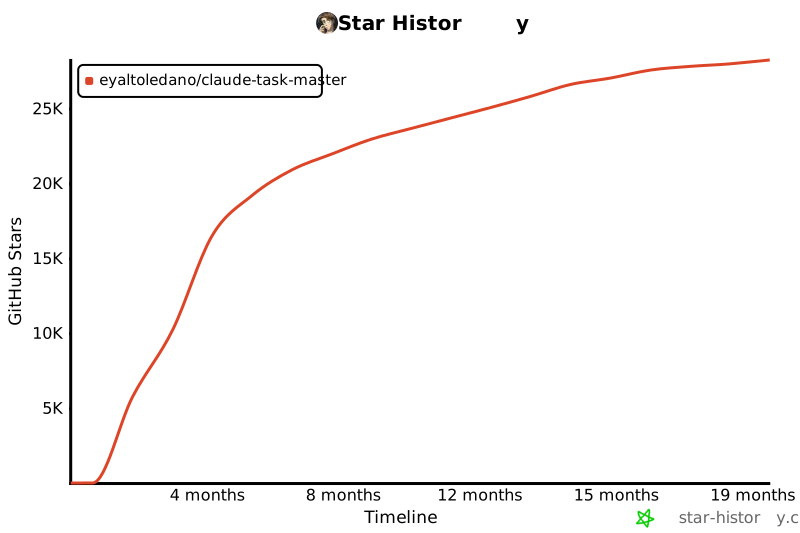](https://www.star-history.com/#eyaltoledano/claude-task-master&Timeline)
|
||||||
|
|
||||||
- `id`: Unique identifier for the task (Example: `1`)
|
## Licensing
|
||||||
- `title`: Brief, descriptive title of the task (Example: `"Initialize Repo"`)
|
|
||||||
- `description`: Concise description of what the task involves (Example: `"Create a new repository, set up initial structure."`)
|
|
||||||
- `status`: Current state of the task (Example: `"pending"`, `"done"`, `"deferred"`)
|
|
||||||
- `dependencies`: IDs of tasks that must be completed before this task (Example: `[1, 2]`)
|
|
||||||
- Dependencies are displayed with status indicators (✅ for completed, ⏱️ for pending)
|
|
||||||
- This helps quickly identify which prerequisite tasks are blocking work
|
|
||||||
- `priority`: Importance level of the task (Example: `"high"`, `"medium"`, `"low"`)
|
|
||||||
- `details`: In-depth implementation instructions (Example: `"Use GitHub client ID/secret, handle callback, set session token."`)
|
|
||||||
- `testStrategy`: Verification approach (Example: `"Deploy and call endpoint to confirm 'Hello World' response."`)
|
|
||||||
- `subtasks`: List of smaller, more specific tasks that make up the main task (Example: `[{"id": 1, "title": "Configure OAuth", ...}]`)
|
|
||||||
|
|
||||||
## Integrating with Cursor AI
|
Task Master is licensed under the MIT License with Commons Clause. This means you can:
|
||||||
|
|
||||||
Claude Task Master is designed to work seamlessly with [Cursor AI](https://www.cursor.so/), providing a structured workflow for AI-driven development.
|
✅ **Allowed**:
|
||||||
|
|
||||||
### Setup with Cursor
|
- Use Task Master for any purpose (personal, commercial, academic)
|
||||||
|
- Modify the code
|
||||||
|
- Distribute copies
|
||||||
|
- Create and sell products built using Task Master
|
||||||
|
|
||||||
1. After initializing your project, open it in Cursor
|
❌ **Not Allowed**:
|
||||||
2. The `.cursor/rules/dev_workflow.mdc` file is automatically loaded by Cursor, providing the AI with knowledge about the task management system
|
|
||||||
3. Place your PRD document in the `scripts/` directory (e.g., `scripts/prd.txt`)
|
|
||||||
4. Open Cursor's AI chat and switch to Agent mode
|
|
||||||
|
|
||||||
### Setting up MCP in Cursor
|
- Sell Task Master itself
|
||||||
|
- Offer Task Master as a hosted service
|
||||||
|
- Create competing products based on Task Master
|
||||||
|
|
||||||
To enable enhanced task management capabilities directly within Cursor using the Model Control Protocol (MCP):
|
See the [LICENSE](LICENSE) file for the complete license text and [licensing details](docs/licensing.md) for more information.
|
||||||
|
|
||||||
1. Go to Cursor settings
|
|
||||||
2. Navigate to the MCP section
|
|
||||||
3. Click on "Add New MCP Server"
|
|
||||||
4. Configure with the following details:
|
|
||||||
- Name: "Task Master"
|
|
||||||
- Type: "Command"
|
|
||||||
- Command: "npx -y --package task-master-ai task-master-mcp"
|
|
||||||
5. Save the settings
|
|
||||||
|
|
||||||
Once configured, you can interact with Task Master's task management commands directly through Cursor's interface, providing a more integrated experience.
|
|
||||||
|
|
||||||
### Initial Task Generation
|
|
||||||
|
|
||||||
In Cursor's AI chat, instruct the agent to generate tasks from your PRD:
|
|
||||||
|
|
||||||
```
|
|
||||||
Please use the task-master parse-prd command to generate tasks from my PRD. The PRD is located at scripts/prd.txt.
|
|
||||||
```
|
|
||||||
|
|
||||||
The agent will execute:
|
|
||||||
|
|
||||||
```bash
|
|
||||||
task-master parse-prd scripts/prd.txt
|
|
||||||
```
|
|
||||||
|
|
||||||
This will:
|
|
||||||
|
|
||||||
- Parse your PRD document
|
|
||||||
- Generate a structured `tasks.json` file with tasks, dependencies, priorities, and test strategies
|
|
||||||
- The agent will understand this process due to the Cursor rules
|
|
||||||
|
|
||||||
### Generate Individual Task Files
|
|
||||||
|
|
||||||
Next, ask the agent to generate individual task files:
|
|
||||||
|
|
||||||
```
|
|
||||||
Please generate individual task files from tasks.json
|
|
||||||
```
|
|
||||||
|
|
||||||
The agent will execute:
|
|
||||||
|
|
||||||
```bash
|
|
||||||
task-master generate
|
|
||||||
```
|
|
||||||
|
|
||||||
This creates individual task files in the `tasks/` directory (e.g., `task_001.txt`, `task_002.txt`), making it easier to reference specific tasks.
|
|
||||||
|
|
||||||
## AI-Driven Development Workflow
|
|
||||||
|
|
||||||
The Cursor agent is pre-configured (via the rules file) to follow this workflow:
|
|
||||||
|
|
||||||
### 1. Task Discovery and Selection
|
|
||||||
|
|
||||||
Ask the agent to list available tasks:
|
|
||||||
|
|
||||||
```
|
|
||||||
What tasks are available to work on next?
|
|
||||||
```
|
|
||||||
|
|
||||||
The agent will:
|
|
||||||
|
|
||||||
- Run `task-master list` to see all tasks
|
|
||||||
- Run `task-master next` to determine the next task to work on
|
|
||||||
- Analyze dependencies to determine which tasks are ready to be worked on
|
|
||||||
- Prioritize tasks based on priority level and ID order
|
|
||||||
- Suggest the next task(s) to implement
|
|
||||||
|
|
||||||
### 2. Task Implementation
|
|
||||||
|
|
||||||
When implementing a task, the agent will:
|
|
||||||
|
|
||||||
- Reference the task's details section for implementation specifics
|
|
||||||
- Consider dependencies on previous tasks
|
|
||||||
- Follow the project's coding standards
|
|
||||||
- Create appropriate tests based on the task's testStrategy
|
|
||||||
|
|
||||||
You can ask:
|
|
||||||
|
|
||||||
```
|
|
||||||
Let's implement task 3. What does it involve?
|
|
||||||
```
|
|
||||||
|
|
||||||
### 3. Task Verification
|
|
||||||
|
|
||||||
Before marking a task as complete, verify it according to:
|
|
||||||
|
|
||||||
- The task's specified testStrategy
|
|
||||||
- Any automated tests in the codebase
|
|
||||||
- Manual verification if required
|
|
||||||
|
|
||||||
### 4. Task Completion
|
|
||||||
|
|
||||||
When a task is completed, tell the agent:
|
|
||||||
|
|
||||||
```
|
|
||||||
Task 3 is now complete. Please update its status.
|
|
||||||
```
|
|
||||||
|
|
||||||
The agent will execute:
|
|
||||||
|
|
||||||
```bash
|
|
||||||
task-master set-status --id=3 --status=done
|
|
||||||
```
|
|
||||||
|
|
||||||
### 5. Handling Implementation Drift
|
|
||||||
|
|
||||||
If during implementation, you discover that:
|
|
||||||
|
|
||||||
- The current approach differs significantly from what was planned
|
|
||||||
- Future tasks need to be modified due to current implementation choices
|
|
||||||
- New dependencies or requirements have emerged
|
|
||||||
|
|
||||||
Tell the agent:
|
|
||||||
|
|
||||||
```
|
|
||||||
We've changed our approach. We're now using Express instead of Fastify. Please update all future tasks to reflect this change.
|
|
||||||
```
|
|
||||||
|
|
||||||
The agent will execute:
|
|
||||||
|
|
||||||
```bash
|
|
||||||
task-master update --from=4 --prompt="Now we are using Express instead of Fastify."
|
|
||||||
```
|
|
||||||
|
|
||||||
This will rewrite or re-scope subsequent tasks in tasks.json while preserving completed work.
|
|
||||||
|
|
||||||
### 6. Breaking Down Complex Tasks
|
|
||||||
|
|
||||||
For complex tasks that need more granularity:
|
|
||||||
|
|
||||||
```
|
|
||||||
Task 5 seems complex. Can you break it down into subtasks?
|
|
||||||
```
|
|
||||||
|
|
||||||
The agent will execute:
|
|
||||||
|
|
||||||
```bash
|
|
||||||
task-master expand --id=5 --num=3
|
|
||||||
```
|
|
||||||
|
|
||||||
You can provide additional context:
|
|
||||||
|
|
||||||
```
|
|
||||||
Please break down task 5 with a focus on security considerations.
|
|
||||||
```
|
|
||||||
|
|
||||||
The agent will execute:
|
|
||||||
|
|
||||||
```bash
|
|
||||||
task-master expand --id=5 --prompt="Focus on security aspects"
|
|
||||||
```
|
|
||||||
|
|
||||||
You can also expand all pending tasks:
|
|
||||||
|
|
||||||
```
|
|
||||||
Please break down all pending tasks into subtasks.
|
|
||||||
```
|
|
||||||
|
|
||||||
The agent will execute:
|
|
||||||
|
|
||||||
```bash
|
|
||||||
task-master expand --all
|
|
||||||
```
|
|
||||||
|
|
||||||
For research-backed subtask generation using Perplexity AI:
|
|
||||||
|
|
||||||
```
|
|
||||||
Please break down task 5 using research-backed generation.
|
|
||||||
```
|
|
||||||
|
|
||||||
The agent will execute:
|
|
||||||
|
|
||||||
```bash
|
|
||||||
task-master expand --id=5 --research
|
|
||||||
```
|
|
||||||
|
|
||||||
## Command Reference
|
|
||||||
|
|
||||||
Here's a comprehensive reference of all available commands:
|
|
||||||
|
|
||||||
### Parse PRD
|
|
||||||
|
|
||||||
```bash
|
|
||||||
# Parse a PRD file and generate tasks
|
|
||||||
task-master parse-prd <prd-file.txt>
|
|
||||||
|
|
||||||
# Limit the number of tasks generated
|
|
||||||
task-master parse-prd <prd-file.txt> --num-tasks=10
|
|
||||||
```
|
|
||||||
|
|
||||||
### List Tasks
|
|
||||||
|
|
||||||
```bash
|
|
||||||
# List all tasks
|
|
||||||
task-master list
|
|
||||||
|
|
||||||
# List tasks with a specific status
|
|
||||||
task-master list --status=<status>
|
|
||||||
|
|
||||||
# List tasks with subtasks
|
|
||||||
task-master list --with-subtasks
|
|
||||||
|
|
||||||
# List tasks with a specific status and include subtasks
|
|
||||||
task-master list --status=<status> --with-subtasks
|
|
||||||
```
|
|
||||||
|
|
||||||
### Show Next Task
|
|
||||||
|
|
||||||
```bash
|
|
||||||
# Show the next task to work on based on dependencies and status
|
|
||||||
task-master next
|
|
||||||
```
|
|
||||||
|
|
||||||
### Show Specific Task
|
|
||||||
|
|
||||||
```bash
|
|
||||||
# Show details of a specific task
|
|
||||||
task-master show <id>
|
|
||||||
# or
|
|
||||||
task-master show --id=<id>
|
|
||||||
|
|
||||||
# View a specific subtask (e.g., subtask 2 of task 1)
|
|
||||||
task-master show 1.2
|
|
||||||
```
|
|
||||||
|
|
||||||
### Update Tasks
|
|
||||||
|
|
||||||
```bash
|
|
||||||
# Update tasks from a specific ID and provide context
|
|
||||||
task-master update --from=<id> --prompt="<prompt>"
|
|
||||||
```
|
|
||||||
|
|
||||||
### Update a Specific Task
|
|
||||||
|
|
||||||
```bash
|
|
||||||
# Update a single task by ID with new information
|
|
||||||
task-master update-task --id=<id> --prompt="<prompt>"
|
|
||||||
|
|
||||||
# Use research-backed updates with Perplexity AI
|
|
||||||
task-master update-task --id=<id> --prompt="<prompt>" --research
|
|
||||||
```
|
|
||||||
|
|
||||||
### Update a Subtask
|
|
||||||
|
|
||||||
```bash
|
|
||||||
# Append additional information to a specific subtask
|
|
||||||
task-master update-subtask --id=<parentId.subtaskId> --prompt="<prompt>"
|
|
||||||
|
|
||||||
# Example: Add details about API rate limiting to subtask 2 of task 5
|
|
||||||
task-master update-subtask --id=5.2 --prompt="Add rate limiting of 100 requests per minute"
|
|
||||||
|
|
||||||
# Use research-backed updates with Perplexity AI
|
|
||||||
task-master update-subtask --id=<parentId.subtaskId> --prompt="<prompt>" --research
|
|
||||||
```
|
|
||||||
|
|
||||||
Unlike the `update-task` command which replaces task information, the `update-subtask` command _appends_ new information to the existing subtask details, marking it with a timestamp. This is useful for iteratively enhancing subtasks while preserving the original content.
|
|
||||||
|
|
||||||
### Generate Task Files
|
|
||||||
|
|
||||||
```bash
|
|
||||||
# Generate individual task files from tasks.json
|
|
||||||
task-master generate
|
|
||||||
```
|
|
||||||
|
|
||||||
### Set Task Status
|
|
||||||
|
|
||||||
```bash
|
|
||||||
# Set status of a single task
|
|
||||||
task-master set-status --id=<id> --status=<status>
|
|
||||||
|
|
||||||
# Set status for multiple tasks
|
|
||||||
task-master set-status --id=1,2,3 --status=<status>
|
|
||||||
|
|
||||||
# Set status for subtasks
|
|
||||||
task-master set-status --id=1.1,1.2 --status=<status>
|
|
||||||
```
|
|
||||||
|
|
||||||
When marking a task as "done", all of its subtasks will automatically be marked as "done" as well.
|
|
||||||
|
|
||||||
### Expand Tasks
|
|
||||||
|
|
||||||
```bash
|
|
||||||
# Expand a specific task with subtasks
|
|
||||||
task-master expand --id=<id> --num=<number>
|
|
||||||
|
|
||||||
# Expand with additional context
|
|
||||||
task-master expand --id=<id> --prompt="<context>"
|
|
||||||
|
|
||||||
# Expand all pending tasks
|
|
||||||
task-master expand --all
|
|
||||||
|
|
||||||
# Force regeneration of subtasks for tasks that already have them
|
|
||||||
task-master expand --all --force
|
|
||||||
|
|
||||||
# Research-backed subtask generation for a specific task
|
|
||||||
task-master expand --id=<id> --research
|
|
||||||
|
|
||||||
# Research-backed generation for all tasks
|
|
||||||
task-master expand --all --research
|
|
||||||
```
|
|
||||||
|
|
||||||
### Clear Subtasks
|
|
||||||
|
|
||||||
```bash
|
|
||||||
# Clear subtasks from a specific task
|
|
||||||
task-master clear-subtasks --id=<id>
|
|
||||||
|
|
||||||
# Clear subtasks from multiple tasks
|
|
||||||
task-master clear-subtasks --id=1,2,3
|
|
||||||
|
|
||||||
# Clear subtasks from all tasks
|
|
||||||
task-master clear-subtasks --all
|
|
||||||
```
|
|
||||||
|
|
||||||
### Analyze Task Complexity
|
|
||||||
|
|
||||||
```bash
|
|
||||||
# Analyze complexity of all tasks
|
|
||||||
task-master analyze-complexity
|
|
||||||
|
|
||||||
# Save report to a custom location
|
|
||||||
task-master analyze-complexity --output=my-report.json
|
|
||||||
|
|
||||||
# Use a specific LLM model
|
|
||||||
task-master analyze-complexity --model=claude-3-opus-20240229
|
|
||||||
|
|
||||||
# Set a custom complexity threshold (1-10)
|
|
||||||
task-master analyze-complexity --threshold=6
|
|
||||||
|
|
||||||
# Use an alternative tasks file
|
|
||||||
task-master analyze-complexity --file=custom-tasks.json
|
|
||||||
|
|
||||||
# Use Perplexity AI for research-backed complexity analysis
|
|
||||||
task-master analyze-complexity --research
|
|
||||||
```
|
|
||||||
|
|
||||||
### View Complexity Report
|
|
||||||
|
|
||||||
```bash
|
|
||||||
# Display the task complexity analysis report
|
|
||||||
task-master complexity-report
|
|
||||||
|
|
||||||
# View a report at a custom location
|
|
||||||
task-master complexity-report --file=my-report.json
|
|
||||||
```
|
|
||||||
|
|
||||||
### Managing Task Dependencies
|
|
||||||
|
|
||||||
```bash
|
|
||||||
# Add a dependency to a task
|
|
||||||
task-master add-dependency --id=<id> --depends-on=<id>
|
|
||||||
|
|
||||||
# Remove a dependency from a task
|
|
||||||
task-master remove-dependency --id=<id> --depends-on=<id>
|
|
||||||
|
|
||||||
# Validate dependencies without fixing them
|
|
||||||
task-master validate-dependencies
|
|
||||||
|
|
||||||
# Find and fix invalid dependencies automatically
|
|
||||||
task-master fix-dependencies
|
|
||||||
```
|
|
||||||
|
|
||||||
### Add a New Task
|
|
||||||
|
|
||||||
```bash
|
|
||||||
# Add a new task using AI
|
|
||||||
task-master add-task --prompt="Description of the new task"
|
|
||||||
|
|
||||||
# Add a task with dependencies
|
|
||||||
task-master add-task --prompt="Description" --dependencies=1,2,3
|
|
||||||
|
|
||||||
# Add a task with priority
|
|
||||||
task-master add-task --prompt="Description" --priority=high
|
|
||||||
```
|
|
||||||
|
|
||||||
## Feature Details
|
|
||||||
|
|
||||||
### Analyzing Task Complexity
|
|
||||||
|
|
||||||
The `analyze-complexity` command:
|
|
||||||
|
|
||||||
- Analyzes each task using AI to assess its complexity on a scale of 1-10
|
|
||||||
- Recommends optimal number of subtasks based on configured DEFAULT_SUBTASKS
|
|
||||||
- Generates tailored prompts for expanding each task
|
|
||||||
- Creates a comprehensive JSON report with ready-to-use commands
|
|
||||||
- Saves the report to scripts/task-complexity-report.json by default
|
|
||||||
|
|
||||||
The generated report contains:
|
|
||||||
|
|
||||||
- Complexity analysis for each task (scored 1-10)
|
|
||||||
- Recommended number of subtasks based on complexity
|
|
||||||
- AI-generated expansion prompts customized for each task
|
|
||||||
- Ready-to-run expansion commands directly within each task analysis
|
|
||||||
|
|
||||||
### Viewing Complexity Report
|
|
||||||
|
|
||||||
The `complexity-report` command:
|
|
||||||
|
|
||||||
- Displays a formatted, easy-to-read version of the complexity analysis report
|
|
||||||
- Shows tasks organized by complexity score (highest to lowest)
|
|
||||||
- Provides complexity distribution statistics (low, medium, high)
|
|
||||||
- Highlights tasks recommended for expansion based on threshold score
|
|
||||||
- Includes ready-to-use expansion commands for each complex task
|
|
||||||
- If no report exists, offers to generate one on the spot
|
|
||||||
|
|
||||||
### Smart Task Expansion
|
|
||||||
|
|
||||||
The `expand` command automatically checks for and uses the complexity report:
|
|
||||||
|
|
||||||
When a complexity report exists:
|
|
||||||
|
|
||||||
- Tasks are automatically expanded using the recommended subtask count and prompts
|
|
||||||
- When expanding all tasks, they're processed in order of complexity (highest first)
|
|
||||||
- Research-backed generation is preserved from the complexity analysis
|
|
||||||
- You can still override recommendations with explicit command-line options
|
|
||||||
|
|
||||||
Example workflow:
|
|
||||||
|
|
||||||
```bash
|
|
||||||
# Generate the complexity analysis report with research capabilities
|
|
||||||
task-master analyze-complexity --research
|
|
||||||
|
|
||||||
# Review the report in a readable format
|
|
||||||
task-master complexity-report
|
|
||||||
|
|
||||||
# Expand tasks using the optimized recommendations
|
|
||||||
task-master expand --id=8
|
|
||||||
# or expand all tasks
|
|
||||||
task-master expand --all
|
|
||||||
```
|
|
||||||
|
|
||||||
### Finding the Next Task
|
|
||||||
|
|
||||||
The `next` command:
|
|
||||||
|
|
||||||
- Identifies tasks that are pending/in-progress and have all dependencies satisfied
|
|
||||||
- Prioritizes tasks by priority level, dependency count, and task ID
|
|
||||||
- Displays comprehensive information about the selected task:
|
|
||||||
- Basic task details (ID, title, priority, dependencies)
|
|
||||||
- Implementation details
|
|
||||||
- Subtasks (if they exist)
|
|
||||||
- Provides contextual suggested actions:
|
|
||||||
- Command to mark the task as in-progress
|
|
||||||
- Command to mark the task as done
|
|
||||||
- Commands for working with subtasks
|
|
||||||
|
|
||||||
### Viewing Specific Task Details
|
|
||||||
|
|
||||||
The `show` command:
|
|
||||||
|
|
||||||
- Displays comprehensive details about a specific task or subtask
|
|
||||||
- Shows task status, priority, dependencies, and detailed implementation notes
|
|
||||||
- For parent tasks, displays all subtasks and their status
|
|
||||||
- For subtasks, shows parent task relationship
|
|
||||||
- Provides contextual action suggestions based on the task's state
|
|
||||||
- Works with both regular tasks and subtasks (using the format taskId.subtaskId)
|
|
||||||
|
|
||||||
## Best Practices for AI-Driven Development
|
|
||||||
|
|
||||||
1. **Start with a detailed PRD**: The more detailed your PRD, the better the generated tasks will be.
|
|
||||||
|
|
||||||
2. **Review generated tasks**: After parsing the PRD, review the tasks to ensure they make sense and have appropriate dependencies.
|
|
||||||
|
|
||||||
3. **Analyze task complexity**: Use the complexity analysis feature to identify which tasks should be broken down further.
|
|
||||||
|
|
||||||
4. **Follow the dependency chain**: Always respect task dependencies - the Cursor agent will help with this.
|
|
||||||
|
|
||||||
5. **Update as you go**: If your implementation diverges from the plan, use the update command to keep future tasks aligned with your current approach.
|
|
||||||
|
|
||||||
6. **Break down complex tasks**: Use the expand command to break down complex tasks into manageable subtasks.
|
|
||||||
|
|
||||||
7. **Regenerate task files**: After any updates to tasks.json, regenerate the task files to keep them in sync.
|
|
||||||
|
|
||||||
8. **Communicate context to the agent**: When asking the Cursor agent to help with a task, provide context about what you're trying to achieve.
|
|
||||||
|
|
||||||
9. **Validate dependencies**: Periodically run the validate-dependencies command to check for invalid or circular dependencies.
|
|
||||||
|
|
||||||
## Example Cursor AI Interactions
|
|
||||||
|
|
||||||
### Starting a new project
|
|
||||||
|
|
||||||
```
|
|
||||||
I've just initialized a new project with Claude Task Master. I have a PRD at scripts/prd.txt.
|
|
||||||
Can you help me parse it and set up the initial tasks?
|
|
||||||
```
|
|
||||||
|
|
||||||
### Working on tasks
|
|
||||||
|
|
||||||
```
|
|
||||||
What's the next task I should work on? Please consider dependencies and priorities.
|
|
||||||
```
|
|
||||||
|
|
||||||
### Implementing a specific task
|
|
||||||
|
|
||||||
```
|
|
||||||
I'd like to implement task 4. Can you help me understand what needs to be done and how to approach it?
|
|
||||||
```
|
|
||||||
|
|
||||||
### Managing subtasks
|
|
||||||
|
|
||||||
```
|
|
||||||
I need to regenerate the subtasks for task 3 with a different approach. Can you help me clear and regenerate them?
|
|
||||||
```
|
|
||||||
|
|
||||||
### Handling changes
|
|
||||||
|
|
||||||
```
|
|
||||||
We've decided to use MongoDB instead of PostgreSQL. Can you update all future tasks to reflect this change?
|
|
||||||
```
|
|
||||||
|
|
||||||
### Completing work
|
|
||||||
|
|
||||||
```
|
|
||||||
I've finished implementing the authentication system described in task 2. All tests are passing.
|
|
||||||
Please mark it as complete and tell me what I should work on next.
|
|
||||||
```
|
|
||||||
|
|
||||||
### Analyzing complexity
|
|
||||||
|
|
||||||
```
|
|
||||||
Can you analyze the complexity of our tasks to help me understand which ones need to be broken down further?
|
|
||||||
```
|
|
||||||
|
|
||||||
### Viewing complexity report
|
|
||||||
|
|
||||||
```
|
|
||||||
Can you show me the complexity report in a more readable format?
|
|
||||||
```
|
|
||||||
|
|||||||
@@ -1,14 +1,14 @@
|
|||||||
# Required
|
# Required
|
||||||
ANTHROPIC_API_KEY=your-api-key-here # Format: sk-ant-api03-...
|
ANTHROPIC_API_KEY=your-api-key-here # For most AI ops -- Format: sk-ant-api03-... (Required)
|
||||||
PERPLEXITY_API_KEY=pplx-abcde # For research (recommended but optional)
|
PERPLEXITY_API_KEY=pplx-abcde # For research -- Format: pplx-abcde (Optional, Highly Recommended)
|
||||||
|
|
||||||
# Optional - defaults shown
|
# Optional - defaults shown
|
||||||
MODEL=claude-3-7-sonnet-20250219 # Recommended models: claude-3-7-sonnet-20250219, claude-3-opus-20240229
|
MODEL=claude-3-7-sonnet-20250219 # Recommended models: claude-3-7-sonnet-20250219, claude-3-opus-20240229 (Required)
|
||||||
PERPLEXITY_MODEL=sonar-pro # Make sure you have access to sonar-pro otherwise you can use sonar regular.
|
PERPLEXITY_MODEL=sonar-pro # Make sure you have access to sonar-pro otherwise you can use sonar regular (Optional)
|
||||||
MAX_TOKENS=4000 # Maximum tokens for model responses
|
MAX_TOKENS=64000 # Maximum tokens for model responses (Required)
|
||||||
TEMPERATURE=0.7 # Temperature for model responses (0.0-1.0)
|
TEMPERATURE=0.2 # Temperature for model responses (0.0-1.0) - lower = less creativity and follow your prompt closely (Required)
|
||||||
DEBUG=false # Enable debug logging (true/false)
|
DEBUG=false # Enable debug logging (true/false)
|
||||||
LOG_LEVEL=info # Log level (debug, info, warn, error)
|
LOG_LEVEL=info # Log level (debug, info, warn, error)
|
||||||
DEFAULT_SUBTASKS=3 # Default number of subtasks when expanding
|
DEFAULT_SUBTASKS=5 # Default number of subtasks when expanding
|
||||||
DEFAULT_PRIORITY=medium # Default priority for generated tasks (high, medium, low)
|
DEFAULT_PRIORITY=medium # Default priority for generated tasks (high, medium, low)
|
||||||
PROJECT_NAME={{projectName}} # Project name for tasks.json metadata
|
PROJECT_NAME={{projectName}} # Project name for tasks.json metadata
|
||||||
@@ -21,9 +21,11 @@ In an AI-driven development process—particularly with tools like [Cursor](http
|
|||||||
The script can be configured through environment variables in a `.env` file at the root of the project:
|
The script can be configured through environment variables in a `.env` file at the root of the project:
|
||||||
|
|
||||||
### Required Configuration
|
### Required Configuration
|
||||||
|
|
||||||
- `ANTHROPIC_API_KEY`: Your Anthropic API key for Claude
|
- `ANTHROPIC_API_KEY`: Your Anthropic API key for Claude
|
||||||
|
|
||||||
### Optional Configuration
|
### Optional Configuration
|
||||||
|
|
||||||
- `MODEL`: Specify which Claude model to use (default: "claude-3-7-sonnet-20250219")
|
- `MODEL`: Specify which Claude model to use (default: "claude-3-7-sonnet-20250219")
|
||||||
- `MAX_TOKENS`: Maximum tokens for model responses (default: 4000)
|
- `MAX_TOKENS`: Maximum tokens for model responses (default: 4000)
|
||||||
- `TEMPERATURE`: Temperature for model responses (default: 0.7)
|
- `TEMPERATURE`: Temperature for model responses (default: 0.7)
|
||||||
@@ -38,9 +40,10 @@ The script can be configured through environment variables in a `.env` file at t
|
|||||||
|
|
||||||
## How It Works
|
## How It Works
|
||||||
|
|
||||||
1. **`tasks.json`**:
|
1. **`tasks.json`**:
|
||||||
- A JSON file at the project root containing an array of tasks (each with `id`, `title`, `description`, `status`, etc.).
|
|
||||||
- The `meta` field can store additional info like the project's name, version, or reference to the PRD.
|
- A JSON file at the project root containing an array of tasks (each with `id`, `title`, `description`, `status`, etc.).
|
||||||
|
- The `meta` field can store additional info like the project's name, version, or reference to the PRD.
|
||||||
- Tasks can have `subtasks` for more detailed implementation steps.
|
- Tasks can have `subtasks` for more detailed implementation steps.
|
||||||
- Dependencies are displayed with status indicators (✅ for completed, ⏱️ for pending) to easily track progress.
|
- Dependencies are displayed with status indicators (✅ for completed, ⏱️ for pending) to easily track progress.
|
||||||
|
|
||||||
@@ -50,7 +53,7 @@ The script can be configured through environment variables in a `.env` file at t
|
|||||||
```bash
|
```bash
|
||||||
# If installed globally
|
# If installed globally
|
||||||
task-master [command] [options]
|
task-master [command] [options]
|
||||||
|
|
||||||
# If using locally within the project
|
# If using locally within the project
|
||||||
node scripts/dev.js [command] [options]
|
node scripts/dev.js [command] [options]
|
||||||
```
|
```
|
||||||
@@ -111,6 +114,7 @@ task-master update --file=custom-tasks.json --from=5 --prompt="Change database f
|
|||||||
```
|
```
|
||||||
|
|
||||||
Notes:
|
Notes:
|
||||||
|
|
||||||
- The `--prompt` parameter is required and should explain the changes or new context
|
- The `--prompt` parameter is required and should explain the changes or new context
|
||||||
- Only tasks that aren't marked as 'done' will be updated
|
- Only tasks that aren't marked as 'done' will be updated
|
||||||
- Tasks with ID >= the specified --from value will be updated
|
- Tasks with ID >= the specified --from value will be updated
|
||||||
@@ -134,6 +138,7 @@ task-master set-status --id=1,2,3 --status=done
|
|||||||
```
|
```
|
||||||
|
|
||||||
Notes:
|
Notes:
|
||||||
|
|
||||||
- When marking a parent task as "done", all of its subtasks will automatically be marked as "done" as well
|
- When marking a parent task as "done", all of its subtasks will automatically be marked as "done" as well
|
||||||
- Common status values are 'done', 'pending', and 'deferred', but any string is accepted
|
- Common status values are 'done', 'pending', and 'deferred', but any string is accepted
|
||||||
- You can specify multiple task IDs by separating them with commas
|
- You can specify multiple task IDs by separating them with commas
|
||||||
@@ -183,6 +188,7 @@ task-master clear-subtasks --all
|
|||||||
```
|
```
|
||||||
|
|
||||||
Notes:
|
Notes:
|
||||||
|
|
||||||
- After clearing subtasks, task files are automatically regenerated
|
- After clearing subtasks, task files are automatically regenerated
|
||||||
- This is useful when you want to regenerate subtasks with a different approach
|
- This is useful when you want to regenerate subtasks with a different approach
|
||||||
- Can be combined with the `expand` command to immediately generate new subtasks
|
- Can be combined with the `expand` command to immediately generate new subtasks
|
||||||
@@ -198,6 +204,7 @@ The script integrates with two AI services:
|
|||||||
The Perplexity integration uses the OpenAI client to connect to Perplexity's API, which provides enhanced research capabilities for generating more informed subtasks. If the Perplexity API is unavailable or encounters an error, the script will automatically fall back to using Anthropic's Claude.
|
The Perplexity integration uses the OpenAI client to connect to Perplexity's API, which provides enhanced research capabilities for generating more informed subtasks. If the Perplexity API is unavailable or encounters an error, the script will automatically fall back to using Anthropic's Claude.
|
||||||
|
|
||||||
To use the Perplexity integration:
|
To use the Perplexity integration:
|
||||||
|
|
||||||
1. Obtain a Perplexity API key
|
1. Obtain a Perplexity API key
|
||||||
2. Add `PERPLEXITY_API_KEY` to your `.env` file
|
2. Add `PERPLEXITY_API_KEY` to your `.env` file
|
||||||
3. Optionally specify `PERPLEXITY_MODEL` in your `.env` file (default: "sonar-medium-online")
|
3. Optionally specify `PERPLEXITY_MODEL` in your `.env` file (default: "sonar-medium-online")
|
||||||
@@ -206,6 +213,7 @@ To use the Perplexity integration:
|
|||||||
## Logging
|
## Logging
|
||||||
|
|
||||||
The script supports different logging levels controlled by the `LOG_LEVEL` environment variable:
|
The script supports different logging levels controlled by the `LOG_LEVEL` environment variable:
|
||||||
|
|
||||||
- `debug`: Detailed information, typically useful for troubleshooting
|
- `debug`: Detailed information, typically useful for troubleshooting
|
||||||
- `info`: Confirmation that things are working as expected (default)
|
- `info`: Confirmation that things are working as expected (default)
|
||||||
- `warn`: Warning messages that don't prevent execution
|
- `warn`: Warning messages that don't prevent execution
|
||||||
@@ -228,17 +236,20 @@ task-master remove-dependency --id=<id> --depends-on=<id>
|
|||||||
These commands:
|
These commands:
|
||||||
|
|
||||||
1. **Allow precise dependency management**:
|
1. **Allow precise dependency management**:
|
||||||
|
|
||||||
- Add dependencies between tasks with automatic validation
|
- Add dependencies between tasks with automatic validation
|
||||||
- Remove dependencies when they're no longer needed
|
- Remove dependencies when they're no longer needed
|
||||||
- Update task files automatically after changes
|
- Update task files automatically after changes
|
||||||
|
|
||||||
2. **Include validation checks**:
|
2. **Include validation checks**:
|
||||||
|
|
||||||
- Prevent circular dependencies (a task depending on itself)
|
- Prevent circular dependencies (a task depending on itself)
|
||||||
- Prevent duplicate dependencies
|
- Prevent duplicate dependencies
|
||||||
- Verify that both tasks exist before adding/removing dependencies
|
- Verify that both tasks exist before adding/removing dependencies
|
||||||
- Check if dependencies exist before attempting to remove them
|
- Check if dependencies exist before attempting to remove them
|
||||||
|
|
||||||
3. **Provide clear feedback**:
|
3. **Provide clear feedback**:
|
||||||
|
|
||||||
- Success messages confirm when dependencies are added/removed
|
- Success messages confirm when dependencies are added/removed
|
||||||
- Error messages explain why operations failed (if applicable)
|
- Error messages explain why operations failed (if applicable)
|
||||||
|
|
||||||
@@ -263,6 +274,7 @@ task-master validate-dependencies --file=custom-tasks.json
|
|||||||
```
|
```
|
||||||
|
|
||||||
This command:
|
This command:
|
||||||
|
|
||||||
- Scans all tasks and subtasks for non-existent dependencies
|
- Scans all tasks and subtasks for non-existent dependencies
|
||||||
- Identifies potential self-dependencies (tasks referencing themselves)
|
- Identifies potential self-dependencies (tasks referencing themselves)
|
||||||
- Reports all found issues without modifying files
|
- Reports all found issues without modifying files
|
||||||
@@ -284,6 +296,7 @@ task-master fix-dependencies --file=custom-tasks.json
|
|||||||
```
|
```
|
||||||
|
|
||||||
This command:
|
This command:
|
||||||
|
|
||||||
1. **Validates all dependencies** across tasks and subtasks
|
1. **Validates all dependencies** across tasks and subtasks
|
||||||
2. **Automatically removes**:
|
2. **Automatically removes**:
|
||||||
- References to non-existent tasks and subtasks
|
- References to non-existent tasks and subtasks
|
||||||
@@ -321,6 +334,7 @@ task-master analyze-complexity --research
|
|||||||
```
|
```
|
||||||
|
|
||||||
Notes:
|
Notes:
|
||||||
|
|
||||||
- The command uses Claude to analyze each task's complexity (or Perplexity with --research flag)
|
- The command uses Claude to analyze each task's complexity (or Perplexity with --research flag)
|
||||||
- Tasks are scored on a scale of 1-10
|
- Tasks are scored on a scale of 1-10
|
||||||
- Each task receives a recommended number of subtasks based on DEFAULT_SUBTASKS configuration
|
- Each task receives a recommended number of subtasks based on DEFAULT_SUBTASKS configuration
|
||||||
@@ -345,33 +359,35 @@ task-master expand --id=8 --num=5 --prompt="Custom prompt"
|
|||||||
```
|
```
|
||||||
|
|
||||||
When a complexity report exists:
|
When a complexity report exists:
|
||||||
|
|
||||||
- The `expand` command will use the recommended subtask count from the report (unless overridden)
|
- The `expand` command will use the recommended subtask count from the report (unless overridden)
|
||||||
- It will use the tailored expansion prompt from the report (unless a custom prompt is provided)
|
- It will use the tailored expansion prompt from the report (unless a custom prompt is provided)
|
||||||
- When using `--all`, tasks are sorted by complexity score (highest first)
|
- When using `--all`, tasks are sorted by complexity score (highest first)
|
||||||
- The `--research` flag is preserved from the complexity analysis to expansion
|
- The `--research` flag is preserved from the complexity analysis to expansion
|
||||||
|
|
||||||
The output report structure is:
|
The output report structure is:
|
||||||
|
|
||||||
```json
|
```json
|
||||||
{
|
{
|
||||||
"meta": {
|
"meta": {
|
||||||
"generatedAt": "2023-06-15T12:34:56.789Z",
|
"generatedAt": "2023-06-15T12:34:56.789Z",
|
||||||
"tasksAnalyzed": 20,
|
"tasksAnalyzed": 20,
|
||||||
"thresholdScore": 5,
|
"thresholdScore": 5,
|
||||||
"projectName": "Your Project Name",
|
"projectName": "Your Project Name",
|
||||||
"usedResearch": true
|
"usedResearch": true
|
||||||
},
|
},
|
||||||
"complexityAnalysis": [
|
"complexityAnalysis": [
|
||||||
{
|
{
|
||||||
"taskId": 8,
|
"taskId": 8,
|
||||||
"taskTitle": "Develop Implementation Drift Handling",
|
"taskTitle": "Develop Implementation Drift Handling",
|
||||||
"complexityScore": 9.5,
|
"complexityScore": 9.5,
|
||||||
"recommendedSubtasks": 6,
|
"recommendedSubtasks": 6,
|
||||||
"expansionPrompt": "Create subtasks that handle detecting...",
|
"expansionPrompt": "Create subtasks that handle detecting...",
|
||||||
"reasoning": "This task requires sophisticated logic...",
|
"reasoning": "This task requires sophisticated logic...",
|
||||||
"expansionCommand": "task-master expand --id=8 --num=6 --prompt=\"Create subtasks...\" --research"
|
"expansionCommand": "task-master expand --id=8 --num=6 --prompt=\"Create subtasks...\" --research"
|
||||||
},
|
}
|
||||||
// More tasks sorted by complexity score (highest first)
|
// More tasks sorted by complexity score (highest first)
|
||||||
]
|
]
|
||||||
}
|
}
|
||||||
```
|
```
|
||||||
|
|
||||||
@@ -438,4 +454,4 @@ This command:
|
|||||||
- Commands for working with subtasks
|
- Commands for working with subtasks
|
||||||
- For subtasks, provides a link to view the parent task
|
- For subtasks, provides a link to view the parent task
|
||||||
|
|
||||||
This command is particularly useful when you need to examine a specific task in detail before implementing it or when you want to check the status and details of a particular task.
|
This command is particularly useful when you need to examine a specific task in detail before implementing it or when you want to check the status and details of a particular task.
|
||||||
|
|||||||
@@ -20,11 +20,11 @@ const args = process.argv.slice(2);
|
|||||||
|
|
||||||
// Spawn the init script with all arguments
|
// Spawn the init script with all arguments
|
||||||
const child = spawn('node', [initScriptPath, ...args], {
|
const child = spawn('node', [initScriptPath, ...args], {
|
||||||
stdio: 'inherit',
|
stdio: 'inherit',
|
||||||
cwd: process.cwd()
|
cwd: process.cwd()
|
||||||
});
|
});
|
||||||
|
|
||||||
// Handle exit
|
// Handle exit
|
||||||
child.on('close', (code) => {
|
child.on('close', (code) => {
|
||||||
process.exit(code);
|
process.exit(code);
|
||||||
});
|
});
|
||||||
|
|||||||
@@ -44,30 +44,36 @@ const initScriptPath = resolve(__dirname, '../scripts/init.js');
|
|||||||
|
|
||||||
// Helper function to run dev.js with arguments
|
// Helper function to run dev.js with arguments
|
||||||
function runDevScript(args) {
|
function runDevScript(args) {
|
||||||
// Debug: Show the transformed arguments when DEBUG=1 is set
|
// Debug: Show the transformed arguments when DEBUG=1 is set
|
||||||
if (process.env.DEBUG === '1') {
|
if (process.env.DEBUG === '1') {
|
||||||
console.error('\nDEBUG - CLI Wrapper Analysis:');
|
console.error('\nDEBUG - CLI Wrapper Analysis:');
|
||||||
console.error('- Original command: ' + process.argv.join(' '));
|
console.error('- Original command: ' + process.argv.join(' '));
|
||||||
console.error('- Transformed args: ' + args.join(' '));
|
console.error('- Transformed args: ' + args.join(' '));
|
||||||
console.error('- dev.js will receive: node ' + devScriptPath + ' ' + args.join(' ') + '\n');
|
console.error(
|
||||||
}
|
'- dev.js will receive: node ' +
|
||||||
|
devScriptPath +
|
||||||
// For testing: If TEST_MODE is set, just print args and exit
|
' ' +
|
||||||
if (process.env.TEST_MODE === '1') {
|
args.join(' ') +
|
||||||
console.log('Would execute:');
|
'\n'
|
||||||
console.log(`node ${devScriptPath} ${args.join(' ')}`);
|
);
|
||||||
process.exit(0);
|
}
|
||||||
return;
|
|
||||||
}
|
// For testing: If TEST_MODE is set, just print args and exit
|
||||||
|
if (process.env.TEST_MODE === '1') {
|
||||||
const child = spawn('node', [devScriptPath, ...args], {
|
console.log('Would execute:');
|
||||||
stdio: 'inherit',
|
console.log(`node ${devScriptPath} ${args.join(' ')}`);
|
||||||
cwd: process.cwd()
|
process.exit(0);
|
||||||
});
|
return;
|
||||||
|
}
|
||||||
child.on('close', (code) => {
|
|
||||||
process.exit(code);
|
const child = spawn('node', [devScriptPath, ...args], {
|
||||||
});
|
stdio: 'inherit',
|
||||||
|
cwd: process.cwd()
|
||||||
|
});
|
||||||
|
|
||||||
|
child.on('close', (code) => {
|
||||||
|
process.exit(code);
|
||||||
|
});
|
||||||
}
|
}
|
||||||
|
|
||||||
// Helper function to detect camelCase and convert to kebab-case
|
// Helper function to detect camelCase and convert to kebab-case
|
||||||
@@ -79,228 +85,239 @@ const toKebabCase = (str) => str.replace(/([A-Z])/g, '-$1').toLowerCase();
|
|||||||
* @returns {Function} Wrapper action function
|
* @returns {Function} Wrapper action function
|
||||||
*/
|
*/
|
||||||
function createDevScriptAction(commandName) {
|
function createDevScriptAction(commandName) {
|
||||||
return (options, cmd) => {
|
return (options, cmd) => {
|
||||||
// Check for camelCase flags and error out with helpful message
|
// Check for camelCase flags and error out with helpful message
|
||||||
const camelCaseFlags = detectCamelCaseFlags(process.argv);
|
const camelCaseFlags = detectCamelCaseFlags(process.argv);
|
||||||
|
|
||||||
// If camelCase flags were found, show error and exit
|
|
||||||
if (camelCaseFlags.length > 0) {
|
|
||||||
console.error('\nError: Please use kebab-case for CLI flags:');
|
|
||||||
camelCaseFlags.forEach(flag => {
|
|
||||||
console.error(` Instead of: --${flag.original}`);
|
|
||||||
console.error(` Use: --${flag.kebabCase}`);
|
|
||||||
});
|
|
||||||
console.error('\nExample: task-master parse-prd --num-tasks=5 instead of --numTasks=5\n');
|
|
||||||
process.exit(1);
|
|
||||||
}
|
|
||||||
|
|
||||||
// Since we've ensured no camelCase flags, we can now just:
|
|
||||||
// 1. Start with the command name
|
|
||||||
const args = [commandName];
|
|
||||||
|
|
||||||
// 3. Get positional arguments and explicit flags from the command line
|
|
||||||
const commandArgs = [];
|
|
||||||
const positionals = new Set(); // Track positional args we've seen
|
|
||||||
|
|
||||||
// Find the command in raw process.argv to extract args
|
|
||||||
const commandIndex = process.argv.indexOf(commandName);
|
|
||||||
if (commandIndex !== -1) {
|
|
||||||
// Process all args after the command name
|
|
||||||
for (let i = commandIndex + 1; i < process.argv.length; i++) {
|
|
||||||
const arg = process.argv[i];
|
|
||||||
|
|
||||||
if (arg.startsWith('--')) {
|
|
||||||
// It's a flag - pass through as is
|
|
||||||
commandArgs.push(arg);
|
|
||||||
// Skip the next arg if this is a flag with a value (not --flag=value format)
|
|
||||||
if (!arg.includes('=') &&
|
|
||||||
i + 1 < process.argv.length &&
|
|
||||||
!process.argv[i+1].startsWith('--')) {
|
|
||||||
commandArgs.push(process.argv[++i]);
|
|
||||||
}
|
|
||||||
} else if (!positionals.has(arg)) {
|
|
||||||
// It's a positional argument we haven't seen
|
|
||||||
commandArgs.push(arg);
|
|
||||||
positionals.add(arg);
|
|
||||||
}
|
|
||||||
}
|
|
||||||
}
|
|
||||||
|
|
||||||
// Add all command line args we collected
|
|
||||||
args.push(...commandArgs);
|
|
||||||
|
|
||||||
// 4. Add default options from Commander if not specified on command line
|
|
||||||
// Track which options we've seen on the command line
|
|
||||||
const userOptions = new Set();
|
|
||||||
for (const arg of commandArgs) {
|
|
||||||
if (arg.startsWith('--')) {
|
|
||||||
// Extract option name (without -- and value)
|
|
||||||
const name = arg.split('=')[0].slice(2);
|
|
||||||
userOptions.add(name);
|
|
||||||
|
|
||||||
// Add the kebab-case version too, to prevent duplicates
|
|
||||||
const kebabName = name.replace(/([A-Z])/g, '-$1').toLowerCase();
|
|
||||||
userOptions.add(kebabName);
|
|
||||||
|
|
||||||
// Add the camelCase version as well
|
|
||||||
const camelName = kebabName.replace(/-([a-z])/g, (_, letter) => letter.toUpperCase());
|
|
||||||
userOptions.add(camelName);
|
|
||||||
}
|
|
||||||
}
|
|
||||||
|
|
||||||
// Add Commander-provided defaults for options not specified by user
|
|
||||||
Object.entries(options).forEach(([key, value]) => {
|
|
||||||
// Debug output to see what keys we're getting
|
|
||||||
if (process.env.DEBUG === '1') {
|
|
||||||
console.error(`DEBUG - Processing option: ${key} = ${value}`);
|
|
||||||
}
|
|
||||||
|
|
||||||
// Special case for numTasks > num-tasks (a known problem case)
|
// If camelCase flags were found, show error and exit
|
||||||
if (key === 'numTasks') {
|
if (camelCaseFlags.length > 0) {
|
||||||
if (process.env.DEBUG === '1') {
|
console.error('\nError: Please use kebab-case for CLI flags:');
|
||||||
console.error('DEBUG - Converting numTasks to num-tasks');
|
camelCaseFlags.forEach((flag) => {
|
||||||
}
|
console.error(` Instead of: --${flag.original}`);
|
||||||
if (!userOptions.has('num-tasks') && !userOptions.has('numTasks')) {
|
console.error(` Use: --${flag.kebabCase}`);
|
||||||
args.push(`--num-tasks=${value}`);
|
});
|
||||||
}
|
console.error(
|
||||||
return;
|
'\nExample: task-master parse-prd --num-tasks=5 instead of --numTasks=5\n'
|
||||||
}
|
);
|
||||||
|
process.exit(1);
|
||||||
// Skip built-in Commander properties and options the user provided
|
}
|
||||||
if (['parent', 'commands', 'options', 'rawArgs'].includes(key) || userOptions.has(key)) {
|
|
||||||
return;
|
// Since we've ensured no camelCase flags, we can now just:
|
||||||
}
|
// 1. Start with the command name
|
||||||
|
const args = [commandName];
|
||||||
// Also check the kebab-case version of this key
|
|
||||||
const kebabKey = key.replace(/([A-Z])/g, '-$1').toLowerCase();
|
// 3. Get positional arguments and explicit flags from the command line
|
||||||
if (userOptions.has(kebabKey)) {
|
const commandArgs = [];
|
||||||
return;
|
const positionals = new Set(); // Track positional args we've seen
|
||||||
}
|
|
||||||
|
// Find the command in raw process.argv to extract args
|
||||||
// Add default values, using kebab-case for the parameter name
|
const commandIndex = process.argv.indexOf(commandName);
|
||||||
if (value !== undefined) {
|
if (commandIndex !== -1) {
|
||||||
if (typeof value === 'boolean') {
|
// Process all args after the command name
|
||||||
if (value === true) {
|
for (let i = commandIndex + 1; i < process.argv.length; i++) {
|
||||||
args.push(`--${kebabKey}`);
|
const arg = process.argv[i];
|
||||||
} else if (value === false && key === 'generate') {
|
|
||||||
args.push('--skip-generate');
|
if (arg.startsWith('--')) {
|
||||||
}
|
// It's a flag - pass through as is
|
||||||
} else {
|
commandArgs.push(arg);
|
||||||
// Always use kebab-case for option names
|
// Skip the next arg if this is a flag with a value (not --flag=value format)
|
||||||
args.push(`--${kebabKey}=${value}`);
|
if (
|
||||||
}
|
!arg.includes('=') &&
|
||||||
}
|
i + 1 < process.argv.length &&
|
||||||
});
|
!process.argv[i + 1].startsWith('--')
|
||||||
|
) {
|
||||||
// Special handling for parent parameter (uses -p)
|
commandArgs.push(process.argv[++i]);
|
||||||
if (options.parent && !args.includes('-p') && !userOptions.has('parent')) {
|
}
|
||||||
args.push('-p', options.parent);
|
} else if (!positionals.has(arg)) {
|
||||||
}
|
// It's a positional argument we haven't seen
|
||||||
|
commandArgs.push(arg);
|
||||||
// Debug output for troubleshooting
|
positionals.add(arg);
|
||||||
if (process.env.DEBUG === '1') {
|
}
|
||||||
console.error('DEBUG - Command args:', commandArgs);
|
}
|
||||||
console.error('DEBUG - User options:', Array.from(userOptions));
|
}
|
||||||
console.error('DEBUG - Commander options:', options);
|
|
||||||
console.error('DEBUG - Final args:', args);
|
// Add all command line args we collected
|
||||||
}
|
args.push(...commandArgs);
|
||||||
|
|
||||||
// Run the script with our processed args
|
// 4. Add default options from Commander if not specified on command line
|
||||||
runDevScript(args);
|
// Track which options we've seen on the command line
|
||||||
};
|
const userOptions = new Set();
|
||||||
|
for (const arg of commandArgs) {
|
||||||
|
if (arg.startsWith('--')) {
|
||||||
|
// Extract option name (without -- and value)
|
||||||
|
const name = arg.split('=')[0].slice(2);
|
||||||
|
userOptions.add(name);
|
||||||
|
|
||||||
|
// Add the kebab-case version too, to prevent duplicates
|
||||||
|
const kebabName = name.replace(/([A-Z])/g, '-$1').toLowerCase();
|
||||||
|
userOptions.add(kebabName);
|
||||||
|
|
||||||
|
// Add the camelCase version as well
|
||||||
|
const camelName = kebabName.replace(/-([a-z])/g, (_, letter) =>
|
||||||
|
letter.toUpperCase()
|
||||||
|
);
|
||||||
|
userOptions.add(camelName);
|
||||||
|
}
|
||||||
|
}
|
||||||
|
|
||||||
|
// Add Commander-provided defaults for options not specified by user
|
||||||
|
Object.entries(options).forEach(([key, value]) => {
|
||||||
|
// Debug output to see what keys we're getting
|
||||||
|
if (process.env.DEBUG === '1') {
|
||||||
|
console.error(`DEBUG - Processing option: ${key} = ${value}`);
|
||||||
|
}
|
||||||
|
|
||||||
|
// Special case for numTasks > num-tasks (a known problem case)
|
||||||
|
if (key === 'numTasks') {
|
||||||
|
if (process.env.DEBUG === '1') {
|
||||||
|
console.error('DEBUG - Converting numTasks to num-tasks');
|
||||||
|
}
|
||||||
|
if (!userOptions.has('num-tasks') && !userOptions.has('numTasks')) {
|
||||||
|
args.push(`--num-tasks=${value}`);
|
||||||
|
}
|
||||||
|
return;
|
||||||
|
}
|
||||||
|
|
||||||
|
// Skip built-in Commander properties and options the user provided
|
||||||
|
if (
|
||||||
|
['parent', 'commands', 'options', 'rawArgs'].includes(key) ||
|
||||||
|
userOptions.has(key)
|
||||||
|
) {
|
||||||
|
return;
|
||||||
|
}
|
||||||
|
|
||||||
|
// Also check the kebab-case version of this key
|
||||||
|
const kebabKey = key.replace(/([A-Z])/g, '-$1').toLowerCase();
|
||||||
|
if (userOptions.has(kebabKey)) {
|
||||||
|
return;
|
||||||
|
}
|
||||||
|
|
||||||
|
// Add default values, using kebab-case for the parameter name
|
||||||
|
if (value !== undefined) {
|
||||||
|
if (typeof value === 'boolean') {
|
||||||
|
if (value === true) {
|
||||||
|
args.push(`--${kebabKey}`);
|
||||||
|
} else if (value === false && key === 'generate') {
|
||||||
|
args.push('--skip-generate');
|
||||||
|
}
|
||||||
|
} else {
|
||||||
|
// Always use kebab-case for option names
|
||||||
|
args.push(`--${kebabKey}=${value}`);
|
||||||
|
}
|
||||||
|
}
|
||||||
|
});
|
||||||
|
|
||||||
|
// Special handling for parent parameter (uses -p)
|
||||||
|
if (options.parent && !args.includes('-p') && !userOptions.has('parent')) {
|
||||||
|
args.push('-p', options.parent);
|
||||||
|
}
|
||||||
|
|
||||||
|
// Debug output for troubleshooting
|
||||||
|
if (process.env.DEBUG === '1') {
|
||||||
|
console.error('DEBUG - Command args:', commandArgs);
|
||||||
|
console.error('DEBUG - User options:', Array.from(userOptions));
|
||||||
|
console.error('DEBUG - Commander options:', options);
|
||||||
|
console.error('DEBUG - Final args:', args);
|
||||||
|
}
|
||||||
|
|
||||||
|
// Run the script with our processed args
|
||||||
|
runDevScript(args);
|
||||||
|
};
|
||||||
}
|
}
|
||||||
|
|
||||||
// Special case for the 'init' command which uses a different script
|
// Special case for the 'init' command which uses a different script
|
||||||
function registerInitCommand(program) {
|
function registerInitCommand(program) {
|
||||||
program
|
program
|
||||||
.command('init')
|
.command('init')
|
||||||
.description('Initialize a new project')
|
.description('Initialize a new project')
|
||||||
.option('-y, --yes', 'Skip prompts and use default values')
|
.option('-y, --yes', 'Skip prompts and use default values')
|
||||||
.option('-n, --name <name>', 'Project name')
|
.option('-n, --name <name>', 'Project name')
|
||||||
.option('-d, --description <description>', 'Project description')
|
.option('-d, --description <description>', 'Project description')
|
||||||
.option('-v, --version <version>', 'Project version')
|
.option('-v, --version <version>', 'Project version')
|
||||||
.option('-a, --author <author>', 'Author name')
|
.option('-a, --author <author>', 'Author name')
|
||||||
.option('--skip-install', 'Skip installing dependencies')
|
.option('--skip-install', 'Skip installing dependencies')
|
||||||
.option('--dry-run', 'Show what would be done without making changes')
|
.option('--dry-run', 'Show what would be done without making changes')
|
||||||
.action((options) => {
|
.action((options) => {
|
||||||
// Pass through any options to the init script
|
// Pass through any options to the init script
|
||||||
const args = ['--yes', 'name', 'description', 'version', 'author', 'skip-install', 'dry-run']
|
const args = [
|
||||||
.filter(opt => options[opt])
|
'--yes',
|
||||||
.map(opt => {
|
'name',
|
||||||
if (opt === 'yes' || opt === 'skip-install' || opt === 'dry-run') {
|
'description',
|
||||||
return `--${opt}`;
|
'version',
|
||||||
}
|
'author',
|
||||||
return `--${opt}=${options[opt]}`;
|
'skip-install',
|
||||||
});
|
'dry-run'
|
||||||
|
]
|
||||||
const child = spawn('node', [initScriptPath, ...args], {
|
.filter((opt) => options[opt])
|
||||||
stdio: 'inherit',
|
.map((opt) => {
|
||||||
cwd: process.cwd()
|
if (opt === 'yes' || opt === 'skip-install' || opt === 'dry-run') {
|
||||||
});
|
return `--${opt}`;
|
||||||
|
}
|
||||||
child.on('close', (code) => {
|
return `--${opt}=${options[opt]}`;
|
||||||
process.exit(code);
|
});
|
||||||
});
|
|
||||||
});
|
const child = spawn('node', [initScriptPath, ...args], {
|
||||||
|
stdio: 'inherit',
|
||||||
|
cwd: process.cwd()
|
||||||
|
});
|
||||||
|
|
||||||
|
child.on('close', (code) => {
|
||||||
|
process.exit(code);
|
||||||
|
});
|
||||||
|
});
|
||||||
}
|
}
|
||||||
|
|
||||||
// Set up the command-line interface
|
// Set up the command-line interface
|
||||||
const program = new Command();
|
const program = new Command();
|
||||||
|
|
||||||
program
|
program
|
||||||
.name('task-master')
|
.name('task-master')
|
||||||
.description('Claude Task Master CLI')
|
.description('Claude Task Master CLI')
|
||||||
.version(version)
|
.version(version)
|
||||||
.addHelpText('afterAll', () => {
|
.addHelpText('afterAll', () => {
|
||||||
// Use the same help display function as dev.js for consistency
|
// Use the same help display function as dev.js for consistency
|
||||||
displayHelp();
|
displayHelp();
|
||||||
return ''; // Return empty string to prevent commander's default help
|
return ''; // Return empty string to prevent commander's default help
|
||||||
});
|
});
|
||||||
|
|
||||||
// Add custom help option to directly call our help display
|
// Add custom help option to directly call our help display
|
||||||
program.helpOption('-h, --help', 'Display help information');
|
program.helpOption('-h, --help', 'Display help information');
|
||||||
program.on('--help', () => {
|
program.on('--help', () => {
|
||||||
displayHelp();
|
displayHelp();
|
||||||
});
|
});
|
||||||
|
|
||||||
// Add special case commands
|
// Add special case commands
|
||||||
registerInitCommand(program);
|
registerInitCommand(program);
|
||||||
|
|
||||||
program
|
program
|
||||||
.command('dev')
|
.command('dev')
|
||||||
.description('Run the dev.js script')
|
.description('Run the dev.js script')
|
||||||
.action(() => {
|
.action(() => {
|
||||||
const args = process.argv.slice(process.argv.indexOf('dev') + 1);
|
const args = process.argv.slice(process.argv.indexOf('dev') + 1);
|
||||||
runDevScript(args);
|
runDevScript(args);
|
||||||
});
|
});
|
||||||
|
|
||||||
// Use a temporary Command instance to get all command definitions
|
// Use a temporary Command instance to get all command definitions
|
||||||
const tempProgram = new Command();
|
const tempProgram = new Command();
|
||||||
registerCommands(tempProgram);
|
registerCommands(tempProgram);
|
||||||
|
|
||||||
// For each command in the temp instance, add a modified version to our actual program
|
// For each command in the temp instance, add a modified version to our actual program
|
||||||
tempProgram.commands.forEach(cmd => {
|
tempProgram.commands.forEach((cmd) => {
|
||||||
if (['init', 'dev'].includes(cmd.name())) {
|
if (['init', 'dev'].includes(cmd.name())) {
|
||||||
// Skip commands we've already defined specially
|
// Skip commands we've already defined specially
|
||||||
return;
|
return;
|
||||||
}
|
}
|
||||||
|
|
||||||
// Create a new command with the same name and description
|
// Create a new command with the same name and description
|
||||||
const newCmd = program
|
const newCmd = program.command(cmd.name()).description(cmd.description());
|
||||||
.command(cmd.name())
|
|
||||||
.description(cmd.description());
|
// Copy all options
|
||||||
|
cmd.options.forEach((opt) => {
|
||||||
// Copy all options
|
newCmd.option(opt.flags, opt.description, opt.defaultValue);
|
||||||
cmd.options.forEach(opt => {
|
});
|
||||||
newCmd.option(
|
|
||||||
opt.flags,
|
// Set the action to proxy to dev.js
|
||||||
opt.description,
|
newCmd.action(createDevScriptAction(cmd.name()));
|
||||||
opt.defaultValue
|
|
||||||
);
|
|
||||||
});
|
|
||||||
|
|
||||||
// Set the action to proxy to dev.js
|
|
||||||
newCmd.action(createDevScriptAction(cmd.name()));
|
|
||||||
});
|
});
|
||||||
|
|
||||||
// Parse the command line arguments
|
// Parse the command line arguments
|
||||||
@@ -308,47 +325,56 @@ program.parse(process.argv);
|
|||||||
|
|
||||||
// Add global error handling for unknown commands and options
|
// Add global error handling for unknown commands and options
|
||||||
process.on('uncaughtException', (err) => {
|
process.on('uncaughtException', (err) => {
|
||||||
// Check if this is a commander.js unknown option error
|
// Check if this is a commander.js unknown option error
|
||||||
if (err.code === 'commander.unknownOption') {
|
if (err.code === 'commander.unknownOption') {
|
||||||
const option = err.message.match(/'([^']+)'/)?.[1];
|
const option = err.message.match(/'([^']+)'/)?.[1];
|
||||||
const commandArg = process.argv.find(arg => !arg.startsWith('-') &&
|
const commandArg = process.argv.find(
|
||||||
arg !== 'task-master' &&
|
(arg) =>
|
||||||
!arg.includes('/') &&
|
!arg.startsWith('-') &&
|
||||||
arg !== 'node');
|
arg !== 'task-master' &&
|
||||||
const command = commandArg || 'unknown';
|
!arg.includes('/') &&
|
||||||
|
arg !== 'node'
|
||||||
console.error(chalk.red(`Error: Unknown option '${option}'`));
|
);
|
||||||
console.error(chalk.yellow(`Run 'task-master ${command} --help' to see available options for this command`));
|
const command = commandArg || 'unknown';
|
||||||
process.exit(1);
|
|
||||||
}
|
console.error(chalk.red(`Error: Unknown option '${option}'`));
|
||||||
|
console.error(
|
||||||
// Check if this is a commander.js unknown command error
|
chalk.yellow(
|
||||||
if (err.code === 'commander.unknownCommand') {
|
`Run 'task-master ${command} --help' to see available options for this command`
|
||||||
const command = err.message.match(/'([^']+)'/)?.[1];
|
)
|
||||||
|
);
|
||||||
console.error(chalk.red(`Error: Unknown command '${command}'`));
|
process.exit(1);
|
||||||
console.error(chalk.yellow(`Run 'task-master --help' to see available commands`));
|
}
|
||||||
process.exit(1);
|
|
||||||
}
|
// Check if this is a commander.js unknown command error
|
||||||
|
if (err.code === 'commander.unknownCommand') {
|
||||||
// Handle other uncaught exceptions
|
const command = err.message.match(/'([^']+)'/)?.[1];
|
||||||
console.error(chalk.red(`Error: ${err.message}`));
|
|
||||||
if (process.env.DEBUG === '1') {
|
console.error(chalk.red(`Error: Unknown command '${command}'`));
|
||||||
console.error(err);
|
console.error(
|
||||||
}
|
chalk.yellow(`Run 'task-master --help' to see available commands`)
|
||||||
process.exit(1);
|
);
|
||||||
|
process.exit(1);
|
||||||
|
}
|
||||||
|
|
||||||
|
// Handle other uncaught exceptions
|
||||||
|
console.error(chalk.red(`Error: ${err.message}`));
|
||||||
|
if (process.env.DEBUG === '1') {
|
||||||
|
console.error(err);
|
||||||
|
}
|
||||||
|
process.exit(1);
|
||||||
});
|
});
|
||||||
|
|
||||||
// Show help if no command was provided (just 'task-master' with no args)
|
// Show help if no command was provided (just 'task-master' with no args)
|
||||||
if (process.argv.length <= 2) {
|
if (process.argv.length <= 2) {
|
||||||
displayBanner();
|
displayBanner();
|
||||||
displayHelp();
|
displayHelp();
|
||||||
process.exit(0);
|
process.exit(0);
|
||||||
}
|
}
|
||||||
|
|
||||||
// Add exports at the end of the file
|
// Add exports at the end of the file
|
||||||
if (typeof module !== 'undefined') {
|
if (typeof module !== 'undefined') {
|
||||||
module.exports = {
|
module.exports = {
|
||||||
detectCamelCaseFlags
|
detectCamelCaseFlags
|
||||||
};
|
};
|
||||||
}
|
}
|
||||||
|
|||||||
@@ -41,39 +41,39 @@ Core functions should follow this pattern to support both CLI and MCP use:
|
|||||||
* @returns {Object|undefined} - Returns data when source is 'mcp'
|
* @returns {Object|undefined} - Returns data when source is 'mcp'
|
||||||
*/
|
*/
|
||||||
function exampleFunction(param1, param2, options = {}) {
|
function exampleFunction(param1, param2, options = {}) {
|
||||||
try {
|
try {
|
||||||
// Skip UI for MCP
|
// Skip UI for MCP
|
||||||
if (options.source !== 'mcp') {
|
if (options.source !== 'mcp') {
|
||||||
displayBanner();
|
displayBanner();
|
||||||
console.log(chalk.blue('Processing operation...'));
|
console.log(chalk.blue('Processing operation...'));
|
||||||
}
|
}
|
||||||
|
|
||||||
// Do the core business logic
|
// Do the core business logic
|
||||||
const result = doSomething(param1, param2);
|
const result = doSomething(param1, param2);
|
||||||
|
|
||||||
// For MCP, return structured data
|
// For MCP, return structured data
|
||||||
if (options.source === 'mcp') {
|
if (options.source === 'mcp') {
|
||||||
return {
|
return {
|
||||||
success: true,
|
success: true,
|
||||||
data: result
|
data: result
|
||||||
};
|
};
|
||||||
}
|
}
|
||||||
|
|
||||||
// For CLI, display output
|
// For CLI, display output
|
||||||
console.log(chalk.green('Operation completed successfully!'));
|
console.log(chalk.green('Operation completed successfully!'));
|
||||||
} catch (error) {
|
} catch (error) {
|
||||||
// Handle errors based on source
|
// Handle errors based on source
|
||||||
if (options.source === 'mcp') {
|
if (options.source === 'mcp') {
|
||||||
return {
|
return {
|
||||||
success: false,
|
success: false,
|
||||||
error: error.message
|
error: error.message
|
||||||
};
|
};
|
||||||
}
|
}
|
||||||
|
|
||||||
// CLI error handling
|
// CLI error handling
|
||||||
console.error(chalk.red(`Error: ${error.message}`));
|
console.error(chalk.red(`Error: ${error.message}`));
|
||||||
process.exit(1);
|
process.exit(1);
|
||||||
}
|
}
|
||||||
}
|
}
|
||||||
```
|
```
|
||||||
|
|
||||||
@@ -89,17 +89,17 @@ export const simpleFunction = adaptForMcp(originalFunction);
|
|||||||
|
|
||||||
// Split implementation - completely different code paths for CLI vs MCP
|
// Split implementation - completely different code paths for CLI vs MCP
|
||||||
export const complexFunction = sourceSplitFunction(
|
export const complexFunction = sourceSplitFunction(
|
||||||
// CLI version with UI
|
// CLI version with UI
|
||||||
function(param1, param2) {
|
function (param1, param2) {
|
||||||
displayBanner();
|
displayBanner();
|
||||||
console.log(`Processing ${param1}...`);
|
console.log(`Processing ${param1}...`);
|
||||||
// ... CLI implementation
|
// ... CLI implementation
|
||||||
},
|
},
|
||||||
// MCP version with structured return
|
// MCP version with structured return
|
||||||
function(param1, param2, options = {}) {
|
function (param1, param2, options = {}) {
|
||||||
// ... MCP implementation
|
// ... MCP implementation
|
||||||
return { success: true, data };
|
return { success: true, data };
|
||||||
}
|
}
|
||||||
);
|
);
|
||||||
```
|
```
|
||||||
|
|
||||||
@@ -110,7 +110,7 @@ When adding new features, follow these steps to ensure CLI and MCP compatibility
|
|||||||
1. **Implement Core Logic** in the appropriate module file
|
1. **Implement Core Logic** in the appropriate module file
|
||||||
2. **Add Source Parameter Support** using the pattern above
|
2. **Add Source Parameter Support** using the pattern above
|
||||||
3. **Add to task-master-core.js** to make it available for direct import
|
3. **Add to task-master-core.js** to make it available for direct import
|
||||||
4. **Update Command Map** in `mcp-server/src/tools/utils.js`
|
4. **Update Command Map** in `mcp-server/src/tools/utils.js`
|
||||||
5. **Create Tool Implementation** in `mcp-server/src/tools/`
|
5. **Create Tool Implementation** in `mcp-server/src/tools/`
|
||||||
6. **Register the Tool** in `mcp-server/src/tools/index.js`
|
6. **Register the Tool** in `mcp-server/src/tools/index.js`
|
||||||
|
|
||||||
@@ -119,39 +119,39 @@ When adding new features, follow these steps to ensure CLI and MCP compatibility
|
|||||||
```javascript
|
```javascript
|
||||||
// In scripts/modules/task-manager.js
|
// In scripts/modules/task-manager.js
|
||||||
export async function newFeature(param1, param2, options = {}) {
|
export async function newFeature(param1, param2, options = {}) {
|
||||||
try {
|
try {
|
||||||
// Source-specific UI
|
// Source-specific UI
|
||||||
if (options.source !== 'mcp') {
|
if (options.source !== 'mcp') {
|
||||||
displayBanner();
|
displayBanner();
|
||||||
console.log(chalk.blue('Running new feature...'));
|
console.log(chalk.blue('Running new feature...'));
|
||||||
}
|
}
|
||||||
|
|
||||||
// Shared core logic
|
// Shared core logic
|
||||||
const result = processFeature(param1, param2);
|
const result = processFeature(param1, param2);
|
||||||
|
|
||||||
// Source-specific return handling
|
// Source-specific return handling
|
||||||
if (options.source === 'mcp') {
|
if (options.source === 'mcp') {
|
||||||
return {
|
return {
|
||||||
success: true,
|
success: true,
|
||||||
data: result
|
data: result
|
||||||
};
|
};
|
||||||
}
|
}
|
||||||
|
|
||||||
// CLI output
|
// CLI output
|
||||||
console.log(chalk.green('Feature completed successfully!'));
|
console.log(chalk.green('Feature completed successfully!'));
|
||||||
displayOutput(result);
|
displayOutput(result);
|
||||||
} catch (error) {
|
} catch (error) {
|
||||||
// Error handling based on source
|
// Error handling based on source
|
||||||
if (options.source === 'mcp') {
|
if (options.source === 'mcp') {
|
||||||
return {
|
return {
|
||||||
success: false,
|
success: false,
|
||||||
error: error.message
|
error: error.message
|
||||||
};
|
};
|
||||||
}
|
}
|
||||||
|
|
||||||
console.error(chalk.red(`Error: ${error.message}`));
|
console.error(chalk.red(`Error: ${error.message}`));
|
||||||
process.exit(1);
|
process.exit(1);
|
||||||
}
|
}
|
||||||
}
|
}
|
||||||
```
|
```
|
||||||
|
|
||||||
@@ -163,12 +163,12 @@ import { newFeature } from '../../../scripts/modules/task-manager.js';
|
|||||||
|
|
||||||
// Add to exports
|
// Add to exports
|
||||||
export default {
|
export default {
|
||||||
// ... existing functions
|
// ... existing functions
|
||||||
|
|
||||||
async newFeature(args = {}, options = {}) {
|
async newFeature(args = {}, options = {}) {
|
||||||
const { param1, param2 } = args;
|
const { param1, param2 } = args;
|
||||||
return executeFunction(newFeature, [param1, param2], options);
|
return executeFunction(newFeature, [param1, param2], options);
|
||||||
}
|
}
|
||||||
};
|
};
|
||||||
```
|
```
|
||||||
|
|
||||||
@@ -177,8 +177,8 @@ export default {
|
|||||||
```javascript
|
```javascript
|
||||||
// In mcp-server/src/tools/utils.js
|
// In mcp-server/src/tools/utils.js
|
||||||
const commandMap = {
|
const commandMap = {
|
||||||
// ... existing mappings
|
// ... existing mappings
|
||||||
'new-feature': 'newFeature'
|
'new-feature': 'newFeature'
|
||||||
};
|
};
|
||||||
```
|
```
|
||||||
|
|
||||||
@@ -186,53 +186,53 @@ const commandMap = {
|
|||||||
|
|
||||||
```javascript
|
```javascript
|
||||||
// In mcp-server/src/tools/newFeature.js
|
// In mcp-server/src/tools/newFeature.js
|
||||||
import { z } from "zod";
|
import { z } from 'zod';
|
||||||
import {
|
import {
|
||||||
executeTaskMasterCommand,
|
executeTaskMasterCommand,
|
||||||
createContentResponse,
|
createContentResponse,
|
||||||
createErrorResponse,
|
createErrorResponse
|
||||||
} from "./utils.js";
|
} from './utils.js';
|
||||||
|
|
||||||
export function registerNewFeatureTool(server) {
|
export function registerNewFeatureTool(server) {
|
||||||
server.addTool({
|
server.addTool({
|
||||||
name: "newFeature",
|
name: 'newFeature',
|
||||||
description: "Run the new feature",
|
description: 'Run the new feature',
|
||||||
parameters: z.object({
|
parameters: z.object({
|
||||||
param1: z.string().describe("First parameter"),
|
param1: z.string().describe('First parameter'),
|
||||||
param2: z.number().optional().describe("Second parameter"),
|
param2: z.number().optional().describe('Second parameter'),
|
||||||
file: z.string().optional().describe("Path to the tasks file"),
|
file: z.string().optional().describe('Path to the tasks file'),
|
||||||
projectRoot: z.string().describe("Root directory of the project")
|
projectRoot: z.string().describe('Root directory of the project')
|
||||||
}),
|
}),
|
||||||
execute: async (args, { log }) => {
|
execute: async (args, { log }) => {
|
||||||
try {
|
try {
|
||||||
log.info(`Running new feature with args: ${JSON.stringify(args)}`);
|
log.info(`Running new feature with args: ${JSON.stringify(args)}`);
|
||||||
|
|
||||||
const cmdArgs = [];
|
const cmdArgs = [];
|
||||||
if (args.param1) cmdArgs.push(`--param1=${args.param1}`);
|
if (args.param1) cmdArgs.push(`--param1=${args.param1}`);
|
||||||
if (args.param2) cmdArgs.push(`--param2=${args.param2}`);
|
if (args.param2) cmdArgs.push(`--param2=${args.param2}`);
|
||||||
if (args.file) cmdArgs.push(`--file=${args.file}`);
|
if (args.file) cmdArgs.push(`--file=${args.file}`);
|
||||||
|
|
||||||
const projectRoot = args.projectRoot;
|
const projectRoot = args.projectRoot;
|
||||||
|
|
||||||
// Execute the command
|
// Execute the command
|
||||||
const result = await executeTaskMasterCommand(
|
const result = await executeTaskMasterCommand(
|
||||||
"new-feature",
|
'new-feature',
|
||||||
log,
|
log,
|
||||||
cmdArgs,
|
cmdArgs,
|
||||||
projectRoot
|
projectRoot
|
||||||
);
|
);
|
||||||
|
|
||||||
if (!result.success) {
|
if (!result.success) {
|
||||||
throw new Error(result.error);
|
throw new Error(result.error);
|
||||||
}
|
}
|
||||||
|
|
||||||
return createContentResponse(result.stdout);
|
return createContentResponse(result.stdout);
|
||||||
} catch (error) {
|
} catch (error) {
|
||||||
log.error(`Error in new feature: ${error.message}`);
|
log.error(`Error in new feature: ${error.message}`);
|
||||||
return createErrorResponse(`Error in new feature: ${error.message}`);
|
return createErrorResponse(`Error in new feature: ${error.message}`);
|
||||||
}
|
}
|
||||||
},
|
}
|
||||||
});
|
});
|
||||||
}
|
}
|
||||||
```
|
```
|
||||||
|
|
||||||
@@ -240,11 +240,11 @@ export function registerNewFeatureTool(server) {
|
|||||||
|
|
||||||
```javascript
|
```javascript
|
||||||
// In mcp-server/src/tools/index.js
|
// In mcp-server/src/tools/index.js
|
||||||
import { registerNewFeatureTool } from "./newFeature.js";
|
import { registerNewFeatureTool } from './newFeature.js';
|
||||||
|
|
||||||
export function registerTaskMasterTools(server) {
|
export function registerTaskMasterTools(server) {
|
||||||
// ... existing registrations
|
// ... existing registrations
|
||||||
registerNewFeatureTool(server);
|
registerNewFeatureTool(server);
|
||||||
}
|
}
|
||||||
```
|
```
|
||||||
|
|
||||||
@@ -266,4 +266,4 @@ node mcp-server/tests/test-command.js newFeature
|
|||||||
2. **Structured Data for MCP** - Return clean JSON objects from MCP source functions
|
2. **Structured Data for MCP** - Return clean JSON objects from MCP source functions
|
||||||
3. **Consistent Error Handling** - Standardize error formats for both interfaces
|
3. **Consistent Error Handling** - Standardize error formats for both interfaces
|
||||||
4. **Documentation** - Update MCP tool documentation when adding new features
|
4. **Documentation** - Update MCP tool documentation when adding new features
|
||||||
5. **Testing** - Test both CLI and MCP interfaces for any new or modified feature
|
5. **Testing** - Test both CLI and MCP interfaces for any new or modified feature
|
||||||
1913
context/mcp-protocol-schema-03262025.json
Normal file
1913
context/mcp-protocol-schema-03262025.json
Normal file
File diff suppressed because it is too large
Load Diff
22
docs/README.md
Normal file
22
docs/README.md
Normal file
@@ -0,0 +1,22 @@
|
|||||||
|
# Task Master Documentation
|
||||||
|
|
||||||
|
Welcome to the Task Master documentation. Use the links below to navigate to the information you need:
|
||||||
|
|
||||||
|
## Getting Started
|
||||||
|
|
||||||
|
- [Configuration Guide](configuration.md) - Set up environment variables and customize Task Master
|
||||||
|
- [Tutorial](tutorial.md) - Step-by-step guide to getting started with Task Master
|
||||||
|
|
||||||
|
## Reference
|
||||||
|
|
||||||
|
- [Command Reference](command-reference.md) - Complete list of all available commands
|
||||||
|
- [Task Structure](task-structure.md) - Understanding the task format and features
|
||||||
|
|
||||||
|
## Examples & Licensing
|
||||||
|
|
||||||
|
- [Example Interactions](examples.md) - Common Cursor AI interaction examples
|
||||||
|
- [Licensing Information](licensing.md) - Detailed information about the license
|
||||||
|
|
||||||
|
## Need More Help?
|
||||||
|
|
||||||
|
If you can't find what you're looking for in these docs, please check the [main README](../README.md) or visit our [GitHub repository](https://github.com/eyaltoledano/claude-task-master).
|
||||||
257
docs/ai-client-utils-example.md
Normal file
257
docs/ai-client-utils-example.md
Normal file
@@ -0,0 +1,257 @@
|
|||||||
|
# AI Client Utilities for MCP Tools
|
||||||
|
|
||||||
|
This document provides examples of how to use the new AI client utilities with AsyncOperationManager in MCP tools.
|
||||||
|
|
||||||
|
## Basic Usage with Direct Functions
|
||||||
|
|
||||||
|
```javascript
|
||||||
|
// In your direct function implementation:
|
||||||
|
import {
|
||||||
|
getAnthropicClientForMCP,
|
||||||
|
getModelConfig,
|
||||||
|
handleClaudeError
|
||||||
|
} from '../utils/ai-client-utils.js';
|
||||||
|
|
||||||
|
export async function someAiOperationDirect(args, log, context) {
|
||||||
|
try {
|
||||||
|
// Initialize Anthropic client with session from context
|
||||||
|
const client = getAnthropicClientForMCP(context.session, log);
|
||||||
|
|
||||||
|
// Get model configuration with defaults or session overrides
|
||||||
|
const modelConfig = getModelConfig(context.session);
|
||||||
|
|
||||||
|
// Make API call with proper error handling
|
||||||
|
try {
|
||||||
|
const response = await client.messages.create({
|
||||||
|
model: modelConfig.model,
|
||||||
|
max_tokens: modelConfig.maxTokens,
|
||||||
|
temperature: modelConfig.temperature,
|
||||||
|
messages: [{ role: 'user', content: 'Your prompt here' }]
|
||||||
|
});
|
||||||
|
|
||||||
|
return {
|
||||||
|
success: true,
|
||||||
|
data: response
|
||||||
|
};
|
||||||
|
} catch (apiError) {
|
||||||
|
// Use helper to get user-friendly error message
|
||||||
|
const friendlyMessage = handleClaudeError(apiError);
|
||||||
|
|
||||||
|
return {
|
||||||
|
success: false,
|
||||||
|
error: {
|
||||||
|
code: 'AI_API_ERROR',
|
||||||
|
message: friendlyMessage
|
||||||
|
}
|
||||||
|
};
|
||||||
|
}
|
||||||
|
} catch (error) {
|
||||||
|
// Handle client initialization errors
|
||||||
|
return {
|
||||||
|
success: false,
|
||||||
|
error: {
|
||||||
|
code: 'AI_CLIENT_ERROR',
|
||||||
|
message: error.message
|
||||||
|
}
|
||||||
|
};
|
||||||
|
}
|
||||||
|
}
|
||||||
|
```
|
||||||
|
|
||||||
|
## Integration with AsyncOperationManager
|
||||||
|
|
||||||
|
```javascript
|
||||||
|
// In your MCP tool implementation:
|
||||||
|
import {
|
||||||
|
AsyncOperationManager,
|
||||||
|
StatusCodes
|
||||||
|
} from '../../utils/async-operation-manager.js';
|
||||||
|
import { someAiOperationDirect } from '../../core/direct-functions/some-ai-operation.js';
|
||||||
|
|
||||||
|
export async function someAiOperation(args, context) {
|
||||||
|
const { session, mcpLog } = context;
|
||||||
|
const log = mcpLog || console;
|
||||||
|
|
||||||
|
try {
|
||||||
|
// Create operation description
|
||||||
|
const operationDescription = `AI operation: ${args.someParam}`;
|
||||||
|
|
||||||
|
// Start async operation
|
||||||
|
const operation = AsyncOperationManager.createOperation(
|
||||||
|
operationDescription,
|
||||||
|
async (reportProgress) => {
|
||||||
|
try {
|
||||||
|
// Initial progress report
|
||||||
|
reportProgress({
|
||||||
|
progress: 0,
|
||||||
|
status: 'Starting AI operation...'
|
||||||
|
});
|
||||||
|
|
||||||
|
// Call direct function with session and progress reporting
|
||||||
|
const result = await someAiOperationDirect(args, log, {
|
||||||
|
reportProgress,
|
||||||
|
mcpLog: log,
|
||||||
|
session
|
||||||
|
});
|
||||||
|
|
||||||
|
// Final progress update
|
||||||
|
reportProgress({
|
||||||
|
progress: 100,
|
||||||
|
status: result.success ? 'Operation completed' : 'Operation failed',
|
||||||
|
result: result.data,
|
||||||
|
error: result.error
|
||||||
|
});
|
||||||
|
|
||||||
|
return result;
|
||||||
|
} catch (error) {
|
||||||
|
// Handle errors in the operation
|
||||||
|
reportProgress({
|
||||||
|
progress: 100,
|
||||||
|
status: 'Operation failed',
|
||||||
|
error: {
|
||||||
|
message: error.message,
|
||||||
|
code: error.code || 'OPERATION_FAILED'
|
||||||
|
}
|
||||||
|
});
|
||||||
|
throw error;
|
||||||
|
}
|
||||||
|
}
|
||||||
|
);
|
||||||
|
|
||||||
|
// Return immediate response with operation ID
|
||||||
|
return {
|
||||||
|
status: StatusCodes.ACCEPTED,
|
||||||
|
body: {
|
||||||
|
success: true,
|
||||||
|
message: 'Operation started',
|
||||||
|
operationId: operation.id
|
||||||
|
}
|
||||||
|
};
|
||||||
|
} catch (error) {
|
||||||
|
// Handle errors in the MCP tool
|
||||||
|
log.error(`Error in someAiOperation: ${error.message}`);
|
||||||
|
return {
|
||||||
|
status: StatusCodes.INTERNAL_SERVER_ERROR,
|
||||||
|
body: {
|
||||||
|
success: false,
|
||||||
|
error: {
|
||||||
|
code: 'OPERATION_FAILED',
|
||||||
|
message: error.message
|
||||||
|
}
|
||||||
|
}
|
||||||
|
};
|
||||||
|
}
|
||||||
|
}
|
||||||
|
```
|
||||||
|
|
||||||
|
## Using Research Capabilities with Perplexity
|
||||||
|
|
||||||
|
```javascript
|
||||||
|
// In your direct function:
|
||||||
|
import {
|
||||||
|
getPerplexityClientForMCP,
|
||||||
|
getBestAvailableAIModel
|
||||||
|
} from '../utils/ai-client-utils.js';
|
||||||
|
|
||||||
|
export async function researchOperationDirect(args, log, context) {
|
||||||
|
try {
|
||||||
|
// Get the best AI model for this operation based on needs
|
||||||
|
const { type, client } = await getBestAvailableAIModel(
|
||||||
|
context.session,
|
||||||
|
{ requiresResearch: true },
|
||||||
|
log
|
||||||
|
);
|
||||||
|
|
||||||
|
// Report which model we're using
|
||||||
|
if (context.reportProgress) {
|
||||||
|
await context.reportProgress({
|
||||||
|
progress: 10,
|
||||||
|
status: `Using ${type} model for research...`
|
||||||
|
});
|
||||||
|
}
|
||||||
|
|
||||||
|
// Make API call based on the model type
|
||||||
|
if (type === 'perplexity') {
|
||||||
|
// Call Perplexity
|
||||||
|
const response = await client.chat.completions.create({
|
||||||
|
model: context.session?.env?.PERPLEXITY_MODEL || 'sonar-medium-online',
|
||||||
|
messages: [{ role: 'user', content: args.researchQuery }],
|
||||||
|
temperature: 0.1
|
||||||
|
});
|
||||||
|
|
||||||
|
return {
|
||||||
|
success: true,
|
||||||
|
data: response.choices[0].message.content
|
||||||
|
};
|
||||||
|
} else {
|
||||||
|
// Call Claude as fallback
|
||||||
|
// (Implementation depends on specific needs)
|
||||||
|
// ...
|
||||||
|
}
|
||||||
|
} catch (error) {
|
||||||
|
// Handle errors
|
||||||
|
return {
|
||||||
|
success: false,
|
||||||
|
error: {
|
||||||
|
code: 'RESEARCH_ERROR',
|
||||||
|
message: error.message
|
||||||
|
}
|
||||||
|
};
|
||||||
|
}
|
||||||
|
}
|
||||||
|
```
|
||||||
|
|
||||||
|
## Model Configuration Override Example
|
||||||
|
|
||||||
|
```javascript
|
||||||
|
// In your direct function:
|
||||||
|
import { getModelConfig } from '../utils/ai-client-utils.js';
|
||||||
|
|
||||||
|
// Using custom defaults for a specific operation
|
||||||
|
const operationDefaults = {
|
||||||
|
model: 'claude-3-haiku-20240307', // Faster, smaller model
|
||||||
|
maxTokens: 1000, // Lower token limit
|
||||||
|
temperature: 0.2 // Lower temperature for more deterministic output
|
||||||
|
};
|
||||||
|
|
||||||
|
// Get model config with operation-specific defaults
|
||||||
|
const modelConfig = getModelConfig(context.session, operationDefaults);
|
||||||
|
|
||||||
|
// Now use modelConfig in your API calls
|
||||||
|
const response = await client.messages.create({
|
||||||
|
model: modelConfig.model,
|
||||||
|
max_tokens: modelConfig.maxTokens,
|
||||||
|
temperature: modelConfig.temperature
|
||||||
|
// Other parameters...
|
||||||
|
});
|
||||||
|
```
|
||||||
|
|
||||||
|
## Best Practices
|
||||||
|
|
||||||
|
1. **Error Handling**:
|
||||||
|
|
||||||
|
- Always use try/catch blocks around both client initialization and API calls
|
||||||
|
- Use `handleClaudeError` to provide user-friendly error messages
|
||||||
|
- Return standardized error objects with code and message
|
||||||
|
|
||||||
|
2. **Progress Reporting**:
|
||||||
|
|
||||||
|
- Report progress at key points (starting, processing, completing)
|
||||||
|
- Include meaningful status messages
|
||||||
|
- Include error details in progress reports when failures occur
|
||||||
|
|
||||||
|
3. **Session Handling**:
|
||||||
|
|
||||||
|
- Always pass the session from the context to the AI client getters
|
||||||
|
- Use `getModelConfig` to respect user settings from session
|
||||||
|
|
||||||
|
4. **Model Selection**:
|
||||||
|
|
||||||
|
- Use `getBestAvailableAIModel` when you need to select between different models
|
||||||
|
- Set `requiresResearch: true` when you need Perplexity capabilities
|
||||||
|
|
||||||
|
5. **AsyncOperationManager Integration**:
|
||||||
|
- Create descriptive operation names
|
||||||
|
- Handle all errors within the operation function
|
||||||
|
- Return standardized results from direct functions
|
||||||
|
- Return immediate responses with operation IDs
|
||||||
205
docs/command-reference.md
Normal file
205
docs/command-reference.md
Normal file
@@ -0,0 +1,205 @@
|
|||||||
|
# Task Master Command Reference
|
||||||
|
|
||||||
|
Here's a comprehensive reference of all available commands:
|
||||||
|
|
||||||
|
## Parse PRD
|
||||||
|
|
||||||
|
```bash
|
||||||
|
# Parse a PRD file and generate tasks
|
||||||
|
task-master parse-prd <prd-file.txt>
|
||||||
|
|
||||||
|
# Limit the number of tasks generated
|
||||||
|
task-master parse-prd <prd-file.txt> --num-tasks=10
|
||||||
|
```
|
||||||
|
|
||||||
|
## List Tasks
|
||||||
|
|
||||||
|
```bash
|
||||||
|
# List all tasks
|
||||||
|
task-master list
|
||||||
|
|
||||||
|
# List tasks with a specific status
|
||||||
|
task-master list --status=<status>
|
||||||
|
|
||||||
|
# List tasks with subtasks
|
||||||
|
task-master list --with-subtasks
|
||||||
|
|
||||||
|
# List tasks with a specific status and include subtasks
|
||||||
|
task-master list --status=<status> --with-subtasks
|
||||||
|
```
|
||||||
|
|
||||||
|
## Show Next Task
|
||||||
|
|
||||||
|
```bash
|
||||||
|
# Show the next task to work on based on dependencies and status
|
||||||
|
task-master next
|
||||||
|
```
|
||||||
|
|
||||||
|
## Show Specific Task
|
||||||
|
|
||||||
|
```bash
|
||||||
|
# Show details of a specific task
|
||||||
|
task-master show <id>
|
||||||
|
# or
|
||||||
|
task-master show --id=<id>
|
||||||
|
|
||||||
|
# View a specific subtask (e.g., subtask 2 of task 1)
|
||||||
|
task-master show 1.2
|
||||||
|
```
|
||||||
|
|
||||||
|
## Update Tasks
|
||||||
|
|
||||||
|
```bash
|
||||||
|
# Update tasks from a specific ID and provide context
|
||||||
|
task-master update --from=<id> --prompt="<prompt>"
|
||||||
|
```
|
||||||
|
|
||||||
|
## Update a Specific Task
|
||||||
|
|
||||||
|
```bash
|
||||||
|
# Update a single task by ID with new information
|
||||||
|
task-master update-task --id=<id> --prompt="<prompt>"
|
||||||
|
|
||||||
|
# Use research-backed updates with Perplexity AI
|
||||||
|
task-master update-task --id=<id> --prompt="<prompt>" --research
|
||||||
|
```
|
||||||
|
|
||||||
|
## Update a Subtask
|
||||||
|
|
||||||
|
```bash
|
||||||
|
# Append additional information to a specific subtask
|
||||||
|
task-master update-subtask --id=<parentId.subtaskId> --prompt="<prompt>"
|
||||||
|
|
||||||
|
# Example: Add details about API rate limiting to subtask 2 of task 5
|
||||||
|
task-master update-subtask --id=5.2 --prompt="Add rate limiting of 100 requests per minute"
|
||||||
|
|
||||||
|
# Use research-backed updates with Perplexity AI
|
||||||
|
task-master update-subtask --id=<parentId.subtaskId> --prompt="<prompt>" --research
|
||||||
|
```
|
||||||
|
|
||||||
|
Unlike the `update-task` command which replaces task information, the `update-subtask` command _appends_ new information to the existing subtask details, marking it with a timestamp. This is useful for iteratively enhancing subtasks while preserving the original content.
|
||||||
|
|
||||||
|
## Generate Task Files
|
||||||
|
|
||||||
|
```bash
|
||||||
|
# Generate individual task files from tasks.json
|
||||||
|
task-master generate
|
||||||
|
```
|
||||||
|
|
||||||
|
## Set Task Status
|
||||||
|
|
||||||
|
```bash
|
||||||
|
# Set status of a single task
|
||||||
|
task-master set-status --id=<id> --status=<status>
|
||||||
|
|
||||||
|
# Set status for multiple tasks
|
||||||
|
task-master set-status --id=1,2,3 --status=<status>
|
||||||
|
|
||||||
|
# Set status for subtasks
|
||||||
|
task-master set-status --id=1.1,1.2 --status=<status>
|
||||||
|
```
|
||||||
|
|
||||||
|
When marking a task as "done", all of its subtasks will automatically be marked as "done" as well.
|
||||||
|
|
||||||
|
## Expand Tasks
|
||||||
|
|
||||||
|
```bash
|
||||||
|
# Expand a specific task with subtasks
|
||||||
|
task-master expand --id=<id> --num=<number>
|
||||||
|
|
||||||
|
# Expand with additional context
|
||||||
|
task-master expand --id=<id> --prompt="<context>"
|
||||||
|
|
||||||
|
# Expand all pending tasks
|
||||||
|
task-master expand --all
|
||||||
|
|
||||||
|
# Force regeneration of subtasks for tasks that already have them
|
||||||
|
task-master expand --all --force
|
||||||
|
|
||||||
|
# Research-backed subtask generation for a specific task
|
||||||
|
task-master expand --id=<id> --research
|
||||||
|
|
||||||
|
# Research-backed generation for all tasks
|
||||||
|
task-master expand --all --research
|
||||||
|
```
|
||||||
|
|
||||||
|
## Clear Subtasks
|
||||||
|
|
||||||
|
```bash
|
||||||
|
# Clear subtasks from a specific task
|
||||||
|
task-master clear-subtasks --id=<id>
|
||||||
|
|
||||||
|
# Clear subtasks from multiple tasks
|
||||||
|
task-master clear-subtasks --id=1,2,3
|
||||||
|
|
||||||
|
# Clear subtasks from all tasks
|
||||||
|
task-master clear-subtasks --all
|
||||||
|
```
|
||||||
|
|
||||||
|
## Analyze Task Complexity
|
||||||
|
|
||||||
|
```bash
|
||||||
|
# Analyze complexity of all tasks
|
||||||
|
task-master analyze-complexity
|
||||||
|
|
||||||
|
# Save report to a custom location
|
||||||
|
task-master analyze-complexity --output=my-report.json
|
||||||
|
|
||||||
|
# Use a specific LLM model
|
||||||
|
task-master analyze-complexity --model=claude-3-opus-20240229
|
||||||
|
|
||||||
|
# Set a custom complexity threshold (1-10)
|
||||||
|
task-master analyze-complexity --threshold=6
|
||||||
|
|
||||||
|
# Use an alternative tasks file
|
||||||
|
task-master analyze-complexity --file=custom-tasks.json
|
||||||
|
|
||||||
|
# Use Perplexity AI for research-backed complexity analysis
|
||||||
|
task-master analyze-complexity --research
|
||||||
|
```
|
||||||
|
|
||||||
|
## View Complexity Report
|
||||||
|
|
||||||
|
```bash
|
||||||
|
# Display the task complexity analysis report
|
||||||
|
task-master complexity-report
|
||||||
|
|
||||||
|
# View a report at a custom location
|
||||||
|
task-master complexity-report --file=my-report.json
|
||||||
|
```
|
||||||
|
|
||||||
|
## Managing Task Dependencies
|
||||||
|
|
||||||
|
```bash
|
||||||
|
# Add a dependency to a task
|
||||||
|
task-master add-dependency --id=<id> --depends-on=<id>
|
||||||
|
|
||||||
|
# Remove a dependency from a task
|
||||||
|
task-master remove-dependency --id=<id> --depends-on=<id>
|
||||||
|
|
||||||
|
# Validate dependencies without fixing them
|
||||||
|
task-master validate-dependencies
|
||||||
|
|
||||||
|
# Find and fix invalid dependencies automatically
|
||||||
|
task-master fix-dependencies
|
||||||
|
```
|
||||||
|
|
||||||
|
## Add a New Task
|
||||||
|
|
||||||
|
```bash
|
||||||
|
# Add a new task using AI
|
||||||
|
task-master add-task --prompt="Description of the new task"
|
||||||
|
|
||||||
|
# Add a task with dependencies
|
||||||
|
task-master add-task --prompt="Description" --dependencies=1,2,3
|
||||||
|
|
||||||
|
# Add a task with priority
|
||||||
|
task-master add-task --prompt="Description" --priority=high
|
||||||
|
```
|
||||||
|
|
||||||
|
## Initialize a Project
|
||||||
|
|
||||||
|
```bash
|
||||||
|
# Initialize a new project with Task Master structure
|
||||||
|
task-master init
|
||||||
|
```
|
||||||
65
docs/configuration.md
Normal file
65
docs/configuration.md
Normal file
@@ -0,0 +1,65 @@
|
|||||||
|
# Configuration
|
||||||
|
|
||||||
|
Task Master can be configured through environment variables in a `.env` file at the root of your project.
|
||||||
|
|
||||||
|
## Required Configuration
|
||||||
|
|
||||||
|
- `ANTHROPIC_API_KEY`: Your Anthropic API key for Claude (Example: `ANTHROPIC_API_KEY=sk-ant-api03-...`)
|
||||||
|
|
||||||
|
## Optional Configuration
|
||||||
|
|
||||||
|
- `MODEL` (Default: `"claude-3-7-sonnet-20250219"`): Claude model to use (Example: `MODEL=claude-3-opus-20240229`)
|
||||||
|
- `MAX_TOKENS` (Default: `"4000"`): Maximum tokens for responses (Example: `MAX_TOKENS=8000`)
|
||||||
|
- `TEMPERATURE` (Default: `"0.7"`): Temperature for model responses (Example: `TEMPERATURE=0.5`)
|
||||||
|
- `DEBUG` (Default: `"false"`): Enable debug logging (Example: `DEBUG=true`)
|
||||||
|
- `LOG_LEVEL` (Default: `"info"`): Console output level (Example: `LOG_LEVEL=debug`)
|
||||||
|
- `DEFAULT_SUBTASKS` (Default: `"3"`): Default subtask count (Example: `DEFAULT_SUBTASKS=5`)
|
||||||
|
- `DEFAULT_PRIORITY` (Default: `"medium"`): Default priority (Example: `DEFAULT_PRIORITY=high`)
|
||||||
|
- `PROJECT_NAME` (Default: `"MCP SaaS MVP"`): Project name in metadata (Example: `PROJECT_NAME=My Awesome Project`)
|
||||||
|
- `PROJECT_VERSION` (Default: `"1.0.0"`): Version in metadata (Example: `PROJECT_VERSION=2.1.0`)
|
||||||
|
- `PERPLEXITY_API_KEY`: For research-backed features (Example: `PERPLEXITY_API_KEY=pplx-...`)
|
||||||
|
- `PERPLEXITY_MODEL` (Default: `"sonar-medium-online"`): Perplexity model (Example: `PERPLEXITY_MODEL=sonar-large-online`)
|
||||||
|
|
||||||
|
## Example .env File
|
||||||
|
|
||||||
|
```
|
||||||
|
# Required
|
||||||
|
ANTHROPIC_API_KEY=sk-ant-api03-your-api-key
|
||||||
|
|
||||||
|
# Optional - Claude Configuration
|
||||||
|
MODEL=claude-3-7-sonnet-20250219
|
||||||
|
MAX_TOKENS=4000
|
||||||
|
TEMPERATURE=0.7
|
||||||
|
|
||||||
|
# Optional - Perplexity API for Research
|
||||||
|
PERPLEXITY_API_KEY=pplx-your-api-key
|
||||||
|
PERPLEXITY_MODEL=sonar-medium-online
|
||||||
|
|
||||||
|
# Optional - Project Info
|
||||||
|
PROJECT_NAME=My Project
|
||||||
|
PROJECT_VERSION=1.0.0
|
||||||
|
|
||||||
|
# Optional - Application Configuration
|
||||||
|
DEFAULT_SUBTASKS=3
|
||||||
|
DEFAULT_PRIORITY=medium
|
||||||
|
DEBUG=false
|
||||||
|
LOG_LEVEL=info
|
||||||
|
```
|
||||||
|
|
||||||
|
## Troubleshooting
|
||||||
|
|
||||||
|
### If `task-master init` doesn't respond:
|
||||||
|
|
||||||
|
Try running it with Node directly:
|
||||||
|
|
||||||
|
```bash
|
||||||
|
node node_modules/claude-task-master/scripts/init.js
|
||||||
|
```
|
||||||
|
|
||||||
|
Or clone the repository and run:
|
||||||
|
|
||||||
|
```bash
|
||||||
|
git clone https://github.com/eyaltoledano/claude-task-master.git
|
||||||
|
cd claude-task-master
|
||||||
|
node scripts/init.js
|
||||||
|
```
|
||||||
53
docs/examples.md
Normal file
53
docs/examples.md
Normal file
@@ -0,0 +1,53 @@
|
|||||||
|
# Example Cursor AI Interactions
|
||||||
|
|
||||||
|
Here are some common interactions with Cursor AI when using Task Master:
|
||||||
|
|
||||||
|
## Starting a new project
|
||||||
|
|
||||||
|
```
|
||||||
|
I've just initialized a new project with Claude Task Master. I have a PRD at scripts/prd.txt.
|
||||||
|
Can you help me parse it and set up the initial tasks?
|
||||||
|
```
|
||||||
|
|
||||||
|
## Working on tasks
|
||||||
|
|
||||||
|
```
|
||||||
|
What's the next task I should work on? Please consider dependencies and priorities.
|
||||||
|
```
|
||||||
|
|
||||||
|
## Implementing a specific task
|
||||||
|
|
||||||
|
```
|
||||||
|
I'd like to implement task 4. Can you help me understand what needs to be done and how to approach it?
|
||||||
|
```
|
||||||
|
|
||||||
|
## Managing subtasks
|
||||||
|
|
||||||
|
```
|
||||||
|
I need to regenerate the subtasks for task 3 with a different approach. Can you help me clear and regenerate them?
|
||||||
|
```
|
||||||
|
|
||||||
|
## Handling changes
|
||||||
|
|
||||||
|
```
|
||||||
|
We've decided to use MongoDB instead of PostgreSQL. Can you update all future tasks to reflect this change?
|
||||||
|
```
|
||||||
|
|
||||||
|
## Completing work
|
||||||
|
|
||||||
|
```
|
||||||
|
I've finished implementing the authentication system described in task 2. All tests are passing.
|
||||||
|
Please mark it as complete and tell me what I should work on next.
|
||||||
|
```
|
||||||
|
|
||||||
|
## Analyzing complexity
|
||||||
|
|
||||||
|
```
|
||||||
|
Can you analyze the complexity of our tasks to help me understand which ones need to be broken down further?
|
||||||
|
```
|
||||||
|
|
||||||
|
## Viewing complexity report
|
||||||
|
|
||||||
|
```
|
||||||
|
Can you show me the complexity report in a more readable format?
|
||||||
|
```
|
||||||
1179
docs/fastmcp-core.txt
Normal file
1179
docs/fastmcp-core.txt
Normal file
File diff suppressed because it is too large
Load Diff
18
docs/licensing.md
Normal file
18
docs/licensing.md
Normal file
@@ -0,0 +1,18 @@
|
|||||||
|
# Licensing
|
||||||
|
|
||||||
|
Task Master is licensed under the MIT License with Commons Clause. This means you can:
|
||||||
|
|
||||||
|
## ✅ Allowed:
|
||||||
|
|
||||||
|
- Use Task Master for any purpose (personal, commercial, academic)
|
||||||
|
- Modify the code
|
||||||
|
- Distribute copies
|
||||||
|
- Create and sell products built using Task Master
|
||||||
|
|
||||||
|
## ❌ Not Allowed:
|
||||||
|
|
||||||
|
- Sell Task Master itself
|
||||||
|
- Offer Task Master as a hosted service
|
||||||
|
- Create competing products based on Task Master
|
||||||
|
|
||||||
|
See the [LICENSE](../LICENSE) file for the complete license text.
|
||||||
File diff suppressed because it is too large
Load Diff
139
docs/task-structure.md
Normal file
139
docs/task-structure.md
Normal file
@@ -0,0 +1,139 @@
|
|||||||
|
# Task Structure
|
||||||
|
|
||||||
|
Tasks in Task Master follow a specific format designed to provide comprehensive information for both humans and AI assistants.
|
||||||
|
|
||||||
|
## Task Fields in tasks.json
|
||||||
|
|
||||||
|
Tasks in tasks.json have the following structure:
|
||||||
|
|
||||||
|
- `id`: Unique identifier for the task (Example: `1`)
|
||||||
|
- `title`: Brief, descriptive title of the task (Example: `"Initialize Repo"`)
|
||||||
|
- `description`: Concise description of what the task involves (Example: `"Create a new repository, set up initial structure."`)
|
||||||
|
- `status`: Current state of the task (Example: `"pending"`, `"done"`, `"deferred"`)
|
||||||
|
- `dependencies`: IDs of tasks that must be completed before this task (Example: `[1, 2]`)
|
||||||
|
- Dependencies are displayed with status indicators (✅ for completed, ⏱️ for pending)
|
||||||
|
- This helps quickly identify which prerequisite tasks are blocking work
|
||||||
|
- `priority`: Importance level of the task (Example: `"high"`, `"medium"`, `"low"`)
|
||||||
|
- `details`: In-depth implementation instructions (Example: `"Use GitHub client ID/secret, handle callback, set session token."`)
|
||||||
|
- `testStrategy`: Verification approach (Example: `"Deploy and call endpoint to confirm 'Hello World' response."`)
|
||||||
|
- `subtasks`: List of smaller, more specific tasks that make up the main task (Example: `[{"id": 1, "title": "Configure OAuth", ...}]`)
|
||||||
|
|
||||||
|
## Task File Format
|
||||||
|
|
||||||
|
Individual task files follow this format:
|
||||||
|
|
||||||
|
```
|
||||||
|
# Task ID: <id>
|
||||||
|
# Title: <title>
|
||||||
|
# Status: <status>
|
||||||
|
# Dependencies: <comma-separated list of dependency IDs>
|
||||||
|
# Priority: <priority>
|
||||||
|
# Description: <brief description>
|
||||||
|
# Details:
|
||||||
|
<detailed implementation notes>
|
||||||
|
|
||||||
|
# Test Strategy:
|
||||||
|
<verification approach>
|
||||||
|
```
|
||||||
|
|
||||||
|
## Features in Detail
|
||||||
|
|
||||||
|
### Analyzing Task Complexity
|
||||||
|
|
||||||
|
The `analyze-complexity` command:
|
||||||
|
|
||||||
|
- Analyzes each task using AI to assess its complexity on a scale of 1-10
|
||||||
|
- Recommends optimal number of subtasks based on configured DEFAULT_SUBTASKS
|
||||||
|
- Generates tailored prompts for expanding each task
|
||||||
|
- Creates a comprehensive JSON report with ready-to-use commands
|
||||||
|
- Saves the report to scripts/task-complexity-report.json by default
|
||||||
|
|
||||||
|
The generated report contains:
|
||||||
|
|
||||||
|
- Complexity analysis for each task (scored 1-10)
|
||||||
|
- Recommended number of subtasks based on complexity
|
||||||
|
- AI-generated expansion prompts customized for each task
|
||||||
|
- Ready-to-run expansion commands directly within each task analysis
|
||||||
|
|
||||||
|
### Viewing Complexity Report
|
||||||
|
|
||||||
|
The `complexity-report` command:
|
||||||
|
|
||||||
|
- Displays a formatted, easy-to-read version of the complexity analysis report
|
||||||
|
- Shows tasks organized by complexity score (highest to lowest)
|
||||||
|
- Provides complexity distribution statistics (low, medium, high)
|
||||||
|
- Highlights tasks recommended for expansion based on threshold score
|
||||||
|
- Includes ready-to-use expansion commands for each complex task
|
||||||
|
- If no report exists, offers to generate one on the spot
|
||||||
|
|
||||||
|
### Smart Task Expansion
|
||||||
|
|
||||||
|
The `expand` command automatically checks for and uses the complexity report:
|
||||||
|
|
||||||
|
When a complexity report exists:
|
||||||
|
|
||||||
|
- Tasks are automatically expanded using the recommended subtask count and prompts
|
||||||
|
- When expanding all tasks, they're processed in order of complexity (highest first)
|
||||||
|
- Research-backed generation is preserved from the complexity analysis
|
||||||
|
- You can still override recommendations with explicit command-line options
|
||||||
|
|
||||||
|
Example workflow:
|
||||||
|
|
||||||
|
```bash
|
||||||
|
# Generate the complexity analysis report with research capabilities
|
||||||
|
task-master analyze-complexity --research
|
||||||
|
|
||||||
|
# Review the report in a readable format
|
||||||
|
task-master complexity-report
|
||||||
|
|
||||||
|
# Expand tasks using the optimized recommendations
|
||||||
|
task-master expand --id=8
|
||||||
|
# or expand all tasks
|
||||||
|
task-master expand --all
|
||||||
|
```
|
||||||
|
|
||||||
|
### Finding the Next Task
|
||||||
|
|
||||||
|
The `next` command:
|
||||||
|
|
||||||
|
- Identifies tasks that are pending/in-progress and have all dependencies satisfied
|
||||||
|
- Prioritizes tasks by priority level, dependency count, and task ID
|
||||||
|
- Displays comprehensive information about the selected task:
|
||||||
|
- Basic task details (ID, title, priority, dependencies)
|
||||||
|
- Implementation details
|
||||||
|
- Subtasks (if they exist)
|
||||||
|
- Provides contextual suggested actions:
|
||||||
|
- Command to mark the task as in-progress
|
||||||
|
- Command to mark the task as done
|
||||||
|
- Commands for working with subtasks
|
||||||
|
|
||||||
|
### Viewing Specific Task Details
|
||||||
|
|
||||||
|
The `show` command:
|
||||||
|
|
||||||
|
- Displays comprehensive details about a specific task or subtask
|
||||||
|
- Shows task status, priority, dependencies, and detailed implementation notes
|
||||||
|
- For parent tasks, displays all subtasks and their status
|
||||||
|
- For subtasks, shows parent task relationship
|
||||||
|
- Provides contextual action suggestions based on the task's state
|
||||||
|
- Works with both regular tasks and subtasks (using the format taskId.subtaskId)
|
||||||
|
|
||||||
|
## Best Practices for AI-Driven Development
|
||||||
|
|
||||||
|
1. **Start with a detailed PRD**: The more detailed your PRD, the better the generated tasks will be.
|
||||||
|
|
||||||
|
2. **Review generated tasks**: After parsing the PRD, review the tasks to ensure they make sense and have appropriate dependencies.
|
||||||
|
|
||||||
|
3. **Analyze task complexity**: Use the complexity analysis feature to identify which tasks should be broken down further.
|
||||||
|
|
||||||
|
4. **Follow the dependency chain**: Always respect task dependencies - the Cursor agent will help with this.
|
||||||
|
|
||||||
|
5. **Update as you go**: If your implementation diverges from the plan, use the update command to keep future tasks aligned with your current approach.
|
||||||
|
|
||||||
|
6. **Break down complex tasks**: Use the expand command to break down complex tasks into manageable subtasks.
|
||||||
|
|
||||||
|
7. **Regenerate task files**: After any updates to tasks.json, regenerate the task files to keep them in sync.
|
||||||
|
|
||||||
|
8. **Communicate context to the agent**: When asking the Cursor agent to help with a task, provide context about what you're trying to achieve.
|
||||||
|
|
||||||
|
9. **Validate dependencies**: Periodically run the validate-dependencies command to check for invalid or circular dependencies.
|
||||||
355
docs/tutorial.md
Normal file
355
docs/tutorial.md
Normal file
@@ -0,0 +1,355 @@
|
|||||||
|
# Task Master Tutorial
|
||||||
|
|
||||||
|
This tutorial will guide you through setting up and using Task Master for AI-driven development.
|
||||||
|
|
||||||
|
## Initial Setup
|
||||||
|
|
||||||
|
There are two ways to set up Task Master: using MCP (recommended) or via npm installation.
|
||||||
|
|
||||||
|
### Option 1: Using MCP (Recommended)
|
||||||
|
|
||||||
|
MCP (Model Control Protocol) provides the easiest way to get started with Task Master directly in your editor.
|
||||||
|
|
||||||
|
1. **Add the MCP config to your editor** (Cursor recommended, but it works with other text editors):
|
||||||
|
|
||||||
|
```json
|
||||||
|
{
|
||||||
|
"mcpServers": {
|
||||||
|
"taskmaster-ai": {
|
||||||
|
"command": "npx",
|
||||||
|
"args": ["-y", "task-master-ai", "mcp-server"],
|
||||||
|
"env": {
|
||||||
|
"ANTHROPIC_API_KEY": "YOUR_ANTHROPIC_API_KEY_HERE",
|
||||||
|
"PERPLEXITY_API_KEY": "YOUR_PERPLEXITY_API_KEY_HERE",
|
||||||
|
"MODEL": "claude-3-7-sonnet-20250219",
|
||||||
|
"PERPLEXITY_MODEL": "sonar-pro",
|
||||||
|
"MAX_TOKENS": 128000,
|
||||||
|
"TEMPERATURE": 0.2,
|
||||||
|
"DEFAULT_SUBTASKS": 5,
|
||||||
|
"DEFAULT_PRIORITY": "medium"
|
||||||
|
}
|
||||||
|
}
|
||||||
|
}
|
||||||
|
}
|
||||||
|
```
|
||||||
|
|
||||||
|
2. **Enable the MCP** in your editor settings
|
||||||
|
|
||||||
|
3. **Prompt the AI** to initialize Task Master:
|
||||||
|
|
||||||
|
```
|
||||||
|
Can you please initialize taskmaster-ai into my project?
|
||||||
|
```
|
||||||
|
|
||||||
|
The AI will:
|
||||||
|
|
||||||
|
- Create necessary project structure
|
||||||
|
- Set up initial configuration files
|
||||||
|
- Guide you through the rest of the process
|
||||||
|
|
||||||
|
4. Place your PRD document in the `scripts/` directory (e.g., `scripts/prd.txt`)
|
||||||
|
|
||||||
|
5. **Use natural language commands** to interact with Task Master:
|
||||||
|
|
||||||
|
```
|
||||||
|
Can you parse my PRD at scripts/prd.txt?
|
||||||
|
What's the next task I should work on?
|
||||||
|
Can you help me implement task 3?
|
||||||
|
```
|
||||||
|
|
||||||
|
### Option 2: Manual Installation
|
||||||
|
|
||||||
|
If you prefer to use the command line interface directly:
|
||||||
|
|
||||||
|
```bash
|
||||||
|
# Install globally
|
||||||
|
npm install -g task-master-ai
|
||||||
|
|
||||||
|
# OR install locally within your project
|
||||||
|
npm install task-master-ai
|
||||||
|
```
|
||||||
|
|
||||||
|
Initialize a new project:
|
||||||
|
|
||||||
|
```bash
|
||||||
|
# If installed globally
|
||||||
|
task-master init
|
||||||
|
|
||||||
|
# If installed locally
|
||||||
|
npx task-master-init
|
||||||
|
```
|
||||||
|
|
||||||
|
This will prompt you for project details and set up a new project with the necessary files and structure.
|
||||||
|
|
||||||
|
## Common Commands
|
||||||
|
|
||||||
|
After setting up Task Master, you can use these commands (either via AI prompts or CLI):
|
||||||
|
|
||||||
|
```bash
|
||||||
|
# Parse a PRD and generate tasks
|
||||||
|
task-master parse-prd your-prd.txt
|
||||||
|
|
||||||
|
# List all tasks
|
||||||
|
task-master list
|
||||||
|
|
||||||
|
# Show the next task to work on
|
||||||
|
task-master next
|
||||||
|
|
||||||
|
# Generate task files
|
||||||
|
task-master generate
|
||||||
|
```
|
||||||
|
|
||||||
|
## Setting up Cursor AI Integration
|
||||||
|
|
||||||
|
Task Master is designed to work seamlessly with [Cursor AI](https://www.cursor.so/), providing a structured workflow for AI-driven development.
|
||||||
|
|
||||||
|
### Using Cursor with MCP (Recommended)
|
||||||
|
|
||||||
|
If you've already set up Task Master with MCP in Cursor, the integration is automatic. You can simply use natural language to interact with Task Master:
|
||||||
|
|
||||||
|
```
|
||||||
|
What tasks are available to work on next?
|
||||||
|
Can you analyze the complexity of our tasks?
|
||||||
|
I'd like to implement task 4. What does it involve?
|
||||||
|
```
|
||||||
|
|
||||||
|
### Manual Cursor Setup
|
||||||
|
|
||||||
|
If you're not using MCP, you can still set up Cursor integration:
|
||||||
|
|
||||||
|
1. After initializing your project, open it in Cursor
|
||||||
|
2. The `.cursor/rules/dev_workflow.mdc` file is automatically loaded by Cursor, providing the AI with knowledge about the task management system
|
||||||
|
3. Place your PRD document in the `scripts/` directory (e.g., `scripts/prd.txt`)
|
||||||
|
4. Open Cursor's AI chat and switch to Agent mode
|
||||||
|
|
||||||
|
### Alternative MCP Setup in Cursor
|
||||||
|
|
||||||
|
You can also set up the MCP server in Cursor settings:
|
||||||
|
|
||||||
|
1. Go to Cursor settings
|
||||||
|
2. Navigate to the MCP section
|
||||||
|
3. Click on "Add New MCP Server"
|
||||||
|
4. Configure with the following details:
|
||||||
|
- Name: "Task Master"
|
||||||
|
- Type: "Command"
|
||||||
|
- Command: "npx -y --package task-master-ai task-master-mcp"
|
||||||
|
5. Save the settings
|
||||||
|
|
||||||
|
Once configured, you can interact with Task Master's task management commands directly through Cursor's interface, providing a more integrated experience.
|
||||||
|
|
||||||
|
## Initial Task Generation
|
||||||
|
|
||||||
|
In Cursor's AI chat, instruct the agent to generate tasks from your PRD:
|
||||||
|
|
||||||
|
```
|
||||||
|
Please use the task-master parse-prd command to generate tasks from my PRD. The PRD is located at scripts/prd.txt.
|
||||||
|
```
|
||||||
|
|
||||||
|
The agent will execute:
|
||||||
|
|
||||||
|
```bash
|
||||||
|
task-master parse-prd scripts/prd.txt
|
||||||
|
```
|
||||||
|
|
||||||
|
This will:
|
||||||
|
|
||||||
|
- Parse your PRD document
|
||||||
|
- Generate a structured `tasks.json` file with tasks, dependencies, priorities, and test strategies
|
||||||
|
- The agent will understand this process due to the Cursor rules
|
||||||
|
|
||||||
|
### Generate Individual Task Files
|
||||||
|
|
||||||
|
Next, ask the agent to generate individual task files:
|
||||||
|
|
||||||
|
```
|
||||||
|
Please generate individual task files from tasks.json
|
||||||
|
```
|
||||||
|
|
||||||
|
The agent will execute:
|
||||||
|
|
||||||
|
```bash
|
||||||
|
task-master generate
|
||||||
|
```
|
||||||
|
|
||||||
|
This creates individual task files in the `tasks/` directory (e.g., `task_001.txt`, `task_002.txt`), making it easier to reference specific tasks.
|
||||||
|
|
||||||
|
## AI-Driven Development Workflow
|
||||||
|
|
||||||
|
The Cursor agent is pre-configured (via the rules file) to follow this workflow:
|
||||||
|
|
||||||
|
### 1. Task Discovery and Selection
|
||||||
|
|
||||||
|
Ask the agent to list available tasks:
|
||||||
|
|
||||||
|
```
|
||||||
|
What tasks are available to work on next?
|
||||||
|
```
|
||||||
|
|
||||||
|
The agent will:
|
||||||
|
|
||||||
|
- Run `task-master list` to see all tasks
|
||||||
|
- Run `task-master next` to determine the next task to work on
|
||||||
|
- Analyze dependencies to determine which tasks are ready to be worked on
|
||||||
|
- Prioritize tasks based on priority level and ID order
|
||||||
|
- Suggest the next task(s) to implement
|
||||||
|
|
||||||
|
### 2. Task Implementation
|
||||||
|
|
||||||
|
When implementing a task, the agent will:
|
||||||
|
|
||||||
|
- Reference the task's details section for implementation specifics
|
||||||
|
- Consider dependencies on previous tasks
|
||||||
|
- Follow the project's coding standards
|
||||||
|
- Create appropriate tests based on the task's testStrategy
|
||||||
|
|
||||||
|
You can ask:
|
||||||
|
|
||||||
|
```
|
||||||
|
Let's implement task 3. What does it involve?
|
||||||
|
```
|
||||||
|
|
||||||
|
### 3. Task Verification
|
||||||
|
|
||||||
|
Before marking a task as complete, verify it according to:
|
||||||
|
|
||||||
|
- The task's specified testStrategy
|
||||||
|
- Any automated tests in the codebase
|
||||||
|
- Manual verification if required
|
||||||
|
|
||||||
|
### 4. Task Completion
|
||||||
|
|
||||||
|
When a task is completed, tell the agent:
|
||||||
|
|
||||||
|
```
|
||||||
|
Task 3 is now complete. Please update its status.
|
||||||
|
```
|
||||||
|
|
||||||
|
The agent will execute:
|
||||||
|
|
||||||
|
```bash
|
||||||
|
task-master set-status --id=3 --status=done
|
||||||
|
```
|
||||||
|
|
||||||
|
### 5. Handling Implementation Drift
|
||||||
|
|
||||||
|
If during implementation, you discover that:
|
||||||
|
|
||||||
|
- The current approach differs significantly from what was planned
|
||||||
|
- Future tasks need to be modified due to current implementation choices
|
||||||
|
- New dependencies or requirements have emerged
|
||||||
|
|
||||||
|
Tell the agent:
|
||||||
|
|
||||||
|
```
|
||||||
|
We've changed our approach. We're now using Express instead of Fastify. Please update all future tasks to reflect this change.
|
||||||
|
```
|
||||||
|
|
||||||
|
The agent will execute:
|
||||||
|
|
||||||
|
```bash
|
||||||
|
task-master update --from=4 --prompt="Now we are using Express instead of Fastify."
|
||||||
|
```
|
||||||
|
|
||||||
|
This will rewrite or re-scope subsequent tasks in tasks.json while preserving completed work.
|
||||||
|
|
||||||
|
### 6. Breaking Down Complex Tasks
|
||||||
|
|
||||||
|
For complex tasks that need more granularity:
|
||||||
|
|
||||||
|
```
|
||||||
|
Task 5 seems complex. Can you break it down into subtasks?
|
||||||
|
```
|
||||||
|
|
||||||
|
The agent will execute:
|
||||||
|
|
||||||
|
```bash
|
||||||
|
task-master expand --id=5 --num=3
|
||||||
|
```
|
||||||
|
|
||||||
|
You can provide additional context:
|
||||||
|
|
||||||
|
```
|
||||||
|
Please break down task 5 with a focus on security considerations.
|
||||||
|
```
|
||||||
|
|
||||||
|
The agent will execute:
|
||||||
|
|
||||||
|
```bash
|
||||||
|
task-master expand --id=5 --prompt="Focus on security aspects"
|
||||||
|
```
|
||||||
|
|
||||||
|
You can also expand all pending tasks:
|
||||||
|
|
||||||
|
```
|
||||||
|
Please break down all pending tasks into subtasks.
|
||||||
|
```
|
||||||
|
|
||||||
|
The agent will execute:
|
||||||
|
|
||||||
|
```bash
|
||||||
|
task-master expand --all
|
||||||
|
```
|
||||||
|
|
||||||
|
For research-backed subtask generation using Perplexity AI:
|
||||||
|
|
||||||
|
```
|
||||||
|
Please break down task 5 using research-backed generation.
|
||||||
|
```
|
||||||
|
|
||||||
|
The agent will execute:
|
||||||
|
|
||||||
|
```bash
|
||||||
|
task-master expand --id=5 --research
|
||||||
|
```
|
||||||
|
|
||||||
|
## Example Cursor AI Interactions
|
||||||
|
|
||||||
|
### Starting a new project
|
||||||
|
|
||||||
|
```
|
||||||
|
I've just initialized a new project with Claude Task Master. I have a PRD at scripts/prd.txt.
|
||||||
|
Can you help me parse it and set up the initial tasks?
|
||||||
|
```
|
||||||
|
|
||||||
|
### Working on tasks
|
||||||
|
|
||||||
|
```
|
||||||
|
What's the next task I should work on? Please consider dependencies and priorities.
|
||||||
|
```
|
||||||
|
|
||||||
|
### Implementing a specific task
|
||||||
|
|
||||||
|
```
|
||||||
|
I'd like to implement task 4. Can you help me understand what needs to be done and how to approach it?
|
||||||
|
```
|
||||||
|
|
||||||
|
### Managing subtasks
|
||||||
|
|
||||||
|
```
|
||||||
|
I need to regenerate the subtasks for task 3 with a different approach. Can you help me clear and regenerate them?
|
||||||
|
```
|
||||||
|
|
||||||
|
### Handling changes
|
||||||
|
|
||||||
|
```
|
||||||
|
We've decided to use MongoDB instead of PostgreSQL. Can you update all future tasks to reflect this change?
|
||||||
|
```
|
||||||
|
|
||||||
|
### Completing work
|
||||||
|
|
||||||
|
```
|
||||||
|
I've finished implementing the authentication system described in task 2. All tests are passing.
|
||||||
|
Please mark it as complete and tell me what I should work on next.
|
||||||
|
```
|
||||||
|
|
||||||
|
### Analyzing complexity
|
||||||
|
|
||||||
|
```
|
||||||
|
Can you analyze the complexity of our tasks to help me understand which ones need to be broken down further?
|
||||||
|
```
|
||||||
|
|
||||||
|
### Viewing complexity report
|
||||||
|
|
||||||
|
```
|
||||||
|
Can you show me the complexity report in a more readable format?
|
||||||
|
```
|
||||||
190
index.js
190
index.js
@@ -41,27 +41,27 @@ export const devScriptPath = resolve(__dirname, './scripts/dev.js');
|
|||||||
|
|
||||||
// Export a function to initialize a new project programmatically
|
// Export a function to initialize a new project programmatically
|
||||||
export const initProject = async (options = {}) => {
|
export const initProject = async (options = {}) => {
|
||||||
const init = await import('./scripts/init.js');
|
const init = await import('./scripts/init.js');
|
||||||
return init.initializeProject(options);
|
return init.initializeProject(options);
|
||||||
};
|
};
|
||||||
|
|
||||||
// Export a function to run init as a CLI command
|
// Export a function to run init as a CLI command
|
||||||
export const runInitCLI = async () => {
|
export const runInitCLI = async () => {
|
||||||
// Using spawn to ensure proper handling of stdio and process exit
|
// Using spawn to ensure proper handling of stdio and process exit
|
||||||
const child = spawn('node', [resolve(__dirname, './scripts/init.js')], {
|
const child = spawn('node', [resolve(__dirname, './scripts/init.js')], {
|
||||||
stdio: 'inherit',
|
stdio: 'inherit',
|
||||||
cwd: process.cwd()
|
cwd: process.cwd()
|
||||||
});
|
});
|
||||||
|
|
||||||
return new Promise((resolve, reject) => {
|
return new Promise((resolve, reject) => {
|
||||||
child.on('close', (code) => {
|
child.on('close', (code) => {
|
||||||
if (code === 0) {
|
if (code === 0) {
|
||||||
resolve();
|
resolve();
|
||||||
} else {
|
} else {
|
||||||
reject(new Error(`Init script exited with code ${code}`));
|
reject(new Error(`Init script exited with code ${code}`));
|
||||||
}
|
}
|
||||||
});
|
});
|
||||||
});
|
});
|
||||||
};
|
};
|
||||||
|
|
||||||
// Export version information
|
// Export version information
|
||||||
@@ -69,81 +69,81 @@ export const version = packageJson.version;
|
|||||||
|
|
||||||
// CLI implementation
|
// CLI implementation
|
||||||
if (import.meta.url === `file://${process.argv[1]}`) {
|
if (import.meta.url === `file://${process.argv[1]}`) {
|
||||||
const program = new Command();
|
const program = new Command();
|
||||||
|
|
||||||
program
|
program
|
||||||
.name('task-master')
|
.name('task-master')
|
||||||
.description('Claude Task Master CLI')
|
.description('Claude Task Master CLI')
|
||||||
.version(version);
|
.version(version);
|
||||||
|
|
||||||
program
|
program
|
||||||
.command('init')
|
.command('init')
|
||||||
.description('Initialize a new project')
|
.description('Initialize a new project')
|
||||||
.action(() => {
|
.action(() => {
|
||||||
runInitCLI().catch(err => {
|
runInitCLI().catch((err) => {
|
||||||
console.error('Init failed:', err.message);
|
console.error('Init failed:', err.message);
|
||||||
process.exit(1);
|
process.exit(1);
|
||||||
});
|
});
|
||||||
});
|
});
|
||||||
|
|
||||||
program
|
program
|
||||||
.command('dev')
|
.command('dev')
|
||||||
.description('Run the dev.js script')
|
.description('Run the dev.js script')
|
||||||
.allowUnknownOption(true)
|
.allowUnknownOption(true)
|
||||||
.action(() => {
|
.action(() => {
|
||||||
const args = process.argv.slice(process.argv.indexOf('dev') + 1);
|
const args = process.argv.slice(process.argv.indexOf('dev') + 1);
|
||||||
const child = spawn('node', [devScriptPath, ...args], {
|
const child = spawn('node', [devScriptPath, ...args], {
|
||||||
stdio: 'inherit',
|
stdio: 'inherit',
|
||||||
cwd: process.cwd()
|
cwd: process.cwd()
|
||||||
});
|
});
|
||||||
|
|
||||||
child.on('close', (code) => {
|
child.on('close', (code) => {
|
||||||
process.exit(code);
|
process.exit(code);
|
||||||
});
|
});
|
||||||
});
|
});
|
||||||
|
|
||||||
// Add shortcuts for common dev.js commands
|
// Add shortcuts for common dev.js commands
|
||||||
program
|
program
|
||||||
.command('list')
|
.command('list')
|
||||||
.description('List all tasks')
|
.description('List all tasks')
|
||||||
.action(() => {
|
.action(() => {
|
||||||
const child = spawn('node', [devScriptPath, 'list'], {
|
const child = spawn('node', [devScriptPath, 'list'], {
|
||||||
stdio: 'inherit',
|
stdio: 'inherit',
|
||||||
cwd: process.cwd()
|
cwd: process.cwd()
|
||||||
});
|
});
|
||||||
|
|
||||||
child.on('close', (code) => {
|
child.on('close', (code) => {
|
||||||
process.exit(code);
|
process.exit(code);
|
||||||
});
|
});
|
||||||
});
|
});
|
||||||
|
|
||||||
program
|
program
|
||||||
.command('next')
|
.command('next')
|
||||||
.description('Show the next task to work on')
|
.description('Show the next task to work on')
|
||||||
.action(() => {
|
.action(() => {
|
||||||
const child = spawn('node', [devScriptPath, 'next'], {
|
const child = spawn('node', [devScriptPath, 'next'], {
|
||||||
stdio: 'inherit',
|
stdio: 'inherit',
|
||||||
cwd: process.cwd()
|
cwd: process.cwd()
|
||||||
});
|
});
|
||||||
|
|
||||||
child.on('close', (code) => {
|
child.on('close', (code) => {
|
||||||
process.exit(code);
|
process.exit(code);
|
||||||
});
|
});
|
||||||
});
|
});
|
||||||
|
|
||||||
program
|
program
|
||||||
.command('generate')
|
.command('generate')
|
||||||
.description('Generate task files')
|
.description('Generate task files')
|
||||||
.action(() => {
|
.action(() => {
|
||||||
const child = spawn('node', [devScriptPath, 'generate'], {
|
const child = spawn('node', [devScriptPath, 'generate'], {
|
||||||
stdio: 'inherit',
|
stdio: 'inherit',
|
||||||
cwd: process.cwd()
|
cwd: process.cwd()
|
||||||
});
|
});
|
||||||
|
|
||||||
child.on('close', (code) => {
|
child.on('close', (code) => {
|
||||||
process.exit(code);
|
process.exit(code);
|
||||||
});
|
});
|
||||||
});
|
});
|
||||||
|
|
||||||
program.parse(process.argv);
|
program.parse(process.argv);
|
||||||
}
|
}
|
||||||
|
|||||||
110
jest.config.js
110
jest.config.js
@@ -1,56 +1,56 @@
|
|||||||
export default {
|
export default {
|
||||||
// Use Node.js environment for testing
|
// Use Node.js environment for testing
|
||||||
testEnvironment: 'node',
|
testEnvironment: 'node',
|
||||||
|
|
||||||
// Automatically clear mock calls between every test
|
// Automatically clear mock calls between every test
|
||||||
clearMocks: true,
|
clearMocks: true,
|
||||||
|
|
||||||
// Indicates whether the coverage information should be collected while executing the test
|
// Indicates whether the coverage information should be collected while executing the test
|
||||||
collectCoverage: false,
|
collectCoverage: false,
|
||||||
|
|
||||||
// The directory where Jest should output its coverage files
|
// The directory where Jest should output its coverage files
|
||||||
coverageDirectory: 'coverage',
|
coverageDirectory: 'coverage',
|
||||||
|
|
||||||
// A list of paths to directories that Jest should use to search for files in
|
// A list of paths to directories that Jest should use to search for files in
|
||||||
roots: ['<rootDir>/tests'],
|
roots: ['<rootDir>/tests'],
|
||||||
|
|
||||||
// The glob patterns Jest uses to detect test files
|
// The glob patterns Jest uses to detect test files
|
||||||
testMatch: [
|
testMatch: [
|
||||||
'**/__tests__/**/*.js',
|
'**/__tests__/**/*.js',
|
||||||
'**/?(*.)+(spec|test).js',
|
'**/?(*.)+(spec|test).js',
|
||||||
'**/tests/*.test.js'
|
'**/tests/*.test.js'
|
||||||
],
|
],
|
||||||
|
|
||||||
// Transform files
|
// Transform files
|
||||||
transform: {},
|
transform: {},
|
||||||
|
|
||||||
// Disable transformations for node_modules
|
// Disable transformations for node_modules
|
||||||
transformIgnorePatterns: ['/node_modules/'],
|
transformIgnorePatterns: ['/node_modules/'],
|
||||||
|
|
||||||
// Set moduleNameMapper for absolute paths
|
// Set moduleNameMapper for absolute paths
|
||||||
moduleNameMapper: {
|
moduleNameMapper: {
|
||||||
'^@/(.*)$': '<rootDir>/$1'
|
'^@/(.*)$': '<rootDir>/$1'
|
||||||
},
|
},
|
||||||
|
|
||||||
// Setup module aliases
|
// Setup module aliases
|
||||||
moduleDirectories: ['node_modules', '<rootDir>'],
|
moduleDirectories: ['node_modules', '<rootDir>'],
|
||||||
|
|
||||||
// Configure test coverage thresholds
|
// Configure test coverage thresholds
|
||||||
coverageThreshold: {
|
coverageThreshold: {
|
||||||
global: {
|
global: {
|
||||||
branches: 80,
|
branches: 80,
|
||||||
functions: 80,
|
functions: 80,
|
||||||
lines: 80,
|
lines: 80,
|
||||||
statements: 80
|
statements: 80
|
||||||
}
|
}
|
||||||
},
|
},
|
||||||
|
|
||||||
// Generate coverage report in these formats
|
// Generate coverage report in these formats
|
||||||
coverageReporters: ['text', 'lcov'],
|
coverageReporters: ['text', 'lcov'],
|
||||||
|
|
||||||
// Verbose output
|
// Verbose output
|
||||||
verbose: true,
|
verbose: true,
|
||||||
|
|
||||||
// Setup file
|
// Setup file
|
||||||
setupFilesAfterEnv: ['<rootDir>/tests/setup.js']
|
setupFilesAfterEnv: ['<rootDir>/tests/setup.js']
|
||||||
};
|
};
|
||||||
|
|||||||
@@ -1,8 +1,8 @@
|
|||||||
#!/usr/bin/env node
|
#!/usr/bin/env node
|
||||||
|
|
||||||
import TaskMasterMCPServer from "./src/index.js";
|
import TaskMasterMCPServer from './src/index.js';
|
||||||
import dotenv from "dotenv";
|
import dotenv from 'dotenv';
|
||||||
import logger from "./src/logger.js";
|
import logger from './src/logger.js';
|
||||||
|
|
||||||
// Load environment variables
|
// Load environment variables
|
||||||
dotenv.config();
|
dotenv.config();
|
||||||
@@ -11,25 +11,25 @@ dotenv.config();
|
|||||||
* Start the MCP server
|
* Start the MCP server
|
||||||
*/
|
*/
|
||||||
async function startServer() {
|
async function startServer() {
|
||||||
const server = new TaskMasterMCPServer();
|
const server = new TaskMasterMCPServer();
|
||||||
|
|
||||||
// Handle graceful shutdown
|
// Handle graceful shutdown
|
||||||
process.on("SIGINT", async () => {
|
process.on('SIGINT', async () => {
|
||||||
await server.stop();
|
await server.stop();
|
||||||
process.exit(0);
|
process.exit(0);
|
||||||
});
|
});
|
||||||
|
|
||||||
process.on("SIGTERM", async () => {
|
process.on('SIGTERM', async () => {
|
||||||
await server.stop();
|
await server.stop();
|
||||||
process.exit(0);
|
process.exit(0);
|
||||||
});
|
});
|
||||||
|
|
||||||
try {
|
try {
|
||||||
await server.start();
|
await server.start();
|
||||||
} catch (error) {
|
} catch (error) {
|
||||||
logger.error(`Failed to start MCP server: ${error.message}`);
|
logger.error(`Failed to start MCP server: ${error.message}`);
|
||||||
process.exit(1);
|
process.exit(1);
|
||||||
}
|
}
|
||||||
}
|
}
|
||||||
|
|
||||||
// Start the server
|
// Start the server
|
||||||
|
|||||||
@@ -2,84 +2,90 @@ import { jest } from '@jest/globals';
|
|||||||
import { ContextManager } from '../context-manager.js';
|
import { ContextManager } from '../context-manager.js';
|
||||||
|
|
||||||
describe('ContextManager', () => {
|
describe('ContextManager', () => {
|
||||||
let contextManager;
|
let contextManager;
|
||||||
|
|
||||||
beforeEach(() => {
|
beforeEach(() => {
|
||||||
contextManager = new ContextManager({
|
contextManager = new ContextManager({
|
||||||
maxCacheSize: 10,
|
maxCacheSize: 10,
|
||||||
ttl: 1000, // 1 second for testing
|
ttl: 1000, // 1 second for testing
|
||||||
maxContextSize: 1000
|
maxContextSize: 1000
|
||||||
});
|
});
|
||||||
});
|
});
|
||||||
|
|
||||||
describe('getContext', () => {
|
describe('getContext', () => {
|
||||||
it('should create a new context when not in cache', async () => {
|
it('should create a new context when not in cache', async () => {
|
||||||
const context = await contextManager.getContext('test-id', { test: true });
|
const context = await contextManager.getContext('test-id', {
|
||||||
expect(context.id).toBe('test-id');
|
test: true
|
||||||
expect(context.metadata.test).toBe(true);
|
});
|
||||||
expect(contextManager.stats.misses).toBe(1);
|
expect(context.id).toBe('test-id');
|
||||||
expect(contextManager.stats.hits).toBe(0);
|
expect(context.metadata.test).toBe(true);
|
||||||
});
|
expect(contextManager.stats.misses).toBe(1);
|
||||||
|
expect(contextManager.stats.hits).toBe(0);
|
||||||
|
});
|
||||||
|
|
||||||
it('should return cached context when available', async () => {
|
it('should return cached context when available', async () => {
|
||||||
// First call creates the context
|
// First call creates the context
|
||||||
await contextManager.getContext('test-id', { test: true });
|
await contextManager.getContext('test-id', { test: true });
|
||||||
|
|
||||||
// Second call should hit cache
|
|
||||||
const context = await contextManager.getContext('test-id', { test: true });
|
|
||||||
expect(context.id).toBe('test-id');
|
|
||||||
expect(context.metadata.test).toBe(true);
|
|
||||||
expect(contextManager.stats.hits).toBe(1);
|
|
||||||
expect(contextManager.stats.misses).toBe(1);
|
|
||||||
});
|
|
||||||
|
|
||||||
it('should respect TTL settings', async () => {
|
// Second call should hit cache
|
||||||
// Create context
|
const context = await contextManager.getContext('test-id', {
|
||||||
await contextManager.getContext('test-id', { test: true });
|
test: true
|
||||||
|
});
|
||||||
// Wait for TTL to expire
|
expect(context.id).toBe('test-id');
|
||||||
await new Promise(resolve => setTimeout(resolve, 1100));
|
expect(context.metadata.test).toBe(true);
|
||||||
|
expect(contextManager.stats.hits).toBe(1);
|
||||||
// Should create new context
|
expect(contextManager.stats.misses).toBe(1);
|
||||||
await contextManager.getContext('test-id', { test: true });
|
});
|
||||||
expect(contextManager.stats.misses).toBe(2);
|
|
||||||
expect(contextManager.stats.hits).toBe(0);
|
|
||||||
});
|
|
||||||
});
|
|
||||||
|
|
||||||
describe('updateContext', () => {
|
it('should respect TTL settings', async () => {
|
||||||
it('should update existing context metadata', async () => {
|
// Create context
|
||||||
await contextManager.getContext('test-id', { initial: true });
|
await contextManager.getContext('test-id', { test: true });
|
||||||
const updated = await contextManager.updateContext('test-id', { updated: true });
|
|
||||||
|
|
||||||
expect(updated.metadata.initial).toBe(true);
|
|
||||||
expect(updated.metadata.updated).toBe(true);
|
|
||||||
});
|
|
||||||
});
|
|
||||||
|
|
||||||
describe('invalidateContext', () => {
|
// Wait for TTL to expire
|
||||||
it('should remove context from cache', async () => {
|
await new Promise((resolve) => setTimeout(resolve, 1100));
|
||||||
await contextManager.getContext('test-id', { test: true });
|
|
||||||
contextManager.invalidateContext('test-id', { test: true });
|
|
||||||
|
|
||||||
// Should be a cache miss
|
|
||||||
await contextManager.getContext('test-id', { test: true });
|
|
||||||
expect(contextManager.stats.invalidations).toBe(1);
|
|
||||||
expect(contextManager.stats.misses).toBe(2);
|
|
||||||
});
|
|
||||||
});
|
|
||||||
|
|
||||||
describe('getStats', () => {
|
// Should create new context
|
||||||
it('should return current cache statistics', async () => {
|
await contextManager.getContext('test-id', { test: true });
|
||||||
await contextManager.getContext('test-id', { test: true });
|
expect(contextManager.stats.misses).toBe(2);
|
||||||
const stats = contextManager.getStats();
|
expect(contextManager.stats.hits).toBe(0);
|
||||||
|
});
|
||||||
expect(stats.hits).toBe(0);
|
});
|
||||||
expect(stats.misses).toBe(1);
|
|
||||||
expect(stats.invalidations).toBe(0);
|
describe('updateContext', () => {
|
||||||
expect(stats.size).toBe(1);
|
it('should update existing context metadata', async () => {
|
||||||
expect(stats.maxSize).toBe(10);
|
await contextManager.getContext('test-id', { initial: true });
|
||||||
expect(stats.ttl).toBe(1000);
|
const updated = await contextManager.updateContext('test-id', {
|
||||||
});
|
updated: true
|
||||||
});
|
});
|
||||||
});
|
|
||||||
|
expect(updated.metadata.initial).toBe(true);
|
||||||
|
expect(updated.metadata.updated).toBe(true);
|
||||||
|
});
|
||||||
|
});
|
||||||
|
|
||||||
|
describe('invalidateContext', () => {
|
||||||
|
it('should remove context from cache', async () => {
|
||||||
|
await contextManager.getContext('test-id', { test: true });
|
||||||
|
contextManager.invalidateContext('test-id', { test: true });
|
||||||
|
|
||||||
|
// Should be a cache miss
|
||||||
|
await contextManager.getContext('test-id', { test: true });
|
||||||
|
expect(contextManager.stats.invalidations).toBe(1);
|
||||||
|
expect(contextManager.stats.misses).toBe(2);
|
||||||
|
});
|
||||||
|
});
|
||||||
|
|
||||||
|
describe('getStats', () => {
|
||||||
|
it('should return current cache statistics', async () => {
|
||||||
|
await contextManager.getContext('test-id', { test: true });
|
||||||
|
const stats = contextManager.getStats();
|
||||||
|
|
||||||
|
expect(stats.hits).toBe(0);
|
||||||
|
expect(stats.misses).toBe(1);
|
||||||
|
expect(stats.invalidations).toBe(0);
|
||||||
|
expect(stats.size).toBe(1);
|
||||||
|
expect(stats.maxSize).toBe(10);
|
||||||
|
expect(stats.ttl).toBe(1000);
|
||||||
|
});
|
||||||
|
});
|
||||||
|
});
|
||||||
|
|||||||
@@ -15,156 +15,157 @@ import { LRUCache } from 'lru-cache';
|
|||||||
*/
|
*/
|
||||||
|
|
||||||
export class ContextManager {
|
export class ContextManager {
|
||||||
/**
|
/**
|
||||||
* Create a new ContextManager instance
|
* Create a new ContextManager instance
|
||||||
* @param {ContextManagerConfig} config - Configuration options
|
* @param {ContextManagerConfig} config - Configuration options
|
||||||
*/
|
*/
|
||||||
constructor(config = {}) {
|
constructor(config = {}) {
|
||||||
this.config = {
|
this.config = {
|
||||||
maxCacheSize: config.maxCacheSize || 1000,
|
maxCacheSize: config.maxCacheSize || 1000,
|
||||||
ttl: config.ttl || 1000 * 60 * 5, // 5 minutes default
|
ttl: config.ttl || 1000 * 60 * 5, // 5 minutes default
|
||||||
maxContextSize: config.maxContextSize || 4000
|
maxContextSize: config.maxContextSize || 4000
|
||||||
};
|
};
|
||||||
|
|
||||||
// Initialize LRU cache for context data
|
// Initialize LRU cache for context data
|
||||||
this.cache = new LRUCache({
|
this.cache = new LRUCache({
|
||||||
max: this.config.maxCacheSize,
|
max: this.config.maxCacheSize,
|
||||||
ttl: this.config.ttl,
|
ttl: this.config.ttl,
|
||||||
updateAgeOnGet: true
|
updateAgeOnGet: true
|
||||||
});
|
});
|
||||||
|
|
||||||
// Cache statistics
|
// Cache statistics
|
||||||
this.stats = {
|
this.stats = {
|
||||||
hits: 0,
|
hits: 0,
|
||||||
misses: 0,
|
misses: 0,
|
||||||
invalidations: 0
|
invalidations: 0
|
||||||
};
|
};
|
||||||
}
|
}
|
||||||
|
|
||||||
/**
|
/**
|
||||||
* Create a new context or retrieve from cache
|
* Create a new context or retrieve from cache
|
||||||
* @param {string} contextId - Unique identifier for the context
|
* @param {string} contextId - Unique identifier for the context
|
||||||
* @param {Object} metadata - Additional metadata for the context
|
* @param {Object} metadata - Additional metadata for the context
|
||||||
* @returns {Object} Context object with metadata
|
* @returns {Object} Context object with metadata
|
||||||
*/
|
*/
|
||||||
async getContext(contextId, metadata = {}) {
|
async getContext(contextId, metadata = {}) {
|
||||||
const cacheKey = this._getCacheKey(contextId, metadata);
|
const cacheKey = this._getCacheKey(contextId, metadata);
|
||||||
|
|
||||||
// Try to get from cache first
|
|
||||||
const cached = this.cache.get(cacheKey);
|
|
||||||
if (cached) {
|
|
||||||
this.stats.hits++;
|
|
||||||
return cached;
|
|
||||||
}
|
|
||||||
|
|
||||||
this.stats.misses++;
|
// Try to get from cache first
|
||||||
|
const cached = this.cache.get(cacheKey);
|
||||||
// Create new context if not in cache
|
if (cached) {
|
||||||
const context = {
|
this.stats.hits++;
|
||||||
id: contextId,
|
return cached;
|
||||||
metadata: {
|
}
|
||||||
...metadata,
|
|
||||||
created: new Date().toISOString()
|
|
||||||
}
|
|
||||||
};
|
|
||||||
|
|
||||||
// Cache the new context
|
this.stats.misses++;
|
||||||
this.cache.set(cacheKey, context);
|
|
||||||
|
|
||||||
return context;
|
|
||||||
}
|
|
||||||
|
|
||||||
/**
|
// Create new context if not in cache
|
||||||
* Update an existing context
|
const context = {
|
||||||
* @param {string} contextId - Context identifier
|
id: contextId,
|
||||||
* @param {Object} updates - Updates to apply to the context
|
metadata: {
|
||||||
* @returns {Object} Updated context
|
...metadata,
|
||||||
*/
|
created: new Date().toISOString()
|
||||||
async updateContext(contextId, updates) {
|
}
|
||||||
const context = await this.getContext(contextId);
|
};
|
||||||
|
|
||||||
// Apply updates to context
|
|
||||||
Object.assign(context.metadata, updates);
|
|
||||||
|
|
||||||
// Update cache
|
|
||||||
const cacheKey = this._getCacheKey(contextId, context.metadata);
|
|
||||||
this.cache.set(cacheKey, context);
|
|
||||||
|
|
||||||
return context;
|
|
||||||
}
|
|
||||||
|
|
||||||
/**
|
// Cache the new context
|
||||||
* Invalidate a context in the cache
|
this.cache.set(cacheKey, context);
|
||||||
* @param {string} contextId - Context identifier
|
|
||||||
* @param {Object} metadata - Metadata used in the cache key
|
|
||||||
*/
|
|
||||||
invalidateContext(contextId, metadata = {}) {
|
|
||||||
const cacheKey = this._getCacheKey(contextId, metadata);
|
|
||||||
this.cache.delete(cacheKey);
|
|
||||||
this.stats.invalidations++;
|
|
||||||
}
|
|
||||||
|
|
||||||
/**
|
return context;
|
||||||
* Get cached data associated with a specific key.
|
}
|
||||||
* Increments cache hit stats if found.
|
|
||||||
* @param {string} key - The cache key.
|
|
||||||
* @returns {any | undefined} The cached data or undefined if not found/expired.
|
|
||||||
*/
|
|
||||||
getCachedData(key) {
|
|
||||||
const cached = this.cache.get(key);
|
|
||||||
if (cached !== undefined) { // Check for undefined specifically, as null/false might be valid cached values
|
|
||||||
this.stats.hits++;
|
|
||||||
return cached;
|
|
||||||
}
|
|
||||||
this.stats.misses++;
|
|
||||||
return undefined;
|
|
||||||
}
|
|
||||||
|
|
||||||
/**
|
/**
|
||||||
* Set data in the cache with a specific key.
|
* Update an existing context
|
||||||
* @param {string} key - The cache key.
|
* @param {string} contextId - Context identifier
|
||||||
* @param {any} data - The data to cache.
|
* @param {Object} updates - Updates to apply to the context
|
||||||
*/
|
* @returns {Object} Updated context
|
||||||
setCachedData(key, data) {
|
*/
|
||||||
this.cache.set(key, data);
|
async updateContext(contextId, updates) {
|
||||||
}
|
const context = await this.getContext(contextId);
|
||||||
|
|
||||||
/**
|
// Apply updates to context
|
||||||
* Invalidate a specific cache key.
|
Object.assign(context.metadata, updates);
|
||||||
* Increments invalidation stats.
|
|
||||||
* @param {string} key - The cache key to invalidate.
|
|
||||||
*/
|
|
||||||
invalidateCacheKey(key) {
|
|
||||||
this.cache.delete(key);
|
|
||||||
this.stats.invalidations++;
|
|
||||||
}
|
|
||||||
|
|
||||||
/**
|
// Update cache
|
||||||
* Get cache statistics
|
const cacheKey = this._getCacheKey(contextId, context.metadata);
|
||||||
* @returns {Object} Cache statistics
|
this.cache.set(cacheKey, context);
|
||||||
*/
|
|
||||||
getStats() {
|
|
||||||
return {
|
|
||||||
hits: this.stats.hits,
|
|
||||||
misses: this.stats.misses,
|
|
||||||
invalidations: this.stats.invalidations,
|
|
||||||
size: this.cache.size,
|
|
||||||
maxSize: this.config.maxCacheSize,
|
|
||||||
ttl: this.config.ttl
|
|
||||||
};
|
|
||||||
}
|
|
||||||
|
|
||||||
/**
|
return context;
|
||||||
* Generate a cache key from context ID and metadata
|
}
|
||||||
* @private
|
|
||||||
* @deprecated No longer used for direct cache key generation outside the manager.
|
/**
|
||||||
* Prefer generating specific keys in calling functions.
|
* Invalidate a context in the cache
|
||||||
*/
|
* @param {string} contextId - Context identifier
|
||||||
_getCacheKey(contextId, metadata) {
|
* @param {Object} metadata - Metadata used in the cache key
|
||||||
// Kept for potential backward compatibility or internal use if needed later.
|
*/
|
||||||
return `${contextId}:${JSON.stringify(metadata)}`;
|
invalidateContext(contextId, metadata = {}) {
|
||||||
}
|
const cacheKey = this._getCacheKey(contextId, metadata);
|
||||||
|
this.cache.delete(cacheKey);
|
||||||
|
this.stats.invalidations++;
|
||||||
|
}
|
||||||
|
|
||||||
|
/**
|
||||||
|
* Get cached data associated with a specific key.
|
||||||
|
* Increments cache hit stats if found.
|
||||||
|
* @param {string} key - The cache key.
|
||||||
|
* @returns {any | undefined} The cached data or undefined if not found/expired.
|
||||||
|
*/
|
||||||
|
getCachedData(key) {
|
||||||
|
const cached = this.cache.get(key);
|
||||||
|
if (cached !== undefined) {
|
||||||
|
// Check for undefined specifically, as null/false might be valid cached values
|
||||||
|
this.stats.hits++;
|
||||||
|
return cached;
|
||||||
|
}
|
||||||
|
this.stats.misses++;
|
||||||
|
return undefined;
|
||||||
|
}
|
||||||
|
|
||||||
|
/**
|
||||||
|
* Set data in the cache with a specific key.
|
||||||
|
* @param {string} key - The cache key.
|
||||||
|
* @param {any} data - The data to cache.
|
||||||
|
*/
|
||||||
|
setCachedData(key, data) {
|
||||||
|
this.cache.set(key, data);
|
||||||
|
}
|
||||||
|
|
||||||
|
/**
|
||||||
|
* Invalidate a specific cache key.
|
||||||
|
* Increments invalidation stats.
|
||||||
|
* @param {string} key - The cache key to invalidate.
|
||||||
|
*/
|
||||||
|
invalidateCacheKey(key) {
|
||||||
|
this.cache.delete(key);
|
||||||
|
this.stats.invalidations++;
|
||||||
|
}
|
||||||
|
|
||||||
|
/**
|
||||||
|
* Get cache statistics
|
||||||
|
* @returns {Object} Cache statistics
|
||||||
|
*/
|
||||||
|
getStats() {
|
||||||
|
return {
|
||||||
|
hits: this.stats.hits,
|
||||||
|
misses: this.stats.misses,
|
||||||
|
invalidations: this.stats.invalidations,
|
||||||
|
size: this.cache.size,
|
||||||
|
maxSize: this.config.maxCacheSize,
|
||||||
|
ttl: this.config.ttl
|
||||||
|
};
|
||||||
|
}
|
||||||
|
|
||||||
|
/**
|
||||||
|
* Generate a cache key from context ID and metadata
|
||||||
|
* @private
|
||||||
|
* @deprecated No longer used for direct cache key generation outside the manager.
|
||||||
|
* Prefer generating specific keys in calling functions.
|
||||||
|
*/
|
||||||
|
_getCacheKey(contextId, metadata) {
|
||||||
|
// Kept for potential backward compatibility or internal use if needed later.
|
||||||
|
return `${contextId}:${JSON.stringify(metadata)}`;
|
||||||
|
}
|
||||||
}
|
}
|
||||||
|
|
||||||
// Export a singleton instance with default config
|
// Export a singleton instance with default config
|
||||||
export const contextManager = new ContextManager();
|
export const contextManager = new ContextManager();
|
||||||
|
|||||||
96
mcp-server/src/core/direct-functions/add-dependency.js
Normal file
96
mcp-server/src/core/direct-functions/add-dependency.js
Normal file
@@ -0,0 +1,96 @@
|
|||||||
|
/**
|
||||||
|
* add-dependency.js
|
||||||
|
* Direct function implementation for adding a dependency to a task
|
||||||
|
*/
|
||||||
|
|
||||||
|
import { addDependency } from '../../../../scripts/modules/dependency-manager.js';
|
||||||
|
import { findTasksJsonPath } from '../utils/path-utils.js';
|
||||||
|
import {
|
||||||
|
enableSilentMode,
|
||||||
|
disableSilentMode
|
||||||
|
} from '../../../../scripts/modules/utils.js';
|
||||||
|
|
||||||
|
/**
|
||||||
|
* Direct function wrapper for addDependency with error handling.
|
||||||
|
*
|
||||||
|
* @param {Object} args - Command arguments
|
||||||
|
* @param {string|number} args.id - Task ID to add dependency to
|
||||||
|
* @param {string|number} args.dependsOn - Task ID that will become a dependency
|
||||||
|
* @param {string} [args.file] - Path to the tasks file
|
||||||
|
* @param {string} [args.projectRoot] - Project root directory
|
||||||
|
* @param {Object} log - Logger object
|
||||||
|
* @returns {Promise<Object>} - Result object with success status and data/error information
|
||||||
|
*/
|
||||||
|
export async function addDependencyDirect(args, log) {
|
||||||
|
try {
|
||||||
|
log.info(`Adding dependency with args: ${JSON.stringify(args)}`);
|
||||||
|
|
||||||
|
// Validate required parameters
|
||||||
|
if (!args.id) {
|
||||||
|
return {
|
||||||
|
success: false,
|
||||||
|
error: {
|
||||||
|
code: 'INPUT_VALIDATION_ERROR',
|
||||||
|
message: 'Task ID (id) is required'
|
||||||
|
}
|
||||||
|
};
|
||||||
|
}
|
||||||
|
|
||||||
|
if (!args.dependsOn) {
|
||||||
|
return {
|
||||||
|
success: false,
|
||||||
|
error: {
|
||||||
|
code: 'INPUT_VALIDATION_ERROR',
|
||||||
|
message: 'Dependency ID (dependsOn) is required'
|
||||||
|
}
|
||||||
|
};
|
||||||
|
}
|
||||||
|
|
||||||
|
// Find the tasks.json path
|
||||||
|
const tasksPath = findTasksJsonPath(args, log);
|
||||||
|
|
||||||
|
// Format IDs for the core function
|
||||||
|
const taskId =
|
||||||
|
args.id.includes && args.id.includes('.')
|
||||||
|
? args.id
|
||||||
|
: parseInt(args.id, 10);
|
||||||
|
const dependencyId =
|
||||||
|
args.dependsOn.includes && args.dependsOn.includes('.')
|
||||||
|
? args.dependsOn
|
||||||
|
: parseInt(args.dependsOn, 10);
|
||||||
|
|
||||||
|
log.info(
|
||||||
|
`Adding dependency: task ${taskId} will depend on ${dependencyId}`
|
||||||
|
);
|
||||||
|
|
||||||
|
// Enable silent mode to prevent console logs from interfering with JSON response
|
||||||
|
enableSilentMode();
|
||||||
|
|
||||||
|
// Call the core function
|
||||||
|
await addDependency(tasksPath, taskId, dependencyId);
|
||||||
|
|
||||||
|
// Restore normal logging
|
||||||
|
disableSilentMode();
|
||||||
|
|
||||||
|
return {
|
||||||
|
success: true,
|
||||||
|
data: {
|
||||||
|
message: `Successfully added dependency: Task ${taskId} now depends on ${dependencyId}`,
|
||||||
|
taskId: taskId,
|
||||||
|
dependencyId: dependencyId
|
||||||
|
}
|
||||||
|
};
|
||||||
|
} catch (error) {
|
||||||
|
// Make sure to restore normal logging even if there's an error
|
||||||
|
disableSilentMode();
|
||||||
|
|
||||||
|
log.error(`Error in addDependencyDirect: ${error.message}`);
|
||||||
|
return {
|
||||||
|
success: false,
|
||||||
|
error: {
|
||||||
|
code: 'CORE_FUNCTION_ERROR',
|
||||||
|
message: error.message
|
||||||
|
}
|
||||||
|
};
|
||||||
|
}
|
||||||
|
}
|
||||||
143
mcp-server/src/core/direct-functions/add-subtask.js
Normal file
143
mcp-server/src/core/direct-functions/add-subtask.js
Normal file
@@ -0,0 +1,143 @@
|
|||||||
|
/**
|
||||||
|
* Direct function wrapper for addSubtask
|
||||||
|
*/
|
||||||
|
|
||||||
|
import { addSubtask } from '../../../../scripts/modules/task-manager.js';
|
||||||
|
import { findTasksJsonPath } from '../utils/path-utils.js';
|
||||||
|
import {
|
||||||
|
enableSilentMode,
|
||||||
|
disableSilentMode
|
||||||
|
} from '../../../../scripts/modules/utils.js';
|
||||||
|
|
||||||
|
/**
|
||||||
|
* Add a subtask to an existing task
|
||||||
|
* @param {Object} args - Function arguments
|
||||||
|
* @param {string} args.id - Parent task ID
|
||||||
|
* @param {string} [args.taskId] - Existing task ID to convert to subtask (optional)
|
||||||
|
* @param {string} [args.title] - Title for new subtask (when creating a new subtask)
|
||||||
|
* @param {string} [args.description] - Description for new subtask
|
||||||
|
* @param {string} [args.details] - Implementation details for new subtask
|
||||||
|
* @param {string} [args.status] - Status for new subtask (default: 'pending')
|
||||||
|
* @param {string} [args.dependencies] - Comma-separated list of dependency IDs
|
||||||
|
* @param {string} [args.file] - Path to the tasks file
|
||||||
|
* @param {boolean} [args.skipGenerate] - Skip regenerating task files
|
||||||
|
* @param {string} [args.projectRoot] - Project root directory
|
||||||
|
* @param {Object} log - Logger object
|
||||||
|
* @returns {Promise<{success: boolean, data?: Object, error?: string}>}
|
||||||
|
*/
|
||||||
|
export async function addSubtaskDirect(args, log) {
|
||||||
|
try {
|
||||||
|
log.info(`Adding subtask with args: ${JSON.stringify(args)}`);
|
||||||
|
|
||||||
|
if (!args.id) {
|
||||||
|
return {
|
||||||
|
success: false,
|
||||||
|
error: {
|
||||||
|
code: 'INPUT_VALIDATION_ERROR',
|
||||||
|
message: 'Parent task ID is required'
|
||||||
|
}
|
||||||
|
};
|
||||||
|
}
|
||||||
|
|
||||||
|
// Either taskId or title must be provided
|
||||||
|
if (!args.taskId && !args.title) {
|
||||||
|
return {
|
||||||
|
success: false,
|
||||||
|
error: {
|
||||||
|
code: 'INPUT_VALIDATION_ERROR',
|
||||||
|
message: 'Either taskId or title must be provided'
|
||||||
|
}
|
||||||
|
};
|
||||||
|
}
|
||||||
|
|
||||||
|
// Find the tasks.json path
|
||||||
|
const tasksPath = findTasksJsonPath(args, log);
|
||||||
|
|
||||||
|
// Parse dependencies if provided
|
||||||
|
let dependencies = [];
|
||||||
|
if (args.dependencies) {
|
||||||
|
dependencies = args.dependencies.split(',').map((id) => {
|
||||||
|
// Handle both regular IDs and dot notation
|
||||||
|
return id.includes('.') ? id.trim() : parseInt(id.trim(), 10);
|
||||||
|
});
|
||||||
|
}
|
||||||
|
|
||||||
|
// Convert existingTaskId to a number if provided
|
||||||
|
const existingTaskId = args.taskId ? parseInt(args.taskId, 10) : null;
|
||||||
|
|
||||||
|
// Convert parent ID to a number
|
||||||
|
const parentId = parseInt(args.id, 10);
|
||||||
|
|
||||||
|
// Determine if we should generate files
|
||||||
|
const generateFiles = !args.skipGenerate;
|
||||||
|
|
||||||
|
// Enable silent mode to prevent console logs from interfering with JSON response
|
||||||
|
enableSilentMode();
|
||||||
|
|
||||||
|
// Case 1: Convert existing task to subtask
|
||||||
|
if (existingTaskId) {
|
||||||
|
log.info(`Converting task ${existingTaskId} to a subtask of ${parentId}`);
|
||||||
|
const result = await addSubtask(
|
||||||
|
tasksPath,
|
||||||
|
parentId,
|
||||||
|
existingTaskId,
|
||||||
|
null,
|
||||||
|
generateFiles
|
||||||
|
);
|
||||||
|
|
||||||
|
// Restore normal logging
|
||||||
|
disableSilentMode();
|
||||||
|
|
||||||
|
return {
|
||||||
|
success: true,
|
||||||
|
data: {
|
||||||
|
message: `Task ${existingTaskId} successfully converted to a subtask of task ${parentId}`,
|
||||||
|
subtask: result
|
||||||
|
}
|
||||||
|
};
|
||||||
|
}
|
||||||
|
// Case 2: Create new subtask
|
||||||
|
else {
|
||||||
|
log.info(`Creating new subtask for parent task ${parentId}`);
|
||||||
|
|
||||||
|
const newSubtaskData = {
|
||||||
|
title: args.title,
|
||||||
|
description: args.description || '',
|
||||||
|
details: args.details || '',
|
||||||
|
status: args.status || 'pending',
|
||||||
|
dependencies: dependencies
|
||||||
|
};
|
||||||
|
|
||||||
|
const result = await addSubtask(
|
||||||
|
tasksPath,
|
||||||
|
parentId,
|
||||||
|
null,
|
||||||
|
newSubtaskData,
|
||||||
|
generateFiles
|
||||||
|
);
|
||||||
|
|
||||||
|
// Restore normal logging
|
||||||
|
disableSilentMode();
|
||||||
|
|
||||||
|
return {
|
||||||
|
success: true,
|
||||||
|
data: {
|
||||||
|
message: `New subtask ${parentId}.${result.id} successfully created`,
|
||||||
|
subtask: result
|
||||||
|
}
|
||||||
|
};
|
||||||
|
}
|
||||||
|
} catch (error) {
|
||||||
|
// Make sure to restore normal logging even if there's an error
|
||||||
|
disableSilentMode();
|
||||||
|
|
||||||
|
log.error(`Error in addSubtaskDirect: ${error.message}`);
|
||||||
|
return {
|
||||||
|
success: false,
|
||||||
|
error: {
|
||||||
|
code: 'CORE_FUNCTION_ERROR',
|
||||||
|
message: error.message
|
||||||
|
}
|
||||||
|
};
|
||||||
|
}
|
||||||
|
}
|
||||||
195
mcp-server/src/core/direct-functions/add-task.js
Normal file
195
mcp-server/src/core/direct-functions/add-task.js
Normal file
@@ -0,0 +1,195 @@
|
|||||||
|
/**
|
||||||
|
* add-task.js
|
||||||
|
* Direct function implementation for adding a new task
|
||||||
|
*/
|
||||||
|
|
||||||
|
import { addTask } from '../../../../scripts/modules/task-manager.js';
|
||||||
|
import { findTasksJsonPath } from '../utils/path-utils.js';
|
||||||
|
import {
|
||||||
|
enableSilentMode,
|
||||||
|
disableSilentMode
|
||||||
|
} from '../../../../scripts/modules/utils.js';
|
||||||
|
import {
|
||||||
|
getAnthropicClientForMCP,
|
||||||
|
getModelConfig
|
||||||
|
} from '../utils/ai-client-utils.js';
|
||||||
|
import {
|
||||||
|
_buildAddTaskPrompt,
|
||||||
|
parseTaskJsonResponse,
|
||||||
|
_handleAnthropicStream
|
||||||
|
} from '../../../../scripts/modules/ai-services.js';
|
||||||
|
|
||||||
|
/**
|
||||||
|
* Direct function wrapper for adding a new task with error handling.
|
||||||
|
*
|
||||||
|
* @param {Object} args - Command arguments
|
||||||
|
* @param {string} args.prompt - Description of the task to add
|
||||||
|
* @param {Array<number>} [args.dependencies=[]] - Task dependencies as array of IDs
|
||||||
|
* @param {string} [args.priority='medium'] - Task priority (high, medium, low)
|
||||||
|
* @param {string} [args.file] - Path to the tasks file
|
||||||
|
* @param {string} [args.projectRoot] - Project root directory
|
||||||
|
* @param {boolean} [args.research] - Whether to use research capabilities for task creation
|
||||||
|
* @param {Object} log - Logger object
|
||||||
|
* @param {Object} context - Additional context (reportProgress, session)
|
||||||
|
* @returns {Promise<Object>} - Result object { success: boolean, data?: any, error?: { code: string, message: string } }
|
||||||
|
*/
|
||||||
|
export async function addTaskDirect(args, log, context = {}) {
|
||||||
|
try {
|
||||||
|
// Enable silent mode to prevent console logs from interfering with JSON response
|
||||||
|
enableSilentMode();
|
||||||
|
|
||||||
|
// Find the tasks.json path
|
||||||
|
const tasksPath = findTasksJsonPath(args, log);
|
||||||
|
|
||||||
|
// Check required parameters
|
||||||
|
if (!args.prompt) {
|
||||||
|
log.error('Missing required parameter: prompt');
|
||||||
|
disableSilentMode();
|
||||||
|
return {
|
||||||
|
success: false,
|
||||||
|
error: {
|
||||||
|
code: 'MISSING_PARAMETER',
|
||||||
|
message: 'The prompt parameter is required for adding a task'
|
||||||
|
}
|
||||||
|
};
|
||||||
|
}
|
||||||
|
|
||||||
|
// Extract and prepare parameters
|
||||||
|
const prompt = args.prompt;
|
||||||
|
const dependencies = Array.isArray(args.dependencies)
|
||||||
|
? args.dependencies
|
||||||
|
: args.dependencies
|
||||||
|
? String(args.dependencies)
|
||||||
|
.split(',')
|
||||||
|
.map((id) => parseInt(id.trim(), 10))
|
||||||
|
: [];
|
||||||
|
const priority = args.priority || 'medium';
|
||||||
|
|
||||||
|
log.info(
|
||||||
|
`Adding new task with prompt: "${prompt}", dependencies: [${dependencies.join(', ')}], priority: ${priority}`
|
||||||
|
);
|
||||||
|
|
||||||
|
// Extract context parameters for advanced functionality
|
||||||
|
// Commenting out reportProgress extraction
|
||||||
|
// const { reportProgress, session } = context;
|
||||||
|
const { session } = context; // Keep session
|
||||||
|
|
||||||
|
// Initialize AI client with session environment
|
||||||
|
let localAnthropic;
|
||||||
|
try {
|
||||||
|
localAnthropic = getAnthropicClientForMCP(session, log);
|
||||||
|
} catch (error) {
|
||||||
|
log.error(`Failed to initialize Anthropic client: ${error.message}`);
|
||||||
|
disableSilentMode();
|
||||||
|
return {
|
||||||
|
success: false,
|
||||||
|
error: {
|
||||||
|
code: 'AI_CLIENT_ERROR',
|
||||||
|
message: `Cannot initialize AI client: ${error.message}`
|
||||||
|
}
|
||||||
|
};
|
||||||
|
}
|
||||||
|
|
||||||
|
// Get model configuration from session
|
||||||
|
const modelConfig = getModelConfig(session);
|
||||||
|
|
||||||
|
// Read existing tasks to provide context
|
||||||
|
let tasksData;
|
||||||
|
try {
|
||||||
|
const fs = await import('fs');
|
||||||
|
tasksData = JSON.parse(fs.readFileSync(tasksPath, 'utf8'));
|
||||||
|
} catch (error) {
|
||||||
|
log.warn(`Could not read existing tasks for context: ${error.message}`);
|
||||||
|
tasksData = { tasks: [] };
|
||||||
|
}
|
||||||
|
|
||||||
|
// Build prompts for AI
|
||||||
|
const { systemPrompt, userPrompt } = _buildAddTaskPrompt(
|
||||||
|
prompt,
|
||||||
|
tasksData.tasks
|
||||||
|
);
|
||||||
|
|
||||||
|
// Make the AI call using the streaming helper
|
||||||
|
let responseText;
|
||||||
|
try {
|
||||||
|
responseText = await _handleAnthropicStream(
|
||||||
|
localAnthropic,
|
||||||
|
{
|
||||||
|
model: modelConfig.model,
|
||||||
|
max_tokens: modelConfig.maxTokens,
|
||||||
|
temperature: modelConfig.temperature,
|
||||||
|
messages: [{ role: 'user', content: userPrompt }],
|
||||||
|
system: systemPrompt
|
||||||
|
},
|
||||||
|
{
|
||||||
|
// reportProgress: context.reportProgress, // Commented out to prevent Cursor stroking out
|
||||||
|
mcpLog: log
|
||||||
|
}
|
||||||
|
);
|
||||||
|
} catch (error) {
|
||||||
|
log.error(`AI processing failed: ${error.message}`);
|
||||||
|
disableSilentMode();
|
||||||
|
return {
|
||||||
|
success: false,
|
||||||
|
error: {
|
||||||
|
code: 'AI_PROCESSING_ERROR',
|
||||||
|
message: `Failed to generate task with AI: ${error.message}`
|
||||||
|
}
|
||||||
|
};
|
||||||
|
}
|
||||||
|
|
||||||
|
// Parse the AI response
|
||||||
|
let taskDataFromAI;
|
||||||
|
try {
|
||||||
|
taskDataFromAI = parseTaskJsonResponse(responseText);
|
||||||
|
} catch (error) {
|
||||||
|
log.error(`Failed to parse AI response: ${error.message}`);
|
||||||
|
disableSilentMode();
|
||||||
|
return {
|
||||||
|
success: false,
|
||||||
|
error: {
|
||||||
|
code: 'RESPONSE_PARSING_ERROR',
|
||||||
|
message: `Failed to parse AI response: ${error.message}`
|
||||||
|
}
|
||||||
|
};
|
||||||
|
}
|
||||||
|
|
||||||
|
// Call the addTask function with 'json' outputFormat to prevent console output when called via MCP
|
||||||
|
const newTaskId = await addTask(
|
||||||
|
tasksPath,
|
||||||
|
prompt,
|
||||||
|
dependencies,
|
||||||
|
priority,
|
||||||
|
{
|
||||||
|
// reportProgress, // Commented out
|
||||||
|
mcpLog: log,
|
||||||
|
session,
|
||||||
|
taskDataFromAI // Pass the parsed AI result
|
||||||
|
},
|
||||||
|
'json'
|
||||||
|
);
|
||||||
|
|
||||||
|
// Restore normal logging
|
||||||
|
disableSilentMode();
|
||||||
|
|
||||||
|
return {
|
||||||
|
success: true,
|
||||||
|
data: {
|
||||||
|
taskId: newTaskId,
|
||||||
|
message: `Successfully added new task #${newTaskId}`
|
||||||
|
}
|
||||||
|
};
|
||||||
|
} catch (error) {
|
||||||
|
// Make sure to restore normal logging even if there's an error
|
||||||
|
disableSilentMode();
|
||||||
|
|
||||||
|
log.error(`Error in addTaskDirect: ${error.message}`);
|
||||||
|
return {
|
||||||
|
success: false,
|
||||||
|
error: {
|
||||||
|
code: 'ADD_TASK_ERROR',
|
||||||
|
message: error.message
|
||||||
|
}
|
||||||
|
};
|
||||||
|
}
|
||||||
|
}
|
||||||
168
mcp-server/src/core/direct-functions/analyze-task-complexity.js
Normal file
168
mcp-server/src/core/direct-functions/analyze-task-complexity.js
Normal file
@@ -0,0 +1,168 @@
|
|||||||
|
/**
|
||||||
|
* Direct function wrapper for analyzeTaskComplexity
|
||||||
|
*/
|
||||||
|
|
||||||
|
import { analyzeTaskComplexity } from '../../../../scripts/modules/task-manager.js';
|
||||||
|
import { findTasksJsonPath } from '../utils/path-utils.js';
|
||||||
|
import {
|
||||||
|
enableSilentMode,
|
||||||
|
disableSilentMode,
|
||||||
|
isSilentMode,
|
||||||
|
readJSON
|
||||||
|
} from '../../../../scripts/modules/utils.js';
|
||||||
|
import fs from 'fs';
|
||||||
|
import path from 'path';
|
||||||
|
|
||||||
|
/**
|
||||||
|
* Analyze task complexity and generate recommendations
|
||||||
|
* @param {Object} args - Function arguments
|
||||||
|
* @param {string} [args.file] - Path to the tasks file
|
||||||
|
* @param {string} [args.output] - Output file path for the report
|
||||||
|
* @param {string} [args.model] - LLM model to use for analysis
|
||||||
|
* @param {string|number} [args.threshold] - Minimum complexity score to recommend expansion (1-10)
|
||||||
|
* @param {boolean} [args.research] - Use Perplexity AI for research-backed complexity analysis
|
||||||
|
* @param {string} [args.projectRoot] - Project root directory
|
||||||
|
* @param {Object} log - Logger object
|
||||||
|
* @param {Object} [context={}] - Context object containing session data
|
||||||
|
* @returns {Promise<{success: boolean, data?: Object, error?: {code: string, message: string}}>}
|
||||||
|
*/
|
||||||
|
export async function analyzeTaskComplexityDirect(args, log, context = {}) {
|
||||||
|
const { session } = context; // Only extract session, not reportProgress
|
||||||
|
|
||||||
|
try {
|
||||||
|
log.info(`Analyzing task complexity with args: ${JSON.stringify(args)}`);
|
||||||
|
|
||||||
|
// Find the tasks.json path
|
||||||
|
const tasksPath = findTasksJsonPath(args, log);
|
||||||
|
|
||||||
|
// Determine output path
|
||||||
|
let outputPath = args.output || 'scripts/task-complexity-report.json';
|
||||||
|
if (!path.isAbsolute(outputPath) && args.projectRoot) {
|
||||||
|
outputPath = path.join(args.projectRoot, outputPath);
|
||||||
|
}
|
||||||
|
|
||||||
|
log.info(`Analyzing task complexity from: ${tasksPath}`);
|
||||||
|
log.info(`Output report will be saved to: ${outputPath}`);
|
||||||
|
|
||||||
|
if (args.research) {
|
||||||
|
log.info('Using Perplexity AI for research-backed complexity analysis');
|
||||||
|
}
|
||||||
|
|
||||||
|
// Create options object for analyzeTaskComplexity
|
||||||
|
const options = {
|
||||||
|
file: tasksPath,
|
||||||
|
output: outputPath,
|
||||||
|
model: args.model,
|
||||||
|
threshold: args.threshold,
|
||||||
|
research: args.research === true
|
||||||
|
};
|
||||||
|
|
||||||
|
// Enable silent mode to prevent console logs from interfering with JSON response
|
||||||
|
const wasSilent = isSilentMode();
|
||||||
|
if (!wasSilent) {
|
||||||
|
enableSilentMode();
|
||||||
|
}
|
||||||
|
|
||||||
|
// Create a logWrapper that matches the expected mcpLog interface as specified in utilities.mdc
|
||||||
|
const logWrapper = {
|
||||||
|
info: (message, ...args) => log.info(message, ...args),
|
||||||
|
warn: (message, ...args) => log.warn(message, ...args),
|
||||||
|
error: (message, ...args) => log.error(message, ...args),
|
||||||
|
debug: (message, ...args) => log.debug && log.debug(message, ...args),
|
||||||
|
success: (message, ...args) => log.info(message, ...args) // Map success to info
|
||||||
|
};
|
||||||
|
|
||||||
|
try {
|
||||||
|
// Call the core function with session and logWrapper as mcpLog
|
||||||
|
await analyzeTaskComplexity(options, {
|
||||||
|
session,
|
||||||
|
mcpLog: logWrapper // Use the wrapper instead of passing log directly
|
||||||
|
});
|
||||||
|
} catch (error) {
|
||||||
|
log.error(`Error in analyzeTaskComplexity: ${error.message}`);
|
||||||
|
return {
|
||||||
|
success: false,
|
||||||
|
error: {
|
||||||
|
code: 'ANALYZE_ERROR',
|
||||||
|
message: `Error running complexity analysis: ${error.message}`
|
||||||
|
}
|
||||||
|
};
|
||||||
|
} finally {
|
||||||
|
// Always restore normal logging in finally block, but only if we enabled it
|
||||||
|
if (!wasSilent) {
|
||||||
|
disableSilentMode();
|
||||||
|
}
|
||||||
|
}
|
||||||
|
|
||||||
|
// Verify the report file was created
|
||||||
|
if (!fs.existsSync(outputPath)) {
|
||||||
|
return {
|
||||||
|
success: false,
|
||||||
|
error: {
|
||||||
|
code: 'ANALYZE_ERROR',
|
||||||
|
message: 'Analysis completed but no report file was created'
|
||||||
|
}
|
||||||
|
};
|
||||||
|
}
|
||||||
|
|
||||||
|
// Read the report file
|
||||||
|
let report;
|
||||||
|
try {
|
||||||
|
report = JSON.parse(fs.readFileSync(outputPath, 'utf8'));
|
||||||
|
|
||||||
|
// Important: Handle different report formats
|
||||||
|
// The core function might return an array or an object with a complexityAnalysis property
|
||||||
|
const analysisArray = Array.isArray(report)
|
||||||
|
? report
|
||||||
|
: report.complexityAnalysis || [];
|
||||||
|
|
||||||
|
// Count tasks by complexity
|
||||||
|
const highComplexityTasks = analysisArray.filter(
|
||||||
|
(t) => t.complexityScore >= 8
|
||||||
|
).length;
|
||||||
|
const mediumComplexityTasks = analysisArray.filter(
|
||||||
|
(t) => t.complexityScore >= 5 && t.complexityScore < 8
|
||||||
|
).length;
|
||||||
|
const lowComplexityTasks = analysisArray.filter(
|
||||||
|
(t) => t.complexityScore < 5
|
||||||
|
).length;
|
||||||
|
|
||||||
|
return {
|
||||||
|
success: true,
|
||||||
|
data: {
|
||||||
|
message: `Task complexity analysis complete. Report saved to ${outputPath}`,
|
||||||
|
reportPath: outputPath,
|
||||||
|
reportSummary: {
|
||||||
|
taskCount: analysisArray.length,
|
||||||
|
highComplexityTasks,
|
||||||
|
mediumComplexityTasks,
|
||||||
|
lowComplexityTasks
|
||||||
|
}
|
||||||
|
}
|
||||||
|
};
|
||||||
|
} catch (parseError) {
|
||||||
|
log.error(`Error parsing report file: ${parseError.message}`);
|
||||||
|
return {
|
||||||
|
success: false,
|
||||||
|
error: {
|
||||||
|
code: 'REPORT_PARSE_ERROR',
|
||||||
|
message: `Error parsing complexity report: ${parseError.message}`
|
||||||
|
}
|
||||||
|
};
|
||||||
|
}
|
||||||
|
} catch (error) {
|
||||||
|
// Make sure to restore normal logging even if there's an error
|
||||||
|
if (isSilentMode()) {
|
||||||
|
disableSilentMode();
|
||||||
|
}
|
||||||
|
|
||||||
|
log.error(`Error in analyzeTaskComplexityDirect: ${error.message}`);
|
||||||
|
return {
|
||||||
|
success: false,
|
||||||
|
error: {
|
||||||
|
code: 'CORE_FUNCTION_ERROR',
|
||||||
|
message: error.message
|
||||||
|
}
|
||||||
|
};
|
||||||
|
}
|
||||||
|
}
|
||||||
32
mcp-server/src/core/direct-functions/cache-stats.js
Normal file
32
mcp-server/src/core/direct-functions/cache-stats.js
Normal file
@@ -0,0 +1,32 @@
|
|||||||
|
/**
|
||||||
|
* cache-stats.js
|
||||||
|
* Direct function implementation for retrieving cache statistics
|
||||||
|
*/
|
||||||
|
|
||||||
|
import { contextManager } from '../context-manager.js';
|
||||||
|
|
||||||
|
/**
|
||||||
|
* Get cache statistics for monitoring
|
||||||
|
* @param {Object} args - Command arguments
|
||||||
|
* @param {Object} log - Logger object
|
||||||
|
* @returns {Object} - Cache statistics
|
||||||
|
*/
|
||||||
|
export async function getCacheStatsDirect(args, log) {
|
||||||
|
try {
|
||||||
|
log.info('Retrieving cache statistics');
|
||||||
|
const stats = contextManager.getStats();
|
||||||
|
return {
|
||||||
|
success: true,
|
||||||
|
data: stats
|
||||||
|
};
|
||||||
|
} catch (error) {
|
||||||
|
log.error(`Error getting cache stats: ${error.message}`);
|
||||||
|
return {
|
||||||
|
success: false,
|
||||||
|
error: {
|
||||||
|
code: 'CACHE_STATS_ERROR',
|
||||||
|
message: error.message || 'Unknown error occurred'
|
||||||
|
}
|
||||||
|
};
|
||||||
|
}
|
||||||
|
}
|
||||||
116
mcp-server/src/core/direct-functions/clear-subtasks.js
Normal file
116
mcp-server/src/core/direct-functions/clear-subtasks.js
Normal file
@@ -0,0 +1,116 @@
|
|||||||
|
/**
|
||||||
|
* Direct function wrapper for clearSubtasks
|
||||||
|
*/
|
||||||
|
|
||||||
|
import { clearSubtasks } from '../../../../scripts/modules/task-manager.js';
|
||||||
|
import { findTasksJsonPath } from '../utils/path-utils.js';
|
||||||
|
import {
|
||||||
|
enableSilentMode,
|
||||||
|
disableSilentMode
|
||||||
|
} from '../../../../scripts/modules/utils.js';
|
||||||
|
import fs from 'fs';
|
||||||
|
|
||||||
|
/**
|
||||||
|
* Clear subtasks from specified tasks
|
||||||
|
* @param {Object} args - Function arguments
|
||||||
|
* @param {string} [args.id] - Task IDs (comma-separated) to clear subtasks from
|
||||||
|
* @param {boolean} [args.all] - Clear subtasks from all tasks
|
||||||
|
* @param {string} [args.file] - Path to the tasks file
|
||||||
|
* @param {string} [args.projectRoot] - Project root directory
|
||||||
|
* @param {Object} log - Logger object
|
||||||
|
* @returns {Promise<{success: boolean, data?: Object, error?: {code: string, message: string}}>}
|
||||||
|
*/
|
||||||
|
export async function clearSubtasksDirect(args, log) {
|
||||||
|
try {
|
||||||
|
log.info(`Clearing subtasks with args: ${JSON.stringify(args)}`);
|
||||||
|
|
||||||
|
// Either id or all must be provided
|
||||||
|
if (!args.id && !args.all) {
|
||||||
|
return {
|
||||||
|
success: false,
|
||||||
|
error: {
|
||||||
|
code: 'INPUT_VALIDATION_ERROR',
|
||||||
|
message:
|
||||||
|
'Either task IDs with id parameter or all parameter must be provided'
|
||||||
|
}
|
||||||
|
};
|
||||||
|
}
|
||||||
|
|
||||||
|
// Find the tasks.json path
|
||||||
|
const tasksPath = findTasksJsonPath(args, log);
|
||||||
|
|
||||||
|
// Check if tasks.json exists
|
||||||
|
if (!fs.existsSync(tasksPath)) {
|
||||||
|
return {
|
||||||
|
success: false,
|
||||||
|
error: {
|
||||||
|
code: 'FILE_NOT_FOUND_ERROR',
|
||||||
|
message: `Tasks file not found at ${tasksPath}`
|
||||||
|
}
|
||||||
|
};
|
||||||
|
}
|
||||||
|
|
||||||
|
let taskIds;
|
||||||
|
|
||||||
|
// If all is specified, get all task IDs
|
||||||
|
if (args.all) {
|
||||||
|
log.info('Clearing subtasks from all tasks');
|
||||||
|
const data = JSON.parse(fs.readFileSync(tasksPath, 'utf8'));
|
||||||
|
if (!data || !data.tasks || data.tasks.length === 0) {
|
||||||
|
return {
|
||||||
|
success: false,
|
||||||
|
error: {
|
||||||
|
code: 'INPUT_VALIDATION_ERROR',
|
||||||
|
message: 'No valid tasks found in the tasks file'
|
||||||
|
}
|
||||||
|
};
|
||||||
|
}
|
||||||
|
taskIds = data.tasks.map((t) => t.id).join(',');
|
||||||
|
} else {
|
||||||
|
// Use the provided task IDs
|
||||||
|
taskIds = args.id;
|
||||||
|
}
|
||||||
|
|
||||||
|
log.info(`Clearing subtasks from tasks: ${taskIds}`);
|
||||||
|
|
||||||
|
// Enable silent mode to prevent console logs from interfering with JSON response
|
||||||
|
enableSilentMode();
|
||||||
|
|
||||||
|
// Call the core function
|
||||||
|
clearSubtasks(tasksPath, taskIds);
|
||||||
|
|
||||||
|
// Restore normal logging
|
||||||
|
disableSilentMode();
|
||||||
|
|
||||||
|
// Read the updated data to provide a summary
|
||||||
|
const updatedData = JSON.parse(fs.readFileSync(tasksPath, 'utf8'));
|
||||||
|
const taskIdArray = taskIds.split(',').map((id) => parseInt(id.trim(), 10));
|
||||||
|
|
||||||
|
// Build a summary of what was done
|
||||||
|
const clearedTasksCount = taskIdArray.length;
|
||||||
|
const taskSummary = taskIdArray.map((id) => {
|
||||||
|
const task = updatedData.tasks.find((t) => t.id === id);
|
||||||
|
return task ? { id, title: task.title } : { id, title: 'Task not found' };
|
||||||
|
});
|
||||||
|
|
||||||
|
return {
|
||||||
|
success: true,
|
||||||
|
data: {
|
||||||
|
message: `Successfully cleared subtasks from ${clearedTasksCount} task(s)`,
|
||||||
|
tasksCleared: taskSummary
|
||||||
|
}
|
||||||
|
};
|
||||||
|
} catch (error) {
|
||||||
|
// Make sure to restore normal logging even if there's an error
|
||||||
|
disableSilentMode();
|
||||||
|
|
||||||
|
log.error(`Error in clearSubtasksDirect: ${error.message}`);
|
||||||
|
return {
|
||||||
|
success: false,
|
||||||
|
error: {
|
||||||
|
code: 'CORE_FUNCTION_ERROR',
|
||||||
|
message: error.message
|
||||||
|
}
|
||||||
|
};
|
||||||
|
}
|
||||||
|
}
|
||||||
133
mcp-server/src/core/direct-functions/complexity-report.js
Normal file
133
mcp-server/src/core/direct-functions/complexity-report.js
Normal file
@@ -0,0 +1,133 @@
|
|||||||
|
/**
|
||||||
|
* complexity-report.js
|
||||||
|
* Direct function implementation for displaying complexity analysis report
|
||||||
|
*/
|
||||||
|
|
||||||
|
import {
|
||||||
|
readComplexityReport,
|
||||||
|
enableSilentMode,
|
||||||
|
disableSilentMode
|
||||||
|
} from '../../../../scripts/modules/utils.js';
|
||||||
|
import { findTasksJsonPath } from '../utils/path-utils.js';
|
||||||
|
import { getCachedOrExecute } from '../../tools/utils.js';
|
||||||
|
import path from 'path';
|
||||||
|
|
||||||
|
/**
|
||||||
|
* Direct function wrapper for displaying the complexity report with error handling and caching.
|
||||||
|
*
|
||||||
|
* @param {Object} args - Command arguments containing file path option
|
||||||
|
* @param {Object} log - Logger object
|
||||||
|
* @returns {Promise<Object>} - Result object with success status and data/error information
|
||||||
|
*/
|
||||||
|
export async function complexityReportDirect(args, log) {
|
||||||
|
try {
|
||||||
|
log.info(`Getting complexity report with args: ${JSON.stringify(args)}`);
|
||||||
|
|
||||||
|
// Get tasks file path to determine project root for the default report location
|
||||||
|
let tasksPath;
|
||||||
|
try {
|
||||||
|
tasksPath = findTasksJsonPath(args, log);
|
||||||
|
} catch (error) {
|
||||||
|
log.warn(
|
||||||
|
`Tasks file not found, using current directory: ${error.message}`
|
||||||
|
);
|
||||||
|
// Continue with default or specified report path
|
||||||
|
}
|
||||||
|
|
||||||
|
// Get report file path from args or use default
|
||||||
|
const reportPath =
|
||||||
|
args.file ||
|
||||||
|
path.join(process.cwd(), 'scripts', 'task-complexity-report.json');
|
||||||
|
|
||||||
|
log.info(`Looking for complexity report at: ${reportPath}`);
|
||||||
|
|
||||||
|
// Generate cache key based on report path
|
||||||
|
const cacheKey = `complexityReport:${reportPath}`;
|
||||||
|
|
||||||
|
// Define the core action function to read the report
|
||||||
|
const coreActionFn = async () => {
|
||||||
|
try {
|
||||||
|
// Enable silent mode to prevent console logs from interfering with JSON response
|
||||||
|
enableSilentMode();
|
||||||
|
|
||||||
|
const report = readComplexityReport(reportPath);
|
||||||
|
|
||||||
|
// Restore normal logging
|
||||||
|
disableSilentMode();
|
||||||
|
|
||||||
|
if (!report) {
|
||||||
|
log.warn(`No complexity report found at ${reportPath}`);
|
||||||
|
return {
|
||||||
|
success: false,
|
||||||
|
error: {
|
||||||
|
code: 'FILE_NOT_FOUND_ERROR',
|
||||||
|
message: `No complexity report found at ${reportPath}. Run 'analyze-complexity' first.`
|
||||||
|
}
|
||||||
|
};
|
||||||
|
}
|
||||||
|
|
||||||
|
return {
|
||||||
|
success: true,
|
||||||
|
data: {
|
||||||
|
report,
|
||||||
|
reportPath
|
||||||
|
}
|
||||||
|
};
|
||||||
|
} catch (error) {
|
||||||
|
// Make sure to restore normal logging even if there's an error
|
||||||
|
disableSilentMode();
|
||||||
|
|
||||||
|
log.error(`Error reading complexity report: ${error.message}`);
|
||||||
|
return {
|
||||||
|
success: false,
|
||||||
|
error: {
|
||||||
|
code: 'READ_ERROR',
|
||||||
|
message: error.message
|
||||||
|
}
|
||||||
|
};
|
||||||
|
}
|
||||||
|
};
|
||||||
|
|
||||||
|
// Use the caching utility
|
||||||
|
try {
|
||||||
|
const result = await getCachedOrExecute({
|
||||||
|
cacheKey,
|
||||||
|
actionFn: coreActionFn,
|
||||||
|
log
|
||||||
|
});
|
||||||
|
log.info(
|
||||||
|
`complexityReportDirect completed. From cache: ${result.fromCache}`
|
||||||
|
);
|
||||||
|
return result; // Returns { success, data/error, fromCache }
|
||||||
|
} catch (error) {
|
||||||
|
// Catch unexpected errors from getCachedOrExecute itself
|
||||||
|
// Ensure silent mode is disabled
|
||||||
|
disableSilentMode();
|
||||||
|
|
||||||
|
log.error(
|
||||||
|
`Unexpected error during getCachedOrExecute for complexityReport: ${error.message}`
|
||||||
|
);
|
||||||
|
return {
|
||||||
|
success: false,
|
||||||
|
error: {
|
||||||
|
code: 'UNEXPECTED_ERROR',
|
||||||
|
message: error.message
|
||||||
|
},
|
||||||
|
fromCache: false
|
||||||
|
};
|
||||||
|
}
|
||||||
|
} catch (error) {
|
||||||
|
// Ensure silent mode is disabled if an outer error occurs
|
||||||
|
disableSilentMode();
|
||||||
|
|
||||||
|
log.error(`Error in complexityReportDirect: ${error.message}`);
|
||||||
|
return {
|
||||||
|
success: false,
|
||||||
|
error: {
|
||||||
|
code: 'UNEXPECTED_ERROR',
|
||||||
|
message: error.message
|
||||||
|
},
|
||||||
|
fromCache: false
|
||||||
|
};
|
||||||
|
}
|
||||||
|
}
|
||||||
126
mcp-server/src/core/direct-functions/expand-all-tasks.js
Normal file
126
mcp-server/src/core/direct-functions/expand-all-tasks.js
Normal file
@@ -0,0 +1,126 @@
|
|||||||
|
/**
|
||||||
|
* Direct function wrapper for expandAllTasks
|
||||||
|
*/
|
||||||
|
|
||||||
|
import { expandAllTasks } from '../../../../scripts/modules/task-manager.js';
|
||||||
|
import {
|
||||||
|
enableSilentMode,
|
||||||
|
disableSilentMode,
|
||||||
|
isSilentMode
|
||||||
|
} from '../../../../scripts/modules/utils.js';
|
||||||
|
import { findTasksJsonPath } from '../utils/path-utils.js';
|
||||||
|
import { getAnthropicClientForMCP } from '../utils/ai-client-utils.js';
|
||||||
|
import path from 'path';
|
||||||
|
import fs from 'fs';
|
||||||
|
|
||||||
|
/**
|
||||||
|
* Expand all pending tasks with subtasks
|
||||||
|
* @param {Object} args - Function arguments
|
||||||
|
* @param {number|string} [args.num] - Number of subtasks to generate
|
||||||
|
* @param {boolean} [args.research] - Enable Perplexity AI for research-backed subtask generation
|
||||||
|
* @param {string} [args.prompt] - Additional context to guide subtask generation
|
||||||
|
* @param {boolean} [args.force] - Force regeneration of subtasks for tasks that already have them
|
||||||
|
* @param {string} [args.file] - Path to the tasks file
|
||||||
|
* @param {string} [args.projectRoot] - Project root directory
|
||||||
|
* @param {Object} log - Logger object
|
||||||
|
* @param {Object} context - Context object containing session
|
||||||
|
* @returns {Promise<{success: boolean, data?: Object, error?: {code: string, message: string}}>}
|
||||||
|
*/
|
||||||
|
export async function expandAllTasksDirect(args, log, context = {}) {
|
||||||
|
const { session } = context; // Only extract session, not reportProgress
|
||||||
|
|
||||||
|
try {
|
||||||
|
log.info(`Expanding all tasks with args: ${JSON.stringify(args)}`);
|
||||||
|
|
||||||
|
// Enable silent mode early to prevent any console output
|
||||||
|
enableSilentMode();
|
||||||
|
|
||||||
|
try {
|
||||||
|
// Find the tasks.json path
|
||||||
|
const tasksPath = findTasksJsonPath(args, log);
|
||||||
|
|
||||||
|
// Parse parameters
|
||||||
|
const numSubtasks = args.num ? parseInt(args.num, 10) : undefined;
|
||||||
|
const useResearch = args.research === true;
|
||||||
|
const additionalContext = args.prompt || '';
|
||||||
|
const forceFlag = args.force === true;
|
||||||
|
|
||||||
|
log.info(
|
||||||
|
`Expanding all tasks with ${numSubtasks || 'default'} subtasks each...`
|
||||||
|
);
|
||||||
|
|
||||||
|
if (useResearch) {
|
||||||
|
log.info('Using Perplexity AI for research-backed subtask generation');
|
||||||
|
|
||||||
|
// Initialize AI client for research-backed expansion
|
||||||
|
try {
|
||||||
|
await getAnthropicClientForMCP(session, log);
|
||||||
|
} catch (error) {
|
||||||
|
// Ensure silent mode is disabled before returning error
|
||||||
|
disableSilentMode();
|
||||||
|
|
||||||
|
log.error(`Failed to initialize AI client: ${error.message}`);
|
||||||
|
return {
|
||||||
|
success: false,
|
||||||
|
error: {
|
||||||
|
code: 'AI_CLIENT_ERROR',
|
||||||
|
message: `Cannot initialize AI client: ${error.message}`
|
||||||
|
}
|
||||||
|
};
|
||||||
|
}
|
||||||
|
}
|
||||||
|
|
||||||
|
if (additionalContext) {
|
||||||
|
log.info(`Additional context: "${additionalContext}"`);
|
||||||
|
}
|
||||||
|
if (forceFlag) {
|
||||||
|
log.info('Force regeneration of subtasks is enabled');
|
||||||
|
}
|
||||||
|
|
||||||
|
// Call the core function with session context for AI operations
|
||||||
|
// and outputFormat as 'json' to prevent UI elements
|
||||||
|
const result = await expandAllTasks(
|
||||||
|
tasksPath,
|
||||||
|
numSubtasks,
|
||||||
|
useResearch,
|
||||||
|
additionalContext,
|
||||||
|
forceFlag,
|
||||||
|
{ mcpLog: log, session },
|
||||||
|
'json' // Use JSON output format to prevent UI elements
|
||||||
|
);
|
||||||
|
|
||||||
|
// The expandAllTasks function now returns a result object
|
||||||
|
return {
|
||||||
|
success: true,
|
||||||
|
data: {
|
||||||
|
message: 'Successfully expanded all pending tasks with subtasks',
|
||||||
|
details: {
|
||||||
|
numSubtasks: numSubtasks,
|
||||||
|
research: useResearch,
|
||||||
|
prompt: additionalContext,
|
||||||
|
force: forceFlag,
|
||||||
|
tasksExpanded: result.expandedCount,
|
||||||
|
totalEligibleTasks: result.tasksToExpand
|
||||||
|
}
|
||||||
|
}
|
||||||
|
};
|
||||||
|
} finally {
|
||||||
|
// Restore normal logging in finally block to ensure it runs even if there's an error
|
||||||
|
disableSilentMode();
|
||||||
|
}
|
||||||
|
} catch (error) {
|
||||||
|
// Ensure silent mode is disabled if an error occurs
|
||||||
|
if (isSilentMode()) {
|
||||||
|
disableSilentMode();
|
||||||
|
}
|
||||||
|
|
||||||
|
log.error(`Error in expandAllTasksDirect: ${error.message}`);
|
||||||
|
return {
|
||||||
|
success: false,
|
||||||
|
error: {
|
||||||
|
code: 'CORE_FUNCTION_ERROR',
|
||||||
|
message: error.message
|
||||||
|
}
|
||||||
|
};
|
||||||
|
}
|
||||||
|
}
|
||||||
275
mcp-server/src/core/direct-functions/expand-task.js
Normal file
275
mcp-server/src/core/direct-functions/expand-task.js
Normal file
@@ -0,0 +1,275 @@
|
|||||||
|
/**
|
||||||
|
* expand-task.js
|
||||||
|
* Direct function implementation for expanding a task into subtasks
|
||||||
|
*/
|
||||||
|
|
||||||
|
import { expandTask } from '../../../../scripts/modules/task-manager.js';
|
||||||
|
import {
|
||||||
|
readJSON,
|
||||||
|
writeJSON,
|
||||||
|
enableSilentMode,
|
||||||
|
disableSilentMode,
|
||||||
|
isSilentMode
|
||||||
|
} from '../../../../scripts/modules/utils.js';
|
||||||
|
import { findTasksJsonPath } from '../utils/path-utils.js';
|
||||||
|
import {
|
||||||
|
getAnthropicClientForMCP,
|
||||||
|
getModelConfig
|
||||||
|
} from '../utils/ai-client-utils.js';
|
||||||
|
import path from 'path';
|
||||||
|
import fs from 'fs';
|
||||||
|
|
||||||
|
/**
|
||||||
|
* Direct function wrapper for expanding a task into subtasks with error handling.
|
||||||
|
*
|
||||||
|
* @param {Object} args - Command arguments
|
||||||
|
* @param {Object} log - Logger object
|
||||||
|
* @param {Object} context - Context object containing session and reportProgress
|
||||||
|
* @returns {Promise<Object>} - Task expansion result { success: boolean, data?: any, error?: { code: string, message: string }, fromCache: boolean }
|
||||||
|
*/
|
||||||
|
export async function expandTaskDirect(args, log, context = {}) {
|
||||||
|
const { session } = context;
|
||||||
|
|
||||||
|
// Log session root data for debugging
|
||||||
|
log.info(
|
||||||
|
`Session data in expandTaskDirect: ${JSON.stringify({
|
||||||
|
hasSession: !!session,
|
||||||
|
sessionKeys: session ? Object.keys(session) : [],
|
||||||
|
roots: session?.roots,
|
||||||
|
rootsStr: JSON.stringify(session?.roots)
|
||||||
|
})}`
|
||||||
|
);
|
||||||
|
|
||||||
|
let tasksPath;
|
||||||
|
try {
|
||||||
|
// If a direct file path is provided, use it directly
|
||||||
|
if (args.file && fs.existsSync(args.file)) {
|
||||||
|
log.info(
|
||||||
|
`[expandTaskDirect] Using explicitly provided tasks file: ${args.file}`
|
||||||
|
);
|
||||||
|
tasksPath = args.file;
|
||||||
|
} else {
|
||||||
|
// Find the tasks path through standard logic
|
||||||
|
log.info(
|
||||||
|
`[expandTaskDirect] No direct file path provided or file not found at ${args.file}, searching using findTasksJsonPath`
|
||||||
|
);
|
||||||
|
tasksPath = findTasksJsonPath(args, log);
|
||||||
|
}
|
||||||
|
} catch (error) {
|
||||||
|
log.error(
|
||||||
|
`[expandTaskDirect] Error during tasksPath determination: ${error.message}`
|
||||||
|
);
|
||||||
|
|
||||||
|
// Include session roots information in error
|
||||||
|
const sessionRootsInfo = session
|
||||||
|
? `\nSession.roots: ${JSON.stringify(session.roots)}\n` +
|
||||||
|
`Current Working Directory: ${process.cwd()}\n` +
|
||||||
|
`Args.projectRoot: ${args.projectRoot}\n` +
|
||||||
|
`Args.file: ${args.file}\n`
|
||||||
|
: '\nSession object not available';
|
||||||
|
|
||||||
|
return {
|
||||||
|
success: false,
|
||||||
|
error: {
|
||||||
|
code: 'FILE_NOT_FOUND_ERROR',
|
||||||
|
message: `Error determining tasksPath: ${error.message}${sessionRootsInfo}`
|
||||||
|
},
|
||||||
|
fromCache: false
|
||||||
|
};
|
||||||
|
}
|
||||||
|
|
||||||
|
log.info(`[expandTaskDirect] Determined tasksPath: ${tasksPath}`);
|
||||||
|
|
||||||
|
// Validate task ID
|
||||||
|
const taskId = args.id ? parseInt(args.id, 10) : null;
|
||||||
|
if (!taskId) {
|
||||||
|
log.error('Task ID is required');
|
||||||
|
return {
|
||||||
|
success: false,
|
||||||
|
error: {
|
||||||
|
code: 'INPUT_VALIDATION_ERROR',
|
||||||
|
message: 'Task ID is required'
|
||||||
|
},
|
||||||
|
fromCache: false
|
||||||
|
};
|
||||||
|
}
|
||||||
|
|
||||||
|
// Process other parameters
|
||||||
|
const numSubtasks = args.num ? parseInt(args.num, 10) : undefined;
|
||||||
|
const useResearch = args.research === true;
|
||||||
|
const additionalContext = args.prompt || '';
|
||||||
|
|
||||||
|
// Initialize AI client if needed (for expandTask function)
|
||||||
|
try {
|
||||||
|
// This ensures the AI client is available by checking it
|
||||||
|
if (useResearch) {
|
||||||
|
log.info('Verifying AI client for research-backed expansion');
|
||||||
|
await getAnthropicClientForMCP(session, log);
|
||||||
|
}
|
||||||
|
} catch (error) {
|
||||||
|
log.error(`Failed to initialize AI client: ${error.message}`);
|
||||||
|
return {
|
||||||
|
success: false,
|
||||||
|
error: {
|
||||||
|
code: 'AI_CLIENT_ERROR',
|
||||||
|
message: `Cannot initialize AI client: ${error.message}`
|
||||||
|
},
|
||||||
|
fromCache: false
|
||||||
|
};
|
||||||
|
}
|
||||||
|
|
||||||
|
try {
|
||||||
|
log.info(
|
||||||
|
`[expandTaskDirect] Expanding task ${taskId} into ${numSubtasks || 'default'} subtasks. Research: ${useResearch}`
|
||||||
|
);
|
||||||
|
|
||||||
|
// Read tasks data
|
||||||
|
log.info(`[expandTaskDirect] Attempting to read JSON from: ${tasksPath}`);
|
||||||
|
const data = readJSON(tasksPath);
|
||||||
|
log.info(
|
||||||
|
`[expandTaskDirect] Result of readJSON: ${data ? 'Data read successfully' : 'readJSON returned null or undefined'}`
|
||||||
|
);
|
||||||
|
|
||||||
|
if (!data || !data.tasks) {
|
||||||
|
log.error(
|
||||||
|
`[expandTaskDirect] readJSON failed or returned invalid data for path: ${tasksPath}`
|
||||||
|
);
|
||||||
|
return {
|
||||||
|
success: false,
|
||||||
|
error: {
|
||||||
|
code: 'INVALID_TASKS_FILE',
|
||||||
|
message: `No valid tasks found in ${tasksPath}. readJSON returned: ${JSON.stringify(data)}`
|
||||||
|
},
|
||||||
|
fromCache: false
|
||||||
|
};
|
||||||
|
}
|
||||||
|
|
||||||
|
// Find the specific task
|
||||||
|
log.info(`[expandTaskDirect] Searching for task ID ${taskId} in data`);
|
||||||
|
const task = data.tasks.find((t) => t.id === taskId);
|
||||||
|
log.info(`[expandTaskDirect] Task found: ${task ? 'Yes' : 'No'}`);
|
||||||
|
|
||||||
|
if (!task) {
|
||||||
|
return {
|
||||||
|
success: false,
|
||||||
|
error: {
|
||||||
|
code: 'TASK_NOT_FOUND',
|
||||||
|
message: `Task with ID ${taskId} not found`
|
||||||
|
},
|
||||||
|
fromCache: false
|
||||||
|
};
|
||||||
|
}
|
||||||
|
|
||||||
|
// Check if task is completed
|
||||||
|
if (task.status === 'done' || task.status === 'completed') {
|
||||||
|
return {
|
||||||
|
success: false,
|
||||||
|
error: {
|
||||||
|
code: 'TASK_COMPLETED',
|
||||||
|
message: `Task ${taskId} is already marked as ${task.status} and cannot be expanded`
|
||||||
|
},
|
||||||
|
fromCache: false
|
||||||
|
};
|
||||||
|
}
|
||||||
|
|
||||||
|
// Check for existing subtasks
|
||||||
|
const hasExistingSubtasks = task.subtasks && task.subtasks.length > 0;
|
||||||
|
|
||||||
|
// If the task already has subtasks, just return it (matching core behavior)
|
||||||
|
if (hasExistingSubtasks) {
|
||||||
|
log.info(`Task ${taskId} already has ${task.subtasks.length} subtasks`);
|
||||||
|
return {
|
||||||
|
success: true,
|
||||||
|
data: {
|
||||||
|
task,
|
||||||
|
subtasksAdded: 0,
|
||||||
|
hasExistingSubtasks
|
||||||
|
},
|
||||||
|
fromCache: false
|
||||||
|
};
|
||||||
|
}
|
||||||
|
|
||||||
|
// Keep a copy of the task before modification
|
||||||
|
const originalTask = JSON.parse(JSON.stringify(task));
|
||||||
|
|
||||||
|
// Tracking subtasks count before expansion
|
||||||
|
const subtasksCountBefore = task.subtasks ? task.subtasks.length : 0;
|
||||||
|
|
||||||
|
// Create a backup of the tasks.json file
|
||||||
|
const backupPath = path.join(path.dirname(tasksPath), 'tasks.json.bak');
|
||||||
|
fs.copyFileSync(tasksPath, backupPath);
|
||||||
|
|
||||||
|
// Directly modify the data instead of calling the CLI function
|
||||||
|
if (!task.subtasks) {
|
||||||
|
task.subtasks = [];
|
||||||
|
}
|
||||||
|
|
||||||
|
// Save tasks.json with potentially empty subtasks array
|
||||||
|
writeJSON(tasksPath, data);
|
||||||
|
|
||||||
|
// Process the request
|
||||||
|
try {
|
||||||
|
// Enable silent mode to prevent console logs from interfering with JSON response
|
||||||
|
enableSilentMode();
|
||||||
|
|
||||||
|
// Call expandTask with session context to ensure AI client is properly initialized
|
||||||
|
const result = await expandTask(
|
||||||
|
tasksPath,
|
||||||
|
taskId,
|
||||||
|
numSubtasks,
|
||||||
|
useResearch,
|
||||||
|
additionalContext,
|
||||||
|
{ mcpLog: log, session } // Only pass mcpLog and session, NOT reportProgress
|
||||||
|
);
|
||||||
|
|
||||||
|
// Restore normal logging
|
||||||
|
disableSilentMode();
|
||||||
|
|
||||||
|
// Read the updated data
|
||||||
|
const updatedData = readJSON(tasksPath);
|
||||||
|
const updatedTask = updatedData.tasks.find((t) => t.id === taskId);
|
||||||
|
|
||||||
|
// Calculate how many subtasks were added
|
||||||
|
const subtasksAdded = updatedTask.subtasks
|
||||||
|
? updatedTask.subtasks.length - subtasksCountBefore
|
||||||
|
: 0;
|
||||||
|
|
||||||
|
// Return the result
|
||||||
|
log.info(
|
||||||
|
`Successfully expanded task ${taskId} with ${subtasksAdded} new subtasks`
|
||||||
|
);
|
||||||
|
return {
|
||||||
|
success: true,
|
||||||
|
data: {
|
||||||
|
task: updatedTask,
|
||||||
|
subtasksAdded,
|
||||||
|
hasExistingSubtasks
|
||||||
|
},
|
||||||
|
fromCache: false
|
||||||
|
};
|
||||||
|
} catch (error) {
|
||||||
|
// Make sure to restore normal logging even if there's an error
|
||||||
|
disableSilentMode();
|
||||||
|
|
||||||
|
log.error(`Error expanding task: ${error.message}`);
|
||||||
|
return {
|
||||||
|
success: false,
|
||||||
|
error: {
|
||||||
|
code: 'CORE_FUNCTION_ERROR',
|
||||||
|
message: error.message || 'Failed to expand task'
|
||||||
|
},
|
||||||
|
fromCache: false
|
||||||
|
};
|
||||||
|
}
|
||||||
|
} catch (error) {
|
||||||
|
log.error(`Error expanding task: ${error.message}`);
|
||||||
|
return {
|
||||||
|
success: false,
|
||||||
|
error: {
|
||||||
|
code: 'CORE_FUNCTION_ERROR',
|
||||||
|
message: error.message || 'Failed to expand task'
|
||||||
|
},
|
||||||
|
fromCache: false
|
||||||
|
};
|
||||||
|
}
|
||||||
|
}
|
||||||
68
mcp-server/src/core/direct-functions/fix-dependencies.js
Normal file
68
mcp-server/src/core/direct-functions/fix-dependencies.js
Normal file
@@ -0,0 +1,68 @@
|
|||||||
|
/**
|
||||||
|
* Direct function wrapper for fixDependenciesCommand
|
||||||
|
*/
|
||||||
|
|
||||||
|
import { fixDependenciesCommand } from '../../../../scripts/modules/dependency-manager.js';
|
||||||
|
import { findTasksJsonPath } from '../utils/path-utils.js';
|
||||||
|
import {
|
||||||
|
enableSilentMode,
|
||||||
|
disableSilentMode
|
||||||
|
} from '../../../../scripts/modules/utils.js';
|
||||||
|
import fs from 'fs';
|
||||||
|
|
||||||
|
/**
|
||||||
|
* Fix invalid dependencies in tasks.json automatically
|
||||||
|
* @param {Object} args - Function arguments
|
||||||
|
* @param {string} [args.file] - Path to the tasks file
|
||||||
|
* @param {string} [args.projectRoot] - Project root directory
|
||||||
|
* @param {Object} log - Logger object
|
||||||
|
* @returns {Promise<{success: boolean, data?: Object, error?: {code: string, message: string}}>}
|
||||||
|
*/
|
||||||
|
export async function fixDependenciesDirect(args, log) {
|
||||||
|
try {
|
||||||
|
log.info(`Fixing invalid dependencies in tasks...`);
|
||||||
|
|
||||||
|
// Find the tasks.json path
|
||||||
|
const tasksPath = findTasksJsonPath(args, log);
|
||||||
|
|
||||||
|
// Verify the file exists
|
||||||
|
if (!fs.existsSync(tasksPath)) {
|
||||||
|
return {
|
||||||
|
success: false,
|
||||||
|
error: {
|
||||||
|
code: 'FILE_NOT_FOUND',
|
||||||
|
message: `Tasks file not found at ${tasksPath}`
|
||||||
|
}
|
||||||
|
};
|
||||||
|
}
|
||||||
|
|
||||||
|
// Enable silent mode to prevent console logs from interfering with JSON response
|
||||||
|
enableSilentMode();
|
||||||
|
|
||||||
|
// Call the original command function
|
||||||
|
await fixDependenciesCommand(tasksPath);
|
||||||
|
|
||||||
|
// Restore normal logging
|
||||||
|
disableSilentMode();
|
||||||
|
|
||||||
|
return {
|
||||||
|
success: true,
|
||||||
|
data: {
|
||||||
|
message: 'Dependencies fixed successfully',
|
||||||
|
tasksPath
|
||||||
|
}
|
||||||
|
};
|
||||||
|
} catch (error) {
|
||||||
|
// Make sure to restore normal logging even if there's an error
|
||||||
|
disableSilentMode();
|
||||||
|
|
||||||
|
log.error(`Error fixing dependencies: ${error.message}`);
|
||||||
|
return {
|
||||||
|
success: false,
|
||||||
|
error: {
|
||||||
|
code: 'FIX_DEPENDENCIES_ERROR',
|
||||||
|
message: error.message
|
||||||
|
}
|
||||||
|
};
|
||||||
|
}
|
||||||
|
}
|
||||||
94
mcp-server/src/core/direct-functions/generate-task-files.js
Normal file
94
mcp-server/src/core/direct-functions/generate-task-files.js
Normal file
@@ -0,0 +1,94 @@
|
|||||||
|
/**
|
||||||
|
* generate-task-files.js
|
||||||
|
* Direct function implementation for generating task files from tasks.json
|
||||||
|
*/
|
||||||
|
|
||||||
|
import { generateTaskFiles } from '../../../../scripts/modules/task-manager.js';
|
||||||
|
import {
|
||||||
|
enableSilentMode,
|
||||||
|
disableSilentMode
|
||||||
|
} from '../../../../scripts/modules/utils.js';
|
||||||
|
import { findTasksJsonPath } from '../utils/path-utils.js';
|
||||||
|
import path from 'path';
|
||||||
|
|
||||||
|
/**
|
||||||
|
* Direct function wrapper for generateTaskFiles with error handling.
|
||||||
|
*
|
||||||
|
* @param {Object} args - Command arguments containing file and output path options.
|
||||||
|
* @param {Object} log - Logger object.
|
||||||
|
* @returns {Promise<Object>} - Result object with success status and data/error information.
|
||||||
|
*/
|
||||||
|
export async function generateTaskFilesDirect(args, log) {
|
||||||
|
try {
|
||||||
|
log.info(`Generating task files with args: ${JSON.stringify(args)}`);
|
||||||
|
|
||||||
|
// Get tasks file path
|
||||||
|
let tasksPath;
|
||||||
|
try {
|
||||||
|
tasksPath = findTasksJsonPath(args, log);
|
||||||
|
} catch (error) {
|
||||||
|
log.error(`Error finding tasks file: ${error.message}`);
|
||||||
|
return {
|
||||||
|
success: false,
|
||||||
|
error: { code: 'TASKS_FILE_ERROR', message: error.message },
|
||||||
|
fromCache: false
|
||||||
|
};
|
||||||
|
}
|
||||||
|
|
||||||
|
// Get output directory (defaults to the same directory as the tasks file)
|
||||||
|
let outputDir = args.output;
|
||||||
|
if (!outputDir) {
|
||||||
|
outputDir = path.dirname(tasksPath);
|
||||||
|
}
|
||||||
|
|
||||||
|
log.info(`Generating task files from ${tasksPath} to ${outputDir}`);
|
||||||
|
|
||||||
|
// Execute core generateTaskFiles function in a separate try/catch
|
||||||
|
try {
|
||||||
|
// Enable silent mode to prevent logs from being written to stdout
|
||||||
|
enableSilentMode();
|
||||||
|
|
||||||
|
// The function is synchronous despite being awaited elsewhere
|
||||||
|
generateTaskFiles(tasksPath, outputDir);
|
||||||
|
|
||||||
|
// Restore normal logging after task generation
|
||||||
|
disableSilentMode();
|
||||||
|
} catch (genError) {
|
||||||
|
// Make sure to restore normal logging even if there's an error
|
||||||
|
disableSilentMode();
|
||||||
|
|
||||||
|
log.error(`Error in generateTaskFiles: ${genError.message}`);
|
||||||
|
return {
|
||||||
|
success: false,
|
||||||
|
error: { code: 'GENERATE_FILES_ERROR', message: genError.message },
|
||||||
|
fromCache: false
|
||||||
|
};
|
||||||
|
}
|
||||||
|
|
||||||
|
// Return success with file paths
|
||||||
|
return {
|
||||||
|
success: true,
|
||||||
|
data: {
|
||||||
|
message: `Successfully generated task files`,
|
||||||
|
tasksPath,
|
||||||
|
outputDir,
|
||||||
|
taskFiles:
|
||||||
|
'Individual task files have been generated in the output directory'
|
||||||
|
},
|
||||||
|
fromCache: false // This operation always modifies state and should never be cached
|
||||||
|
};
|
||||||
|
} catch (error) {
|
||||||
|
// Make sure to restore normal logging if an outer error occurs
|
||||||
|
disableSilentMode();
|
||||||
|
|
||||||
|
log.error(`Error generating task files: ${error.message}`);
|
||||||
|
return {
|
||||||
|
success: false,
|
||||||
|
error: {
|
||||||
|
code: 'GENERATE_TASKS_ERROR',
|
||||||
|
message: error.message || 'Unknown error generating task files'
|
||||||
|
},
|
||||||
|
fromCache: false
|
||||||
|
};
|
||||||
|
}
|
||||||
|
}
|
||||||
120
mcp-server/src/core/direct-functions/list-tasks.js
Normal file
120
mcp-server/src/core/direct-functions/list-tasks.js
Normal file
@@ -0,0 +1,120 @@
|
|||||||
|
/**
|
||||||
|
* list-tasks.js
|
||||||
|
* Direct function implementation for listing tasks
|
||||||
|
*/
|
||||||
|
|
||||||
|
import { listTasks } from '../../../../scripts/modules/task-manager.js';
|
||||||
|
import { getCachedOrExecute } from '../../tools/utils.js';
|
||||||
|
import { findTasksJsonPath } from '../utils/path-utils.js';
|
||||||
|
import {
|
||||||
|
enableSilentMode,
|
||||||
|
disableSilentMode
|
||||||
|
} from '../../../../scripts/modules/utils.js';
|
||||||
|
|
||||||
|
/**
|
||||||
|
* Direct function wrapper for listTasks with error handling and caching.
|
||||||
|
*
|
||||||
|
* @param {Object} args - Command arguments (projectRoot is expected to be resolved).
|
||||||
|
* @param {Object} log - Logger object.
|
||||||
|
* @returns {Promise<Object>} - Task list result { success: boolean, data?: any, error?: { code: string, message: string }, fromCache: boolean }.
|
||||||
|
*/
|
||||||
|
export async function listTasksDirect(args, log) {
|
||||||
|
let tasksPath;
|
||||||
|
try {
|
||||||
|
// Find the tasks path first - needed for cache key and execution
|
||||||
|
tasksPath = findTasksJsonPath(args, log);
|
||||||
|
} catch (error) {
|
||||||
|
if (error.code === 'TASKS_FILE_NOT_FOUND') {
|
||||||
|
log.error(`Tasks file not found: ${error.message}`);
|
||||||
|
// Return the error structure expected by the calling tool/handler
|
||||||
|
return {
|
||||||
|
success: false,
|
||||||
|
error: { code: error.code, message: error.message },
|
||||||
|
fromCache: false
|
||||||
|
};
|
||||||
|
}
|
||||||
|
log.error(`Unexpected error finding tasks file: ${error.message}`);
|
||||||
|
// Re-throw for outer catch or return structured error
|
||||||
|
return {
|
||||||
|
success: false,
|
||||||
|
error: { code: 'FIND_TASKS_PATH_ERROR', message: error.message },
|
||||||
|
fromCache: false
|
||||||
|
};
|
||||||
|
}
|
||||||
|
|
||||||
|
// Generate cache key *after* finding tasksPath
|
||||||
|
const statusFilter = args.status || 'all';
|
||||||
|
const withSubtasks = args.withSubtasks || false;
|
||||||
|
const cacheKey = `listTasks:${tasksPath}:${statusFilter}:${withSubtasks}`;
|
||||||
|
|
||||||
|
// Define the action function to be executed on cache miss
|
||||||
|
const coreListTasksAction = async () => {
|
||||||
|
try {
|
||||||
|
// Enable silent mode to prevent console logs from interfering with JSON response
|
||||||
|
enableSilentMode();
|
||||||
|
|
||||||
|
log.info(
|
||||||
|
`Executing core listTasks function for path: ${tasksPath}, filter: ${statusFilter}, subtasks: ${withSubtasks}`
|
||||||
|
);
|
||||||
|
const resultData = listTasks(
|
||||||
|
tasksPath,
|
||||||
|
statusFilter,
|
||||||
|
withSubtasks,
|
||||||
|
'json'
|
||||||
|
);
|
||||||
|
|
||||||
|
if (!resultData || !resultData.tasks) {
|
||||||
|
log.error('Invalid or empty response from listTasks core function');
|
||||||
|
return {
|
||||||
|
success: false,
|
||||||
|
error: {
|
||||||
|
code: 'INVALID_CORE_RESPONSE',
|
||||||
|
message: 'Invalid or empty response from listTasks core function'
|
||||||
|
}
|
||||||
|
};
|
||||||
|
}
|
||||||
|
log.info(
|
||||||
|
`Core listTasks function retrieved ${resultData.tasks.length} tasks`
|
||||||
|
);
|
||||||
|
|
||||||
|
// Restore normal logging
|
||||||
|
disableSilentMode();
|
||||||
|
|
||||||
|
return { success: true, data: resultData };
|
||||||
|
} catch (error) {
|
||||||
|
// Make sure to restore normal logging even if there's an error
|
||||||
|
disableSilentMode();
|
||||||
|
|
||||||
|
log.error(`Core listTasks function failed: ${error.message}`);
|
||||||
|
return {
|
||||||
|
success: false,
|
||||||
|
error: {
|
||||||
|
code: 'LIST_TASKS_CORE_ERROR',
|
||||||
|
message: error.message || 'Failed to list tasks'
|
||||||
|
}
|
||||||
|
};
|
||||||
|
}
|
||||||
|
};
|
||||||
|
|
||||||
|
// Use the caching utility
|
||||||
|
try {
|
||||||
|
const result = await getCachedOrExecute({
|
||||||
|
cacheKey,
|
||||||
|
actionFn: coreListTasksAction,
|
||||||
|
log
|
||||||
|
});
|
||||||
|
log.info(`listTasksDirect completed. From cache: ${result.fromCache}`);
|
||||||
|
return result; // Returns { success, data/error, fromCache }
|
||||||
|
} catch (error) {
|
||||||
|
// Catch unexpected errors from getCachedOrExecute itself (though unlikely)
|
||||||
|
log.error(
|
||||||
|
`Unexpected error during getCachedOrExecute for listTasks: ${error.message}`
|
||||||
|
);
|
||||||
|
console.error(error.stack);
|
||||||
|
return {
|
||||||
|
success: false,
|
||||||
|
error: { code: 'CACHE_UTIL_ERROR', message: error.message },
|
||||||
|
fromCache: false
|
||||||
|
};
|
||||||
|
}
|
||||||
|
}
|
||||||
132
mcp-server/src/core/direct-functions/next-task.js
Normal file
132
mcp-server/src/core/direct-functions/next-task.js
Normal file
@@ -0,0 +1,132 @@
|
|||||||
|
/**
|
||||||
|
* next-task.js
|
||||||
|
* Direct function implementation for finding the next task to work on
|
||||||
|
*/
|
||||||
|
|
||||||
|
import { findNextTask } from '../../../../scripts/modules/task-manager.js';
|
||||||
|
import { readJSON } from '../../../../scripts/modules/utils.js';
|
||||||
|
import { getCachedOrExecute } from '../../tools/utils.js';
|
||||||
|
import { findTasksJsonPath } from '../utils/path-utils.js';
|
||||||
|
import {
|
||||||
|
enableSilentMode,
|
||||||
|
disableSilentMode
|
||||||
|
} from '../../../../scripts/modules/utils.js';
|
||||||
|
|
||||||
|
/**
|
||||||
|
* Direct function wrapper for finding the next task to work on with error handling and caching.
|
||||||
|
*
|
||||||
|
* @param {Object} args - Command arguments
|
||||||
|
* @param {Object} log - Logger object
|
||||||
|
* @returns {Promise<Object>} - Next task result { success: boolean, data?: any, error?: { code: string, message: string }, fromCache: boolean }
|
||||||
|
*/
|
||||||
|
export async function nextTaskDirect(args, log) {
|
||||||
|
let tasksPath;
|
||||||
|
try {
|
||||||
|
// Find the tasks path first - needed for cache key and execution
|
||||||
|
tasksPath = findTasksJsonPath(args, log);
|
||||||
|
} catch (error) {
|
||||||
|
log.error(`Tasks file not found: ${error.message}`);
|
||||||
|
return {
|
||||||
|
success: false,
|
||||||
|
error: {
|
||||||
|
code: 'FILE_NOT_FOUND_ERROR',
|
||||||
|
message: error.message
|
||||||
|
},
|
||||||
|
fromCache: false
|
||||||
|
};
|
||||||
|
}
|
||||||
|
|
||||||
|
// Generate cache key using task path
|
||||||
|
const cacheKey = `nextTask:${tasksPath}`;
|
||||||
|
|
||||||
|
// Define the action function to be executed on cache miss
|
||||||
|
const coreNextTaskAction = async () => {
|
||||||
|
try {
|
||||||
|
// Enable silent mode to prevent console logs from interfering with JSON response
|
||||||
|
enableSilentMode();
|
||||||
|
|
||||||
|
log.info(`Finding next task from ${tasksPath}`);
|
||||||
|
|
||||||
|
// Read tasks data
|
||||||
|
const data = readJSON(tasksPath);
|
||||||
|
if (!data || !data.tasks) {
|
||||||
|
return {
|
||||||
|
success: false,
|
||||||
|
error: {
|
||||||
|
code: 'INVALID_TASKS_FILE',
|
||||||
|
message: `No valid tasks found in ${tasksPath}`
|
||||||
|
}
|
||||||
|
};
|
||||||
|
}
|
||||||
|
|
||||||
|
// Find the next task
|
||||||
|
const nextTask = findNextTask(data.tasks);
|
||||||
|
|
||||||
|
if (!nextTask) {
|
||||||
|
log.info(
|
||||||
|
'No eligible next task found. All tasks are either completed or have unsatisfied dependencies'
|
||||||
|
);
|
||||||
|
return {
|
||||||
|
success: true,
|
||||||
|
data: {
|
||||||
|
message:
|
||||||
|
'No eligible next task found. All tasks are either completed or have unsatisfied dependencies',
|
||||||
|
nextTask: null,
|
||||||
|
allTasks: data.tasks
|
||||||
|
}
|
||||||
|
};
|
||||||
|
}
|
||||||
|
|
||||||
|
// Restore normal logging
|
||||||
|
disableSilentMode();
|
||||||
|
|
||||||
|
// Return the next task data with the full tasks array for reference
|
||||||
|
log.info(
|
||||||
|
`Successfully found next task ${nextTask.id}: ${nextTask.title}`
|
||||||
|
);
|
||||||
|
return {
|
||||||
|
success: true,
|
||||||
|
data: {
|
||||||
|
nextTask,
|
||||||
|
allTasks: data.tasks
|
||||||
|
}
|
||||||
|
};
|
||||||
|
} catch (error) {
|
||||||
|
// Make sure to restore normal logging even if there's an error
|
||||||
|
disableSilentMode();
|
||||||
|
|
||||||
|
log.error(`Error finding next task: ${error.message}`);
|
||||||
|
return {
|
||||||
|
success: false,
|
||||||
|
error: {
|
||||||
|
code: 'CORE_FUNCTION_ERROR',
|
||||||
|
message: error.message || 'Failed to find next task'
|
||||||
|
}
|
||||||
|
};
|
||||||
|
}
|
||||||
|
};
|
||||||
|
|
||||||
|
// Use the caching utility
|
||||||
|
try {
|
||||||
|
const result = await getCachedOrExecute({
|
||||||
|
cacheKey,
|
||||||
|
actionFn: coreNextTaskAction,
|
||||||
|
log
|
||||||
|
});
|
||||||
|
log.info(`nextTaskDirect completed. From cache: ${result.fromCache}`);
|
||||||
|
return result; // Returns { success, data/error, fromCache }
|
||||||
|
} catch (error) {
|
||||||
|
// Catch unexpected errors from getCachedOrExecute itself
|
||||||
|
log.error(
|
||||||
|
`Unexpected error during getCachedOrExecute for nextTask: ${error.message}`
|
||||||
|
);
|
||||||
|
return {
|
||||||
|
success: false,
|
||||||
|
error: {
|
||||||
|
code: 'UNEXPECTED_ERROR',
|
||||||
|
message: error.message
|
||||||
|
},
|
||||||
|
fromCache: false
|
||||||
|
};
|
||||||
|
}
|
||||||
|
}
|
||||||
178
mcp-server/src/core/direct-functions/parse-prd.js
Normal file
178
mcp-server/src/core/direct-functions/parse-prd.js
Normal file
@@ -0,0 +1,178 @@
|
|||||||
|
/**
|
||||||
|
* parse-prd.js
|
||||||
|
* Direct function implementation for parsing PRD documents
|
||||||
|
*/
|
||||||
|
|
||||||
|
import path from 'path';
|
||||||
|
import fs from 'fs';
|
||||||
|
import { parsePRD } from '../../../../scripts/modules/task-manager.js';
|
||||||
|
import { findTasksJsonPath } from '../utils/path-utils.js';
|
||||||
|
import {
|
||||||
|
enableSilentMode,
|
||||||
|
disableSilentMode
|
||||||
|
} from '../../../../scripts/modules/utils.js';
|
||||||
|
import {
|
||||||
|
getAnthropicClientForMCP,
|
||||||
|
getModelConfig
|
||||||
|
} from '../utils/ai-client-utils.js';
|
||||||
|
|
||||||
|
/**
|
||||||
|
* Direct function wrapper for parsing PRD documents and generating tasks.
|
||||||
|
*
|
||||||
|
* @param {Object} args - Command arguments containing input, numTasks or tasks, and output options.
|
||||||
|
* @param {Object} log - Logger object.
|
||||||
|
* @param {Object} context - Context object containing session data.
|
||||||
|
* @returns {Promise<Object>} - Result object with success status and data/error information.
|
||||||
|
*/
|
||||||
|
export async function parsePRDDirect(args, log, context = {}) {
|
||||||
|
const { session } = context; // Only extract session, not reportProgress
|
||||||
|
|
||||||
|
try {
|
||||||
|
log.info(`Parsing PRD document with args: ${JSON.stringify(args)}`);
|
||||||
|
|
||||||
|
// Initialize AI client for PRD parsing
|
||||||
|
let aiClient;
|
||||||
|
try {
|
||||||
|
aiClient = getAnthropicClientForMCP(session, log);
|
||||||
|
} catch (error) {
|
||||||
|
log.error(`Failed to initialize AI client: ${error.message}`);
|
||||||
|
return {
|
||||||
|
success: false,
|
||||||
|
error: {
|
||||||
|
code: 'AI_CLIENT_ERROR',
|
||||||
|
message: `Cannot initialize AI client: ${error.message}`
|
||||||
|
},
|
||||||
|
fromCache: false
|
||||||
|
};
|
||||||
|
}
|
||||||
|
|
||||||
|
// Parameter validation and path resolution
|
||||||
|
if (!args.input) {
|
||||||
|
const errorMessage =
|
||||||
|
'No input file specified. Please provide an input PRD document path.';
|
||||||
|
log.error(errorMessage);
|
||||||
|
return {
|
||||||
|
success: false,
|
||||||
|
error: { code: 'MISSING_INPUT_FILE', message: errorMessage },
|
||||||
|
fromCache: false
|
||||||
|
};
|
||||||
|
}
|
||||||
|
|
||||||
|
// Resolve input path (relative to project root if provided)
|
||||||
|
const projectRoot = args.projectRoot || process.cwd();
|
||||||
|
const inputPath = path.isAbsolute(args.input)
|
||||||
|
? args.input
|
||||||
|
: path.resolve(projectRoot, args.input);
|
||||||
|
|
||||||
|
// Determine output path
|
||||||
|
let outputPath;
|
||||||
|
if (args.output) {
|
||||||
|
outputPath = path.isAbsolute(args.output)
|
||||||
|
? args.output
|
||||||
|
: path.resolve(projectRoot, args.output);
|
||||||
|
} else {
|
||||||
|
// Default to tasks/tasks.json in the project root
|
||||||
|
outputPath = path.resolve(projectRoot, 'tasks', 'tasks.json');
|
||||||
|
}
|
||||||
|
|
||||||
|
// Verify input file exists
|
||||||
|
if (!fs.existsSync(inputPath)) {
|
||||||
|
const errorMessage = `Input file not found: ${inputPath}`;
|
||||||
|
log.error(errorMessage);
|
||||||
|
return {
|
||||||
|
success: false,
|
||||||
|
error: { code: 'INPUT_FILE_NOT_FOUND', message: errorMessage },
|
||||||
|
fromCache: false
|
||||||
|
};
|
||||||
|
}
|
||||||
|
|
||||||
|
// Parse number of tasks - handle both string and number values
|
||||||
|
let numTasks = 10; // Default
|
||||||
|
if (args.numTasks) {
|
||||||
|
numTasks =
|
||||||
|
typeof args.numTasks === 'string'
|
||||||
|
? parseInt(args.numTasks, 10)
|
||||||
|
: args.numTasks;
|
||||||
|
if (isNaN(numTasks)) {
|
||||||
|
numTasks = 10; // Fallback to default if parsing fails
|
||||||
|
log.warn(`Invalid numTasks value: ${args.numTasks}. Using default: 10`);
|
||||||
|
}
|
||||||
|
}
|
||||||
|
|
||||||
|
log.info(
|
||||||
|
`Preparing to parse PRD from ${inputPath} and output to ${outputPath} with ${numTasks} tasks`
|
||||||
|
);
|
||||||
|
|
||||||
|
// Create the logger wrapper for proper logging in the core function
|
||||||
|
const logWrapper = {
|
||||||
|
info: (message, ...args) => log.info(message, ...args),
|
||||||
|
warn: (message, ...args) => log.warn(message, ...args),
|
||||||
|
error: (message, ...args) => log.error(message, ...args),
|
||||||
|
debug: (message, ...args) => log.debug && log.debug(message, ...args),
|
||||||
|
success: (message, ...args) => log.info(message, ...args) // Map success to info
|
||||||
|
};
|
||||||
|
|
||||||
|
// Get model config from session
|
||||||
|
const modelConfig = getModelConfig(session);
|
||||||
|
|
||||||
|
// Enable silent mode to prevent console logs from interfering with JSON response
|
||||||
|
enableSilentMode();
|
||||||
|
try {
|
||||||
|
// Execute core parsePRD function with AI client
|
||||||
|
await parsePRD(
|
||||||
|
inputPath,
|
||||||
|
outputPath,
|
||||||
|
numTasks,
|
||||||
|
{
|
||||||
|
mcpLog: logWrapper,
|
||||||
|
session
|
||||||
|
},
|
||||||
|
aiClient,
|
||||||
|
modelConfig
|
||||||
|
);
|
||||||
|
|
||||||
|
// Since parsePRD doesn't return a value but writes to a file, we'll read the result
|
||||||
|
// to return it to the caller
|
||||||
|
if (fs.existsSync(outputPath)) {
|
||||||
|
const tasksData = JSON.parse(fs.readFileSync(outputPath, 'utf8'));
|
||||||
|
log.info(
|
||||||
|
`Successfully parsed PRD and generated ${tasksData.tasks?.length || 0} tasks`
|
||||||
|
);
|
||||||
|
|
||||||
|
return {
|
||||||
|
success: true,
|
||||||
|
data: {
|
||||||
|
message: `Successfully generated ${tasksData.tasks?.length || 0} tasks from PRD`,
|
||||||
|
taskCount: tasksData.tasks?.length || 0,
|
||||||
|
outputPath
|
||||||
|
},
|
||||||
|
fromCache: false // This operation always modifies state and should never be cached
|
||||||
|
};
|
||||||
|
} else {
|
||||||
|
const errorMessage = `Tasks file was not created at ${outputPath}`;
|
||||||
|
log.error(errorMessage);
|
||||||
|
return {
|
||||||
|
success: false,
|
||||||
|
error: { code: 'OUTPUT_FILE_NOT_CREATED', message: errorMessage },
|
||||||
|
fromCache: false
|
||||||
|
};
|
||||||
|
}
|
||||||
|
} finally {
|
||||||
|
// Always restore normal logging
|
||||||
|
disableSilentMode();
|
||||||
|
}
|
||||||
|
} catch (error) {
|
||||||
|
// Make sure to restore normal logging even if there's an error
|
||||||
|
disableSilentMode();
|
||||||
|
|
||||||
|
log.error(`Error parsing PRD: ${error.message}`);
|
||||||
|
return {
|
||||||
|
success: false,
|
||||||
|
error: {
|
||||||
|
code: 'PARSE_PRD_ERROR',
|
||||||
|
message: error.message || 'Unknown error parsing PRD'
|
||||||
|
},
|
||||||
|
fromCache: false
|
||||||
|
};
|
||||||
|
}
|
||||||
|
}
|
||||||
94
mcp-server/src/core/direct-functions/remove-dependency.js
Normal file
94
mcp-server/src/core/direct-functions/remove-dependency.js
Normal file
@@ -0,0 +1,94 @@
|
|||||||
|
/**
|
||||||
|
* Direct function wrapper for removeDependency
|
||||||
|
*/
|
||||||
|
|
||||||
|
import { removeDependency } from '../../../../scripts/modules/dependency-manager.js';
|
||||||
|
import { findTasksJsonPath } from '../utils/path-utils.js';
|
||||||
|
import {
|
||||||
|
enableSilentMode,
|
||||||
|
disableSilentMode
|
||||||
|
} from '../../../../scripts/modules/utils.js';
|
||||||
|
|
||||||
|
/**
|
||||||
|
* Remove a dependency from a task
|
||||||
|
* @param {Object} args - Function arguments
|
||||||
|
* @param {string|number} args.id - Task ID to remove dependency from
|
||||||
|
* @param {string|number} args.dependsOn - Task ID to remove as a dependency
|
||||||
|
* @param {string} [args.file] - Path to the tasks file
|
||||||
|
* @param {string} [args.projectRoot] - Project root directory
|
||||||
|
* @param {Object} log - Logger object
|
||||||
|
* @returns {Promise<{success: boolean, data?: Object, error?: {code: string, message: string}}>}
|
||||||
|
*/
|
||||||
|
export async function removeDependencyDirect(args, log) {
|
||||||
|
try {
|
||||||
|
log.info(`Removing dependency with args: ${JSON.stringify(args)}`);
|
||||||
|
|
||||||
|
// Validate required parameters
|
||||||
|
if (!args.id) {
|
||||||
|
return {
|
||||||
|
success: false,
|
||||||
|
error: {
|
||||||
|
code: 'INPUT_VALIDATION_ERROR',
|
||||||
|
message: 'Task ID (id) is required'
|
||||||
|
}
|
||||||
|
};
|
||||||
|
}
|
||||||
|
|
||||||
|
if (!args.dependsOn) {
|
||||||
|
return {
|
||||||
|
success: false,
|
||||||
|
error: {
|
||||||
|
code: 'INPUT_VALIDATION_ERROR',
|
||||||
|
message: 'Dependency ID (dependsOn) is required'
|
||||||
|
}
|
||||||
|
};
|
||||||
|
}
|
||||||
|
|
||||||
|
// Find the tasks.json path
|
||||||
|
const tasksPath = findTasksJsonPath(args, log);
|
||||||
|
|
||||||
|
// Format IDs for the core function
|
||||||
|
const taskId =
|
||||||
|
args.id.includes && args.id.includes('.')
|
||||||
|
? args.id
|
||||||
|
: parseInt(args.id, 10);
|
||||||
|
const dependencyId =
|
||||||
|
args.dependsOn.includes && args.dependsOn.includes('.')
|
||||||
|
? args.dependsOn
|
||||||
|
: parseInt(args.dependsOn, 10);
|
||||||
|
|
||||||
|
log.info(
|
||||||
|
`Removing dependency: task ${taskId} no longer depends on ${dependencyId}`
|
||||||
|
);
|
||||||
|
|
||||||
|
// Enable silent mode to prevent console logs from interfering with JSON response
|
||||||
|
enableSilentMode();
|
||||||
|
|
||||||
|
// Call the core function
|
||||||
|
await removeDependency(tasksPath, taskId, dependencyId);
|
||||||
|
|
||||||
|
// Restore normal logging
|
||||||
|
disableSilentMode();
|
||||||
|
|
||||||
|
return {
|
||||||
|
success: true,
|
||||||
|
data: {
|
||||||
|
message: `Successfully removed dependency: Task ${taskId} no longer depends on ${dependencyId}`,
|
||||||
|
taskId: taskId,
|
||||||
|
dependencyId: dependencyId
|
||||||
|
}
|
||||||
|
};
|
||||||
|
} catch (error) {
|
||||||
|
// Make sure to restore normal logging even if there's an error
|
||||||
|
disableSilentMode();
|
||||||
|
|
||||||
|
log.error(`Error in removeDependencyDirect: ${error.message}`);
|
||||||
|
return {
|
||||||
|
success: false,
|
||||||
|
error: {
|
||||||
|
code: 'CORE_FUNCTION_ERROR',
|
||||||
|
message: error.message
|
||||||
|
}
|
||||||
|
};
|
||||||
|
}
|
||||||
|
}
|
||||||
106
mcp-server/src/core/direct-functions/remove-subtask.js
Normal file
106
mcp-server/src/core/direct-functions/remove-subtask.js
Normal file
@@ -0,0 +1,106 @@
|
|||||||
|
/**
|
||||||
|
* Direct function wrapper for removeSubtask
|
||||||
|
*/
|
||||||
|
|
||||||
|
import { removeSubtask } from '../../../../scripts/modules/task-manager.js';
|
||||||
|
import { findTasksJsonPath } from '../utils/path-utils.js';
|
||||||
|
import {
|
||||||
|
enableSilentMode,
|
||||||
|
disableSilentMode
|
||||||
|
} from '../../../../scripts/modules/utils.js';
|
||||||
|
|
||||||
|
/**
|
||||||
|
* Remove a subtask from its parent task
|
||||||
|
* @param {Object} args - Function arguments
|
||||||
|
* @param {string} args.id - Subtask ID in format "parentId.subtaskId" (required)
|
||||||
|
* @param {boolean} [args.convert] - Whether to convert the subtask to a standalone task
|
||||||
|
* @param {string} [args.file] - Path to the tasks file
|
||||||
|
* @param {boolean} [args.skipGenerate] - Skip regenerating task files
|
||||||
|
* @param {string} [args.projectRoot] - Project root directory
|
||||||
|
* @param {Object} log - Logger object
|
||||||
|
* @returns {Promise<{success: boolean, data?: Object, error?: {code: string, message: string}}>}
|
||||||
|
*/
|
||||||
|
export async function removeSubtaskDirect(args, log) {
|
||||||
|
try {
|
||||||
|
// Enable silent mode to prevent console logs from interfering with JSON response
|
||||||
|
enableSilentMode();
|
||||||
|
|
||||||
|
log.info(`Removing subtask with args: ${JSON.stringify(args)}`);
|
||||||
|
|
||||||
|
if (!args.id) {
|
||||||
|
return {
|
||||||
|
success: false,
|
||||||
|
error: {
|
||||||
|
code: 'INPUT_VALIDATION_ERROR',
|
||||||
|
message:
|
||||||
|
'Subtask ID is required and must be in format "parentId.subtaskId"'
|
||||||
|
}
|
||||||
|
};
|
||||||
|
}
|
||||||
|
|
||||||
|
// Validate subtask ID format
|
||||||
|
if (!args.id.includes('.')) {
|
||||||
|
return {
|
||||||
|
success: false,
|
||||||
|
error: {
|
||||||
|
code: 'INPUT_VALIDATION_ERROR',
|
||||||
|
message: `Invalid subtask ID format: ${args.id}. Expected format: "parentId.subtaskId"`
|
||||||
|
}
|
||||||
|
};
|
||||||
|
}
|
||||||
|
|
||||||
|
// Find the tasks.json path
|
||||||
|
const tasksPath = findTasksJsonPath(args, log);
|
||||||
|
|
||||||
|
// Convert convertToTask to a boolean
|
||||||
|
const convertToTask = args.convert === true;
|
||||||
|
|
||||||
|
// Determine if we should generate files
|
||||||
|
const generateFiles = !args.skipGenerate;
|
||||||
|
|
||||||
|
log.info(
|
||||||
|
`Removing subtask ${args.id} (convertToTask: ${convertToTask}, generateFiles: ${generateFiles})`
|
||||||
|
);
|
||||||
|
|
||||||
|
const result = await removeSubtask(
|
||||||
|
tasksPath,
|
||||||
|
args.id,
|
||||||
|
convertToTask,
|
||||||
|
generateFiles
|
||||||
|
);
|
||||||
|
|
||||||
|
// Restore normal logging
|
||||||
|
disableSilentMode();
|
||||||
|
|
||||||
|
if (convertToTask && result) {
|
||||||
|
// Return info about the converted task
|
||||||
|
return {
|
||||||
|
success: true,
|
||||||
|
data: {
|
||||||
|
message: `Subtask ${args.id} successfully converted to task #${result.id}`,
|
||||||
|
task: result
|
||||||
|
}
|
||||||
|
};
|
||||||
|
} else {
|
||||||
|
// Return simple success message for deletion
|
||||||
|
return {
|
||||||
|
success: true,
|
||||||
|
data: {
|
||||||
|
message: `Subtask ${args.id} successfully removed`
|
||||||
|
}
|
||||||
|
};
|
||||||
|
}
|
||||||
|
} catch (error) {
|
||||||
|
// Ensure silent mode is disabled even if an outer error occurs
|
||||||
|
disableSilentMode();
|
||||||
|
|
||||||
|
log.error(`Error in removeSubtaskDirect: ${error.message}`);
|
||||||
|
return {
|
||||||
|
success: false,
|
||||||
|
error: {
|
||||||
|
code: 'CORE_FUNCTION_ERROR',
|
||||||
|
message: error.message
|
||||||
|
}
|
||||||
|
};
|
||||||
|
}
|
||||||
|
}
|
||||||
107
mcp-server/src/core/direct-functions/remove-task.js
Normal file
107
mcp-server/src/core/direct-functions/remove-task.js
Normal file
@@ -0,0 +1,107 @@
|
|||||||
|
/**
|
||||||
|
* remove-task.js
|
||||||
|
* Direct function implementation for removing a task
|
||||||
|
*/
|
||||||
|
|
||||||
|
import { removeTask } from '../../../../scripts/modules/task-manager.js';
|
||||||
|
import {
|
||||||
|
enableSilentMode,
|
||||||
|
disableSilentMode
|
||||||
|
} from '../../../../scripts/modules/utils.js';
|
||||||
|
import { findTasksJsonPath } from '../utils/path-utils.js';
|
||||||
|
|
||||||
|
/**
|
||||||
|
* Direct function wrapper for removeTask with error handling.
|
||||||
|
*
|
||||||
|
* @param {Object} args - Command arguments
|
||||||
|
* @param {Object} log - Logger object
|
||||||
|
* @returns {Promise<Object>} - Remove task result { success: boolean, data?: any, error?: { code: string, message: string }, fromCache: false }
|
||||||
|
*/
|
||||||
|
export async function removeTaskDirect(args, log) {
|
||||||
|
try {
|
||||||
|
// Find the tasks path first
|
||||||
|
let tasksPath;
|
||||||
|
try {
|
||||||
|
tasksPath = findTasksJsonPath(args, log);
|
||||||
|
} catch (error) {
|
||||||
|
log.error(`Tasks file not found: ${error.message}`);
|
||||||
|
return {
|
||||||
|
success: false,
|
||||||
|
error: {
|
||||||
|
code: 'FILE_NOT_FOUND_ERROR',
|
||||||
|
message: error.message
|
||||||
|
},
|
||||||
|
fromCache: false
|
||||||
|
};
|
||||||
|
}
|
||||||
|
|
||||||
|
// Validate task ID parameter
|
||||||
|
const taskId = args.id;
|
||||||
|
if (!taskId) {
|
||||||
|
log.error('Task ID is required');
|
||||||
|
return {
|
||||||
|
success: false,
|
||||||
|
error: {
|
||||||
|
code: 'INPUT_VALIDATION_ERROR',
|
||||||
|
message: 'Task ID is required'
|
||||||
|
},
|
||||||
|
fromCache: false
|
||||||
|
};
|
||||||
|
}
|
||||||
|
|
||||||
|
// Skip confirmation in the direct function since it's handled by the client
|
||||||
|
log.info(`Removing task with ID: ${taskId} from ${tasksPath}`);
|
||||||
|
|
||||||
|
try {
|
||||||
|
// Enable silent mode to prevent console logs from interfering with JSON response
|
||||||
|
enableSilentMode();
|
||||||
|
|
||||||
|
// Call the core removeTask function
|
||||||
|
const result = await removeTask(tasksPath, taskId);
|
||||||
|
|
||||||
|
// Restore normal logging
|
||||||
|
disableSilentMode();
|
||||||
|
|
||||||
|
log.info(`Successfully removed task: ${taskId}`);
|
||||||
|
|
||||||
|
// Return the result
|
||||||
|
return {
|
||||||
|
success: true,
|
||||||
|
data: {
|
||||||
|
message: result.message,
|
||||||
|
taskId: taskId,
|
||||||
|
tasksPath: tasksPath,
|
||||||
|
removedTask: result.removedTask
|
||||||
|
},
|
||||||
|
fromCache: false
|
||||||
|
};
|
||||||
|
} catch (error) {
|
||||||
|
// Make sure to restore normal logging even if there's an error
|
||||||
|
disableSilentMode();
|
||||||
|
|
||||||
|
log.error(`Error removing task: ${error.message}`);
|
||||||
|
return {
|
||||||
|
success: false,
|
||||||
|
error: {
|
||||||
|
code: error.code || 'REMOVE_TASK_ERROR',
|
||||||
|
message: error.message || 'Failed to remove task'
|
||||||
|
},
|
||||||
|
fromCache: false
|
||||||
|
};
|
||||||
|
}
|
||||||
|
} catch (error) {
|
||||||
|
// Ensure silent mode is disabled even if an outer error occurs
|
||||||
|
disableSilentMode();
|
||||||
|
|
||||||
|
// Catch any unexpected errors
|
||||||
|
log.error(`Unexpected error in removeTaskDirect: ${error.message}`);
|
||||||
|
return {
|
||||||
|
success: false,
|
||||||
|
error: {
|
||||||
|
code: 'UNEXPECTED_ERROR',
|
||||||
|
message: error.message
|
||||||
|
},
|
||||||
|
fromCache: false
|
||||||
|
};
|
||||||
|
}
|
||||||
|
}
|
||||||
124
mcp-server/src/core/direct-functions/set-task-status.js
Normal file
124
mcp-server/src/core/direct-functions/set-task-status.js
Normal file
@@ -0,0 +1,124 @@
|
|||||||
|
/**
|
||||||
|
* set-task-status.js
|
||||||
|
* Direct function implementation for setting task status
|
||||||
|
*/
|
||||||
|
|
||||||
|
import { setTaskStatus } from '../../../../scripts/modules/task-manager.js';
|
||||||
|
import { findTasksJsonPath } from '../utils/path-utils.js';
|
||||||
|
import {
|
||||||
|
enableSilentMode,
|
||||||
|
disableSilentMode,
|
||||||
|
isSilentMode
|
||||||
|
} from '../../../../scripts/modules/utils.js';
|
||||||
|
|
||||||
|
/**
|
||||||
|
* Direct function wrapper for setTaskStatus with error handling.
|
||||||
|
*
|
||||||
|
* @param {Object} args - Command arguments containing id, status and file path options.
|
||||||
|
* @param {Object} log - Logger object.
|
||||||
|
* @returns {Promise<Object>} - Result object with success status and data/error information.
|
||||||
|
*/
|
||||||
|
export async function setTaskStatusDirect(args, log) {
|
||||||
|
try {
|
||||||
|
log.info(`Setting task status with args: ${JSON.stringify(args)}`);
|
||||||
|
|
||||||
|
// Check required parameters
|
||||||
|
if (!args.id) {
|
||||||
|
const errorMessage =
|
||||||
|
'No task ID specified. Please provide a task ID to update.';
|
||||||
|
log.error(errorMessage);
|
||||||
|
return {
|
||||||
|
success: false,
|
||||||
|
error: { code: 'MISSING_TASK_ID', message: errorMessage },
|
||||||
|
fromCache: false
|
||||||
|
};
|
||||||
|
}
|
||||||
|
|
||||||
|
if (!args.status) {
|
||||||
|
const errorMessage =
|
||||||
|
'No status specified. Please provide a new status value.';
|
||||||
|
log.error(errorMessage);
|
||||||
|
return {
|
||||||
|
success: false,
|
||||||
|
error: { code: 'MISSING_STATUS', message: errorMessage },
|
||||||
|
fromCache: false
|
||||||
|
};
|
||||||
|
}
|
||||||
|
|
||||||
|
// Get tasks file path
|
||||||
|
let tasksPath;
|
||||||
|
try {
|
||||||
|
// The enhanced findTasksJsonPath will now search in parent directories if needed
|
||||||
|
tasksPath = findTasksJsonPath(args, log);
|
||||||
|
log.info(`Found tasks file at: ${tasksPath}`);
|
||||||
|
} catch (error) {
|
||||||
|
log.error(`Error finding tasks file: ${error.message}`);
|
||||||
|
return {
|
||||||
|
success: false,
|
||||||
|
error: {
|
||||||
|
code: 'TASKS_FILE_ERROR',
|
||||||
|
message: `${error.message}\n\nPlease ensure you are in a Task Master project directory or use the --project-root parameter to specify the path to your project.`
|
||||||
|
},
|
||||||
|
fromCache: false
|
||||||
|
};
|
||||||
|
}
|
||||||
|
|
||||||
|
// Execute core setTaskStatus function
|
||||||
|
const taskId = args.id;
|
||||||
|
const newStatus = args.status;
|
||||||
|
|
||||||
|
log.info(`Setting task ${taskId} status to "${newStatus}"`);
|
||||||
|
|
||||||
|
// Call the core function with proper silent mode handling
|
||||||
|
let result;
|
||||||
|
enableSilentMode(); // Enable silent mode before calling core function
|
||||||
|
try {
|
||||||
|
// Call the core function
|
||||||
|
await setTaskStatus(tasksPath, taskId, newStatus, { mcpLog: log });
|
||||||
|
|
||||||
|
log.info(`Successfully set task ${taskId} status to ${newStatus}`);
|
||||||
|
|
||||||
|
// Return success data
|
||||||
|
result = {
|
||||||
|
success: true,
|
||||||
|
data: {
|
||||||
|
message: `Successfully updated task ${taskId} status to "${newStatus}"`,
|
||||||
|
taskId,
|
||||||
|
status: newStatus,
|
||||||
|
tasksPath
|
||||||
|
},
|
||||||
|
fromCache: false // This operation always modifies state and should never be cached
|
||||||
|
};
|
||||||
|
} catch (error) {
|
||||||
|
log.error(`Error setting task status: ${error.message}`);
|
||||||
|
result = {
|
||||||
|
success: false,
|
||||||
|
error: {
|
||||||
|
code: 'SET_STATUS_ERROR',
|
||||||
|
message: error.message || 'Unknown error setting task status'
|
||||||
|
},
|
||||||
|
fromCache: false
|
||||||
|
};
|
||||||
|
} finally {
|
||||||
|
// ALWAYS restore normal logging in finally block
|
||||||
|
disableSilentMode();
|
||||||
|
}
|
||||||
|
|
||||||
|
return result;
|
||||||
|
} catch (error) {
|
||||||
|
// Ensure silent mode is disabled if there was an uncaught error in the outer try block
|
||||||
|
if (isSilentMode()) {
|
||||||
|
disableSilentMode();
|
||||||
|
}
|
||||||
|
|
||||||
|
log.error(`Error setting task status: ${error.message}`);
|
||||||
|
return {
|
||||||
|
success: false,
|
||||||
|
error: {
|
||||||
|
code: 'SET_STATUS_ERROR',
|
||||||
|
message: error.message || 'Unknown error setting task status'
|
||||||
|
},
|
||||||
|
fromCache: false
|
||||||
|
};
|
||||||
|
}
|
||||||
|
}
|
||||||
141
mcp-server/src/core/direct-functions/show-task.js
Normal file
141
mcp-server/src/core/direct-functions/show-task.js
Normal file
@@ -0,0 +1,141 @@
|
|||||||
|
/**
|
||||||
|
* show-task.js
|
||||||
|
* Direct function implementation for showing task details
|
||||||
|
*/
|
||||||
|
|
||||||
|
import { findTaskById } from '../../../../scripts/modules/utils.js';
|
||||||
|
import { readJSON } from '../../../../scripts/modules/utils.js';
|
||||||
|
import { getCachedOrExecute } from '../../tools/utils.js';
|
||||||
|
import { findTasksJsonPath } from '../utils/path-utils.js';
|
||||||
|
import {
|
||||||
|
enableSilentMode,
|
||||||
|
disableSilentMode
|
||||||
|
} from '../../../../scripts/modules/utils.js';
|
||||||
|
|
||||||
|
/**
|
||||||
|
* Direct function wrapper for showing task details with error handling and caching.
|
||||||
|
*
|
||||||
|
* @param {Object} args - Command arguments
|
||||||
|
* @param {Object} log - Logger object
|
||||||
|
* @returns {Promise<Object>} - Task details result { success: boolean, data?: any, error?: { code: string, message: string }, fromCache: boolean }
|
||||||
|
*/
|
||||||
|
export async function showTaskDirect(args, log) {
|
||||||
|
let tasksPath;
|
||||||
|
try {
|
||||||
|
// Find the tasks path first - needed for cache key and execution
|
||||||
|
tasksPath = findTasksJsonPath(args, log);
|
||||||
|
} catch (error) {
|
||||||
|
log.error(`Tasks file not found: ${error.message}`);
|
||||||
|
return {
|
||||||
|
success: false,
|
||||||
|
error: {
|
||||||
|
code: 'FILE_NOT_FOUND_ERROR',
|
||||||
|
message: error.message
|
||||||
|
},
|
||||||
|
fromCache: false
|
||||||
|
};
|
||||||
|
}
|
||||||
|
|
||||||
|
// Validate task ID
|
||||||
|
const taskId = args.id;
|
||||||
|
if (!taskId) {
|
||||||
|
log.error('Task ID is required');
|
||||||
|
return {
|
||||||
|
success: false,
|
||||||
|
error: {
|
||||||
|
code: 'INPUT_VALIDATION_ERROR',
|
||||||
|
message: 'Task ID is required'
|
||||||
|
},
|
||||||
|
fromCache: false
|
||||||
|
};
|
||||||
|
}
|
||||||
|
|
||||||
|
// Generate cache key using task path and ID
|
||||||
|
const cacheKey = `showTask:${tasksPath}:${taskId}`;
|
||||||
|
|
||||||
|
// Define the action function to be executed on cache miss
|
||||||
|
const coreShowTaskAction = async () => {
|
||||||
|
try {
|
||||||
|
// Enable silent mode to prevent console logs from interfering with JSON response
|
||||||
|
enableSilentMode();
|
||||||
|
|
||||||
|
log.info(`Retrieving task details for ID: ${taskId} from ${tasksPath}`);
|
||||||
|
|
||||||
|
// Read tasks data
|
||||||
|
const data = readJSON(tasksPath);
|
||||||
|
if (!data || !data.tasks) {
|
||||||
|
return {
|
||||||
|
success: false,
|
||||||
|
error: {
|
||||||
|
code: 'INVALID_TASKS_FILE',
|
||||||
|
message: `No valid tasks found in ${tasksPath}`
|
||||||
|
}
|
||||||
|
};
|
||||||
|
}
|
||||||
|
|
||||||
|
// Find the specific task
|
||||||
|
const task = findTaskById(data.tasks, taskId);
|
||||||
|
|
||||||
|
if (!task) {
|
||||||
|
return {
|
||||||
|
success: false,
|
||||||
|
error: {
|
||||||
|
code: 'TASK_NOT_FOUND',
|
||||||
|
message: `Task with ID ${taskId} not found`
|
||||||
|
}
|
||||||
|
};
|
||||||
|
}
|
||||||
|
|
||||||
|
// Restore normal logging
|
||||||
|
disableSilentMode();
|
||||||
|
|
||||||
|
// Return the task data with the full tasks array for reference
|
||||||
|
// (needed for formatDependenciesWithStatus function in UI)
|
||||||
|
log.info(`Successfully found task ${taskId}`);
|
||||||
|
return {
|
||||||
|
success: true,
|
||||||
|
data: {
|
||||||
|
task,
|
||||||
|
allTasks: data.tasks
|
||||||
|
}
|
||||||
|
};
|
||||||
|
} catch (error) {
|
||||||
|
// Make sure to restore normal logging even if there's an error
|
||||||
|
disableSilentMode();
|
||||||
|
|
||||||
|
log.error(`Error showing task: ${error.message}`);
|
||||||
|
return {
|
||||||
|
success: false,
|
||||||
|
error: {
|
||||||
|
code: 'CORE_FUNCTION_ERROR',
|
||||||
|
message: error.message || 'Failed to show task details'
|
||||||
|
}
|
||||||
|
};
|
||||||
|
}
|
||||||
|
};
|
||||||
|
|
||||||
|
// Use the caching utility
|
||||||
|
try {
|
||||||
|
const result = await getCachedOrExecute({
|
||||||
|
cacheKey,
|
||||||
|
actionFn: coreShowTaskAction,
|
||||||
|
log
|
||||||
|
});
|
||||||
|
log.info(`showTaskDirect completed. From cache: ${result.fromCache}`);
|
||||||
|
return result; // Returns { success, data/error, fromCache }
|
||||||
|
} catch (error) {
|
||||||
|
// Catch unexpected errors from getCachedOrExecute itself
|
||||||
|
disableSilentMode();
|
||||||
|
log.error(
|
||||||
|
`Unexpected error during getCachedOrExecute for showTask: ${error.message}`
|
||||||
|
);
|
||||||
|
return {
|
||||||
|
success: false,
|
||||||
|
error: {
|
||||||
|
code: 'UNEXPECTED_ERROR',
|
||||||
|
message: error.message
|
||||||
|
},
|
||||||
|
fromCache: false
|
||||||
|
};
|
||||||
|
}
|
||||||
|
}
|
||||||
193
mcp-server/src/core/direct-functions/update-subtask-by-id.js
Normal file
193
mcp-server/src/core/direct-functions/update-subtask-by-id.js
Normal file
@@ -0,0 +1,193 @@
|
|||||||
|
/**
|
||||||
|
* update-subtask-by-id.js
|
||||||
|
* Direct function implementation for appending information to a specific subtask
|
||||||
|
*/
|
||||||
|
|
||||||
|
import { updateSubtaskById } from '../../../../scripts/modules/task-manager.js';
|
||||||
|
import {
|
||||||
|
enableSilentMode,
|
||||||
|
disableSilentMode
|
||||||
|
} from '../../../../scripts/modules/utils.js';
|
||||||
|
import { findTasksJsonPath } from '../utils/path-utils.js';
|
||||||
|
import {
|
||||||
|
getAnthropicClientForMCP,
|
||||||
|
getPerplexityClientForMCP
|
||||||
|
} from '../utils/ai-client-utils.js';
|
||||||
|
|
||||||
|
/**
|
||||||
|
* Direct function wrapper for updateSubtaskById with error handling.
|
||||||
|
*
|
||||||
|
* @param {Object} args - Command arguments containing id, prompt, useResearch and file path options.
|
||||||
|
* @param {Object} log - Logger object.
|
||||||
|
* @param {Object} context - Context object containing session data.
|
||||||
|
* @returns {Promise<Object>} - Result object with success status and data/error information.
|
||||||
|
*/
|
||||||
|
export async function updateSubtaskByIdDirect(args, log, context = {}) {
|
||||||
|
const { session } = context; // Only extract session, not reportProgress
|
||||||
|
|
||||||
|
try {
|
||||||
|
log.info(`Updating subtask with args: ${JSON.stringify(args)}`);
|
||||||
|
|
||||||
|
// Check required parameters
|
||||||
|
if (!args.id) {
|
||||||
|
const errorMessage =
|
||||||
|
'No subtask ID specified. Please provide a subtask ID to update.';
|
||||||
|
log.error(errorMessage);
|
||||||
|
return {
|
||||||
|
success: false,
|
||||||
|
error: { code: 'MISSING_SUBTASK_ID', message: errorMessage },
|
||||||
|
fromCache: false
|
||||||
|
};
|
||||||
|
}
|
||||||
|
|
||||||
|
if (!args.prompt) {
|
||||||
|
const errorMessage =
|
||||||
|
'No prompt specified. Please provide a prompt with information to add to the subtask.';
|
||||||
|
log.error(errorMessage);
|
||||||
|
return {
|
||||||
|
success: false,
|
||||||
|
error: { code: 'MISSING_PROMPT', message: errorMessage },
|
||||||
|
fromCache: false
|
||||||
|
};
|
||||||
|
}
|
||||||
|
|
||||||
|
// Validate subtask ID format
|
||||||
|
const subtaskId = args.id;
|
||||||
|
if (typeof subtaskId !== 'string' && typeof subtaskId !== 'number') {
|
||||||
|
const errorMessage = `Invalid subtask ID type: ${typeof subtaskId}. Subtask ID must be a string or number.`;
|
||||||
|
log.error(errorMessage);
|
||||||
|
return {
|
||||||
|
success: false,
|
||||||
|
error: { code: 'INVALID_SUBTASK_ID_TYPE', message: errorMessage },
|
||||||
|
fromCache: false
|
||||||
|
};
|
||||||
|
}
|
||||||
|
|
||||||
|
const subtaskIdStr = String(subtaskId);
|
||||||
|
if (!subtaskIdStr.includes('.')) {
|
||||||
|
const errorMessage = `Invalid subtask ID format: ${subtaskIdStr}. Subtask ID must be in format "parentId.subtaskId" (e.g., "5.2").`;
|
||||||
|
log.error(errorMessage);
|
||||||
|
return {
|
||||||
|
success: false,
|
||||||
|
error: { code: 'INVALID_SUBTASK_ID_FORMAT', message: errorMessage },
|
||||||
|
fromCache: false
|
||||||
|
};
|
||||||
|
}
|
||||||
|
|
||||||
|
// Get tasks file path
|
||||||
|
let tasksPath;
|
||||||
|
try {
|
||||||
|
tasksPath = findTasksJsonPath(args, log);
|
||||||
|
} catch (error) {
|
||||||
|
log.error(`Error finding tasks file: ${error.message}`);
|
||||||
|
return {
|
||||||
|
success: false,
|
||||||
|
error: { code: 'TASKS_FILE_ERROR', message: error.message },
|
||||||
|
fromCache: false
|
||||||
|
};
|
||||||
|
}
|
||||||
|
|
||||||
|
// Get research flag
|
||||||
|
const useResearch = args.research === true;
|
||||||
|
|
||||||
|
log.info(
|
||||||
|
`Updating subtask with ID ${subtaskIdStr} with prompt "${args.prompt}" and research: ${useResearch}`
|
||||||
|
);
|
||||||
|
|
||||||
|
// Initialize the appropriate AI client based on research flag
|
||||||
|
try {
|
||||||
|
if (useResearch) {
|
||||||
|
// Initialize Perplexity client
|
||||||
|
await getPerplexityClientForMCP(session);
|
||||||
|
} else {
|
||||||
|
// Initialize Anthropic client
|
||||||
|
await getAnthropicClientForMCP(session);
|
||||||
|
}
|
||||||
|
} catch (error) {
|
||||||
|
log.error(`AI client initialization error: ${error.message}`);
|
||||||
|
return {
|
||||||
|
success: false,
|
||||||
|
error: {
|
||||||
|
code: 'AI_CLIENT_ERROR',
|
||||||
|
message: error.message || 'Failed to initialize AI client'
|
||||||
|
},
|
||||||
|
fromCache: false
|
||||||
|
};
|
||||||
|
}
|
||||||
|
|
||||||
|
try {
|
||||||
|
// Enable silent mode to prevent console logs from interfering with JSON response
|
||||||
|
enableSilentMode();
|
||||||
|
|
||||||
|
// Create a logger wrapper object to handle logging without breaking the mcpLog[level] calls
|
||||||
|
// This ensures outputFormat is set to 'json' while still supporting proper logging
|
||||||
|
const logWrapper = {
|
||||||
|
info: (message) => log.info(message),
|
||||||
|
warn: (message) => log.warn(message),
|
||||||
|
error: (message) => log.error(message),
|
||||||
|
debug: (message) => log.debug && log.debug(message),
|
||||||
|
success: (message) => log.info(message) // Map success to info if needed
|
||||||
|
};
|
||||||
|
|
||||||
|
// Execute core updateSubtaskById function
|
||||||
|
// Pass both session and logWrapper as mcpLog to ensure outputFormat is 'json'
|
||||||
|
const updatedSubtask = await updateSubtaskById(
|
||||||
|
tasksPath,
|
||||||
|
subtaskIdStr,
|
||||||
|
args.prompt,
|
||||||
|
useResearch,
|
||||||
|
{
|
||||||
|
session,
|
||||||
|
mcpLog: logWrapper
|
||||||
|
}
|
||||||
|
);
|
||||||
|
|
||||||
|
// Restore normal logging
|
||||||
|
disableSilentMode();
|
||||||
|
|
||||||
|
// Handle the case where the subtask couldn't be updated (e.g., already marked as done)
|
||||||
|
if (!updatedSubtask) {
|
||||||
|
return {
|
||||||
|
success: false,
|
||||||
|
error: {
|
||||||
|
code: 'SUBTASK_UPDATE_FAILED',
|
||||||
|
message:
|
||||||
|
'Failed to update subtask. It may be marked as completed, or another error occurred.'
|
||||||
|
},
|
||||||
|
fromCache: false
|
||||||
|
};
|
||||||
|
}
|
||||||
|
|
||||||
|
// Return the updated subtask information
|
||||||
|
return {
|
||||||
|
success: true,
|
||||||
|
data: {
|
||||||
|
message: `Successfully updated subtask with ID ${subtaskIdStr}`,
|
||||||
|
subtaskId: subtaskIdStr,
|
||||||
|
parentId: subtaskIdStr.split('.')[0],
|
||||||
|
subtask: updatedSubtask,
|
||||||
|
tasksPath,
|
||||||
|
useResearch
|
||||||
|
},
|
||||||
|
fromCache: false // This operation always modifies state and should never be cached
|
||||||
|
};
|
||||||
|
} catch (error) {
|
||||||
|
// Make sure to restore normal logging even if there's an error
|
||||||
|
disableSilentMode();
|
||||||
|
throw error; // Rethrow to be caught by outer catch block
|
||||||
|
}
|
||||||
|
} catch (error) {
|
||||||
|
// Ensure silent mode is disabled
|
||||||
|
disableSilentMode();
|
||||||
|
|
||||||
|
log.error(`Error updating subtask by ID: ${error.message}`);
|
||||||
|
return {
|
||||||
|
success: false,
|
||||||
|
error: {
|
||||||
|
code: 'UPDATE_SUBTASK_ERROR',
|
||||||
|
message: error.message || 'Unknown error updating subtask'
|
||||||
|
},
|
||||||
|
fromCache: false
|
||||||
|
};
|
||||||
|
}
|
||||||
|
}
|
||||||
185
mcp-server/src/core/direct-functions/update-task-by-id.js
Normal file
185
mcp-server/src/core/direct-functions/update-task-by-id.js
Normal file
@@ -0,0 +1,185 @@
|
|||||||
|
/**
|
||||||
|
* update-task-by-id.js
|
||||||
|
* Direct function implementation for updating a single task by ID with new information
|
||||||
|
*/
|
||||||
|
|
||||||
|
import { updateTaskById } from '../../../../scripts/modules/task-manager.js';
|
||||||
|
import { findTasksJsonPath } from '../utils/path-utils.js';
|
||||||
|
import {
|
||||||
|
enableSilentMode,
|
||||||
|
disableSilentMode
|
||||||
|
} from '../../../../scripts/modules/utils.js';
|
||||||
|
import {
|
||||||
|
getAnthropicClientForMCP,
|
||||||
|
getPerplexityClientForMCP
|
||||||
|
} from '../utils/ai-client-utils.js';
|
||||||
|
|
||||||
|
/**
|
||||||
|
* Direct function wrapper for updateTaskById with error handling.
|
||||||
|
*
|
||||||
|
* @param {Object} args - Command arguments containing id, prompt, useResearch and file path options.
|
||||||
|
* @param {Object} log - Logger object.
|
||||||
|
* @param {Object} context - Context object containing session data.
|
||||||
|
* @returns {Promise<Object>} - Result object with success status and data/error information.
|
||||||
|
*/
|
||||||
|
export async function updateTaskByIdDirect(args, log, context = {}) {
|
||||||
|
const { session } = context; // Only extract session, not reportProgress
|
||||||
|
|
||||||
|
try {
|
||||||
|
log.info(`Updating task with args: ${JSON.stringify(args)}`);
|
||||||
|
|
||||||
|
// Check required parameters
|
||||||
|
if (!args.id) {
|
||||||
|
const errorMessage =
|
||||||
|
'No task ID specified. Please provide a task ID to update.';
|
||||||
|
log.error(errorMessage);
|
||||||
|
return {
|
||||||
|
success: false,
|
||||||
|
error: { code: 'MISSING_TASK_ID', message: errorMessage },
|
||||||
|
fromCache: false
|
||||||
|
};
|
||||||
|
}
|
||||||
|
|
||||||
|
if (!args.prompt) {
|
||||||
|
const errorMessage =
|
||||||
|
'No prompt specified. Please provide a prompt with new information for the task update.';
|
||||||
|
log.error(errorMessage);
|
||||||
|
return {
|
||||||
|
success: false,
|
||||||
|
error: { code: 'MISSING_PROMPT', message: errorMessage },
|
||||||
|
fromCache: false
|
||||||
|
};
|
||||||
|
}
|
||||||
|
|
||||||
|
// Parse taskId - handle both string and number values
|
||||||
|
let taskId;
|
||||||
|
if (typeof args.id === 'string') {
|
||||||
|
// Handle subtask IDs (e.g., "5.2")
|
||||||
|
if (args.id.includes('.')) {
|
||||||
|
taskId = args.id; // Keep as string for subtask IDs
|
||||||
|
} else {
|
||||||
|
// Parse as integer for main task IDs
|
||||||
|
taskId = parseInt(args.id, 10);
|
||||||
|
if (isNaN(taskId)) {
|
||||||
|
const errorMessage = `Invalid task ID: ${args.id}. Task ID must be a positive integer or subtask ID (e.g., "5.2").`;
|
||||||
|
log.error(errorMessage);
|
||||||
|
return {
|
||||||
|
success: false,
|
||||||
|
error: { code: 'INVALID_TASK_ID', message: errorMessage },
|
||||||
|
fromCache: false
|
||||||
|
};
|
||||||
|
}
|
||||||
|
}
|
||||||
|
} else {
|
||||||
|
taskId = args.id;
|
||||||
|
}
|
||||||
|
|
||||||
|
// Get tasks file path
|
||||||
|
let tasksPath;
|
||||||
|
try {
|
||||||
|
tasksPath = findTasksJsonPath(args, log);
|
||||||
|
} catch (error) {
|
||||||
|
log.error(`Error finding tasks file: ${error.message}`);
|
||||||
|
return {
|
||||||
|
success: false,
|
||||||
|
error: { code: 'TASKS_FILE_ERROR', message: error.message },
|
||||||
|
fromCache: false
|
||||||
|
};
|
||||||
|
}
|
||||||
|
|
||||||
|
// Get research flag
|
||||||
|
const useResearch = args.research === true;
|
||||||
|
|
||||||
|
// Initialize appropriate AI client based on research flag
|
||||||
|
let aiClient;
|
||||||
|
try {
|
||||||
|
if (useResearch) {
|
||||||
|
log.info('Using Perplexity AI for research-backed task update');
|
||||||
|
aiClient = await getPerplexityClientForMCP(session, log);
|
||||||
|
} else {
|
||||||
|
log.info('Using Claude AI for task update');
|
||||||
|
aiClient = getAnthropicClientForMCP(session, log);
|
||||||
|
}
|
||||||
|
} catch (error) {
|
||||||
|
log.error(`Failed to initialize AI client: ${error.message}`);
|
||||||
|
return {
|
||||||
|
success: false,
|
||||||
|
error: {
|
||||||
|
code: 'AI_CLIENT_ERROR',
|
||||||
|
message: `Cannot initialize AI client: ${error.message}`
|
||||||
|
},
|
||||||
|
fromCache: false
|
||||||
|
};
|
||||||
|
}
|
||||||
|
|
||||||
|
log.info(
|
||||||
|
`Updating task with ID ${taskId} with prompt "${args.prompt}" and research: ${useResearch}`
|
||||||
|
);
|
||||||
|
|
||||||
|
try {
|
||||||
|
// Enable silent mode to prevent console logs from interfering with JSON response
|
||||||
|
enableSilentMode();
|
||||||
|
|
||||||
|
// Create a logger wrapper that matches what updateTaskById expects
|
||||||
|
const logWrapper = {
|
||||||
|
info: (message) => log.info(message),
|
||||||
|
warn: (message) => log.warn(message),
|
||||||
|
error: (message) => log.error(message),
|
||||||
|
debug: (message) => log.debug && log.debug(message),
|
||||||
|
success: (message) => log.info(message) // Map success to info since many loggers don't have success
|
||||||
|
};
|
||||||
|
|
||||||
|
// Execute core updateTaskById function with proper parameters
|
||||||
|
await updateTaskById(
|
||||||
|
tasksPath,
|
||||||
|
taskId,
|
||||||
|
args.prompt,
|
||||||
|
useResearch,
|
||||||
|
{
|
||||||
|
mcpLog: logWrapper, // Use our wrapper object that has the expected method structure
|
||||||
|
session
|
||||||
|
},
|
||||||
|
'json'
|
||||||
|
);
|
||||||
|
|
||||||
|
// Since updateTaskById doesn't return a value but modifies the tasks file,
|
||||||
|
// we'll return a success message
|
||||||
|
return {
|
||||||
|
success: true,
|
||||||
|
data: {
|
||||||
|
message: `Successfully updated task with ID ${taskId} based on the prompt`,
|
||||||
|
taskId,
|
||||||
|
tasksPath,
|
||||||
|
useResearch
|
||||||
|
},
|
||||||
|
fromCache: false // This operation always modifies state and should never be cached
|
||||||
|
};
|
||||||
|
} catch (error) {
|
||||||
|
log.error(`Error updating task by ID: ${error.message}`);
|
||||||
|
return {
|
||||||
|
success: false,
|
||||||
|
error: {
|
||||||
|
code: 'UPDATE_TASK_ERROR',
|
||||||
|
message: error.message || 'Unknown error updating task'
|
||||||
|
},
|
||||||
|
fromCache: false
|
||||||
|
};
|
||||||
|
} finally {
|
||||||
|
// Make sure to restore normal logging even if there's an error
|
||||||
|
disableSilentMode();
|
||||||
|
}
|
||||||
|
} catch (error) {
|
||||||
|
// Ensure silent mode is disabled
|
||||||
|
disableSilentMode();
|
||||||
|
|
||||||
|
log.error(`Error updating task by ID: ${error.message}`);
|
||||||
|
return {
|
||||||
|
success: false,
|
||||||
|
error: {
|
||||||
|
code: 'UPDATE_TASK_ERROR',
|
||||||
|
message: error.message || 'Unknown error updating task'
|
||||||
|
},
|
||||||
|
fromCache: false
|
||||||
|
};
|
||||||
|
}
|
||||||
|
}
|
||||||
180
mcp-server/src/core/direct-functions/update-tasks.js
Normal file
180
mcp-server/src/core/direct-functions/update-tasks.js
Normal file
@@ -0,0 +1,180 @@
|
|||||||
|
/**
|
||||||
|
* update-tasks.js
|
||||||
|
* Direct function implementation for updating tasks based on new context/prompt
|
||||||
|
*/
|
||||||
|
|
||||||
|
import { updateTasks } from '../../../../scripts/modules/task-manager.js';
|
||||||
|
import {
|
||||||
|
enableSilentMode,
|
||||||
|
disableSilentMode
|
||||||
|
} from '../../../../scripts/modules/utils.js';
|
||||||
|
import { findTasksJsonPath } from '../utils/path-utils.js';
|
||||||
|
import {
|
||||||
|
getAnthropicClientForMCP,
|
||||||
|
getPerplexityClientForMCP
|
||||||
|
} from '../utils/ai-client-utils.js';
|
||||||
|
|
||||||
|
/**
|
||||||
|
* Direct function wrapper for updating tasks based on new context/prompt.
|
||||||
|
*
|
||||||
|
* @param {Object} args - Command arguments containing fromId, prompt, useResearch and file path options.
|
||||||
|
* @param {Object} log - Logger object.
|
||||||
|
* @param {Object} context - Context object containing session data.
|
||||||
|
* @returns {Promise<Object>} - Result object with success status and data/error information.
|
||||||
|
*/
|
||||||
|
export async function updateTasksDirect(args, log, context = {}) {
|
||||||
|
const { session } = context; // Only extract session, not reportProgress
|
||||||
|
|
||||||
|
try {
|
||||||
|
log.info(`Updating tasks with args: ${JSON.stringify(args)}`);
|
||||||
|
|
||||||
|
// Check for the common mistake of using 'id' instead of 'from'
|
||||||
|
if (args.id !== undefined && args.from === undefined) {
|
||||||
|
const errorMessage =
|
||||||
|
"You specified 'id' parameter but 'update' requires 'from' parameter. Use 'from' for this tool or use 'update_task' tool if you want to update a single task.";
|
||||||
|
log.error(errorMessage);
|
||||||
|
return {
|
||||||
|
success: false,
|
||||||
|
error: {
|
||||||
|
code: 'PARAMETER_MISMATCH',
|
||||||
|
message: errorMessage,
|
||||||
|
suggestion:
|
||||||
|
"Use 'from' parameter instead of 'id', or use the 'update_task' tool for single task updates"
|
||||||
|
},
|
||||||
|
fromCache: false
|
||||||
|
};
|
||||||
|
}
|
||||||
|
|
||||||
|
// Check required parameters
|
||||||
|
if (!args.from) {
|
||||||
|
const errorMessage =
|
||||||
|
'No from ID specified. Please provide a task ID to start updating from.';
|
||||||
|
log.error(errorMessage);
|
||||||
|
return {
|
||||||
|
success: false,
|
||||||
|
error: { code: 'MISSING_FROM_ID', message: errorMessage },
|
||||||
|
fromCache: false
|
||||||
|
};
|
||||||
|
}
|
||||||
|
|
||||||
|
if (!args.prompt) {
|
||||||
|
const errorMessage =
|
||||||
|
'No prompt specified. Please provide a prompt with new context for task updates.';
|
||||||
|
log.error(errorMessage);
|
||||||
|
return {
|
||||||
|
success: false,
|
||||||
|
error: { code: 'MISSING_PROMPT', message: errorMessage },
|
||||||
|
fromCache: false
|
||||||
|
};
|
||||||
|
}
|
||||||
|
|
||||||
|
// Parse fromId - handle both string and number values
|
||||||
|
let fromId;
|
||||||
|
if (typeof args.from === 'string') {
|
||||||
|
fromId = parseInt(args.from, 10);
|
||||||
|
if (isNaN(fromId)) {
|
||||||
|
const errorMessage = `Invalid from ID: ${args.from}. Task ID must be a positive integer.`;
|
||||||
|
log.error(errorMessage);
|
||||||
|
return {
|
||||||
|
success: false,
|
||||||
|
error: { code: 'INVALID_FROM_ID', message: errorMessage },
|
||||||
|
fromCache: false
|
||||||
|
};
|
||||||
|
}
|
||||||
|
} else {
|
||||||
|
fromId = args.from;
|
||||||
|
}
|
||||||
|
|
||||||
|
// Get tasks file path
|
||||||
|
let tasksPath;
|
||||||
|
try {
|
||||||
|
tasksPath = findTasksJsonPath(args, log);
|
||||||
|
} catch (error) {
|
||||||
|
log.error(`Error finding tasks file: ${error.message}`);
|
||||||
|
return {
|
||||||
|
success: false,
|
||||||
|
error: { code: 'TASKS_FILE_ERROR', message: error.message },
|
||||||
|
fromCache: false
|
||||||
|
};
|
||||||
|
}
|
||||||
|
|
||||||
|
// Get research flag
|
||||||
|
const useResearch = args.research === true;
|
||||||
|
|
||||||
|
// Initialize appropriate AI client based on research flag
|
||||||
|
let aiClient;
|
||||||
|
try {
|
||||||
|
if (useResearch) {
|
||||||
|
log.info('Using Perplexity AI for research-backed task updates');
|
||||||
|
aiClient = await getPerplexityClientForMCP(session, log);
|
||||||
|
} else {
|
||||||
|
log.info('Using Claude AI for task updates');
|
||||||
|
aiClient = getAnthropicClientForMCP(session, log);
|
||||||
|
}
|
||||||
|
} catch (error) {
|
||||||
|
log.error(`Failed to initialize AI client: ${error.message}`);
|
||||||
|
return {
|
||||||
|
success: false,
|
||||||
|
error: {
|
||||||
|
code: 'AI_CLIENT_ERROR',
|
||||||
|
message: `Cannot initialize AI client: ${error.message}`
|
||||||
|
},
|
||||||
|
fromCache: false
|
||||||
|
};
|
||||||
|
}
|
||||||
|
|
||||||
|
log.info(
|
||||||
|
`Updating tasks from ID ${fromId} with prompt "${args.prompt}" and research: ${useResearch}`
|
||||||
|
);
|
||||||
|
|
||||||
|
try {
|
||||||
|
// Enable silent mode to prevent console logs from interfering with JSON response
|
||||||
|
enableSilentMode();
|
||||||
|
|
||||||
|
// Execute core updateTasks function, passing the AI client and session
|
||||||
|
await updateTasks(tasksPath, fromId, args.prompt, useResearch, {
|
||||||
|
mcpLog: log,
|
||||||
|
session
|
||||||
|
});
|
||||||
|
|
||||||
|
// Since updateTasks doesn't return a value but modifies the tasks file,
|
||||||
|
// we'll return a success message
|
||||||
|
return {
|
||||||
|
success: true,
|
||||||
|
data: {
|
||||||
|
message: `Successfully updated tasks from ID ${fromId} based on the prompt`,
|
||||||
|
fromId,
|
||||||
|
tasksPath,
|
||||||
|
useResearch
|
||||||
|
},
|
||||||
|
fromCache: false // This operation always modifies state and should never be cached
|
||||||
|
};
|
||||||
|
} catch (error) {
|
||||||
|
log.error(`Error updating tasks: ${error.message}`);
|
||||||
|
return {
|
||||||
|
success: false,
|
||||||
|
error: {
|
||||||
|
code: 'UPDATE_TASKS_ERROR',
|
||||||
|
message: error.message || 'Unknown error updating tasks'
|
||||||
|
},
|
||||||
|
fromCache: false
|
||||||
|
};
|
||||||
|
} finally {
|
||||||
|
// Make sure to restore normal logging even if there's an error
|
||||||
|
disableSilentMode();
|
||||||
|
}
|
||||||
|
} catch (error) {
|
||||||
|
// Ensure silent mode is disabled
|
||||||
|
disableSilentMode();
|
||||||
|
|
||||||
|
log.error(`Error updating tasks: ${error.message}`);
|
||||||
|
return {
|
||||||
|
success: false,
|
||||||
|
error: {
|
||||||
|
code: 'UPDATE_TASKS_ERROR',
|
||||||
|
message: error.message || 'Unknown error updating tasks'
|
||||||
|
},
|
||||||
|
fromCache: false
|
||||||
|
};
|
||||||
|
}
|
||||||
|
}
|
||||||
@@ -0,0 +1,68 @@
|
|||||||
|
/**
|
||||||
|
* Direct function wrapper for validateDependenciesCommand
|
||||||
|
*/
|
||||||
|
|
||||||
|
import { validateDependenciesCommand } from '../../../../scripts/modules/dependency-manager.js';
|
||||||
|
import { findTasksJsonPath } from '../utils/path-utils.js';
|
||||||
|
import {
|
||||||
|
enableSilentMode,
|
||||||
|
disableSilentMode
|
||||||
|
} from '../../../../scripts/modules/utils.js';
|
||||||
|
import fs from 'fs';
|
||||||
|
|
||||||
|
/**
|
||||||
|
* Validate dependencies in tasks.json
|
||||||
|
* @param {Object} args - Function arguments
|
||||||
|
* @param {string} [args.file] - Path to the tasks file
|
||||||
|
* @param {string} [args.projectRoot] - Project root directory
|
||||||
|
* @param {Object} log - Logger object
|
||||||
|
* @returns {Promise<{success: boolean, data?: Object, error?: {code: string, message: string}}>}
|
||||||
|
*/
|
||||||
|
export async function validateDependenciesDirect(args, log) {
|
||||||
|
try {
|
||||||
|
log.info(`Validating dependencies in tasks...`);
|
||||||
|
|
||||||
|
// Find the tasks.json path
|
||||||
|
const tasksPath = findTasksJsonPath(args, log);
|
||||||
|
|
||||||
|
// Verify the file exists
|
||||||
|
if (!fs.existsSync(tasksPath)) {
|
||||||
|
return {
|
||||||
|
success: false,
|
||||||
|
error: {
|
||||||
|
code: 'FILE_NOT_FOUND',
|
||||||
|
message: `Tasks file not found at ${tasksPath}`
|
||||||
|
}
|
||||||
|
};
|
||||||
|
}
|
||||||
|
|
||||||
|
// Enable silent mode to prevent console logs from interfering with JSON response
|
||||||
|
enableSilentMode();
|
||||||
|
|
||||||
|
// Call the original command function
|
||||||
|
await validateDependenciesCommand(tasksPath);
|
||||||
|
|
||||||
|
// Restore normal logging
|
||||||
|
disableSilentMode();
|
||||||
|
|
||||||
|
return {
|
||||||
|
success: true,
|
||||||
|
data: {
|
||||||
|
message: 'Dependencies validated successfully',
|
||||||
|
tasksPath
|
||||||
|
}
|
||||||
|
};
|
||||||
|
} catch (error) {
|
||||||
|
// Make sure to restore normal logging even if there's an error
|
||||||
|
disableSilentMode();
|
||||||
|
|
||||||
|
log.error(`Error validating dependencies: ${error.message}`);
|
||||||
|
return {
|
||||||
|
success: false,
|
||||||
|
error: {
|
||||||
|
code: 'VALIDATION_ERROR',
|
||||||
|
message: error.message
|
||||||
|
}
|
||||||
|
};
|
||||||
|
}
|
||||||
|
}
|
||||||
@@ -1,167 +1,96 @@
|
|||||||
/**
|
/**
|
||||||
* task-master-core.js
|
* task-master-core.js
|
||||||
* Direct function imports from Task Master modules
|
* Central module that imports and re-exports all direct function implementations
|
||||||
*
|
* for improved organization and maintainability.
|
||||||
* This module provides direct access to Task Master core functions
|
|
||||||
* for improved performance and error handling compared to CLI execution.
|
|
||||||
*/
|
*/
|
||||||
|
|
||||||
import path from 'path';
|
// Import direct function implementations
|
||||||
import { fileURLToPath } from 'url';
|
import { listTasksDirect } from './direct-functions/list-tasks.js';
|
||||||
import { dirname } from 'path';
|
import { getCacheStatsDirect } from './direct-functions/cache-stats.js';
|
||||||
import fs from 'fs';
|
import { parsePRDDirect } from './direct-functions/parse-prd.js';
|
||||||
|
import { updateTasksDirect } from './direct-functions/update-tasks.js';
|
||||||
|
import { updateTaskByIdDirect } from './direct-functions/update-task-by-id.js';
|
||||||
|
import { updateSubtaskByIdDirect } from './direct-functions/update-subtask-by-id.js';
|
||||||
|
import { generateTaskFilesDirect } from './direct-functions/generate-task-files.js';
|
||||||
|
import { setTaskStatusDirect } from './direct-functions/set-task-status.js';
|
||||||
|
import { showTaskDirect } from './direct-functions/show-task.js';
|
||||||
|
import { nextTaskDirect } from './direct-functions/next-task.js';
|
||||||
|
import { expandTaskDirect } from './direct-functions/expand-task.js';
|
||||||
|
import { addTaskDirect } from './direct-functions/add-task.js';
|
||||||
|
import { addSubtaskDirect } from './direct-functions/add-subtask.js';
|
||||||
|
import { removeSubtaskDirect } from './direct-functions/remove-subtask.js';
|
||||||
|
import { analyzeTaskComplexityDirect } from './direct-functions/analyze-task-complexity.js';
|
||||||
|
import { clearSubtasksDirect } from './direct-functions/clear-subtasks.js';
|
||||||
|
import { expandAllTasksDirect } from './direct-functions/expand-all-tasks.js';
|
||||||
|
import { removeDependencyDirect } from './direct-functions/remove-dependency.js';
|
||||||
|
import { validateDependenciesDirect } from './direct-functions/validate-dependencies.js';
|
||||||
|
import { fixDependenciesDirect } from './direct-functions/fix-dependencies.js';
|
||||||
|
import { complexityReportDirect } from './direct-functions/complexity-report.js';
|
||||||
|
import { addDependencyDirect } from './direct-functions/add-dependency.js';
|
||||||
|
import { removeTaskDirect } from './direct-functions/remove-task.js';
|
||||||
|
|
||||||
// Get the current module's directory
|
// Re-export utility functions
|
||||||
const __filename = fileURLToPath(import.meta.url);
|
export { findTasksJsonPath } from './utils/path-utils.js';
|
||||||
const __dirname = dirname(__filename);
|
|
||||||
|
|
||||||
// Import Task Master modules
|
// Re-export AI client utilities
|
||||||
import {
|
export {
|
||||||
listTasks,
|
getAnthropicClientForMCP,
|
||||||
// We'll import more functions as we continue implementation
|
getPerplexityClientForMCP,
|
||||||
} from '../../../scripts/modules/task-manager.js';
|
getModelConfig,
|
||||||
|
getBestAvailableAIModel,
|
||||||
|
handleClaudeError
|
||||||
|
} from './utils/ai-client-utils.js';
|
||||||
|
|
||||||
// Import context manager
|
// Use Map for potential future enhancements like introspection or dynamic dispatch
|
||||||
import { contextManager } from './context-manager.js';
|
export const directFunctions = new Map([
|
||||||
import { getCachedOrExecute } from '../tools/utils.js'; // Import the utility here
|
['listTasksDirect', listTasksDirect],
|
||||||
|
['getCacheStatsDirect', getCacheStatsDirect],
|
||||||
|
['parsePRDDirect', parsePRDDirect],
|
||||||
|
['updateTasksDirect', updateTasksDirect],
|
||||||
|
['updateTaskByIdDirect', updateTaskByIdDirect],
|
||||||
|
['updateSubtaskByIdDirect', updateSubtaskByIdDirect],
|
||||||
|
['generateTaskFilesDirect', generateTaskFilesDirect],
|
||||||
|
['setTaskStatusDirect', setTaskStatusDirect],
|
||||||
|
['showTaskDirect', showTaskDirect],
|
||||||
|
['nextTaskDirect', nextTaskDirect],
|
||||||
|
['expandTaskDirect', expandTaskDirect],
|
||||||
|
['addTaskDirect', addTaskDirect],
|
||||||
|
['addSubtaskDirect', addSubtaskDirect],
|
||||||
|
['removeSubtaskDirect', removeSubtaskDirect],
|
||||||
|
['analyzeTaskComplexityDirect', analyzeTaskComplexityDirect],
|
||||||
|
['clearSubtasksDirect', clearSubtasksDirect],
|
||||||
|
['expandAllTasksDirect', expandAllTasksDirect],
|
||||||
|
['removeDependencyDirect', removeDependencyDirect],
|
||||||
|
['validateDependenciesDirect', validateDependenciesDirect],
|
||||||
|
['fixDependenciesDirect', fixDependenciesDirect],
|
||||||
|
['complexityReportDirect', complexityReportDirect],
|
||||||
|
['addDependencyDirect', addDependencyDirect],
|
||||||
|
['removeTaskDirect', removeTaskDirect]
|
||||||
|
]);
|
||||||
|
|
||||||
/**
|
// Re-export all direct function implementations
|
||||||
* Finds the absolute path to the tasks.json file based on project root and arguments.
|
export {
|
||||||
* @param {Object} args - Command arguments, potentially including 'projectRoot' and 'file'.
|
listTasksDirect,
|
||||||
* @param {Object} log - Logger object.
|
getCacheStatsDirect,
|
||||||
* @returns {string} - Absolute path to the tasks.json file.
|
parsePRDDirect,
|
||||||
* @throws {Error} - If tasks.json cannot be found.
|
updateTasksDirect,
|
||||||
*/
|
updateTaskByIdDirect,
|
||||||
function findTasksJsonPath(args, log) {
|
updateSubtaskByIdDirect,
|
||||||
// Assume projectRoot is already normalized absolute path if passed in args
|
generateTaskFilesDirect,
|
||||||
// Or use getProjectRoot if we decide to centralize that logic
|
setTaskStatusDirect,
|
||||||
const projectRoot = args.projectRoot || process.cwd();
|
showTaskDirect,
|
||||||
log.info(`Searching for tasks.json within project root: ${projectRoot}`);
|
nextTaskDirect,
|
||||||
|
expandTaskDirect,
|
||||||
const possiblePaths = [];
|
addTaskDirect,
|
||||||
|
addSubtaskDirect,
|
||||||
// 1. If a file is explicitly provided relative to projectRoot
|
removeSubtaskDirect,
|
||||||
if (args.file) {
|
analyzeTaskComplexityDirect,
|
||||||
possiblePaths.push(path.resolve(projectRoot, args.file));
|
clearSubtasksDirect,
|
||||||
}
|
expandAllTasksDirect,
|
||||||
|
removeDependencyDirect,
|
||||||
// 2. Check the standard locations relative to projectRoot
|
validateDependenciesDirect,
|
||||||
possiblePaths.push(
|
fixDependenciesDirect,
|
||||||
path.join(projectRoot, 'tasks.json'),
|
complexityReportDirect,
|
||||||
path.join(projectRoot, 'tasks', 'tasks.json')
|
addDependencyDirect,
|
||||||
);
|
removeTaskDirect
|
||||||
|
};
|
||||||
log.info(`Checking potential task file paths: ${possiblePaths.join(', ')}`);
|
|
||||||
|
|
||||||
// Find the first existing path
|
|
||||||
for (const p of possiblePaths) {
|
|
||||||
if (fs.existsSync(p)) {
|
|
||||||
log.info(`Found tasks file at: ${p}`);
|
|
||||||
return p;
|
|
||||||
}
|
|
||||||
}
|
|
||||||
|
|
||||||
// If no file was found, throw an error
|
|
||||||
const error = new Error(`Tasks file not found in any of the expected locations relative to ${projectRoot}: ${possiblePaths.join(', ')}`);
|
|
||||||
error.code = 'TASKS_FILE_NOT_FOUND';
|
|
||||||
throw error;
|
|
||||||
}
|
|
||||||
|
|
||||||
/**
|
|
||||||
* Direct function wrapper for listTasks with error handling and caching.
|
|
||||||
*
|
|
||||||
* @param {Object} args - Command arguments (projectRoot is expected to be resolved).
|
|
||||||
* @param {Object} log - Logger object.
|
|
||||||
* @returns {Promise<Object>} - Task list result { success: boolean, data?: any, error?: { code: string, message: string }, fromCache: boolean }.
|
|
||||||
*/
|
|
||||||
export async function listTasksDirect(args, log) {
|
|
||||||
let tasksPath;
|
|
||||||
try {
|
|
||||||
// Find the tasks path first - needed for cache key and execution
|
|
||||||
tasksPath = findTasksJsonPath(args, log);
|
|
||||||
} catch (error) {
|
|
||||||
if (error.code === 'TASKS_FILE_NOT_FOUND') {
|
|
||||||
log.error(`Tasks file not found: ${error.message}`);
|
|
||||||
// Return the error structure expected by the calling tool/handler
|
|
||||||
return { success: false, error: { code: error.code, message: error.message }, fromCache: false };
|
|
||||||
}
|
|
||||||
log.error(`Unexpected error finding tasks file: ${error.message}`);
|
|
||||||
// Re-throw for outer catch or return structured error
|
|
||||||
return { success: false, error: { code: 'FIND_TASKS_PATH_ERROR', message: error.message }, fromCache: false };
|
|
||||||
}
|
|
||||||
|
|
||||||
// Generate cache key *after* finding tasksPath
|
|
||||||
const statusFilter = args.status || 'all';
|
|
||||||
const withSubtasks = args.withSubtasks || false;
|
|
||||||
const cacheKey = `listTasks:${tasksPath}:${statusFilter}:${withSubtasks}`;
|
|
||||||
|
|
||||||
// Define the action function to be executed on cache miss
|
|
||||||
const coreListTasksAction = async () => {
|
|
||||||
try {
|
|
||||||
log.info(`Executing core listTasks function for path: ${tasksPath}, filter: ${statusFilter}, subtasks: ${withSubtasks}`);
|
|
||||||
const resultData = listTasks(tasksPath, statusFilter, withSubtasks, 'json');
|
|
||||||
|
|
||||||
if (!resultData || !resultData.tasks) {
|
|
||||||
log.error('Invalid or empty response from listTasks core function');
|
|
||||||
return { success: false, error: { code: 'INVALID_CORE_RESPONSE', message: 'Invalid or empty response from listTasks core function' } };
|
|
||||||
}
|
|
||||||
log.info(`Core listTasks function retrieved ${resultData.tasks.length} tasks`);
|
|
||||||
return { success: true, data: resultData };
|
|
||||||
|
|
||||||
} catch (error) {
|
|
||||||
log.error(`Core listTasks function failed: ${error.message}`);
|
|
||||||
return { success: false, error: { code: 'LIST_TASKS_CORE_ERROR', message: error.message || 'Failed to list tasks' } };
|
|
||||||
}
|
|
||||||
};
|
|
||||||
|
|
||||||
// Use the caching utility
|
|
||||||
try {
|
|
||||||
const result = await getCachedOrExecute({
|
|
||||||
cacheKey,
|
|
||||||
actionFn: coreListTasksAction,
|
|
||||||
log
|
|
||||||
});
|
|
||||||
log.info(`listTasksDirect completed. From cache: ${result.fromCache}`);
|
|
||||||
return result; // Returns { success, data/error, fromCache }
|
|
||||||
} catch(error) {
|
|
||||||
// Catch unexpected errors from getCachedOrExecute itself (though unlikely)
|
|
||||||
log.error(`Unexpected error during getCachedOrExecute for listTasks: ${error.message}`);
|
|
||||||
console.error(error.stack);
|
|
||||||
return { success: false, error: { code: 'CACHE_UTIL_ERROR', message: error.message }, fromCache: false };
|
|
||||||
}
|
|
||||||
}
|
|
||||||
|
|
||||||
/**
|
|
||||||
* Get cache statistics for monitoring
|
|
||||||
* @param {Object} args - Command arguments
|
|
||||||
* @param {Object} log - Logger object
|
|
||||||
* @returns {Object} - Cache statistics
|
|
||||||
*/
|
|
||||||
export async function getCacheStatsDirect(args, log) {
|
|
||||||
try {
|
|
||||||
log.info('Retrieving cache statistics');
|
|
||||||
const stats = contextManager.getStats();
|
|
||||||
return {
|
|
||||||
success: true,
|
|
||||||
data: stats
|
|
||||||
};
|
|
||||||
} catch (error) {
|
|
||||||
log.error(`Error getting cache stats: ${error.message}`);
|
|
||||||
return {
|
|
||||||
success: false,
|
|
||||||
error: {
|
|
||||||
code: 'CACHE_STATS_ERROR',
|
|
||||||
message: error.message || 'Unknown error occurred'
|
|
||||||
}
|
|
||||||
};
|
|
||||||
}
|
|
||||||
}
|
|
||||||
|
|
||||||
/**
|
|
||||||
* Maps Task Master functions to their direct implementation
|
|
||||||
*/
|
|
||||||
export const directFunctions = {
|
|
||||||
list: listTasksDirect,
|
|
||||||
cacheStats: getCacheStatsDirect,
|
|
||||||
// Add more functions as we implement them
|
|
||||||
};
|
|
||||||
|
|||||||
213
mcp-server/src/core/utils/ai-client-utils.js
Normal file
213
mcp-server/src/core/utils/ai-client-utils.js
Normal file
@@ -0,0 +1,213 @@
|
|||||||
|
/**
|
||||||
|
* ai-client-utils.js
|
||||||
|
* Utility functions for initializing AI clients in MCP context
|
||||||
|
*/
|
||||||
|
|
||||||
|
import { Anthropic } from '@anthropic-ai/sdk';
|
||||||
|
import dotenv from 'dotenv';
|
||||||
|
|
||||||
|
// Load environment variables for CLI mode
|
||||||
|
dotenv.config();
|
||||||
|
|
||||||
|
// Default model configuration from CLI environment
|
||||||
|
const DEFAULT_MODEL_CONFIG = {
|
||||||
|
model: 'claude-3-7-sonnet-20250219',
|
||||||
|
maxTokens: 64000,
|
||||||
|
temperature: 0.2
|
||||||
|
};
|
||||||
|
|
||||||
|
/**
|
||||||
|
* Get an Anthropic client instance initialized with MCP session environment variables
|
||||||
|
* @param {Object} [session] - Session object from MCP containing environment variables
|
||||||
|
* @param {Object} [log] - Logger object to use (defaults to console)
|
||||||
|
* @returns {Anthropic} Anthropic client instance
|
||||||
|
* @throws {Error} If API key is missing
|
||||||
|
*/
|
||||||
|
export function getAnthropicClientForMCP(session, log = console) {
|
||||||
|
try {
|
||||||
|
// Extract API key from session.env or fall back to environment variables
|
||||||
|
const apiKey =
|
||||||
|
session?.env?.ANTHROPIC_API_KEY || process.env.ANTHROPIC_API_KEY;
|
||||||
|
|
||||||
|
if (!apiKey) {
|
||||||
|
throw new Error(
|
||||||
|
'ANTHROPIC_API_KEY not found in session environment or process.env'
|
||||||
|
);
|
||||||
|
}
|
||||||
|
|
||||||
|
// Initialize and return a new Anthropic client
|
||||||
|
return new Anthropic({
|
||||||
|
apiKey,
|
||||||
|
defaultHeaders: {
|
||||||
|
'anthropic-beta': 'output-128k-2025-02-19' // Include header for increased token limit
|
||||||
|
}
|
||||||
|
});
|
||||||
|
} catch (error) {
|
||||||
|
log.error(`Failed to initialize Anthropic client: ${error.message}`);
|
||||||
|
throw error;
|
||||||
|
}
|
||||||
|
}
|
||||||
|
|
||||||
|
/**
|
||||||
|
* Get a Perplexity client instance initialized with MCP session environment variables
|
||||||
|
* @param {Object} [session] - Session object from MCP containing environment variables
|
||||||
|
* @param {Object} [log] - Logger object to use (defaults to console)
|
||||||
|
* @returns {OpenAI} OpenAI client configured for Perplexity API
|
||||||
|
* @throws {Error} If API key is missing or OpenAI package can't be imported
|
||||||
|
*/
|
||||||
|
export async function getPerplexityClientForMCP(session, log = console) {
|
||||||
|
try {
|
||||||
|
// Extract API key from session.env or fall back to environment variables
|
||||||
|
const apiKey =
|
||||||
|
session?.env?.PERPLEXITY_API_KEY || process.env.PERPLEXITY_API_KEY;
|
||||||
|
|
||||||
|
if (!apiKey) {
|
||||||
|
throw new Error(
|
||||||
|
'PERPLEXITY_API_KEY not found in session environment or process.env'
|
||||||
|
);
|
||||||
|
}
|
||||||
|
|
||||||
|
// Dynamically import OpenAI (it may not be used in all contexts)
|
||||||
|
const { default: OpenAI } = await import('openai');
|
||||||
|
|
||||||
|
// Initialize and return a new OpenAI client configured for Perplexity
|
||||||
|
return new OpenAI({
|
||||||
|
apiKey,
|
||||||
|
baseURL: 'https://api.perplexity.ai'
|
||||||
|
});
|
||||||
|
} catch (error) {
|
||||||
|
log.error(`Failed to initialize Perplexity client: ${error.message}`);
|
||||||
|
throw error;
|
||||||
|
}
|
||||||
|
}
|
||||||
|
|
||||||
|
/**
|
||||||
|
* Get model configuration from session environment or fall back to defaults
|
||||||
|
* @param {Object} [session] - Session object from MCP containing environment variables
|
||||||
|
* @param {Object} [defaults] - Default model configuration to use if not in session
|
||||||
|
* @returns {Object} Model configuration with model, maxTokens, and temperature
|
||||||
|
*/
|
||||||
|
export function getModelConfig(session, defaults = DEFAULT_MODEL_CONFIG) {
|
||||||
|
// Get values from session or fall back to defaults
|
||||||
|
return {
|
||||||
|
model: session?.env?.MODEL || defaults.model,
|
||||||
|
maxTokens: parseInt(session?.env?.MAX_TOKENS || defaults.maxTokens),
|
||||||
|
temperature: parseFloat(session?.env?.TEMPERATURE || defaults.temperature)
|
||||||
|
};
|
||||||
|
}
|
||||||
|
|
||||||
|
/**
|
||||||
|
* Returns the best available AI model based on specified options
|
||||||
|
* @param {Object} session - Session object from MCP containing environment variables
|
||||||
|
* @param {Object} options - Options for model selection
|
||||||
|
* @param {boolean} [options.requiresResearch=false] - Whether the operation requires research capabilities
|
||||||
|
* @param {boolean} [options.claudeOverloaded=false] - Whether Claude is currently overloaded
|
||||||
|
* @param {Object} [log] - Logger object to use (defaults to console)
|
||||||
|
* @returns {Promise<Object>} Selected model info with type and client
|
||||||
|
* @throws {Error} If no AI models are available
|
||||||
|
*/
|
||||||
|
export async function getBestAvailableAIModel(
|
||||||
|
session,
|
||||||
|
options = {},
|
||||||
|
log = console
|
||||||
|
) {
|
||||||
|
const { requiresResearch = false, claudeOverloaded = false } = options;
|
||||||
|
|
||||||
|
// Test case: When research is needed but no Perplexity, use Claude
|
||||||
|
if (
|
||||||
|
requiresResearch &&
|
||||||
|
!(session?.env?.PERPLEXITY_API_KEY || process.env.PERPLEXITY_API_KEY) &&
|
||||||
|
(session?.env?.ANTHROPIC_API_KEY || process.env.ANTHROPIC_API_KEY)
|
||||||
|
) {
|
||||||
|
try {
|
||||||
|
log.warn('Perplexity not available for research, using Claude');
|
||||||
|
const client = getAnthropicClientForMCP(session, log);
|
||||||
|
return { type: 'claude', client };
|
||||||
|
} catch (error) {
|
||||||
|
log.error(`Claude not available: ${error.message}`);
|
||||||
|
throw new Error('No AI models available for research');
|
||||||
|
}
|
||||||
|
}
|
||||||
|
|
||||||
|
// Regular path: Perplexity for research when available
|
||||||
|
if (
|
||||||
|
requiresResearch &&
|
||||||
|
(session?.env?.PERPLEXITY_API_KEY || process.env.PERPLEXITY_API_KEY)
|
||||||
|
) {
|
||||||
|
try {
|
||||||
|
const client = await getPerplexityClientForMCP(session, log);
|
||||||
|
return { type: 'perplexity', client };
|
||||||
|
} catch (error) {
|
||||||
|
log.warn(`Perplexity not available: ${error.message}`);
|
||||||
|
// Fall through to Claude as backup
|
||||||
|
}
|
||||||
|
}
|
||||||
|
|
||||||
|
// Test case: Claude for overloaded scenario
|
||||||
|
if (
|
||||||
|
claudeOverloaded &&
|
||||||
|
(session?.env?.ANTHROPIC_API_KEY || process.env.ANTHROPIC_API_KEY)
|
||||||
|
) {
|
||||||
|
try {
|
||||||
|
log.warn(
|
||||||
|
'Claude is overloaded but no alternatives are available. Proceeding with Claude anyway.'
|
||||||
|
);
|
||||||
|
const client = getAnthropicClientForMCP(session, log);
|
||||||
|
return { type: 'claude', client };
|
||||||
|
} catch (error) {
|
||||||
|
log.error(
|
||||||
|
`Claude not available despite being overloaded: ${error.message}`
|
||||||
|
);
|
||||||
|
throw new Error('No AI models available');
|
||||||
|
}
|
||||||
|
}
|
||||||
|
|
||||||
|
// Default case: Use Claude when available and not overloaded
|
||||||
|
if (
|
||||||
|
!claudeOverloaded &&
|
||||||
|
(session?.env?.ANTHROPIC_API_KEY || process.env.ANTHROPIC_API_KEY)
|
||||||
|
) {
|
||||||
|
try {
|
||||||
|
const client = getAnthropicClientForMCP(session, log);
|
||||||
|
return { type: 'claude', client };
|
||||||
|
} catch (error) {
|
||||||
|
log.warn(`Claude not available: ${error.message}`);
|
||||||
|
// Fall through to error if no other options
|
||||||
|
}
|
||||||
|
}
|
||||||
|
|
||||||
|
// If we got here, no models were successfully initialized
|
||||||
|
throw new Error('No AI models available. Please check your API keys.');
|
||||||
|
}
|
||||||
|
|
||||||
|
/**
|
||||||
|
* Handle Claude API errors with user-friendly messages
|
||||||
|
* @param {Error} error - The error from Claude API
|
||||||
|
* @returns {string} User-friendly error message
|
||||||
|
*/
|
||||||
|
export function handleClaudeError(error) {
|
||||||
|
// Check if it's a structured error response
|
||||||
|
if (error.type === 'error' && error.error) {
|
||||||
|
switch (error.error.type) {
|
||||||
|
case 'overloaded_error':
|
||||||
|
return 'Claude is currently experiencing high demand and is overloaded. Please wait a few minutes and try again.';
|
||||||
|
case 'rate_limit_error':
|
||||||
|
return 'You have exceeded the rate limit. Please wait a few minutes before making more requests.';
|
||||||
|
case 'invalid_request_error':
|
||||||
|
return 'There was an issue with the request format. If this persists, please report it as a bug.';
|
||||||
|
default:
|
||||||
|
return `Claude API error: ${error.error.message}`;
|
||||||
|
}
|
||||||
|
}
|
||||||
|
|
||||||
|
// Check for network/timeout errors
|
||||||
|
if (error.message?.toLowerCase().includes('timeout')) {
|
||||||
|
return 'The request to Claude timed out. Please try again.';
|
||||||
|
}
|
||||||
|
if (error.message?.toLowerCase().includes('network')) {
|
||||||
|
return 'There was a network error connecting to Claude. Please check your internet connection and try again.';
|
||||||
|
}
|
||||||
|
|
||||||
|
// Default error message
|
||||||
|
return `Error communicating with Claude: ${error.message}`;
|
||||||
|
}
|
||||||
251
mcp-server/src/core/utils/async-manager.js
Normal file
251
mcp-server/src/core/utils/async-manager.js
Normal file
@@ -0,0 +1,251 @@
|
|||||||
|
import { v4 as uuidv4 } from 'uuid';
|
||||||
|
|
||||||
|
class AsyncOperationManager {
|
||||||
|
constructor() {
|
||||||
|
this.operations = new Map(); // Stores active operation state
|
||||||
|
this.completedOperations = new Map(); // Stores completed operations
|
||||||
|
this.maxCompletedOperations = 100; // Maximum number of completed operations to store
|
||||||
|
this.listeners = new Map(); // For potential future notifications
|
||||||
|
}
|
||||||
|
|
||||||
|
/**
|
||||||
|
* Adds an operation to be executed asynchronously.
|
||||||
|
* @param {Function} operationFn - The async function to execute (e.g., a Direct function).
|
||||||
|
* @param {Object} args - Arguments to pass to the operationFn.
|
||||||
|
* @param {Object} context - The MCP tool context { log, reportProgress, session }.
|
||||||
|
* @returns {string} The unique ID assigned to this operation.
|
||||||
|
*/
|
||||||
|
addOperation(operationFn, args, context) {
|
||||||
|
const operationId = `op-${uuidv4()}`;
|
||||||
|
const operation = {
|
||||||
|
id: operationId,
|
||||||
|
status: 'pending',
|
||||||
|
startTime: Date.now(),
|
||||||
|
endTime: null,
|
||||||
|
result: null,
|
||||||
|
error: null,
|
||||||
|
// Store necessary parts of context, especially log for background execution
|
||||||
|
log: context.log,
|
||||||
|
reportProgress: context.reportProgress, // Pass reportProgress through
|
||||||
|
session: context.session // Pass session through if needed by the operationFn
|
||||||
|
};
|
||||||
|
this.operations.set(operationId, operation);
|
||||||
|
this.log(operationId, 'info', `Operation added.`);
|
||||||
|
|
||||||
|
// Start execution in the background (don't await here)
|
||||||
|
this._runOperation(operationId, operationFn, args, context).catch((err) => {
|
||||||
|
// Catch unexpected errors during the async execution setup itself
|
||||||
|
this.log(
|
||||||
|
operationId,
|
||||||
|
'error',
|
||||||
|
`Critical error starting operation: ${err.message}`,
|
||||||
|
{ stack: err.stack }
|
||||||
|
);
|
||||||
|
operation.status = 'failed';
|
||||||
|
operation.error = {
|
||||||
|
code: 'MANAGER_EXECUTION_ERROR',
|
||||||
|
message: err.message
|
||||||
|
};
|
||||||
|
operation.endTime = Date.now();
|
||||||
|
|
||||||
|
// Move to completed operations
|
||||||
|
this._moveToCompleted(operationId);
|
||||||
|
});
|
||||||
|
|
||||||
|
return operationId;
|
||||||
|
}
|
||||||
|
|
||||||
|
/**
|
||||||
|
* Internal function to execute the operation.
|
||||||
|
* @param {string} operationId - The ID of the operation.
|
||||||
|
* @param {Function} operationFn - The async function to execute.
|
||||||
|
* @param {Object} args - Arguments for the function.
|
||||||
|
* @param {Object} context - The original MCP tool context.
|
||||||
|
*/
|
||||||
|
async _runOperation(operationId, operationFn, args, context) {
|
||||||
|
const operation = this.operations.get(operationId);
|
||||||
|
if (!operation) return; // Should not happen
|
||||||
|
|
||||||
|
operation.status = 'running';
|
||||||
|
this.log(operationId, 'info', `Operation running.`);
|
||||||
|
this.emit('statusChanged', { operationId, status: 'running' });
|
||||||
|
|
||||||
|
try {
|
||||||
|
// Pass the necessary context parts to the direct function
|
||||||
|
// The direct function needs to be adapted if it needs reportProgress
|
||||||
|
// We pass the original context's log, plus our wrapped reportProgress
|
||||||
|
const result = await operationFn(args, operation.log, {
|
||||||
|
reportProgress: (progress) =>
|
||||||
|
this._handleProgress(operationId, progress),
|
||||||
|
mcpLog: operation.log, // Pass log as mcpLog if direct fn expects it
|
||||||
|
session: operation.session
|
||||||
|
});
|
||||||
|
|
||||||
|
operation.status = result.success ? 'completed' : 'failed';
|
||||||
|
operation.result = result.success ? result.data : null;
|
||||||
|
operation.error = result.success ? null : result.error;
|
||||||
|
this.log(
|
||||||
|
operationId,
|
||||||
|
'info',
|
||||||
|
`Operation finished with status: ${operation.status}`
|
||||||
|
);
|
||||||
|
} catch (error) {
|
||||||
|
this.log(
|
||||||
|
operationId,
|
||||||
|
'error',
|
||||||
|
`Operation failed with error: ${error.message}`,
|
||||||
|
{ stack: error.stack }
|
||||||
|
);
|
||||||
|
operation.status = 'failed';
|
||||||
|
operation.error = {
|
||||||
|
code: 'OPERATION_EXECUTION_ERROR',
|
||||||
|
message: error.message
|
||||||
|
};
|
||||||
|
} finally {
|
||||||
|
operation.endTime = Date.now();
|
||||||
|
this.emit('statusChanged', {
|
||||||
|
operationId,
|
||||||
|
status: operation.status,
|
||||||
|
result: operation.result,
|
||||||
|
error: operation.error
|
||||||
|
});
|
||||||
|
|
||||||
|
// Move to completed operations if done or failed
|
||||||
|
if (operation.status === 'completed' || operation.status === 'failed') {
|
||||||
|
this._moveToCompleted(operationId);
|
||||||
|
}
|
||||||
|
}
|
||||||
|
}
|
||||||
|
|
||||||
|
/**
|
||||||
|
* Move an operation from active operations to completed operations history.
|
||||||
|
* @param {string} operationId - The ID of the operation to move.
|
||||||
|
* @private
|
||||||
|
*/
|
||||||
|
_moveToCompleted(operationId) {
|
||||||
|
const operation = this.operations.get(operationId);
|
||||||
|
if (!operation) return;
|
||||||
|
|
||||||
|
// Store only the necessary data in completed operations
|
||||||
|
const completedData = {
|
||||||
|
id: operation.id,
|
||||||
|
status: operation.status,
|
||||||
|
startTime: operation.startTime,
|
||||||
|
endTime: operation.endTime,
|
||||||
|
result: operation.result,
|
||||||
|
error: operation.error
|
||||||
|
};
|
||||||
|
|
||||||
|
this.completedOperations.set(operationId, completedData);
|
||||||
|
this.operations.delete(operationId);
|
||||||
|
|
||||||
|
// Trim completed operations if exceeding maximum
|
||||||
|
if (this.completedOperations.size > this.maxCompletedOperations) {
|
||||||
|
// Get the oldest operation (sorted by endTime)
|
||||||
|
const oldest = [...this.completedOperations.entries()].sort(
|
||||||
|
(a, b) => a[1].endTime - b[1].endTime
|
||||||
|
)[0];
|
||||||
|
|
||||||
|
if (oldest) {
|
||||||
|
this.completedOperations.delete(oldest[0]);
|
||||||
|
}
|
||||||
|
}
|
||||||
|
}
|
||||||
|
|
||||||
|
/**
|
||||||
|
* Handles progress updates from the running operation and forwards them.
|
||||||
|
* @param {string} operationId - The ID of the operation reporting progress.
|
||||||
|
* @param {Object} progress - The progress object { progress, total? }.
|
||||||
|
*/
|
||||||
|
_handleProgress(operationId, progress) {
|
||||||
|
const operation = this.operations.get(operationId);
|
||||||
|
if (operation && operation.reportProgress) {
|
||||||
|
try {
|
||||||
|
// Use the reportProgress function captured from the original context
|
||||||
|
operation.reportProgress(progress);
|
||||||
|
this.log(
|
||||||
|
operationId,
|
||||||
|
'debug',
|
||||||
|
`Reported progress: ${JSON.stringify(progress)}`
|
||||||
|
);
|
||||||
|
} catch (err) {
|
||||||
|
this.log(
|
||||||
|
operationId,
|
||||||
|
'warn',
|
||||||
|
`Failed to report progress: ${err.message}`
|
||||||
|
);
|
||||||
|
// Don't stop the operation, just log the reporting failure
|
||||||
|
}
|
||||||
|
}
|
||||||
|
}
|
||||||
|
|
||||||
|
/**
|
||||||
|
* Retrieves the status and result/error of an operation.
|
||||||
|
* @param {string} operationId - The ID of the operation.
|
||||||
|
* @returns {Object | null} The operation details or null if not found.
|
||||||
|
*/
|
||||||
|
getStatus(operationId) {
|
||||||
|
// First check active operations
|
||||||
|
const operation = this.operations.get(operationId);
|
||||||
|
if (operation) {
|
||||||
|
return {
|
||||||
|
id: operation.id,
|
||||||
|
status: operation.status,
|
||||||
|
startTime: operation.startTime,
|
||||||
|
endTime: operation.endTime,
|
||||||
|
result: operation.result,
|
||||||
|
error: operation.error
|
||||||
|
};
|
||||||
|
}
|
||||||
|
|
||||||
|
// Then check completed operations
|
||||||
|
const completedOperation = this.completedOperations.get(operationId);
|
||||||
|
if (completedOperation) {
|
||||||
|
return completedOperation;
|
||||||
|
}
|
||||||
|
|
||||||
|
// Operation not found in either active or completed
|
||||||
|
return {
|
||||||
|
error: {
|
||||||
|
code: 'OPERATION_NOT_FOUND',
|
||||||
|
message: `Operation ID ${operationId} not found. It may have been completed and removed from history, or the ID may be invalid.`
|
||||||
|
},
|
||||||
|
status: 'not_found'
|
||||||
|
};
|
||||||
|
}
|
||||||
|
|
||||||
|
/**
|
||||||
|
* Internal logging helper to prefix logs with the operation ID.
|
||||||
|
* @param {string} operationId - The ID of the operation.
|
||||||
|
* @param {'info'|'warn'|'error'|'debug'} level - Log level.
|
||||||
|
* @param {string} message - Log message.
|
||||||
|
* @param {Object} [meta] - Additional metadata.
|
||||||
|
*/
|
||||||
|
log(operationId, level, message, meta = {}) {
|
||||||
|
const operation = this.operations.get(operationId);
|
||||||
|
// Use the logger instance associated with the operation if available, otherwise console
|
||||||
|
const logger = operation?.log || console;
|
||||||
|
const logFn = logger[level] || logger.log || console.log; // Fallback
|
||||||
|
logFn(`[AsyncOp ${operationId}] ${message}`, meta);
|
||||||
|
}
|
||||||
|
|
||||||
|
// --- Basic Event Emitter ---
|
||||||
|
on(eventName, listener) {
|
||||||
|
if (!this.listeners.has(eventName)) {
|
||||||
|
this.listeners.set(eventName, []);
|
||||||
|
}
|
||||||
|
this.listeners.get(eventName).push(listener);
|
||||||
|
}
|
||||||
|
|
||||||
|
emit(eventName, data) {
|
||||||
|
if (this.listeners.has(eventName)) {
|
||||||
|
this.listeners.get(eventName).forEach((listener) => listener(data));
|
||||||
|
}
|
||||||
|
}
|
||||||
|
}
|
||||||
|
|
||||||
|
// Export a singleton instance
|
||||||
|
const asyncOperationManager = new AsyncOperationManager();
|
||||||
|
|
||||||
|
// Export the manager and potentially the class if needed elsewhere
|
||||||
|
export { asyncOperationManager, AsyncOperationManager };
|
||||||
47
mcp-server/src/core/utils/env-utils.js
Normal file
47
mcp-server/src/core/utils/env-utils.js
Normal file
@@ -0,0 +1,47 @@
|
|||||||
|
/**
|
||||||
|
* Temporarily sets environment variables from session.env, executes an action,
|
||||||
|
* and restores the original environment variables.
|
||||||
|
* @param {object | undefined} sessionEnv - The environment object from the session.
|
||||||
|
* @param {Function} actionFn - An async function to execute with the temporary environment.
|
||||||
|
* @returns {Promise<any>} The result of the actionFn.
|
||||||
|
*/
|
||||||
|
export async function withSessionEnv(sessionEnv, actionFn) {
|
||||||
|
if (
|
||||||
|
!sessionEnv ||
|
||||||
|
typeof sessionEnv !== 'object' ||
|
||||||
|
Object.keys(sessionEnv).length === 0
|
||||||
|
) {
|
||||||
|
// If no sessionEnv is provided, just run the action directly
|
||||||
|
return await actionFn();
|
||||||
|
}
|
||||||
|
|
||||||
|
const originalEnv = {};
|
||||||
|
const keysToRestore = [];
|
||||||
|
|
||||||
|
// Set environment variables from sessionEnv
|
||||||
|
for (const key in sessionEnv) {
|
||||||
|
if (Object.prototype.hasOwnProperty.call(sessionEnv, key)) {
|
||||||
|
// Store original value if it exists, otherwise mark for deletion
|
||||||
|
if (process.env[key] !== undefined) {
|
||||||
|
originalEnv[key] = process.env[key];
|
||||||
|
}
|
||||||
|
keysToRestore.push(key);
|
||||||
|
process.env[key] = sessionEnv[key];
|
||||||
|
}
|
||||||
|
}
|
||||||
|
|
||||||
|
try {
|
||||||
|
// Execute the provided action function
|
||||||
|
return await actionFn();
|
||||||
|
} finally {
|
||||||
|
// Restore original environment variables
|
||||||
|
for (const key of keysToRestore) {
|
||||||
|
if (Object.prototype.hasOwnProperty.call(originalEnv, key)) {
|
||||||
|
process.env[key] = originalEnv[key];
|
||||||
|
} else {
|
||||||
|
// If the key didn't exist originally, delete it
|
||||||
|
delete process.env[key];
|
||||||
|
}
|
||||||
|
}
|
||||||
|
}
|
||||||
|
}
|
||||||
293
mcp-server/src/core/utils/path-utils.js
Normal file
293
mcp-server/src/core/utils/path-utils.js
Normal file
@@ -0,0 +1,293 @@
|
|||||||
|
/**
|
||||||
|
* path-utils.js
|
||||||
|
* Utility functions for file path operations in Task Master
|
||||||
|
*
|
||||||
|
* This module provides robust path resolution for both:
|
||||||
|
* 1. PACKAGE PATH: Where task-master code is installed
|
||||||
|
* (global node_modules OR local ./node_modules/task-master OR direct from repo)
|
||||||
|
* 2. PROJECT PATH: Where user's tasks.json resides (typically user's project root)
|
||||||
|
*/
|
||||||
|
|
||||||
|
import path from 'path';
|
||||||
|
import fs from 'fs';
|
||||||
|
import { fileURLToPath } from 'url';
|
||||||
|
import os from 'os';
|
||||||
|
|
||||||
|
// Store last found project root to improve performance on subsequent calls (primarily for CLI)
|
||||||
|
export let lastFoundProjectRoot = null;
|
||||||
|
|
||||||
|
// Project marker files that indicate a potential project root
|
||||||
|
export const PROJECT_MARKERS = [
|
||||||
|
// Task Master specific
|
||||||
|
'tasks.json',
|
||||||
|
'tasks/tasks.json',
|
||||||
|
|
||||||
|
// Common version control
|
||||||
|
'.git',
|
||||||
|
'.svn',
|
||||||
|
|
||||||
|
// Common package files
|
||||||
|
'package.json',
|
||||||
|
'pyproject.toml',
|
||||||
|
'Gemfile',
|
||||||
|
'go.mod',
|
||||||
|
'Cargo.toml',
|
||||||
|
|
||||||
|
// Common IDE/editor folders
|
||||||
|
'.cursor',
|
||||||
|
'.vscode',
|
||||||
|
'.idea',
|
||||||
|
|
||||||
|
// Common dependency directories (check if directory)
|
||||||
|
'node_modules',
|
||||||
|
'venv',
|
||||||
|
'.venv',
|
||||||
|
|
||||||
|
// Common config files
|
||||||
|
'.env',
|
||||||
|
'.eslintrc',
|
||||||
|
'tsconfig.json',
|
||||||
|
'babel.config.js',
|
||||||
|
'jest.config.js',
|
||||||
|
'webpack.config.js',
|
||||||
|
|
||||||
|
// Common CI/CD files
|
||||||
|
'.github/workflows',
|
||||||
|
'.gitlab-ci.yml',
|
||||||
|
'.circleci/config.yml'
|
||||||
|
];
|
||||||
|
|
||||||
|
/**
|
||||||
|
* Gets the path to the task-master package installation directory
|
||||||
|
* NOTE: This might become unnecessary if CLI fallback in MCP utils is removed.
|
||||||
|
* @returns {string} - Absolute path to the package installation directory
|
||||||
|
*/
|
||||||
|
export function getPackagePath() {
|
||||||
|
// When running from source, __dirname is the directory containing this file
|
||||||
|
// When running from npm, we need to find the package root
|
||||||
|
const thisFilePath = fileURLToPath(import.meta.url);
|
||||||
|
const thisFileDir = path.dirname(thisFilePath);
|
||||||
|
|
||||||
|
// Navigate from core/utils up to the package root
|
||||||
|
// In dev: /path/to/task-master/mcp-server/src/core/utils -> /path/to/task-master
|
||||||
|
// In npm: /path/to/node_modules/task-master/mcp-server/src/core/utils -> /path/to/node_modules/task-master
|
||||||
|
return path.resolve(thisFileDir, '../../../../');
|
||||||
|
}
|
||||||
|
|
||||||
|
/**
|
||||||
|
* Finds the absolute path to the tasks.json file based on project root and arguments.
|
||||||
|
* @param {Object} args - Command arguments, potentially including 'projectRoot' and 'file'.
|
||||||
|
* @param {Object} log - Logger object.
|
||||||
|
* @returns {string} - Absolute path to the tasks.json file.
|
||||||
|
* @throws {Error} - If tasks.json cannot be found.
|
||||||
|
*/
|
||||||
|
export function findTasksJsonPath(args, log) {
|
||||||
|
// PRECEDENCE ORDER for finding tasks.json:
|
||||||
|
// 1. Explicitly provided `projectRoot` in args (Highest priority, expected in MCP context)
|
||||||
|
// 2. Previously found/cached `lastFoundProjectRoot` (primarily for CLI performance)
|
||||||
|
// 3. Search upwards from current working directory (`process.cwd()`) - CLI usage
|
||||||
|
|
||||||
|
// 1. If project root is explicitly provided (e.g., from MCP session), use it directly
|
||||||
|
if (args.projectRoot) {
|
||||||
|
const projectRoot = args.projectRoot;
|
||||||
|
log.info(`Using explicitly provided project root: ${projectRoot}`);
|
||||||
|
try {
|
||||||
|
// This will throw if tasks.json isn't found within this root
|
||||||
|
return findTasksJsonInDirectory(projectRoot, args.file, log);
|
||||||
|
} catch (error) {
|
||||||
|
// Include debug info in error
|
||||||
|
const debugInfo = {
|
||||||
|
projectRoot,
|
||||||
|
currentDir: process.cwd(),
|
||||||
|
serverDir: path.dirname(process.argv[1]),
|
||||||
|
possibleProjectRoot: path.resolve(
|
||||||
|
path.dirname(process.argv[1]),
|
||||||
|
'../..'
|
||||||
|
),
|
||||||
|
lastFoundProjectRoot,
|
||||||
|
searchedPaths: error.message
|
||||||
|
};
|
||||||
|
|
||||||
|
error.message = `Tasks file not found in any of the expected locations relative to project root "${projectRoot}" (from session).\nDebug Info: ${JSON.stringify(debugInfo, null, 2)}`;
|
||||||
|
throw error;
|
||||||
|
}
|
||||||
|
}
|
||||||
|
|
||||||
|
// --- Fallback logic primarily for CLI or when projectRoot isn't passed ---
|
||||||
|
|
||||||
|
// 2. If we have a last known project root that worked, try it first
|
||||||
|
if (lastFoundProjectRoot) {
|
||||||
|
log.info(`Trying last known project root: ${lastFoundProjectRoot}`);
|
||||||
|
try {
|
||||||
|
// Use the cached root
|
||||||
|
const tasksPath = findTasksJsonInDirectory(
|
||||||
|
lastFoundProjectRoot,
|
||||||
|
args.file,
|
||||||
|
log
|
||||||
|
);
|
||||||
|
return tasksPath; // Return if found in cached root
|
||||||
|
} catch (error) {
|
||||||
|
log.info(
|
||||||
|
`Task file not found in last known project root, continuing search.`
|
||||||
|
);
|
||||||
|
// Continue with search if not found in cache
|
||||||
|
}
|
||||||
|
}
|
||||||
|
|
||||||
|
// 3. Start search from current directory (most common CLI scenario)
|
||||||
|
const startDir = process.cwd();
|
||||||
|
log.info(
|
||||||
|
`Searching for tasks.json starting from current directory: ${startDir}`
|
||||||
|
);
|
||||||
|
|
||||||
|
// Try to find tasks.json by walking up the directory tree from cwd
|
||||||
|
try {
|
||||||
|
// This will throw if not found in the CWD tree
|
||||||
|
return findTasksJsonWithParentSearch(startDir, args.file, log);
|
||||||
|
} catch (error) {
|
||||||
|
// If all attempts fail, augment and throw the original error from CWD search
|
||||||
|
error.message = `${error.message}\n\nPossible solutions:\n1. Run the command from your project directory containing tasks.json\n2. Use --project-root=/path/to/project to specify the project location (if using CLI)\n3. Ensure the project root is correctly passed from the client (if using MCP)\n\nCurrent working directory: ${startDir}\nLast known project root: ${lastFoundProjectRoot}\nProject root from args: ${args.projectRoot}`;
|
||||||
|
throw error;
|
||||||
|
}
|
||||||
|
}
|
||||||
|
|
||||||
|
/**
|
||||||
|
* Check if a directory contains any project marker files or directories
|
||||||
|
* @param {string} dirPath - Directory to check
|
||||||
|
* @returns {boolean} - True if the directory contains any project markers
|
||||||
|
*/
|
||||||
|
function hasProjectMarkers(dirPath) {
|
||||||
|
return PROJECT_MARKERS.some((marker) => {
|
||||||
|
const markerPath = path.join(dirPath, marker);
|
||||||
|
// Check if the marker exists as either a file or directory
|
||||||
|
return fs.existsSync(markerPath);
|
||||||
|
});
|
||||||
|
}
|
||||||
|
|
||||||
|
/**
|
||||||
|
* Search for tasks.json in a specific directory
|
||||||
|
* @param {string} dirPath - Directory to search in
|
||||||
|
* @param {string} explicitFilePath - Optional explicit file path relative to dirPath
|
||||||
|
* @param {Object} log - Logger object
|
||||||
|
* @returns {string} - Absolute path to tasks.json
|
||||||
|
* @throws {Error} - If tasks.json cannot be found
|
||||||
|
*/
|
||||||
|
function findTasksJsonInDirectory(dirPath, explicitFilePath, log) {
|
||||||
|
const possiblePaths = [];
|
||||||
|
|
||||||
|
// 1. If a file is explicitly provided relative to dirPath
|
||||||
|
if (explicitFilePath) {
|
||||||
|
possiblePaths.push(path.resolve(dirPath, explicitFilePath));
|
||||||
|
}
|
||||||
|
|
||||||
|
// 2. Check the standard locations relative to dirPath
|
||||||
|
possiblePaths.push(
|
||||||
|
path.join(dirPath, 'tasks.json'),
|
||||||
|
path.join(dirPath, 'tasks', 'tasks.json')
|
||||||
|
);
|
||||||
|
|
||||||
|
log.info(`Checking potential task file paths: ${possiblePaths.join(', ')}`);
|
||||||
|
|
||||||
|
// Find the first existing path
|
||||||
|
for (const p of possiblePaths) {
|
||||||
|
log.info(`Checking if exists: ${p}`);
|
||||||
|
const exists = fs.existsSync(p);
|
||||||
|
log.info(`Path ${p} exists: ${exists}`);
|
||||||
|
|
||||||
|
if (exists) {
|
||||||
|
log.info(`Found tasks file at: ${p}`);
|
||||||
|
// Store the project root for future use
|
||||||
|
lastFoundProjectRoot = dirPath;
|
||||||
|
return p;
|
||||||
|
}
|
||||||
|
}
|
||||||
|
|
||||||
|
// If no file was found, throw an error
|
||||||
|
const error = new Error(
|
||||||
|
`Tasks file not found in any of the expected locations relative to ${dirPath}: ${possiblePaths.join(', ')}`
|
||||||
|
);
|
||||||
|
error.code = 'TASKS_FILE_NOT_FOUND';
|
||||||
|
throw error;
|
||||||
|
}
|
||||||
|
|
||||||
|
/**
|
||||||
|
* Recursively search for tasks.json in the given directory and parent directories
|
||||||
|
* Also looks for project markers to identify potential project roots
|
||||||
|
* @param {string} startDir - Directory to start searching from
|
||||||
|
* @param {string} explicitFilePath - Optional explicit file path
|
||||||
|
* @param {Object} log - Logger object
|
||||||
|
* @returns {string} - Absolute path to tasks.json
|
||||||
|
* @throws {Error} - If tasks.json cannot be found in any parent directory
|
||||||
|
*/
|
||||||
|
function findTasksJsonWithParentSearch(startDir, explicitFilePath, log) {
|
||||||
|
let currentDir = startDir;
|
||||||
|
const rootDir = path.parse(currentDir).root;
|
||||||
|
|
||||||
|
// Keep traversing up until we hit the root directory
|
||||||
|
while (currentDir !== rootDir) {
|
||||||
|
// First check for tasks.json directly
|
||||||
|
try {
|
||||||
|
return findTasksJsonInDirectory(currentDir, explicitFilePath, log);
|
||||||
|
} catch (error) {
|
||||||
|
// If tasks.json not found but the directory has project markers,
|
||||||
|
// log it as a potential project root (helpful for debugging)
|
||||||
|
if (hasProjectMarkers(currentDir)) {
|
||||||
|
log.info(`Found project markers in ${currentDir}, but no tasks.json`);
|
||||||
|
}
|
||||||
|
|
||||||
|
// Move up to parent directory
|
||||||
|
const parentDir = path.dirname(currentDir);
|
||||||
|
|
||||||
|
// Check if we've reached the root
|
||||||
|
if (parentDir === currentDir) {
|
||||||
|
break;
|
||||||
|
}
|
||||||
|
|
||||||
|
log.info(
|
||||||
|
`Tasks file not found in ${currentDir}, searching in parent directory: ${parentDir}`
|
||||||
|
);
|
||||||
|
currentDir = parentDir;
|
||||||
|
}
|
||||||
|
}
|
||||||
|
|
||||||
|
// If we've searched all the way to the root and found nothing
|
||||||
|
const error = new Error(
|
||||||
|
`Tasks file not found in ${startDir} or any parent directory.`
|
||||||
|
);
|
||||||
|
error.code = 'TASKS_FILE_NOT_FOUND';
|
||||||
|
throw error;
|
||||||
|
}
|
||||||
|
|
||||||
|
// Note: findTasksWithNpmConsideration is not used by findTasksJsonPath and might be legacy or used elsewhere.
|
||||||
|
// If confirmed unused, it could potentially be removed in a separate cleanup.
|
||||||
|
function findTasksWithNpmConsideration(startDir, log) {
|
||||||
|
// First try our recursive parent search from cwd
|
||||||
|
try {
|
||||||
|
return findTasksJsonWithParentSearch(startDir, null, log);
|
||||||
|
} catch (error) {
|
||||||
|
// If that fails, try looking relative to the executable location
|
||||||
|
const execPath = process.argv[1];
|
||||||
|
const execDir = path.dirname(execPath);
|
||||||
|
log.info(`Looking for tasks file relative to executable at: ${execDir}`);
|
||||||
|
|
||||||
|
try {
|
||||||
|
return findTasksJsonWithParentSearch(execDir, null, log);
|
||||||
|
} catch (secondError) {
|
||||||
|
// If that also fails, check standard locations in user's home directory
|
||||||
|
const homeDir = os.homedir();
|
||||||
|
log.info(`Looking for tasks file in home directory: ${homeDir}`);
|
||||||
|
|
||||||
|
try {
|
||||||
|
// Check standard locations in home dir
|
||||||
|
return findTasksJsonInDirectory(
|
||||||
|
path.join(homeDir, '.task-master'),
|
||||||
|
null,
|
||||||
|
log
|
||||||
|
);
|
||||||
|
} catch (thirdError) {
|
||||||
|
// If all approaches fail, throw the original error
|
||||||
|
throw error;
|
||||||
|
}
|
||||||
|
}
|
||||||
|
}
|
||||||
|
}
|
||||||
@@ -1,10 +1,11 @@
|
|||||||
import { FastMCP } from "fastmcp";
|
import { FastMCP } from 'fastmcp';
|
||||||
import path from "path";
|
import path from 'path';
|
||||||
import dotenv from "dotenv";
|
import dotenv from 'dotenv';
|
||||||
import { fileURLToPath } from "url";
|
import { fileURLToPath } from 'url';
|
||||||
import fs from "fs";
|
import fs from 'fs';
|
||||||
import logger from "./logger.js";
|
import logger from './logger.js';
|
||||||
import { registerTaskMasterTools } from "./tools/index.js";
|
import { registerTaskMasterTools } from './tools/index.js';
|
||||||
|
import { asyncOperationManager } from './core/utils/async-manager.js';
|
||||||
|
|
||||||
// Load environment variables
|
// Load environment variables
|
||||||
dotenv.config();
|
dotenv.config();
|
||||||
@@ -17,70 +18,77 @@ const __dirname = path.dirname(__filename);
|
|||||||
* Main MCP server class that integrates with Task Master
|
* Main MCP server class that integrates with Task Master
|
||||||
*/
|
*/
|
||||||
class TaskMasterMCPServer {
|
class TaskMasterMCPServer {
|
||||||
constructor() {
|
constructor() {
|
||||||
// Get version from package.json using synchronous fs
|
// Get version from package.json using synchronous fs
|
||||||
const packagePath = path.join(__dirname, "../../package.json");
|
const packagePath = path.join(__dirname, '../../package.json');
|
||||||
const packageJson = JSON.parse(fs.readFileSync(packagePath, "utf8"));
|
const packageJson = JSON.parse(fs.readFileSync(packagePath, 'utf8'));
|
||||||
|
|
||||||
this.options = {
|
this.options = {
|
||||||
name: "Task Master MCP Server",
|
name: 'Task Master MCP Server',
|
||||||
version: packageJson.version,
|
version: packageJson.version
|
||||||
};
|
};
|
||||||
|
|
||||||
this.server = new FastMCP(this.options);
|
this.server = new FastMCP(this.options);
|
||||||
this.initialized = false;
|
this.initialized = false;
|
||||||
|
|
||||||
// this.server.addResource({});
|
this.server.addResource({});
|
||||||
|
|
||||||
// this.server.addResourceTemplate({});
|
this.server.addResourceTemplate({});
|
||||||
|
|
||||||
// Bind methods
|
// Make the manager accessible (e.g., pass it to tool registration)
|
||||||
this.init = this.init.bind(this);
|
this.asyncManager = asyncOperationManager;
|
||||||
this.start = this.start.bind(this);
|
|
||||||
this.stop = this.stop.bind(this);
|
|
||||||
|
|
||||||
// Setup logging
|
// Bind methods
|
||||||
this.logger = logger;
|
this.init = this.init.bind(this);
|
||||||
}
|
this.start = this.start.bind(this);
|
||||||
|
this.stop = this.stop.bind(this);
|
||||||
|
|
||||||
/**
|
// Setup logging
|
||||||
* Initialize the MCP server with necessary tools and routes
|
this.logger = logger;
|
||||||
*/
|
}
|
||||||
async init() {
|
|
||||||
if (this.initialized) return;
|
|
||||||
|
|
||||||
// Register Task Master tools
|
/**
|
||||||
registerTaskMasterTools(this.server);
|
* Initialize the MCP server with necessary tools and routes
|
||||||
|
*/
|
||||||
|
async init() {
|
||||||
|
if (this.initialized) return;
|
||||||
|
|
||||||
this.initialized = true;
|
// Pass the manager instance to the tool registration function
|
||||||
|
registerTaskMasterTools(this.server, this.asyncManager);
|
||||||
|
|
||||||
return this;
|
this.initialized = true;
|
||||||
}
|
|
||||||
|
|
||||||
/**
|
return this;
|
||||||
* Start the MCP server
|
}
|
||||||
*/
|
|
||||||
async start() {
|
|
||||||
if (!this.initialized) {
|
|
||||||
await this.init();
|
|
||||||
}
|
|
||||||
|
|
||||||
// Start the FastMCP server
|
/**
|
||||||
await this.server.start({
|
* Start the MCP server
|
||||||
transportType: "stdio",
|
*/
|
||||||
});
|
async start() {
|
||||||
|
if (!this.initialized) {
|
||||||
|
await this.init();
|
||||||
|
}
|
||||||
|
|
||||||
return this;
|
// Start the FastMCP server with increased timeout
|
||||||
}
|
await this.server.start({
|
||||||
|
transportType: 'stdio',
|
||||||
|
timeout: 120000 // 2 minutes timeout (in milliseconds)
|
||||||
|
});
|
||||||
|
|
||||||
/**
|
return this;
|
||||||
* Stop the MCP server
|
}
|
||||||
*/
|
|
||||||
async stop() {
|
/**
|
||||||
if (this.server) {
|
* Stop the MCP server
|
||||||
await this.server.stop();
|
*/
|
||||||
}
|
async stop() {
|
||||||
}
|
if (this.server) {
|
||||||
|
await this.server.stop();
|
||||||
|
}
|
||||||
|
}
|
||||||
}
|
}
|
||||||
|
|
||||||
|
// Export the manager from here as well, if needed elsewhere
|
||||||
|
export { asyncOperationManager };
|
||||||
|
|
||||||
export default TaskMasterMCPServer;
|
export default TaskMasterMCPServer;
|
||||||
|
|||||||
@@ -1,18 +1,19 @@
|
|||||||
import chalk from "chalk";
|
import chalk from 'chalk';
|
||||||
|
import { isSilentMode } from '../../scripts/modules/utils.js';
|
||||||
|
|
||||||
// Define log levels
|
// Define log levels
|
||||||
const LOG_LEVELS = {
|
const LOG_LEVELS = {
|
||||||
debug: 0,
|
debug: 0,
|
||||||
info: 1,
|
info: 1,
|
||||||
warn: 2,
|
warn: 2,
|
||||||
error: 3,
|
error: 3,
|
||||||
success: 4,
|
success: 4
|
||||||
};
|
};
|
||||||
|
|
||||||
// Get log level from environment or default to info
|
// Get log level from environment or default to info
|
||||||
const LOG_LEVEL = process.env.LOG_LEVEL
|
const LOG_LEVEL = process.env.LOG_LEVEL
|
||||||
? LOG_LEVELS[process.env.LOG_LEVEL.toLowerCase()]
|
? (LOG_LEVELS[process.env.LOG_LEVEL.toLowerCase()] ?? LOG_LEVELS.info)
|
||||||
: LOG_LEVELS.info;
|
: LOG_LEVELS.info;
|
||||||
|
|
||||||
/**
|
/**
|
||||||
* Logs a message with the specified level
|
* Logs a message with the specified level
|
||||||
@@ -20,45 +21,86 @@ const LOG_LEVEL = process.env.LOG_LEVEL
|
|||||||
* @param {...any} args - Arguments to log
|
* @param {...any} args - Arguments to log
|
||||||
*/
|
*/
|
||||||
function log(level, ...args) {
|
function log(level, ...args) {
|
||||||
const icons = {
|
// Skip logging if silent mode is enabled
|
||||||
debug: chalk.gray("🔍"),
|
if (isSilentMode()) {
|
||||||
info: chalk.blue("ℹ️"),
|
return;
|
||||||
warn: chalk.yellow("⚠️"),
|
}
|
||||||
error: chalk.red("❌"),
|
|
||||||
success: chalk.green("✅"),
|
|
||||||
};
|
|
||||||
|
|
||||||
if (LOG_LEVELS[level] >= LOG_LEVEL) {
|
// Use text prefixes instead of emojis
|
||||||
const icon = icons[level] || "";
|
const prefixes = {
|
||||||
|
debug: chalk.gray('[DEBUG]'),
|
||||||
|
info: chalk.blue('[INFO]'),
|
||||||
|
warn: chalk.yellow('[WARN]'),
|
||||||
|
error: chalk.red('[ERROR]'),
|
||||||
|
success: chalk.green('[SUCCESS]')
|
||||||
|
};
|
||||||
|
|
||||||
if (level === "error") {
|
if (LOG_LEVELS[level] !== undefined && LOG_LEVELS[level] >= LOG_LEVEL) {
|
||||||
console.error(icon, chalk.red(...args));
|
const prefix = prefixes[level] || '';
|
||||||
} else if (level === "warn") {
|
let coloredArgs = args;
|
||||||
console.warn(icon, chalk.yellow(...args));
|
|
||||||
} else if (level === "success") {
|
try {
|
||||||
console.log(icon, chalk.green(...args));
|
switch (level) {
|
||||||
} else if (level === "info") {
|
case 'error':
|
||||||
console.log(icon, chalk.blue(...args));
|
coloredArgs = args.map((arg) =>
|
||||||
} else {
|
typeof arg === 'string' ? chalk.red(arg) : arg
|
||||||
console.log(icon, ...args);
|
);
|
||||||
}
|
break;
|
||||||
}
|
case 'warn':
|
||||||
|
coloredArgs = args.map((arg) =>
|
||||||
|
typeof arg === 'string' ? chalk.yellow(arg) : arg
|
||||||
|
);
|
||||||
|
break;
|
||||||
|
case 'success':
|
||||||
|
coloredArgs = args.map((arg) =>
|
||||||
|
typeof arg === 'string' ? chalk.green(arg) : arg
|
||||||
|
);
|
||||||
|
break;
|
||||||
|
case 'info':
|
||||||
|
coloredArgs = args.map((arg) =>
|
||||||
|
typeof arg === 'string' ? chalk.blue(arg) : arg
|
||||||
|
);
|
||||||
|
break;
|
||||||
|
case 'debug':
|
||||||
|
coloredArgs = args.map((arg) =>
|
||||||
|
typeof arg === 'string' ? chalk.gray(arg) : arg
|
||||||
|
);
|
||||||
|
break;
|
||||||
|
// default: use original args (no color)
|
||||||
|
}
|
||||||
|
} catch (colorError) {
|
||||||
|
// Fallback if chalk fails on an argument
|
||||||
|
// Use console.error here for internal logger errors, separate from normal logging
|
||||||
|
console.error('Internal Logger Error applying chalk color:', colorError);
|
||||||
|
coloredArgs = args;
|
||||||
|
}
|
||||||
|
|
||||||
|
// Revert to console.log - FastMCP's context logger (context.log)
|
||||||
|
// is responsible for directing logs correctly (e.g., to stderr)
|
||||||
|
// during tool execution without upsetting the client connection.
|
||||||
|
// Logs outside of tool execution (like startup) will go to stdout.
|
||||||
|
console.log(prefix, ...coloredArgs);
|
||||||
|
}
|
||||||
}
|
}
|
||||||
|
|
||||||
/**
|
/**
|
||||||
* Create a logger object with methods for different log levels
|
* Create a logger object with methods for different log levels
|
||||||
* Can be used as a drop-in replacement for existing logger initialization
|
|
||||||
* @returns {Object} Logger object with info, error, debug, warn, and success methods
|
* @returns {Object} Logger object with info, error, debug, warn, and success methods
|
||||||
*/
|
*/
|
||||||
export function createLogger() {
|
export function createLogger() {
|
||||||
return {
|
const createLogMethod =
|
||||||
debug: (message) => log("debug", message),
|
(level) =>
|
||||||
info: (message) => log("info", message),
|
(...args) =>
|
||||||
warn: (message) => log("warn", message),
|
log(level, ...args);
|
||||||
error: (message) => log("error", message),
|
|
||||||
success: (message) => log("success", message),
|
return {
|
||||||
log: log, // Also expose the raw log function
|
debug: createLogMethod('debug'),
|
||||||
};
|
info: createLogMethod('info'),
|
||||||
|
warn: createLogMethod('warn'),
|
||||||
|
error: createLogMethod('error'),
|
||||||
|
success: createLogMethod('success'),
|
||||||
|
log: log // Also expose the raw log function
|
||||||
|
};
|
||||||
}
|
}
|
||||||
|
|
||||||
// Export a default logger instance
|
// Export a default logger instance
|
||||||
|
|||||||
81
mcp-server/src/tools/add-dependency.js
Normal file
81
mcp-server/src/tools/add-dependency.js
Normal file
@@ -0,0 +1,81 @@
|
|||||||
|
/**
|
||||||
|
* tools/add-dependency.js
|
||||||
|
* Tool for adding a dependency to a task
|
||||||
|
*/
|
||||||
|
|
||||||
|
import { z } from 'zod';
|
||||||
|
import {
|
||||||
|
handleApiResult,
|
||||||
|
createErrorResponse,
|
||||||
|
getProjectRootFromSession
|
||||||
|
} from './utils.js';
|
||||||
|
import { addDependencyDirect } from '../core/task-master-core.js';
|
||||||
|
|
||||||
|
/**
|
||||||
|
* Register the addDependency tool with the MCP server
|
||||||
|
* @param {Object} server - FastMCP server instance
|
||||||
|
*/
|
||||||
|
export function registerAddDependencyTool(server) {
|
||||||
|
server.addTool({
|
||||||
|
name: 'add_dependency',
|
||||||
|
description: 'Add a dependency relationship between two tasks',
|
||||||
|
parameters: z.object({
|
||||||
|
id: z.string().describe('ID of task that will depend on another task'),
|
||||||
|
dependsOn: z
|
||||||
|
.string()
|
||||||
|
.describe('ID of task that will become a dependency'),
|
||||||
|
file: z
|
||||||
|
.string()
|
||||||
|
.optional()
|
||||||
|
.describe('Path to the tasks file (default: tasks/tasks.json)'),
|
||||||
|
projectRoot: z
|
||||||
|
.string()
|
||||||
|
.optional()
|
||||||
|
.describe(
|
||||||
|
'Root directory of the project (default: current working directory)'
|
||||||
|
)
|
||||||
|
}),
|
||||||
|
execute: async (args, { log, session, reportProgress }) => {
|
||||||
|
try {
|
||||||
|
log.info(
|
||||||
|
`Adding dependency for task ${args.id} to depend on ${args.dependsOn}`
|
||||||
|
);
|
||||||
|
reportProgress({ progress: 0 });
|
||||||
|
|
||||||
|
// Get project root using the utility function
|
||||||
|
let rootFolder = getProjectRootFromSession(session, log);
|
||||||
|
|
||||||
|
// Fallback to args.projectRoot if session didn't provide one
|
||||||
|
if (!rootFolder && args.projectRoot) {
|
||||||
|
rootFolder = args.projectRoot;
|
||||||
|
log.info(`Using project root from args as fallback: ${rootFolder}`);
|
||||||
|
}
|
||||||
|
|
||||||
|
// Call the direct function with the resolved rootFolder
|
||||||
|
const result = await addDependencyDirect(
|
||||||
|
{
|
||||||
|
projectRoot: rootFolder,
|
||||||
|
...args
|
||||||
|
},
|
||||||
|
log,
|
||||||
|
{ reportProgress, mcpLog: log, session }
|
||||||
|
);
|
||||||
|
|
||||||
|
reportProgress({ progress: 100 });
|
||||||
|
|
||||||
|
// Log result
|
||||||
|
if (result.success) {
|
||||||
|
log.info(`Successfully added dependency: ${result.data.message}`);
|
||||||
|
} else {
|
||||||
|
log.error(`Failed to add dependency: ${result.error.message}`);
|
||||||
|
}
|
||||||
|
|
||||||
|
// Use handleApiResult to format the response
|
||||||
|
return handleApiResult(result, log, 'Error adding dependency');
|
||||||
|
} catch (error) {
|
||||||
|
log.error(`Error in addDependency tool: ${error.message}`);
|
||||||
|
return createErrorResponse(error.message);
|
||||||
|
}
|
||||||
|
}
|
||||||
|
});
|
||||||
|
}
|
||||||
96
mcp-server/src/tools/add-subtask.js
Normal file
96
mcp-server/src/tools/add-subtask.js
Normal file
@@ -0,0 +1,96 @@
|
|||||||
|
/**
|
||||||
|
* tools/add-subtask.js
|
||||||
|
* Tool for adding subtasks to existing tasks
|
||||||
|
*/
|
||||||
|
|
||||||
|
import { z } from 'zod';
|
||||||
|
import {
|
||||||
|
handleApiResult,
|
||||||
|
createErrorResponse,
|
||||||
|
getProjectRootFromSession
|
||||||
|
} from './utils.js';
|
||||||
|
import { addSubtaskDirect } from '../core/task-master-core.js';
|
||||||
|
|
||||||
|
/**
|
||||||
|
* Register the addSubtask tool with the MCP server
|
||||||
|
* @param {Object} server - FastMCP server instance
|
||||||
|
*/
|
||||||
|
export function registerAddSubtaskTool(server) {
|
||||||
|
server.addTool({
|
||||||
|
name: 'add_subtask',
|
||||||
|
description: 'Add a subtask to an existing task',
|
||||||
|
parameters: z.object({
|
||||||
|
id: z.string().describe('Parent task ID (required)'),
|
||||||
|
taskId: z
|
||||||
|
.string()
|
||||||
|
.optional()
|
||||||
|
.describe('Existing task ID to convert to subtask'),
|
||||||
|
title: z
|
||||||
|
.string()
|
||||||
|
.optional()
|
||||||
|
.describe('Title for the new subtask (when creating a new subtask)'),
|
||||||
|
description: z
|
||||||
|
.string()
|
||||||
|
.optional()
|
||||||
|
.describe('Description for the new subtask'),
|
||||||
|
details: z
|
||||||
|
.string()
|
||||||
|
.optional()
|
||||||
|
.describe('Implementation details for the new subtask'),
|
||||||
|
status: z
|
||||||
|
.string()
|
||||||
|
.optional()
|
||||||
|
.describe("Status for the new subtask (default: 'pending')"),
|
||||||
|
dependencies: z
|
||||||
|
.string()
|
||||||
|
.optional()
|
||||||
|
.describe('Comma-separated list of dependency IDs for the new subtask'),
|
||||||
|
file: z
|
||||||
|
.string()
|
||||||
|
.optional()
|
||||||
|
.describe('Path to the tasks file (default: tasks/tasks.json)'),
|
||||||
|
skipGenerate: z
|
||||||
|
.boolean()
|
||||||
|
.optional()
|
||||||
|
.describe('Skip regenerating task files'),
|
||||||
|
projectRoot: z
|
||||||
|
.string()
|
||||||
|
.optional()
|
||||||
|
.describe(
|
||||||
|
'Root directory of the project (default: current working directory)'
|
||||||
|
)
|
||||||
|
}),
|
||||||
|
execute: async (args, { log, session, reportProgress }) => {
|
||||||
|
try {
|
||||||
|
log.info(`Adding subtask with args: ${JSON.stringify(args)}`);
|
||||||
|
|
||||||
|
let rootFolder = getProjectRootFromSession(session, log);
|
||||||
|
|
||||||
|
if (!rootFolder && args.projectRoot) {
|
||||||
|
rootFolder = args.projectRoot;
|
||||||
|
log.info(`Using project root from args as fallback: ${rootFolder}`);
|
||||||
|
}
|
||||||
|
|
||||||
|
const result = await addSubtaskDirect(
|
||||||
|
{
|
||||||
|
projectRoot: rootFolder,
|
||||||
|
...args
|
||||||
|
},
|
||||||
|
log,
|
||||||
|
{ reportProgress, mcpLog: log, session }
|
||||||
|
);
|
||||||
|
|
||||||
|
if (result.success) {
|
||||||
|
log.info(`Subtask added successfully: ${result.data.message}`);
|
||||||
|
} else {
|
||||||
|
log.error(`Failed to add subtask: ${result.error.message}`);
|
||||||
|
}
|
||||||
|
|
||||||
|
return handleApiResult(result, log, 'Error adding subtask');
|
||||||
|
} catch (error) {
|
||||||
|
log.error(`Error in addSubtask tool: ${error.message}`);
|
||||||
|
return createErrorResponse(error.message);
|
||||||
|
}
|
||||||
|
}
|
||||||
|
});
|
||||||
|
}
|
||||||
74
mcp-server/src/tools/add-task.js
Normal file
74
mcp-server/src/tools/add-task.js
Normal file
@@ -0,0 +1,74 @@
|
|||||||
|
/**
|
||||||
|
* tools/add-task.js
|
||||||
|
* Tool to add a new task using AI
|
||||||
|
*/
|
||||||
|
|
||||||
|
import { z } from 'zod';
|
||||||
|
import {
|
||||||
|
createErrorResponse,
|
||||||
|
createContentResponse,
|
||||||
|
getProjectRootFromSession,
|
||||||
|
executeTaskMasterCommand,
|
||||||
|
handleApiResult
|
||||||
|
} from './utils.js';
|
||||||
|
import { addTaskDirect } from '../core/task-master-core.js';
|
||||||
|
|
||||||
|
/**
|
||||||
|
* Register the addTask tool with the MCP server
|
||||||
|
* @param {Object} server - FastMCP server instance
|
||||||
|
*/
|
||||||
|
export function registerAddTaskTool(server) {
|
||||||
|
server.addTool({
|
||||||
|
name: 'add_task',
|
||||||
|
description: 'Add a new task using AI',
|
||||||
|
parameters: z.object({
|
||||||
|
prompt: z.string().describe('Description of the task to add'),
|
||||||
|
dependencies: z
|
||||||
|
.string()
|
||||||
|
.optional()
|
||||||
|
.describe('Comma-separated list of task IDs this task depends on'),
|
||||||
|
priority: z
|
||||||
|
.string()
|
||||||
|
.optional()
|
||||||
|
.describe('Task priority (high, medium, low)'),
|
||||||
|
file: z.string().optional().describe('Path to the tasks file'),
|
||||||
|
projectRoot: z
|
||||||
|
.string()
|
||||||
|
.optional()
|
||||||
|
.describe('Root directory of the project'),
|
||||||
|
research: z
|
||||||
|
.boolean()
|
||||||
|
.optional()
|
||||||
|
.describe('Whether to use research capabilities for task creation')
|
||||||
|
}),
|
||||||
|
execute: async (args, { log, reportProgress, session }) => {
|
||||||
|
try {
|
||||||
|
log.info(`Starting add-task with args: ${JSON.stringify(args)}`);
|
||||||
|
|
||||||
|
// Get project root from session
|
||||||
|
let rootFolder = getProjectRootFromSession(session, log);
|
||||||
|
|
||||||
|
if (!rootFolder && args.projectRoot) {
|
||||||
|
rootFolder = args.projectRoot;
|
||||||
|
log.info(`Using project root from args as fallback: ${rootFolder}`);
|
||||||
|
}
|
||||||
|
|
||||||
|
// Call the direct function
|
||||||
|
const result = await addTaskDirect(
|
||||||
|
{
|
||||||
|
...args,
|
||||||
|
projectRoot: rootFolder
|
||||||
|
},
|
||||||
|
log,
|
||||||
|
{ reportProgress, session }
|
||||||
|
);
|
||||||
|
|
||||||
|
// Return the result
|
||||||
|
return handleApiResult(result, log);
|
||||||
|
} catch (error) {
|
||||||
|
log.error(`Error in add-task tool: ${error.message}`);
|
||||||
|
return createErrorResponse(error.message);
|
||||||
|
}
|
||||||
|
}
|
||||||
|
});
|
||||||
|
}
|
||||||
@@ -1,66 +0,0 @@
|
|||||||
/**
|
|
||||||
* tools/addTask.js
|
|
||||||
* Tool to add a new task using AI
|
|
||||||
*/
|
|
||||||
|
|
||||||
import { z } from "zod";
|
|
||||||
import {
|
|
||||||
executeTaskMasterCommand,
|
|
||||||
createContentResponse,
|
|
||||||
createErrorResponse,
|
|
||||||
} from "./utils.js";
|
|
||||||
|
|
||||||
/**
|
|
||||||
* Register the addTask tool with the MCP server
|
|
||||||
* @param {FastMCP} server - FastMCP server instance
|
|
||||||
*/
|
|
||||||
export function registerAddTaskTool(server) {
|
|
||||||
server.addTool({
|
|
||||||
name: "addTask",
|
|
||||||
description: "Add a new task using AI",
|
|
||||||
parameters: z.object({
|
|
||||||
prompt: z.string().describe("Description of the task to add"),
|
|
||||||
dependencies: z
|
|
||||||
.string()
|
|
||||||
.optional()
|
|
||||||
.describe("Comma-separated list of task IDs this task depends on"),
|
|
||||||
priority: z
|
|
||||||
.string()
|
|
||||||
.optional()
|
|
||||||
.describe("Task priority (high, medium, low)"),
|
|
||||||
file: z.string().optional().describe("Path to the tasks file"),
|
|
||||||
projectRoot: z
|
|
||||||
.string()
|
|
||||||
.describe(
|
|
||||||
"Root directory of the project (default: current working directory)"
|
|
||||||
),
|
|
||||||
}),
|
|
||||||
execute: async (args, { log }) => {
|
|
||||||
try {
|
|
||||||
log.info(`Adding new task: ${args.prompt}`);
|
|
||||||
|
|
||||||
const cmdArgs = [`--prompt="${args.prompt}"`];
|
|
||||||
if (args.dependencies)
|
|
||||||
cmdArgs.push(`--dependencies=${args.dependencies}`);
|
|
||||||
if (args.priority) cmdArgs.push(`--priority=${args.priority}`);
|
|
||||||
if (args.file) cmdArgs.push(`--file=${args.file}`);
|
|
||||||
|
|
||||||
const result = executeTaskMasterCommand(
|
|
||||||
"add-task",
|
|
||||||
log,
|
|
||||||
cmdArgs,
|
|
||||||
projectRoot
|
|
||||||
);
|
|
||||||
|
|
||||||
if (!result.success) {
|
|
||||||
throw new Error(result.error);
|
|
||||||
}
|
|
||||||
|
|
||||||
return createContentResponse(result.stdout);
|
|
||||||
} catch (error) {
|
|
||||||
log.error(`Error adding task: ${error.message}`);
|
|
||||||
return createErrorResponse(`Error adding task: ${error.message}`);
|
|
||||||
}
|
|
||||||
},
|
|
||||||
});
|
|
||||||
}
|
|
||||||
97
mcp-server/src/tools/analyze.js
Normal file
97
mcp-server/src/tools/analyze.js
Normal file
@@ -0,0 +1,97 @@
|
|||||||
|
/**
|
||||||
|
* tools/analyze.js
|
||||||
|
* Tool for analyzing task complexity and generating recommendations
|
||||||
|
*/
|
||||||
|
|
||||||
|
import { z } from 'zod';
|
||||||
|
import {
|
||||||
|
handleApiResult,
|
||||||
|
createErrorResponse,
|
||||||
|
getProjectRootFromSession
|
||||||
|
} from './utils.js';
|
||||||
|
import { analyzeTaskComplexityDirect } from '../core/task-master-core.js';
|
||||||
|
|
||||||
|
/**
|
||||||
|
* Register the analyze tool with the MCP server
|
||||||
|
* @param {Object} server - FastMCP server instance
|
||||||
|
*/
|
||||||
|
export function registerAnalyzeTool(server) {
|
||||||
|
server.addTool({
|
||||||
|
name: 'analyze_project_complexity',
|
||||||
|
description:
|
||||||
|
'Analyze task complexity and generate expansion recommendations',
|
||||||
|
parameters: z.object({
|
||||||
|
output: z
|
||||||
|
.string()
|
||||||
|
.optional()
|
||||||
|
.describe(
|
||||||
|
'Output file path for the report (default: scripts/task-complexity-report.json)'
|
||||||
|
),
|
||||||
|
model: z
|
||||||
|
.string()
|
||||||
|
.optional()
|
||||||
|
.describe(
|
||||||
|
'LLM model to use for analysis (defaults to configured model)'
|
||||||
|
),
|
||||||
|
threshold: z
|
||||||
|
.union([z.number(), z.string()])
|
||||||
|
.optional()
|
||||||
|
.describe(
|
||||||
|
'Minimum complexity score to recommend expansion (1-10) (default: 5)'
|
||||||
|
),
|
||||||
|
file: z
|
||||||
|
.string()
|
||||||
|
.optional()
|
||||||
|
.describe('Path to the tasks file (default: tasks/tasks.json)'),
|
||||||
|
research: z
|
||||||
|
.boolean()
|
||||||
|
.optional()
|
||||||
|
.describe('Use Perplexity AI for research-backed complexity analysis'),
|
||||||
|
projectRoot: z
|
||||||
|
.string()
|
||||||
|
.optional()
|
||||||
|
.describe(
|
||||||
|
'Root directory of the project (default: current working directory)'
|
||||||
|
)
|
||||||
|
}),
|
||||||
|
execute: async (args, { log, session }) => {
|
||||||
|
try {
|
||||||
|
log.info(
|
||||||
|
`Analyzing task complexity with args: ${JSON.stringify(args)}`
|
||||||
|
);
|
||||||
|
|
||||||
|
let rootFolder = getProjectRootFromSession(session, log);
|
||||||
|
|
||||||
|
if (!rootFolder && args.projectRoot) {
|
||||||
|
rootFolder = args.projectRoot;
|
||||||
|
log.info(`Using project root from args as fallback: ${rootFolder}`);
|
||||||
|
}
|
||||||
|
|
||||||
|
const result = await analyzeTaskComplexityDirect(
|
||||||
|
{
|
||||||
|
projectRoot: rootFolder,
|
||||||
|
...args
|
||||||
|
},
|
||||||
|
log,
|
||||||
|
{ session }
|
||||||
|
);
|
||||||
|
|
||||||
|
if (result.success) {
|
||||||
|
log.info(`Task complexity analysis complete: ${result.data.message}`);
|
||||||
|
log.info(
|
||||||
|
`Report summary: ${JSON.stringify(result.data.reportSummary)}`
|
||||||
|
);
|
||||||
|
} else {
|
||||||
|
log.error(
|
||||||
|
`Failed to analyze task complexity: ${result.error.message}`
|
||||||
|
);
|
||||||
|
}
|
||||||
|
|
||||||
|
return handleApiResult(result, log, 'Error analyzing task complexity');
|
||||||
|
} catch (error) {
|
||||||
|
log.error(`Error in analyze tool: ${error.message}`);
|
||||||
|
return createErrorResponse(error.message);
|
||||||
|
}
|
||||||
|
}
|
||||||
|
});
|
||||||
|
}
|
||||||
80
mcp-server/src/tools/clear-subtasks.js
Normal file
80
mcp-server/src/tools/clear-subtasks.js
Normal file
@@ -0,0 +1,80 @@
|
|||||||
|
/**
|
||||||
|
* tools/clear-subtasks.js
|
||||||
|
* Tool for clearing subtasks from parent tasks
|
||||||
|
*/
|
||||||
|
|
||||||
|
import { z } from 'zod';
|
||||||
|
import {
|
||||||
|
handleApiResult,
|
||||||
|
createErrorResponse,
|
||||||
|
getProjectRootFromSession
|
||||||
|
} from './utils.js';
|
||||||
|
import { clearSubtasksDirect } from '../core/task-master-core.js';
|
||||||
|
|
||||||
|
/**
|
||||||
|
* Register the clearSubtasks tool with the MCP server
|
||||||
|
* @param {Object} server - FastMCP server instance
|
||||||
|
*/
|
||||||
|
export function registerClearSubtasksTool(server) {
|
||||||
|
server.addTool({
|
||||||
|
name: 'clear_subtasks',
|
||||||
|
description: 'Clear subtasks from specified tasks',
|
||||||
|
parameters: z
|
||||||
|
.object({
|
||||||
|
id: z
|
||||||
|
.string()
|
||||||
|
.optional()
|
||||||
|
.describe('Task IDs (comma-separated) to clear subtasks from'),
|
||||||
|
all: z.boolean().optional().describe('Clear subtasks from all tasks'),
|
||||||
|
file: z
|
||||||
|
.string()
|
||||||
|
.optional()
|
||||||
|
.describe('Path to the tasks file (default: tasks/tasks.json)'),
|
||||||
|
projectRoot: z
|
||||||
|
.string()
|
||||||
|
.optional()
|
||||||
|
.describe(
|
||||||
|
'Root directory of the project (default: current working directory)'
|
||||||
|
)
|
||||||
|
})
|
||||||
|
.refine((data) => data.id || data.all, {
|
||||||
|
message: "Either 'id' or 'all' parameter must be provided",
|
||||||
|
path: ['id', 'all']
|
||||||
|
}),
|
||||||
|
execute: async (args, { log, session, reportProgress }) => {
|
||||||
|
try {
|
||||||
|
log.info(`Clearing subtasks with args: ${JSON.stringify(args)}`);
|
||||||
|
await reportProgress({ progress: 0 });
|
||||||
|
|
||||||
|
let rootFolder = getProjectRootFromSession(session, log);
|
||||||
|
|
||||||
|
if (!rootFolder && args.projectRoot) {
|
||||||
|
rootFolder = args.projectRoot;
|
||||||
|
log.info(`Using project root from args as fallback: ${rootFolder}`);
|
||||||
|
}
|
||||||
|
|
||||||
|
const result = await clearSubtasksDirect(
|
||||||
|
{
|
||||||
|
projectRoot: rootFolder,
|
||||||
|
...args
|
||||||
|
},
|
||||||
|
log,
|
||||||
|
{ reportProgress, mcpLog: log, session }
|
||||||
|
);
|
||||||
|
|
||||||
|
reportProgress({ progress: 100 });
|
||||||
|
|
||||||
|
if (result.success) {
|
||||||
|
log.info(`Subtasks cleared successfully: ${result.data.message}`);
|
||||||
|
} else {
|
||||||
|
log.error(`Failed to clear subtasks: ${result.error.message}`);
|
||||||
|
}
|
||||||
|
|
||||||
|
return handleApiResult(result, log, 'Error clearing subtasks');
|
||||||
|
} catch (error) {
|
||||||
|
log.error(`Error in clearSubtasks tool: ${error.message}`);
|
||||||
|
return createErrorResponse(error.message);
|
||||||
|
}
|
||||||
|
}
|
||||||
|
});
|
||||||
|
}
|
||||||
83
mcp-server/src/tools/complexity-report.js
Normal file
83
mcp-server/src/tools/complexity-report.js
Normal file
@@ -0,0 +1,83 @@
|
|||||||
|
/**
|
||||||
|
* tools/complexity-report.js
|
||||||
|
* Tool for displaying the complexity analysis report
|
||||||
|
*/
|
||||||
|
|
||||||
|
import { z } from 'zod';
|
||||||
|
import {
|
||||||
|
handleApiResult,
|
||||||
|
createErrorResponse,
|
||||||
|
getProjectRootFromSession
|
||||||
|
} from './utils.js';
|
||||||
|
import { complexityReportDirect } from '../core/task-master-core.js';
|
||||||
|
|
||||||
|
/**
|
||||||
|
* Register the complexityReport tool with the MCP server
|
||||||
|
* @param {Object} server - FastMCP server instance
|
||||||
|
*/
|
||||||
|
export function registerComplexityReportTool(server) {
|
||||||
|
server.addTool({
|
||||||
|
name: 'complexity_report',
|
||||||
|
description: 'Display the complexity analysis report in a readable format',
|
||||||
|
parameters: z.object({
|
||||||
|
file: z
|
||||||
|
.string()
|
||||||
|
.optional()
|
||||||
|
.describe(
|
||||||
|
'Path to the report file (default: scripts/task-complexity-report.json)'
|
||||||
|
),
|
||||||
|
projectRoot: z
|
||||||
|
.string()
|
||||||
|
.optional()
|
||||||
|
.describe(
|
||||||
|
'Root directory of the project (default: current working directory)'
|
||||||
|
)
|
||||||
|
}),
|
||||||
|
execute: async (args, { log, session, reportProgress }) => {
|
||||||
|
try {
|
||||||
|
log.info(
|
||||||
|
`Getting complexity report with args: ${JSON.stringify(args)}`
|
||||||
|
);
|
||||||
|
// await reportProgress({ progress: 0 });
|
||||||
|
|
||||||
|
let rootFolder = getProjectRootFromSession(session, log);
|
||||||
|
|
||||||
|
if (!rootFolder && args.projectRoot) {
|
||||||
|
rootFolder = args.projectRoot;
|
||||||
|
log.info(`Using project root from args as fallback: ${rootFolder}`);
|
||||||
|
}
|
||||||
|
|
||||||
|
const result = await complexityReportDirect(
|
||||||
|
{
|
||||||
|
projectRoot: rootFolder,
|
||||||
|
...args
|
||||||
|
},
|
||||||
|
log /*, { reportProgress, mcpLog: log, session}*/
|
||||||
|
);
|
||||||
|
|
||||||
|
// await reportProgress({ progress: 100 });
|
||||||
|
|
||||||
|
if (result.success) {
|
||||||
|
log.info(
|
||||||
|
`Successfully retrieved complexity report${result.fromCache ? ' (from cache)' : ''}`
|
||||||
|
);
|
||||||
|
} else {
|
||||||
|
log.error(
|
||||||
|
`Failed to retrieve complexity report: ${result.error.message}`
|
||||||
|
);
|
||||||
|
}
|
||||||
|
|
||||||
|
return handleApiResult(
|
||||||
|
result,
|
||||||
|
log,
|
||||||
|
'Error retrieving complexity report'
|
||||||
|
);
|
||||||
|
} catch (error) {
|
||||||
|
log.error(`Error in complexity-report tool: ${error.message}`);
|
||||||
|
return createErrorResponse(
|
||||||
|
`Failed to retrieve complexity report: ${error.message}`
|
||||||
|
);
|
||||||
|
}
|
||||||
|
}
|
||||||
|
});
|
||||||
|
}
|
||||||
89
mcp-server/src/tools/expand-all.js
Normal file
89
mcp-server/src/tools/expand-all.js
Normal file
@@ -0,0 +1,89 @@
|
|||||||
|
/**
|
||||||
|
* tools/expand-all.js
|
||||||
|
* Tool for expanding all pending tasks with subtasks
|
||||||
|
*/
|
||||||
|
|
||||||
|
import { z } from 'zod';
|
||||||
|
import {
|
||||||
|
handleApiResult,
|
||||||
|
createErrorResponse,
|
||||||
|
getProjectRootFromSession
|
||||||
|
} from './utils.js';
|
||||||
|
import { expandAllTasksDirect } from '../core/task-master-core.js';
|
||||||
|
|
||||||
|
/**
|
||||||
|
* Register the expandAll tool with the MCP server
|
||||||
|
* @param {Object} server - FastMCP server instance
|
||||||
|
*/
|
||||||
|
export function registerExpandAllTool(server) {
|
||||||
|
server.addTool({
|
||||||
|
name: 'expand_all',
|
||||||
|
description: 'Expand all pending tasks into subtasks',
|
||||||
|
parameters: z.object({
|
||||||
|
num: z
|
||||||
|
.string()
|
||||||
|
.optional()
|
||||||
|
.describe('Number of subtasks to generate for each task'),
|
||||||
|
research: z
|
||||||
|
.boolean()
|
||||||
|
.optional()
|
||||||
|
.describe(
|
||||||
|
'Enable Perplexity AI for research-backed subtask generation'
|
||||||
|
),
|
||||||
|
prompt: z
|
||||||
|
.string()
|
||||||
|
.optional()
|
||||||
|
.describe('Additional context to guide subtask generation'),
|
||||||
|
force: z
|
||||||
|
.boolean()
|
||||||
|
.optional()
|
||||||
|
.describe(
|
||||||
|
'Force regeneration of subtasks for tasks that already have them'
|
||||||
|
),
|
||||||
|
file: z
|
||||||
|
.string()
|
||||||
|
.optional()
|
||||||
|
.describe('Path to the tasks file (default: tasks/tasks.json)'),
|
||||||
|
projectRoot: z
|
||||||
|
.string()
|
||||||
|
.optional()
|
||||||
|
.describe(
|
||||||
|
'Root directory of the project (default: current working directory)'
|
||||||
|
)
|
||||||
|
}),
|
||||||
|
execute: async (args, { log, session }) => {
|
||||||
|
try {
|
||||||
|
log.info(`Expanding all tasks with args: ${JSON.stringify(args)}`);
|
||||||
|
|
||||||
|
let rootFolder = getProjectRootFromSession(session, log);
|
||||||
|
|
||||||
|
if (!rootFolder && args.projectRoot) {
|
||||||
|
rootFolder = args.projectRoot;
|
||||||
|
log.info(`Using project root from args as fallback: ${rootFolder}`);
|
||||||
|
}
|
||||||
|
|
||||||
|
const result = await expandAllTasksDirect(
|
||||||
|
{
|
||||||
|
projectRoot: rootFolder,
|
||||||
|
...args
|
||||||
|
},
|
||||||
|
log,
|
||||||
|
{ session }
|
||||||
|
);
|
||||||
|
|
||||||
|
if (result.success) {
|
||||||
|
log.info(`Successfully expanded all tasks: ${result.data.message}`);
|
||||||
|
} else {
|
||||||
|
log.error(
|
||||||
|
`Failed to expand all tasks: ${result.error?.message || 'Unknown error'}`
|
||||||
|
);
|
||||||
|
}
|
||||||
|
|
||||||
|
return handleApiResult(result, log, 'Error expanding all tasks');
|
||||||
|
} catch (error) {
|
||||||
|
log.error(`Error in expand-all tool: ${error.message}`);
|
||||||
|
return createErrorResponse(error.message);
|
||||||
|
}
|
||||||
|
}
|
||||||
|
});
|
||||||
|
}
|
||||||
90
mcp-server/src/tools/expand-task.js
Normal file
90
mcp-server/src/tools/expand-task.js
Normal file
@@ -0,0 +1,90 @@
|
|||||||
|
/**
|
||||||
|
* tools/expand-task.js
|
||||||
|
* Tool to expand a task into subtasks
|
||||||
|
*/
|
||||||
|
|
||||||
|
import { z } from 'zod';
|
||||||
|
import {
|
||||||
|
handleApiResult,
|
||||||
|
createErrorResponse,
|
||||||
|
getProjectRootFromSession
|
||||||
|
} from './utils.js';
|
||||||
|
import { expandTaskDirect } from '../core/task-master-core.js';
|
||||||
|
import fs from 'fs';
|
||||||
|
import path from 'path';
|
||||||
|
|
||||||
|
/**
|
||||||
|
* Register the expand-task tool with the MCP server
|
||||||
|
* @param {Object} server - FastMCP server instance
|
||||||
|
*/
|
||||||
|
export function registerExpandTaskTool(server) {
|
||||||
|
server.addTool({
|
||||||
|
name: 'expand_task',
|
||||||
|
description: 'Expand a task into subtasks for detailed implementation',
|
||||||
|
parameters: z.object({
|
||||||
|
id: z.string().describe('ID of task to expand'),
|
||||||
|
num: z
|
||||||
|
.union([z.string(), z.number()])
|
||||||
|
.optional()
|
||||||
|
.describe('Number of subtasks to generate'),
|
||||||
|
research: z
|
||||||
|
.boolean()
|
||||||
|
.optional()
|
||||||
|
.describe('Use Perplexity AI for research-backed generation'),
|
||||||
|
prompt: z
|
||||||
|
.string()
|
||||||
|
.optional()
|
||||||
|
.describe('Additional context for subtask generation'),
|
||||||
|
file: z.string().optional().describe('Path to the tasks file'),
|
||||||
|
projectRoot: z
|
||||||
|
.string()
|
||||||
|
.optional()
|
||||||
|
.describe(
|
||||||
|
'Root directory of the project (default: current working directory)'
|
||||||
|
)
|
||||||
|
}),
|
||||||
|
execute: async (args, { log, reportProgress, session }) => {
|
||||||
|
try {
|
||||||
|
log.info(`Starting expand-task with args: ${JSON.stringify(args)}`);
|
||||||
|
|
||||||
|
// Get project root from session
|
||||||
|
let rootFolder = getProjectRootFromSession(session, log);
|
||||||
|
|
||||||
|
if (!rootFolder && args.projectRoot) {
|
||||||
|
rootFolder = args.projectRoot;
|
||||||
|
log.info(`Using project root from args as fallback: ${rootFolder}`);
|
||||||
|
}
|
||||||
|
|
||||||
|
log.info(`Project root resolved to: ${rootFolder}`);
|
||||||
|
|
||||||
|
// Check for tasks.json in the standard locations
|
||||||
|
const tasksJsonPath = path.join(rootFolder, 'tasks', 'tasks.json');
|
||||||
|
|
||||||
|
if (fs.existsSync(tasksJsonPath)) {
|
||||||
|
log.info(`Found tasks.json at ${tasksJsonPath}`);
|
||||||
|
// Add the file parameter directly to args
|
||||||
|
args.file = tasksJsonPath;
|
||||||
|
} else {
|
||||||
|
log.warn(`Could not find tasks.json at ${tasksJsonPath}`);
|
||||||
|
}
|
||||||
|
|
||||||
|
// Call direct function with only session in the context, not reportProgress
|
||||||
|
// Use the pattern recommended in the MCP guidelines
|
||||||
|
const result = await expandTaskDirect(
|
||||||
|
{
|
||||||
|
...args,
|
||||||
|
projectRoot: rootFolder
|
||||||
|
},
|
||||||
|
log,
|
||||||
|
{ session }
|
||||||
|
); // Only pass session, NOT reportProgress
|
||||||
|
|
||||||
|
// Return the result
|
||||||
|
return handleApiResult(result, log, 'Error expanding task');
|
||||||
|
} catch (error) {
|
||||||
|
log.error(`Error in expand task tool: ${error.message}`);
|
||||||
|
return createErrorResponse(error.message);
|
||||||
|
}
|
||||||
|
}
|
||||||
|
});
|
||||||
|
}
|
||||||
@@ -1,78 +0,0 @@
|
|||||||
/**
|
|
||||||
* tools/expandTask.js
|
|
||||||
* Tool to break down a task into detailed subtasks
|
|
||||||
*/
|
|
||||||
|
|
||||||
import { z } from "zod";
|
|
||||||
import {
|
|
||||||
executeTaskMasterCommand,
|
|
||||||
createContentResponse,
|
|
||||||
createErrorResponse,
|
|
||||||
} from "./utils.js";
|
|
||||||
|
|
||||||
/**
|
|
||||||
* Register the expandTask tool with the MCP server
|
|
||||||
* @param {Object} server - FastMCP server instance
|
|
||||||
*/
|
|
||||||
export function registerExpandTaskTool(server) {
|
|
||||||
server.addTool({
|
|
||||||
name: "expandTask",
|
|
||||||
description: "Break down a task into detailed subtasks",
|
|
||||||
parameters: z.object({
|
|
||||||
id: z.string().describe("Task ID to expand"),
|
|
||||||
num: z.number().optional().describe("Number of subtasks to generate"),
|
|
||||||
research: z
|
|
||||||
.boolean()
|
|
||||||
.optional()
|
|
||||||
.describe(
|
|
||||||
"Enable Perplexity AI for research-backed subtask generation"
|
|
||||||
),
|
|
||||||
prompt: z
|
|
||||||
.string()
|
|
||||||
.optional()
|
|
||||||
.describe("Additional context to guide subtask generation"),
|
|
||||||
force: z
|
|
||||||
.boolean()
|
|
||||||
.optional()
|
|
||||||
.describe(
|
|
||||||
"Force regeneration of subtasks for tasks that already have them"
|
|
||||||
),
|
|
||||||
file: z.string().optional().describe("Path to the tasks file"),
|
|
||||||
projectRoot: z
|
|
||||||
.string()
|
|
||||||
.describe(
|
|
||||||
"Root directory of the project (default: current working directory)"
|
|
||||||
),
|
|
||||||
}),
|
|
||||||
execute: async (args, { log }) => {
|
|
||||||
try {
|
|
||||||
log.info(`Expanding task ${args.id}`);
|
|
||||||
|
|
||||||
const cmdArgs = [`--id=${args.id}`];
|
|
||||||
if (args.num) cmdArgs.push(`--num=${args.num}`);
|
|
||||||
if (args.research) cmdArgs.push("--research");
|
|
||||||
if (args.prompt) cmdArgs.push(`--prompt="${args.prompt}"`);
|
|
||||||
if (args.force) cmdArgs.push("--force");
|
|
||||||
if (args.file) cmdArgs.push(`--file=${args.file}`);
|
|
||||||
|
|
||||||
const projectRoot = args.projectRoot;
|
|
||||||
|
|
||||||
const result = executeTaskMasterCommand(
|
|
||||||
"expand",
|
|
||||||
log,
|
|
||||||
cmdArgs,
|
|
||||||
projectRoot
|
|
||||||
);
|
|
||||||
|
|
||||||
if (!result.success) {
|
|
||||||
throw new Error(result.error);
|
|
||||||
}
|
|
||||||
|
|
||||||
return createContentResponse(result.stdout);
|
|
||||||
} catch (error) {
|
|
||||||
log.error(`Error expanding task: ${error.message}`);
|
|
||||||
return createErrorResponse(`Error expanding task: ${error.message}`);
|
|
||||||
}
|
|
||||||
},
|
|
||||||
});
|
|
||||||
}
|
|
||||||
67
mcp-server/src/tools/fix-dependencies.js
Normal file
67
mcp-server/src/tools/fix-dependencies.js
Normal file
@@ -0,0 +1,67 @@
|
|||||||
|
/**
|
||||||
|
* tools/fix-dependencies.js
|
||||||
|
* Tool for automatically fixing invalid task dependencies
|
||||||
|
*/
|
||||||
|
|
||||||
|
import { z } from 'zod';
|
||||||
|
import {
|
||||||
|
handleApiResult,
|
||||||
|
createErrorResponse,
|
||||||
|
getProjectRootFromSession
|
||||||
|
} from './utils.js';
|
||||||
|
import { fixDependenciesDirect } from '../core/task-master-core.js';
|
||||||
|
|
||||||
|
/**
|
||||||
|
* Register the fixDependencies tool with the MCP server
|
||||||
|
* @param {Object} server - FastMCP server instance
|
||||||
|
*/
|
||||||
|
export function registerFixDependenciesTool(server) {
|
||||||
|
server.addTool({
|
||||||
|
name: 'fix_dependencies',
|
||||||
|
description: 'Fix invalid dependencies in tasks automatically',
|
||||||
|
parameters: z.object({
|
||||||
|
file: z.string().optional().describe('Path to the tasks file'),
|
||||||
|
projectRoot: z
|
||||||
|
.string()
|
||||||
|
.optional()
|
||||||
|
.describe(
|
||||||
|
'Root directory of the project (default: current working directory)'
|
||||||
|
)
|
||||||
|
}),
|
||||||
|
execute: async (args, { log, session, reportProgress }) => {
|
||||||
|
try {
|
||||||
|
log.info(`Fixing dependencies with args: ${JSON.stringify(args)}`);
|
||||||
|
await reportProgress({ progress: 0 });
|
||||||
|
|
||||||
|
let rootFolder = getProjectRootFromSession(session, log);
|
||||||
|
|
||||||
|
if (!rootFolder && args.projectRoot) {
|
||||||
|
rootFolder = args.projectRoot;
|
||||||
|
log.info(`Using project root from args as fallback: ${rootFolder}`);
|
||||||
|
}
|
||||||
|
|
||||||
|
const result = await fixDependenciesDirect(
|
||||||
|
{
|
||||||
|
projectRoot: rootFolder,
|
||||||
|
...args
|
||||||
|
},
|
||||||
|
log,
|
||||||
|
{ reportProgress, mcpLog: log, session }
|
||||||
|
);
|
||||||
|
|
||||||
|
await reportProgress({ progress: 100 });
|
||||||
|
|
||||||
|
if (result.success) {
|
||||||
|
log.info(`Successfully fixed dependencies: ${result.data.message}`);
|
||||||
|
} else {
|
||||||
|
log.error(`Failed to fix dependencies: ${result.error.message}`);
|
||||||
|
}
|
||||||
|
|
||||||
|
return handleApiResult(result, log, 'Error fixing dependencies');
|
||||||
|
} catch (error) {
|
||||||
|
log.error(`Error in fixDependencies tool: ${error.message}`);
|
||||||
|
return createErrorResponse(error.message);
|
||||||
|
}
|
||||||
|
}
|
||||||
|
});
|
||||||
|
}
|
||||||
73
mcp-server/src/tools/generate.js
Normal file
73
mcp-server/src/tools/generate.js
Normal file
@@ -0,0 +1,73 @@
|
|||||||
|
/**
|
||||||
|
* tools/generate.js
|
||||||
|
* Tool to generate individual task files from tasks.json
|
||||||
|
*/
|
||||||
|
|
||||||
|
import { z } from 'zod';
|
||||||
|
import {
|
||||||
|
handleApiResult,
|
||||||
|
createErrorResponse,
|
||||||
|
getProjectRootFromSession
|
||||||
|
} from './utils.js';
|
||||||
|
import { generateTaskFilesDirect } from '../core/task-master-core.js';
|
||||||
|
|
||||||
|
/**
|
||||||
|
* Register the generate tool with the MCP server
|
||||||
|
* @param {Object} server - FastMCP server instance
|
||||||
|
*/
|
||||||
|
export function registerGenerateTool(server) {
|
||||||
|
server.addTool({
|
||||||
|
name: 'generate',
|
||||||
|
description:
|
||||||
|
'Generates individual task files in tasks/ directory based on tasks.json',
|
||||||
|
parameters: z.object({
|
||||||
|
file: z.string().optional().describe('Path to the tasks file'),
|
||||||
|
output: z
|
||||||
|
.string()
|
||||||
|
.optional()
|
||||||
|
.describe('Output directory (default: same directory as tasks file)'),
|
||||||
|
projectRoot: z
|
||||||
|
.string()
|
||||||
|
.optional()
|
||||||
|
.describe(
|
||||||
|
'Root directory of the project (default: current working directory)'
|
||||||
|
)
|
||||||
|
}),
|
||||||
|
execute: async (args, { log, session, reportProgress }) => {
|
||||||
|
try {
|
||||||
|
log.info(`Generating task files with args: ${JSON.stringify(args)}`);
|
||||||
|
// await reportProgress({ progress: 0 });
|
||||||
|
|
||||||
|
let rootFolder = getProjectRootFromSession(session, log);
|
||||||
|
|
||||||
|
if (!rootFolder && args.projectRoot) {
|
||||||
|
rootFolder = args.projectRoot;
|
||||||
|
log.info(`Using project root from args as fallback: ${rootFolder}`);
|
||||||
|
}
|
||||||
|
|
||||||
|
const result = await generateTaskFilesDirect(
|
||||||
|
{
|
||||||
|
projectRoot: rootFolder,
|
||||||
|
...args
|
||||||
|
},
|
||||||
|
log /*, { reportProgress, mcpLog: log, session}*/
|
||||||
|
);
|
||||||
|
|
||||||
|
// await reportProgress({ progress: 100 });
|
||||||
|
|
||||||
|
if (result.success) {
|
||||||
|
log.info(`Successfully generated task files: ${result.data.message}`);
|
||||||
|
} else {
|
||||||
|
log.error(
|
||||||
|
`Failed to generate task files: ${result.error?.message || 'Unknown error'}`
|
||||||
|
);
|
||||||
|
}
|
||||||
|
|
||||||
|
return handleApiResult(result, log, 'Error generating task files');
|
||||||
|
} catch (error) {
|
||||||
|
log.error(`Error in generate tool: ${error.message}`);
|
||||||
|
return createErrorResponse(error.message);
|
||||||
|
}
|
||||||
|
}
|
||||||
|
});
|
||||||
|
}
|
||||||
47
mcp-server/src/tools/get-operation-status.js
Normal file
47
mcp-server/src/tools/get-operation-status.js
Normal file
@@ -0,0 +1,47 @@
|
|||||||
|
// mcp-server/src/tools/get-operation-status.js
|
||||||
|
import { z } from 'zod';
|
||||||
|
import { createErrorResponse, createContentResponse } from './utils.js'; // Assuming these utils exist
|
||||||
|
|
||||||
|
/**
|
||||||
|
* Register the get_operation_status tool.
|
||||||
|
* @param {FastMCP} server - FastMCP server instance.
|
||||||
|
* @param {AsyncOperationManager} asyncManager - The async operation manager.
|
||||||
|
*/
|
||||||
|
export function registerGetOperationStatusTool(server, asyncManager) {
|
||||||
|
server.addTool({
|
||||||
|
name: 'get_operation_status',
|
||||||
|
description:
|
||||||
|
'Retrieves the status and result/error of a background operation.',
|
||||||
|
parameters: z.object({
|
||||||
|
operationId: z.string().describe('The ID of the operation to check.')
|
||||||
|
}),
|
||||||
|
execute: async (args, { log }) => {
|
||||||
|
try {
|
||||||
|
const { operationId } = args;
|
||||||
|
log.info(`Checking status for operation ID: ${operationId}`);
|
||||||
|
|
||||||
|
const status = asyncManager.getStatus(operationId);
|
||||||
|
|
||||||
|
// Status will now always return an object, but it might have status='not_found'
|
||||||
|
if (status.status === 'not_found') {
|
||||||
|
log.warn(`Operation ID not found: ${operationId}`);
|
||||||
|
return createErrorResponse(
|
||||||
|
status.error?.message || `Operation ID not found: ${operationId}`,
|
||||||
|
status.error?.code || 'OPERATION_NOT_FOUND'
|
||||||
|
);
|
||||||
|
}
|
||||||
|
|
||||||
|
log.info(`Status for ${operationId}: ${status.status}`);
|
||||||
|
return createContentResponse(status);
|
||||||
|
} catch (error) {
|
||||||
|
log.error(`Error in get_operation_status tool: ${error.message}`, {
|
||||||
|
stack: error.stack
|
||||||
|
});
|
||||||
|
return createErrorResponse(
|
||||||
|
`Failed to get operation status: ${error.message}`,
|
||||||
|
'GET_STATUS_ERROR'
|
||||||
|
);
|
||||||
|
}
|
||||||
|
}
|
||||||
|
});
|
||||||
|
}
|
||||||
108
mcp-server/src/tools/get-task.js
Normal file
108
mcp-server/src/tools/get-task.js
Normal file
@@ -0,0 +1,108 @@
|
|||||||
|
/**
|
||||||
|
* tools/get-task.js
|
||||||
|
* Tool to get task details by ID
|
||||||
|
*/
|
||||||
|
|
||||||
|
import { z } from 'zod';
|
||||||
|
import {
|
||||||
|
handleApiResult,
|
||||||
|
createErrorResponse,
|
||||||
|
getProjectRootFromSession
|
||||||
|
} from './utils.js';
|
||||||
|
import { showTaskDirect } from '../core/task-master-core.js';
|
||||||
|
|
||||||
|
/**
|
||||||
|
* Custom processor function that removes allTasks from the response
|
||||||
|
* @param {Object} data - The data returned from showTaskDirect
|
||||||
|
* @returns {Object} - The processed data with allTasks removed
|
||||||
|
*/
|
||||||
|
function processTaskResponse(data) {
|
||||||
|
if (!data) return data;
|
||||||
|
|
||||||
|
// If we have the expected structure with task and allTasks
|
||||||
|
if (data.task) {
|
||||||
|
// Return only the task object, removing the allTasks array
|
||||||
|
return data.task;
|
||||||
|
}
|
||||||
|
|
||||||
|
// If structure is unexpected, return as is
|
||||||
|
return data;
|
||||||
|
}
|
||||||
|
|
||||||
|
/**
|
||||||
|
* Register the get-task tool with the MCP server
|
||||||
|
* @param {Object} server - FastMCP server instance
|
||||||
|
*/
|
||||||
|
export function registerShowTaskTool(server) {
|
||||||
|
server.addTool({
|
||||||
|
name: 'get_task',
|
||||||
|
description: 'Get detailed information about a specific task',
|
||||||
|
parameters: z.object({
|
||||||
|
id: z.string().describe('Task ID to get'),
|
||||||
|
file: z.string().optional().describe('Path to the tasks file'),
|
||||||
|
projectRoot: z
|
||||||
|
.string()
|
||||||
|
.optional()
|
||||||
|
.describe(
|
||||||
|
'Root directory of the project (default: current working directory)'
|
||||||
|
)
|
||||||
|
}),
|
||||||
|
execute: async (args, { log, session, reportProgress }) => {
|
||||||
|
// Log the session right at the start of execute
|
||||||
|
log.info(
|
||||||
|
`Session object received in execute: ${JSON.stringify(session)}`
|
||||||
|
); // Use JSON.stringify for better visibility
|
||||||
|
|
||||||
|
try {
|
||||||
|
log.info(`Getting task details for ID: ${args.id}`);
|
||||||
|
|
||||||
|
log.info(
|
||||||
|
`Session object received in execute: ${JSON.stringify(session)}`
|
||||||
|
); // Use JSON.stringify for better visibility
|
||||||
|
|
||||||
|
let rootFolder = getProjectRootFromSession(session, log);
|
||||||
|
|
||||||
|
if (!rootFolder && args.projectRoot) {
|
||||||
|
rootFolder = args.projectRoot;
|
||||||
|
log.info(`Using project root from args as fallback: ${rootFolder}`);
|
||||||
|
} else if (!rootFolder) {
|
||||||
|
// Ensure we always have *some* root, even if session failed and args didn't provide one
|
||||||
|
rootFolder = process.cwd();
|
||||||
|
log.warn(
|
||||||
|
`Session and args failed to provide root, using CWD: ${rootFolder}`
|
||||||
|
);
|
||||||
|
}
|
||||||
|
|
||||||
|
log.info(`Attempting to use project root: ${rootFolder}`); // Log the final resolved root
|
||||||
|
|
||||||
|
log.info(`Root folder: ${rootFolder}`); // Log the final resolved root
|
||||||
|
const result = await showTaskDirect(
|
||||||
|
{
|
||||||
|
projectRoot: rootFolder,
|
||||||
|
...args
|
||||||
|
},
|
||||||
|
log
|
||||||
|
);
|
||||||
|
|
||||||
|
if (result.success) {
|
||||||
|
log.info(
|
||||||
|
`Successfully retrieved task details for ID: ${args.id}${result.fromCache ? ' (from cache)' : ''}`
|
||||||
|
);
|
||||||
|
} else {
|
||||||
|
log.error(`Failed to get task: ${result.error.message}`);
|
||||||
|
}
|
||||||
|
|
||||||
|
// Use our custom processor function to remove allTasks from the response
|
||||||
|
return handleApiResult(
|
||||||
|
result,
|
||||||
|
log,
|
||||||
|
'Error retrieving task details',
|
||||||
|
processTaskResponse
|
||||||
|
);
|
||||||
|
} catch (error) {
|
||||||
|
log.error(`Error in get-task tool: ${error.message}\n${error.stack}`); // Add stack trace
|
||||||
|
return createErrorResponse(`Failed to get task: ${error.message}`);
|
||||||
|
}
|
||||||
|
}
|
||||||
|
});
|
||||||
|
}
|
||||||
81
mcp-server/src/tools/get-tasks.js
Normal file
81
mcp-server/src/tools/get-tasks.js
Normal file
@@ -0,0 +1,81 @@
|
|||||||
|
/**
|
||||||
|
* tools/get-tasks.js
|
||||||
|
* Tool to get all tasks from Task Master
|
||||||
|
*/
|
||||||
|
|
||||||
|
import { z } from 'zod';
|
||||||
|
import {
|
||||||
|
createErrorResponse,
|
||||||
|
handleApiResult,
|
||||||
|
getProjectRootFromSession
|
||||||
|
} from './utils.js';
|
||||||
|
import { listTasksDirect } from '../core/task-master-core.js';
|
||||||
|
|
||||||
|
/**
|
||||||
|
* Register the getTasks tool with the MCP server
|
||||||
|
* @param {Object} server - FastMCP server instance
|
||||||
|
*/
|
||||||
|
export function registerListTasksTool(server) {
|
||||||
|
server.addTool({
|
||||||
|
name: 'get_tasks',
|
||||||
|
description:
|
||||||
|
'Get all tasks from Task Master, optionally filtering by status and including subtasks.',
|
||||||
|
parameters: z.object({
|
||||||
|
status: z
|
||||||
|
.string()
|
||||||
|
.optional()
|
||||||
|
.describe("Filter tasks by status (e.g., 'pending', 'done')"),
|
||||||
|
withSubtasks: z
|
||||||
|
.boolean()
|
||||||
|
.optional()
|
||||||
|
.describe(
|
||||||
|
'Include subtasks nested within their parent tasks in the response'
|
||||||
|
),
|
||||||
|
file: z
|
||||||
|
.string()
|
||||||
|
.optional()
|
||||||
|
.describe(
|
||||||
|
'Path to the tasks file (relative to project root or absolute)'
|
||||||
|
),
|
||||||
|
projectRoot: z
|
||||||
|
.string()
|
||||||
|
.optional()
|
||||||
|
.describe(
|
||||||
|
'Root directory of the project (default: automatically detected from session or CWD)'
|
||||||
|
)
|
||||||
|
}),
|
||||||
|
execute: async (args, { log, session, reportProgress }) => {
|
||||||
|
try {
|
||||||
|
log.info(`Getting tasks with filters: ${JSON.stringify(args)}`);
|
||||||
|
// await reportProgress({ progress: 0 });
|
||||||
|
|
||||||
|
let rootFolder = getProjectRootFromSession(session, log);
|
||||||
|
|
||||||
|
if (!rootFolder && args.projectRoot) {
|
||||||
|
rootFolder = args.projectRoot;
|
||||||
|
log.info(`Using project root from args as fallback: ${rootFolder}`);
|
||||||
|
}
|
||||||
|
|
||||||
|
const result = await listTasksDirect(
|
||||||
|
{
|
||||||
|
projectRoot: rootFolder,
|
||||||
|
...args
|
||||||
|
},
|
||||||
|
log /*, { reportProgress, mcpLog: log, session}*/
|
||||||
|
);
|
||||||
|
|
||||||
|
// await reportProgress({ progress: 100 });
|
||||||
|
|
||||||
|
log.info(
|
||||||
|
`Retrieved ${result.success ? result.data?.tasks?.length || 0 : 0} tasks${result.fromCache ? ' (from cache)' : ''}`
|
||||||
|
);
|
||||||
|
return handleApiResult(result, log, 'Error getting tasks');
|
||||||
|
} catch (error) {
|
||||||
|
log.error(`Error getting tasks: ${error.message}`);
|
||||||
|
return createErrorResponse(error.message);
|
||||||
|
}
|
||||||
|
}
|
||||||
|
});
|
||||||
|
}
|
||||||
|
|
||||||
|
// We no longer need the formatTasksResponse function as we're returning raw JSON data
|
||||||
@@ -3,27 +3,71 @@
|
|||||||
* Export all Task Master CLI tools for MCP server
|
* Export all Task Master CLI tools for MCP server
|
||||||
*/
|
*/
|
||||||
|
|
||||||
import logger from "../logger.js";
|
import { registerListTasksTool } from './get-tasks.js';
|
||||||
import { registerListTasksTool } from "./listTasks.js";
|
import logger from '../logger.js';
|
||||||
import { registerShowTaskTool } from "./showTask.js";
|
import { registerSetTaskStatusTool } from './set-task-status.js';
|
||||||
import { registerSetTaskStatusTool } from "./setTaskStatus.js";
|
import { registerParsePRDTool } from './parse-prd.js';
|
||||||
import { registerExpandTaskTool } from "./expandTask.js";
|
import { registerUpdateTool } from './update.js';
|
||||||
import { registerNextTaskTool } from "./nextTask.js";
|
import { registerUpdateTaskTool } from './update-task.js';
|
||||||
import { registerAddTaskTool } from "./addTask.js";
|
import { registerUpdateSubtaskTool } from './update-subtask.js';
|
||||||
|
import { registerGenerateTool } from './generate.js';
|
||||||
|
import { registerShowTaskTool } from './get-task.js';
|
||||||
|
import { registerNextTaskTool } from './next-task.js';
|
||||||
|
import { registerExpandTaskTool } from './expand-task.js';
|
||||||
|
import { registerAddTaskTool } from './add-task.js';
|
||||||
|
import { registerAddSubtaskTool } from './add-subtask.js';
|
||||||
|
import { registerRemoveSubtaskTool } from './remove-subtask.js';
|
||||||
|
import { registerAnalyzeTool } from './analyze.js';
|
||||||
|
import { registerClearSubtasksTool } from './clear-subtasks.js';
|
||||||
|
import { registerExpandAllTool } from './expand-all.js';
|
||||||
|
import { registerRemoveDependencyTool } from './remove-dependency.js';
|
||||||
|
import { registerValidateDependenciesTool } from './validate-dependencies.js';
|
||||||
|
import { registerFixDependenciesTool } from './fix-dependencies.js';
|
||||||
|
import { registerComplexityReportTool } from './complexity-report.js';
|
||||||
|
import { registerAddDependencyTool } from './add-dependency.js';
|
||||||
|
import { registerRemoveTaskTool } from './remove-task.js';
|
||||||
|
import { registerInitializeProjectTool } from './initialize-project.js';
|
||||||
|
import { asyncOperationManager } from '../core/utils/async-manager.js';
|
||||||
|
|
||||||
/**
|
/**
|
||||||
* Register all Task Master tools with the MCP server
|
* Register all Task Master tools with the MCP server
|
||||||
* @param {Object} server - FastMCP server instance
|
* @param {Object} server - FastMCP server instance
|
||||||
|
* @param {asyncOperationManager} asyncManager - The async operation manager instance
|
||||||
*/
|
*/
|
||||||
export function registerTaskMasterTools(server) {
|
export function registerTaskMasterTools(server, asyncManager) {
|
||||||
registerListTasksTool(server);
|
try {
|
||||||
registerShowTaskTool(server);
|
// Register each tool
|
||||||
registerSetTaskStatusTool(server);
|
registerListTasksTool(server);
|
||||||
registerExpandTaskTool(server);
|
registerSetTaskStatusTool(server);
|
||||||
registerNextTaskTool(server);
|
registerParsePRDTool(server);
|
||||||
registerAddTaskTool(server);
|
registerUpdateTool(server);
|
||||||
|
registerUpdateTaskTool(server);
|
||||||
|
registerUpdateSubtaskTool(server);
|
||||||
|
registerGenerateTool(server);
|
||||||
|
registerShowTaskTool(server);
|
||||||
|
registerNextTaskTool(server);
|
||||||
|
registerExpandTaskTool(server);
|
||||||
|
registerAddTaskTool(server, asyncManager);
|
||||||
|
registerAddSubtaskTool(server);
|
||||||
|
registerRemoveSubtaskTool(server);
|
||||||
|
registerAnalyzeTool(server);
|
||||||
|
registerClearSubtasksTool(server);
|
||||||
|
registerExpandAllTool(server);
|
||||||
|
registerRemoveDependencyTool(server);
|
||||||
|
registerValidateDependenciesTool(server);
|
||||||
|
registerFixDependenciesTool(server);
|
||||||
|
registerComplexityReportTool(server);
|
||||||
|
registerAddDependencyTool(server);
|
||||||
|
registerRemoveTaskTool(server);
|
||||||
|
registerInitializeProjectTool(server);
|
||||||
|
} catch (error) {
|
||||||
|
logger.error(`Error registering Task Master tools: ${error.message}`);
|
||||||
|
throw error;
|
||||||
|
}
|
||||||
|
|
||||||
|
logger.info('Registered Task Master MCP tools');
|
||||||
}
|
}
|
||||||
|
|
||||||
export default {
|
export default {
|
||||||
registerTaskMasterTools,
|
registerTaskMasterTools
|
||||||
};
|
};
|
||||||
|
|||||||
99
mcp-server/src/tools/initialize-project.js
Normal file
99
mcp-server/src/tools/initialize-project.js
Normal file
@@ -0,0 +1,99 @@
|
|||||||
|
import { z } from 'zod';
|
||||||
|
import { execSync } from 'child_process';
|
||||||
|
import { createContentResponse, createErrorResponse } from './utils.js'; // Only need response creators
|
||||||
|
|
||||||
|
export function registerInitializeProjectTool(server) {
|
||||||
|
server.addTool({
|
||||||
|
name: 'initialize_project', // snake_case for tool name
|
||||||
|
description:
|
||||||
|
"Initializes a new Task Master project structure in the current working directory by running 'task-master init'.",
|
||||||
|
parameters: z.object({
|
||||||
|
projectName: z
|
||||||
|
.string()
|
||||||
|
.optional()
|
||||||
|
.describe('The name for the new project.'),
|
||||||
|
projectDescription: z
|
||||||
|
.string()
|
||||||
|
.optional()
|
||||||
|
.describe('A brief description for the project.'),
|
||||||
|
projectVersion: z
|
||||||
|
.string()
|
||||||
|
.optional()
|
||||||
|
.describe("The initial version for the project (e.g., '0.1.0')."),
|
||||||
|
authorName: z.string().optional().describe("The author's name."),
|
||||||
|
skipInstall: z
|
||||||
|
.boolean()
|
||||||
|
.optional()
|
||||||
|
.default(false)
|
||||||
|
.describe('Skip installing dependencies automatically.'),
|
||||||
|
addAliases: z
|
||||||
|
.boolean()
|
||||||
|
.optional()
|
||||||
|
.default(false)
|
||||||
|
.describe('Add shell aliases (tm, taskmaster) to shell config file.'),
|
||||||
|
yes: z
|
||||||
|
.boolean()
|
||||||
|
.optional()
|
||||||
|
.default(false)
|
||||||
|
.describe('Skip prompts and use default values or provided arguments.')
|
||||||
|
// projectRoot is not needed here as 'init' works on the current directory
|
||||||
|
}),
|
||||||
|
execute: async (args, { log }) => {
|
||||||
|
// Destructure context to get log
|
||||||
|
try {
|
||||||
|
log.info(
|
||||||
|
`Executing initialize_project with args: ${JSON.stringify(args)}`
|
||||||
|
);
|
||||||
|
|
||||||
|
// Construct the command arguments carefully
|
||||||
|
// Using npx ensures it uses the locally installed version if available, or fetches it
|
||||||
|
let command = 'npx task-master init';
|
||||||
|
const cliArgs = [];
|
||||||
|
if (args.projectName)
|
||||||
|
cliArgs.push(`--name "${args.projectName.replace(/"/g, '\\"')}"`); // Escape quotes
|
||||||
|
if (args.projectDescription)
|
||||||
|
cliArgs.push(
|
||||||
|
`--description "${args.projectDescription.replace(/"/g, '\\"')}"`
|
||||||
|
);
|
||||||
|
if (args.projectVersion)
|
||||||
|
cliArgs.push(
|
||||||
|
`--version "${args.projectVersion.replace(/"/g, '\\"')}"`
|
||||||
|
);
|
||||||
|
if (args.authorName)
|
||||||
|
cliArgs.push(`--author "${args.authorName.replace(/"/g, '\\"')}"`);
|
||||||
|
if (args.skipInstall) cliArgs.push('--skip-install');
|
||||||
|
if (args.addAliases) cliArgs.push('--aliases');
|
||||||
|
if (args.yes) cliArgs.push('--yes');
|
||||||
|
|
||||||
|
command += ' ' + cliArgs.join(' ');
|
||||||
|
|
||||||
|
log.info(`Constructed command: ${command}`);
|
||||||
|
|
||||||
|
// Execute the command in the current working directory of the server process
|
||||||
|
// Capture stdout/stderr. Use a reasonable timeout (e.g., 5 minutes)
|
||||||
|
const output = execSync(command, {
|
||||||
|
encoding: 'utf8',
|
||||||
|
stdio: 'pipe',
|
||||||
|
timeout: 300000
|
||||||
|
});
|
||||||
|
|
||||||
|
log.info(`Initialization output:\n${output}`);
|
||||||
|
|
||||||
|
// Return a standard success response manually
|
||||||
|
return createContentResponse(
|
||||||
|
'Project initialized successfully.',
|
||||||
|
{ output: output } // Include output in the data payload
|
||||||
|
);
|
||||||
|
} catch (error) {
|
||||||
|
// Catch errors from execSync or timeouts
|
||||||
|
const errorMessage = `Project initialization failed: ${error.message}`;
|
||||||
|
const errorDetails =
|
||||||
|
error.stderr?.toString() || error.stdout?.toString() || error.message; // Provide stderr/stdout if available
|
||||||
|
log.error(`${errorMessage}\nDetails: ${errorDetails}`);
|
||||||
|
|
||||||
|
// Return a standard error response manually
|
||||||
|
return createErrorResponse(errorMessage, { details: errorDetails });
|
||||||
|
}
|
||||||
|
}
|
||||||
|
});
|
||||||
|
}
|
||||||
@@ -1,53 +0,0 @@
|
|||||||
/**
|
|
||||||
* tools/listTasks.js
|
|
||||||
* Tool to list all tasks from Task Master
|
|
||||||
*/
|
|
||||||
|
|
||||||
import { z } from "zod";
|
|
||||||
import {
|
|
||||||
createErrorResponse,
|
|
||||||
handleApiResult
|
|
||||||
} from "./utils.js";
|
|
||||||
import { listTasksDirect } from "../core/task-master-core.js";
|
|
||||||
|
|
||||||
/**
|
|
||||||
* Register the listTasks tool with the MCP server
|
|
||||||
* @param {Object} server - FastMCP server instance
|
|
||||||
*/
|
|
||||||
export function registerListTasksTool(server) {
|
|
||||||
server.addTool({
|
|
||||||
name: "listTasks",
|
|
||||||
description: "List all tasks from Task Master",
|
|
||||||
parameters: z.object({
|
|
||||||
status: z.string().optional().describe("Filter tasks by status"),
|
|
||||||
withSubtasks: z
|
|
||||||
.boolean()
|
|
||||||
.optional()
|
|
||||||
.describe("Include subtasks in the response"),
|
|
||||||
file: z.string().optional().describe("Path to the tasks file"),
|
|
||||||
projectRoot: z
|
|
||||||
.string()
|
|
||||||
.optional()
|
|
||||||
.describe(
|
|
||||||
"Root directory of the project (default: current working directory)"
|
|
||||||
),
|
|
||||||
}),
|
|
||||||
execute: async (args, { log }) => {
|
|
||||||
try {
|
|
||||||
log.info(`Listing tasks with filters: ${JSON.stringify(args)}`);
|
|
||||||
|
|
||||||
// Call core function - args contains projectRoot which is handled internally
|
|
||||||
const result = await listTasksDirect(args, log);
|
|
||||||
|
|
||||||
// Log result and use handleApiResult utility
|
|
||||||
log.info(`Retrieved ${result.success ? (result.data?.tasks?.length || 0) : 0} tasks`);
|
|
||||||
return handleApiResult(result, log, 'Error listing tasks');
|
|
||||||
} catch (error) {
|
|
||||||
log.error(`Error listing tasks: ${error.message}`);
|
|
||||||
return createErrorResponse(error.message);
|
|
||||||
}
|
|
||||||
},
|
|
||||||
});
|
|
||||||
}
|
|
||||||
|
|
||||||
// We no longer need the formatTasksResponse function as we're returning raw JSON data
|
|
||||||
71
mcp-server/src/tools/next-task.js
Normal file
71
mcp-server/src/tools/next-task.js
Normal file
@@ -0,0 +1,71 @@
|
|||||||
|
/**
|
||||||
|
* tools/next-task.js
|
||||||
|
* Tool to find the next task to work on
|
||||||
|
*/
|
||||||
|
|
||||||
|
import { z } from 'zod';
|
||||||
|
import {
|
||||||
|
handleApiResult,
|
||||||
|
createErrorResponse,
|
||||||
|
getProjectRootFromSession
|
||||||
|
} from './utils.js';
|
||||||
|
import { nextTaskDirect } from '../core/task-master-core.js';
|
||||||
|
|
||||||
|
/**
|
||||||
|
* Register the next-task tool with the MCP server
|
||||||
|
* @param {Object} server - FastMCP server instance
|
||||||
|
*/
|
||||||
|
export function registerNextTaskTool(server) {
|
||||||
|
server.addTool({
|
||||||
|
name: 'next_task',
|
||||||
|
description:
|
||||||
|
'Find the next task to work on based on dependencies and status',
|
||||||
|
parameters: z.object({
|
||||||
|
file: z.string().optional().describe('Path to the tasks file'),
|
||||||
|
projectRoot: z
|
||||||
|
.string()
|
||||||
|
.optional()
|
||||||
|
.describe(
|
||||||
|
'Root directory of the project (default: current working directory)'
|
||||||
|
)
|
||||||
|
}),
|
||||||
|
execute: async (args, { log, session, reportProgress }) => {
|
||||||
|
try {
|
||||||
|
log.info(`Finding next task with args: ${JSON.stringify(args)}`);
|
||||||
|
// await reportProgress({ progress: 0 });
|
||||||
|
|
||||||
|
let rootFolder = getProjectRootFromSession(session, log);
|
||||||
|
|
||||||
|
if (!rootFolder && args.projectRoot) {
|
||||||
|
rootFolder = args.projectRoot;
|
||||||
|
log.info(`Using project root from args as fallback: ${rootFolder}`);
|
||||||
|
}
|
||||||
|
|
||||||
|
const result = await nextTaskDirect(
|
||||||
|
{
|
||||||
|
projectRoot: rootFolder,
|
||||||
|
...args
|
||||||
|
},
|
||||||
|
log /*, { reportProgress, mcpLog: log, session}*/
|
||||||
|
);
|
||||||
|
|
||||||
|
// await reportProgress({ progress: 100 });
|
||||||
|
|
||||||
|
if (result.success) {
|
||||||
|
log.info(
|
||||||
|
`Successfully found next task: ${result.data?.task?.id || 'No available tasks'}`
|
||||||
|
);
|
||||||
|
} else {
|
||||||
|
log.error(
|
||||||
|
`Failed to find next task: ${result.error?.message || 'Unknown error'}`
|
||||||
|
);
|
||||||
|
}
|
||||||
|
|
||||||
|
return handleApiResult(result, log, 'Error finding next task');
|
||||||
|
} catch (error) {
|
||||||
|
log.error(`Error in nextTask tool: ${error.message}`);
|
||||||
|
return createErrorResponse(error.message);
|
||||||
|
}
|
||||||
|
}
|
||||||
|
});
|
||||||
|
}
|
||||||
@@ -1,57 +0,0 @@
|
|||||||
/**
|
|
||||||
* tools/nextTask.js
|
|
||||||
* Tool to show the next task to work on based on dependencies and status
|
|
||||||
*/
|
|
||||||
|
|
||||||
import { z } from "zod";
|
|
||||||
import {
|
|
||||||
executeTaskMasterCommand,
|
|
||||||
createContentResponse,
|
|
||||||
createErrorResponse,
|
|
||||||
} from "./utils.js";
|
|
||||||
|
|
||||||
/**
|
|
||||||
* Register the nextTask tool with the MCP server
|
|
||||||
* @param {Object} server - FastMCP server instance
|
|
||||||
*/
|
|
||||||
export function registerNextTaskTool(server) {
|
|
||||||
server.addTool({
|
|
||||||
name: "nextTask",
|
|
||||||
description:
|
|
||||||
"Show the next task to work on based on dependencies and status",
|
|
||||||
parameters: z.object({
|
|
||||||
file: z.string().optional().describe("Path to the tasks file"),
|
|
||||||
projectRoot: z
|
|
||||||
.string()
|
|
||||||
.describe(
|
|
||||||
"Root directory of the project (default: current working directory)"
|
|
||||||
),
|
|
||||||
}),
|
|
||||||
execute: async (args, { log }) => {
|
|
||||||
try {
|
|
||||||
log.info(`Finding next task to work on`);
|
|
||||||
|
|
||||||
const cmdArgs = [];
|
|
||||||
if (args.file) cmdArgs.push(`--file=${args.file}`);
|
|
||||||
|
|
||||||
const projectRoot = args.projectRoot;
|
|
||||||
|
|
||||||
const result = executeTaskMasterCommand(
|
|
||||||
"next",
|
|
||||||
log,
|
|
||||||
cmdArgs,
|
|
||||||
projectRoot
|
|
||||||
);
|
|
||||||
|
|
||||||
if (!result.success) {
|
|
||||||
throw new Error(result.error);
|
|
||||||
}
|
|
||||||
|
|
||||||
return createContentResponse(result.stdout);
|
|
||||||
} catch (error) {
|
|
||||||
log.error(`Error finding next task: ${error.message}`);
|
|
||||||
return createErrorResponse(`Error finding next task: ${error.message}`);
|
|
||||||
}
|
|
||||||
},
|
|
||||||
});
|
|
||||||
}
|
|
||||||
88
mcp-server/src/tools/parse-prd.js
Normal file
88
mcp-server/src/tools/parse-prd.js
Normal file
@@ -0,0 +1,88 @@
|
|||||||
|
/**
|
||||||
|
* tools/parsePRD.js
|
||||||
|
* Tool to parse PRD document and generate tasks
|
||||||
|
*/
|
||||||
|
|
||||||
|
import { z } from 'zod';
|
||||||
|
import {
|
||||||
|
handleApiResult,
|
||||||
|
createErrorResponse,
|
||||||
|
getProjectRootFromSession
|
||||||
|
} from './utils.js';
|
||||||
|
import { parsePRDDirect } from '../core/task-master-core.js';
|
||||||
|
|
||||||
|
/**
|
||||||
|
* Register the parsePRD tool with the MCP server
|
||||||
|
* @param {Object} server - FastMCP server instance
|
||||||
|
*/
|
||||||
|
export function registerParsePRDTool(server) {
|
||||||
|
server.addTool({
|
||||||
|
name: 'parse_prd',
|
||||||
|
description:
|
||||||
|
'Parse a Product Requirements Document (PRD) or text file to automatically generate initial tasks.',
|
||||||
|
parameters: z.object({
|
||||||
|
input: z
|
||||||
|
.string()
|
||||||
|
.default('tasks/tasks.json')
|
||||||
|
.describe(
|
||||||
|
'Path to the PRD document file (relative to project root or absolute)'
|
||||||
|
),
|
||||||
|
numTasks: z
|
||||||
|
.string()
|
||||||
|
.optional()
|
||||||
|
.describe(
|
||||||
|
'Approximate number of top-level tasks to generate (default: 10)'
|
||||||
|
),
|
||||||
|
output: z
|
||||||
|
.string()
|
||||||
|
.optional()
|
||||||
|
.describe(
|
||||||
|
'Output path for tasks.json file (relative to project root or absolute, default: tasks/tasks.json)'
|
||||||
|
),
|
||||||
|
force: z
|
||||||
|
.boolean()
|
||||||
|
.optional()
|
||||||
|
.describe('Allow overwriting an existing tasks.json file.'),
|
||||||
|
projectRoot: z
|
||||||
|
.string()
|
||||||
|
.optional()
|
||||||
|
.describe(
|
||||||
|
'Root directory of the project (default: automatically detected from session or CWD)'
|
||||||
|
)
|
||||||
|
}),
|
||||||
|
execute: async (args, { log, session }) => {
|
||||||
|
try {
|
||||||
|
log.info(`Parsing PRD with args: ${JSON.stringify(args)}`);
|
||||||
|
|
||||||
|
let rootFolder = getProjectRootFromSession(session, log);
|
||||||
|
|
||||||
|
if (!rootFolder && args.projectRoot) {
|
||||||
|
rootFolder = args.projectRoot;
|
||||||
|
log.info(`Using project root from args as fallback: ${rootFolder}`);
|
||||||
|
}
|
||||||
|
|
||||||
|
const result = await parsePRDDirect(
|
||||||
|
{
|
||||||
|
projectRoot: rootFolder,
|
||||||
|
...args
|
||||||
|
},
|
||||||
|
log,
|
||||||
|
{ session }
|
||||||
|
);
|
||||||
|
|
||||||
|
if (result.success) {
|
||||||
|
log.info(`Successfully parsed PRD: ${result.data.message}`);
|
||||||
|
} else {
|
||||||
|
log.error(
|
||||||
|
`Failed to parse PRD: ${result.error?.message || 'Unknown error'}`
|
||||||
|
);
|
||||||
|
}
|
||||||
|
|
||||||
|
return handleApiResult(result, log, 'Error parsing PRD');
|
||||||
|
} catch (error) {
|
||||||
|
log.error(`Error in parse-prd tool: ${error.message}`);
|
||||||
|
return createErrorResponse(error.message);
|
||||||
|
}
|
||||||
|
}
|
||||||
|
});
|
||||||
|
}
|
||||||
73
mcp-server/src/tools/remove-dependency.js
Normal file
73
mcp-server/src/tools/remove-dependency.js
Normal file
@@ -0,0 +1,73 @@
|
|||||||
|
/**
|
||||||
|
* tools/remove-dependency.js
|
||||||
|
* Tool for removing a dependency from a task
|
||||||
|
*/
|
||||||
|
|
||||||
|
import { z } from 'zod';
|
||||||
|
import {
|
||||||
|
handleApiResult,
|
||||||
|
createErrorResponse,
|
||||||
|
getProjectRootFromSession
|
||||||
|
} from './utils.js';
|
||||||
|
import { removeDependencyDirect } from '../core/task-master-core.js';
|
||||||
|
|
||||||
|
/**
|
||||||
|
* Register the removeDependency tool with the MCP server
|
||||||
|
* @param {Object} server - FastMCP server instance
|
||||||
|
*/
|
||||||
|
export function registerRemoveDependencyTool(server) {
|
||||||
|
server.addTool({
|
||||||
|
name: 'remove_dependency',
|
||||||
|
description: 'Remove a dependency from a task',
|
||||||
|
parameters: z.object({
|
||||||
|
id: z.string().describe('Task ID to remove dependency from'),
|
||||||
|
dependsOn: z.string().describe('Task ID to remove as a dependency'),
|
||||||
|
file: z
|
||||||
|
.string()
|
||||||
|
.optional()
|
||||||
|
.describe('Path to the tasks file (default: tasks/tasks.json)'),
|
||||||
|
projectRoot: z
|
||||||
|
.string()
|
||||||
|
.optional()
|
||||||
|
.describe(
|
||||||
|
'Root directory of the project (default: current working directory)'
|
||||||
|
)
|
||||||
|
}),
|
||||||
|
execute: async (args, { log, session, reportProgress }) => {
|
||||||
|
try {
|
||||||
|
log.info(
|
||||||
|
`Removing dependency for task ${args.id} from ${args.dependsOn} with args: ${JSON.stringify(args)}`
|
||||||
|
);
|
||||||
|
// await reportProgress({ progress: 0 });
|
||||||
|
|
||||||
|
let rootFolder = getProjectRootFromSession(session, log);
|
||||||
|
|
||||||
|
if (!rootFolder && args.projectRoot) {
|
||||||
|
rootFolder = args.projectRoot;
|
||||||
|
log.info(`Using project root from args as fallback: ${rootFolder}`);
|
||||||
|
}
|
||||||
|
|
||||||
|
const result = await removeDependencyDirect(
|
||||||
|
{
|
||||||
|
projectRoot: rootFolder,
|
||||||
|
...args
|
||||||
|
},
|
||||||
|
log /*, { reportProgress, mcpLog: log, session}*/
|
||||||
|
);
|
||||||
|
|
||||||
|
// await reportProgress({ progress: 100 });
|
||||||
|
|
||||||
|
if (result.success) {
|
||||||
|
log.info(`Successfully removed dependency: ${result.data.message}`);
|
||||||
|
} else {
|
||||||
|
log.error(`Failed to remove dependency: ${result.error.message}`);
|
||||||
|
}
|
||||||
|
|
||||||
|
return handleApiResult(result, log, 'Error removing dependency');
|
||||||
|
} catch (error) {
|
||||||
|
log.error(`Error in removeDependency tool: ${error.message}`);
|
||||||
|
return createErrorResponse(error.message);
|
||||||
|
}
|
||||||
|
}
|
||||||
|
});
|
||||||
|
}
|
||||||
Some files were not shown because too many files have changed in this diff Show More
Reference in New Issue
Block a user